Before you connect, you may not know the address of the robot, or a virtual controller may be running on a port RobotStudio chose for you. `AbbController.Discover` finds ABB controllers without opening a connection and without a license.
> **Available on** RWS 1.0 (IRC5) : yes | RWS 2.0 (OmniCore) : yes.
## Search the network
The search lasts a fixed time, two seconds by default. Two ways of finding a controller run at the same time: listening for the announcements the controllers of the network send, and testing the ports of this machine, which is what finds a virtual controller of RobotStudio whatever port it was given.
**C# : Discover**
```csharp
using UnderAutomation.ABB;
using UnderAutomation.ABB.Discovery;
public class Discover
{
static void Main()
{
/**/
// Looks for two seconds, no license and no connection needed
DiscoveredController[] found = AbbController.Discover();
foreach (var controller in found)
{
Console.WriteLine($"{controller.SystemName} at {controller.Address}:{controller.Port}");
Console.WriteLine($"RobotWare {controller.RobotWareVersion}, {(controller.UseHttps ? "HTTPS" : "HTTP")}");
}
/**/
}
}
```
**Python : Discover**
```python
from underautomation.abb.abb_controller import AbbController
##
# Looks for two seconds, no license and no connection needed
found = AbbController.discover()
for controller in found:
print(f"{controller.system_name} at {controller.address}:{controller.port}")
print(f"RobotWare {controller.robot_ware_version}, {'HTTPS' if controller.use_https else 'HTTP'}")
##
```
Only controllers on the same local network, and those running on this machine, are found. A firewall, a router or a virtual private network between your PC and the robot usually blocks the announcements and the port test.
## Connect to a result
Each result is a `DiscoveredController`. Its `ToConnectionParameters` method builds parameters ready for `Connect`, with the address, the port, the scheme and the RWS version already set.
**C# : DiscoverConnect**
```csharp
using UnderAutomation.ABB;
using UnderAutomation.ABB.Discovery;
public class DiscoverConnect
{
static void Main()
{
DiscoveredController[] found = AbbController.Discover();
if (found.Length == 0)
return;
/**/
// ToConnectionParameters carries the address, the port, the scheme and the RWS version found.
// The user name and the password keep their default values.
AbbController robot = new AbbController();
robot.Connect(found[0].ToConnectionParameters());
/**/
Console.WriteLine(robot.Rws.Controller.GetIdentity().Name);
robot.Disconnect();
}
}
```
**Python : DiscoverConnect**
```python
from underautomation.abb.abb_controller import AbbController
found = AbbController.discover()
##
# to_connection_parameters carries the address, the port, the scheme and the RWS version found.
# The user name and the password keep their default values.
robot = AbbController()
robot.connect(found[0].to_connection_parameters())
##
print(robot.rws.controller.get_identity().name)
robot.disconnect()
```
The user name and the password are not part of what a controller announces, so they keep their default values. Change them on the returned parameters if your controller uses a dedicated account.
## What is known about a result
A controller found by its announcement carries its name and its RobotWare version, but its RWS version is only deduced from what it publishes. A controller found by testing the ports of this machine has no name, since a port alone says nothing about it, but its RWS version is certain because the controller was asked directly. Check `IsVersionDetected` before relying on `ProbableVersion`.
## Asynchronous search
**C# : DiscoverAsync**
```csharp
using UnderAutomation.ABB;
using UnderAutomation.ABB.Discovery;
public class DiscoverAsync
{
static async Task Main()
{
/**/
using (var cts = new CancellationTokenSource(TimeSpan.FromSeconds(5)))
{
DiscoveredController[] found = await AbbController.DiscoverAsync(2000, cts.Token);
foreach (var controller in found)
Console.WriteLine(controller.Address);
}
/**/
}
}
```
The asynchronous method is not available on .NET Framework 3.5 and 4.0, which have no `async` / `await`. `Discover` works there too, it simply blocks for the duration of the search.
## Try it in the demo application
The connection screen of the demo application uses `DiscoverAsync` to fill its list of controllers.
Everything on this page can be tried without writing code, in the **Connection** page of the [demo application](/abb/documentation/demo-app).
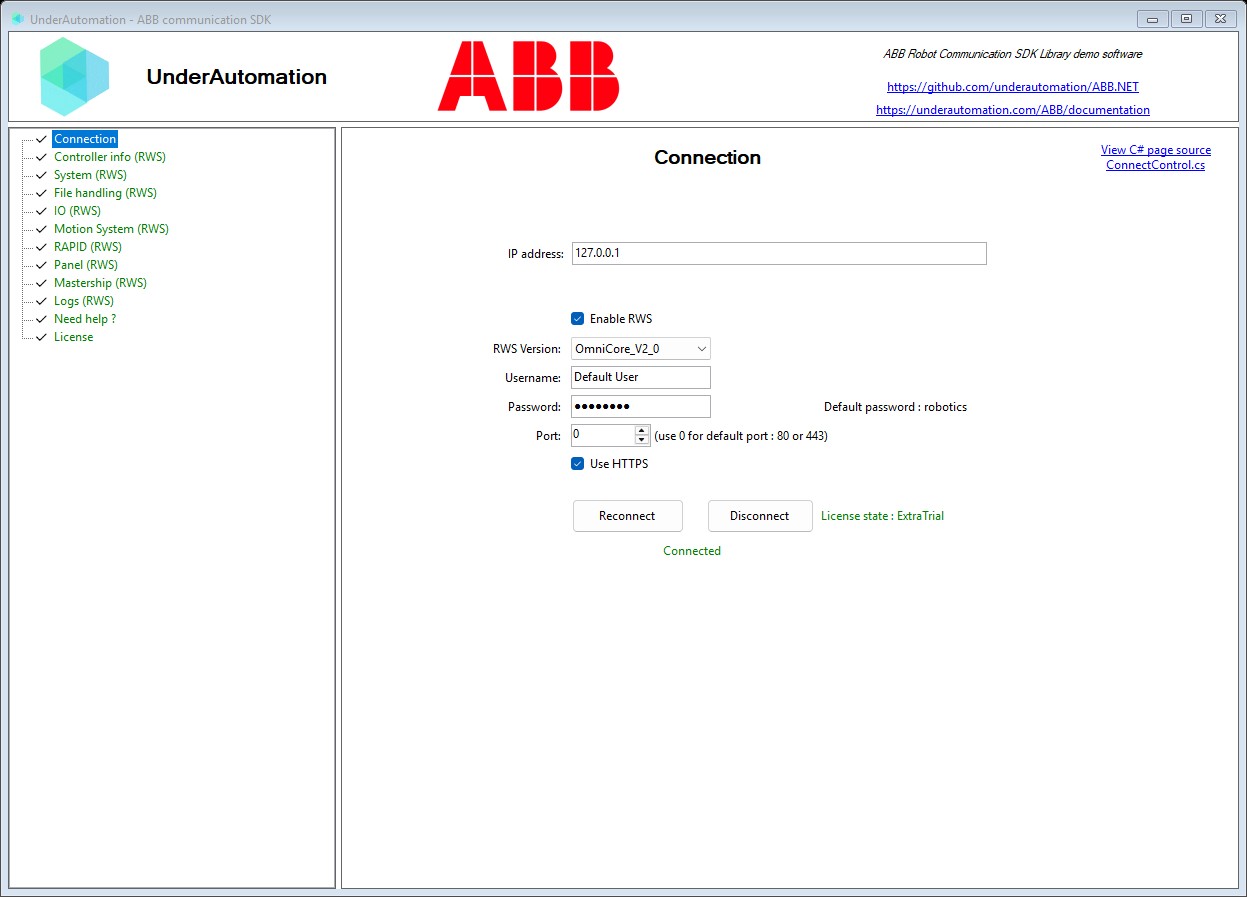
Its C# source is [ConnectControl.cs](https://github.com/underautomation/ABB.NET/blob/main/UnderAutomation.ABB.Showcase.Forms/Components/ConnectControl.cs).
## API reference
**Members of Discovery.DiscoveredController**
```csharp
public class DiscoveredController {
// IPv4 address of the controller
public string Address { get; }
// Full name the controller publishes on the network. It contains .
//
// Null when the controller did not announce itself.
public string InstanceName { get; }
// True when is more than a guess.
//
// It is always true for a controller found by testing the ports of this machine, because the
// controller was asked. For a controller heard announcing itself, it is false when the announcement
// did not carry what the version is deduced from, and then holds the
// most common value rather than a deduction.
public bool IsVersionDetected { get; }
// Port of the PC SDK interface of the controller, or 0 when the controller does not publish it.
//
// This SDK does not use that interface, the value is given for information.
public int PcSdkPort { get; }
// Port the Robot Web Services interface listens on.
//
// A virtual controller gets a new port from RobotStudio at every start, so this value is
// the reason to discover the controller instead of writing the port down.
public int Port { get; }
// RWS version this controller most probably speaks.
//
// This is deduced from what the controller publishes, not from a request sent to it.
// Check before relying on it.
public RwsVersion ProbableVersion { get; }
// RobotWare version of the controller, for example "7.21.0".
//
// Null when the controller does not publish it. Only OmniCore controllers do.
public string RobotWareVersion { get; }
// Unique identifier of the robot system.
//
// Null when the controller does not publish it. Only OmniCore controllers do.
public string SystemId { get; }
// Name of the robot system, as configured on the controller.
//
// Null when the controller was found by testing the ports of this machine rather than by
// hearing it announce itself, because a port tells nothing about the name.
public string SystemName { get; }
// Build connection parameters pointing at this controller, ready for .
//
// The address, the port, the scheme and the RWS version come from the discovery. The user name
// and the password keep their default values, change them if the controller needs other ones.
public ConnectionParameters ToConnectionParameters()
// Returns a string representation of this controller
public override string ToString()
// True when the controller serves Robot Web Services over HTTPS.
//
// OmniCore controllers use HTTPS, IRC5 controllers use HTTP.
public bool UseHttps { get; }
}
```