SNPX (also known as RobotIF, Robot Interface, or SRTP) is a high-performance binary protocol for reading and writing data on a Fanuc robot controller in less than 2 ms.
## Key features
- **Registers**: Read/write numeric (R[]), position (PR[]), string (SR[]), and flag (F[]) registers
- **I/O signals**: Read/write 13 digital signal types and 5 numeric I/O types
- **System variables**: Read/write integer, real, position, and string variables
- **Current position**: Read world and user frame positions for any group
- **Alarms**: Read active alarm, alarm history, clear alarms
- **Task monitoring**: Read running program status, line number, and caller
- **Batch reading**: Read groups of data in a single command for maximum throughput
- **Comments**: Read/write descriptions for registers and I/O
## Quick example
**C# : Snpx**
```csharp
using UnderAutomation.Fanuc;
using UnderAutomation.Fanuc.Common;
public class Snpx
{
static void Main()
{
// Create a new Fanuc robot instance
FanucRobot robot = new FanucRobot();
// Set connection parameters
ConnectionParameters parameters = new ConnectionParameters("192.168.0.1");
parameters.Snpx.Enable = true;
// Connect to the robot
robot.Connect(parameters);
/**/
// Read a register
Position posReg1 = robot.Snpx.PositionRegisters.Read(1);
float numReg5 = robot.Snpx.NumericRegisters.Read(5);
string strReg10 = robot.Snpx.StringRegisters.Read(10);
// Write a register
posReg1.CartesianPosition.X = 100;
robot.Snpx.PositionRegisters.Write(1, posReg1);
robot.Snpx.NumericRegisters.Write(2, 123.45f);
robot.Snpx.StringRegisters.Write(3, "Hello, world!");
// Read a variable
int rmtMaster = robot.Snpx.IntegerSystemVariables.Read("$RMT_MASTER");
string lastAlm = robot.Snpx.StringSystemVariables.Read("$ALM_IF.$LAST_ALM");
Position cellFloor = robot.Snpx.PositionSystemVariables.Read("$CELL_FLOOR");
// Write a system variable
robot.Snpx.IntegerSystemVariables.Write("$RMT_MASTER", 1);
robot.Snpx.StringSystemVariables.Write("$ALM_IF.$LAST_ALM", "No alarms");
robot.Snpx.PositionSystemVariables.Write("$CELL_FLOOR", cellFloor);
// Write a Karel program variable
robot.Snpx.IntegerSystemVariables.Write("$[KarelProgram]KarelVariable", 1);
// Read and Write I/O (SDI,SDO,RDI,RDO,UI,UO,SI,SO,WI,WO,WSI,PMC_K,PMC_R)
robot.Snpx.RDO.Write(1, true);
ushort ai5 = robot.Snpx.AI.Read(5);
// Read and Write analogs (AI,AO,GI,GO,PMC_D)
robot.Snpx.AO.Write(2, 5);
ushort ao3 = robot.Snpx.AO.Read(3);
// Clear alarms
robot.Snpx.ClearAlarms();
/**/
}
}
```
**Python : Snpx**
```python
from underautomation.fanuc.fanuc_robot import FanucRobot
from underautomation.fanuc.connection_parameters import ConnectionParameters
# Create a robot instance
robot = FanucRobot()
# Configure connection parameters
parameters = ConnectionParameters("192.168.0.1")
parameters.snpx.enable = True
# Connect to the robot
robot.connect(parameters)
##
# Read a register
pos_reg1 = robot.snpx.position_registers.read(1)
num_reg5 = robot.snpx.numeric_registers.read(5)
str_reg10 = robot.snpx.string_registers.read(10)
# Write a register
pos_reg1.cartesian_position.x = 100
robot.snpx.position_registers.write(1, pos_reg1)
robot.snpx.numeric_registers.write(2, 123.45)
robot.snpx.string_registers.write(3, "Hello, world!")
# Read a variable
rmt_master = robot.snpx.integer_system_variables.read("$RMT_MASTER")
last_alm = robot.snpx.string_system_variables.read("$ALM_IF.$LAST_ALM")
cell_floor = robot.snpx.position_system_variables.read("$CELL_FLOOR")
# Write a system variable
robot.snpx.integer_system_variables.write("$RMT_MASTER", 1)
robot.snpx.string_system_variables.write("$ALM_IF.$LAST_ALM", "No alarms")
robot.snpx.position_system_variables.write("$CELL_FLOOR", cell_floor)
# Write a Karel program variable
robot.snpx.integer_system_variables.write("$[KarelProgram]KarelVariable", 1)
# Read and Write I/O (SDI,SDO,RDI,RDO,UI,UO,SI,SO,WI,WO,WSI,PMC_K,PMC_R)
robot.snpx.rdo.write(1, True)
ai5 = robot.snpx.ai.read(5)
# Read and Write analogs (AI,AO,GI,GO,PMC_D)
robot.snpx.ao.write(2, 5)
ao3 = robot.snpx.ao.read(3)
# Clear alarms
robot.snpx.clear_alarms()
##
```
## Differences with official Fanuc Robot Interface
Fanuc provides its own Robot Interface client (FRRJIF.DLL). Here are the main differences:
UnderAutomation SDK
Fanuc FRRJIF.DLL
Publisher
UnderAutomation
Fanuc Ltd.
Technology
100% managed .NET assembly
Native ActiveX / COM
Dependencies
No dependencies, single DLL
Requires PCDK installation
Typical read time
2 ms
30 ms
Cross platform
Windows, Linux, macOS
Windows only
Languages
C#, Python, LabVIEW
COM-compatible languages
## Robot options
To enable SNPX on your robot, you need one of the following:
- **FANUC America (R650 FRA)**: Option R553 "HMI Device SNPX" is required
- **FANUC Ltd. (R651 FRL)**: No additional option needed
TCP port **60008** (Robot IF Server) must be accessible on your controller.
## Performance
SNPX is the fastest protocol in the SDK. Regardless of the amount of data transported in a single command, execution time remains constant at approximately **2 ms**.
For example, you can read 80 position registers in a single batch in the same time as reading a single variable.
When used with ROBOGUIDE, execution times under 1 ms can be achieved.
## Connection
**C# : SnpxConnection**
```csharp
using UnderAutomation.Fanuc;
using UnderAutomation.Fanuc.Snpx;
public class SnpxConnection
{
static void Main()
{
/**/
// Via FanucRobot
var robot = new FanucRobot();
var parameters = new ConnectionParameters("192.168.0.1");
parameters.Snpx.Enable = true;
robot.Connect(parameters);
// Or standalone
var snpx = new SnpxClient();
snpx.Connect("192.168.0.1");
/**/
}
}
```
**Python : SnpxConnection**
```python
from underautomation.fanuc.fanuc_robot import FanucRobot
from underautomation.fanuc.connection_parameters import ConnectionParameters
from underautomation.fanuc.snpx.snpx_client import SnpxClient
##
# Via FanucRobot
robot = FanucRobot()
parameters = ConnectionParameters("192.168.0.1")
parameters.snpx.enable = True
robot.connect(parameters)
# Or standalone
snpx = SnpxClient()
snpx.connect("192.168.0.1")
##
```
## Check if SNPX is available
**C# : SnpxFeatures**
```csharp
using UnderAutomation.Fanuc;
using UnderAutomation.Fanuc.Common.Files.Diagnosis;
public class SnpxFeatures
{
static void Main()
{
FanucRobot robot = new FanucRobot();
var parameters = new ConnectionParameters("192.168.0.1");
parameters.Ftp.Enable = true;
parameters.Ftp.FtpUser = "";
parameters.Ftp.FtpPassword = "";
robot.Connect(parameters);
/**/
Features features = robot.Ftp.GetSummaryDiagnostic().Features;
bool isSnpxAvailable = features.HasSnpx;
/**/
}
}
```
**Python : SnpxFeatures**
```python
from underautomation.fanuc.fanuc_robot import FanucRobot
from underautomation.fanuc.connection_parameters import ConnectionParameters
robot = FanucRobot()
parameters = ConnectionParameters("192.168.0.1")
parameters.ftp.enable = True
parameters.ftp.ftp_user = ""
parameters.ftp.ftp_password = ""
robot.connect(parameters)
##
features = robot.ftp.get_summary_diagnostic().features
is_snpx_available = features.has_snpx
##
```
## Next steps
- [Registers](/fanuc/documentation/snpx-registers) : R[], PR[], SR[], F[]
- [Inputs & Outputs](/fanuc/documentation/snpx-io) : Digital and numeric signals
- [System variables](/fanuc/documentation/snpx-variables) : Integer, real, position, string variables
- [Current position](/fanuc/documentation/snpx-position) : World and user frame positions
- [Alarms & task status](/fanuc/documentation/snpx-alarms-tasks) : Alarm management and task monitoring
- [Batch reading](/fanuc/documentation/snpx-batch) : High-performance batch operations
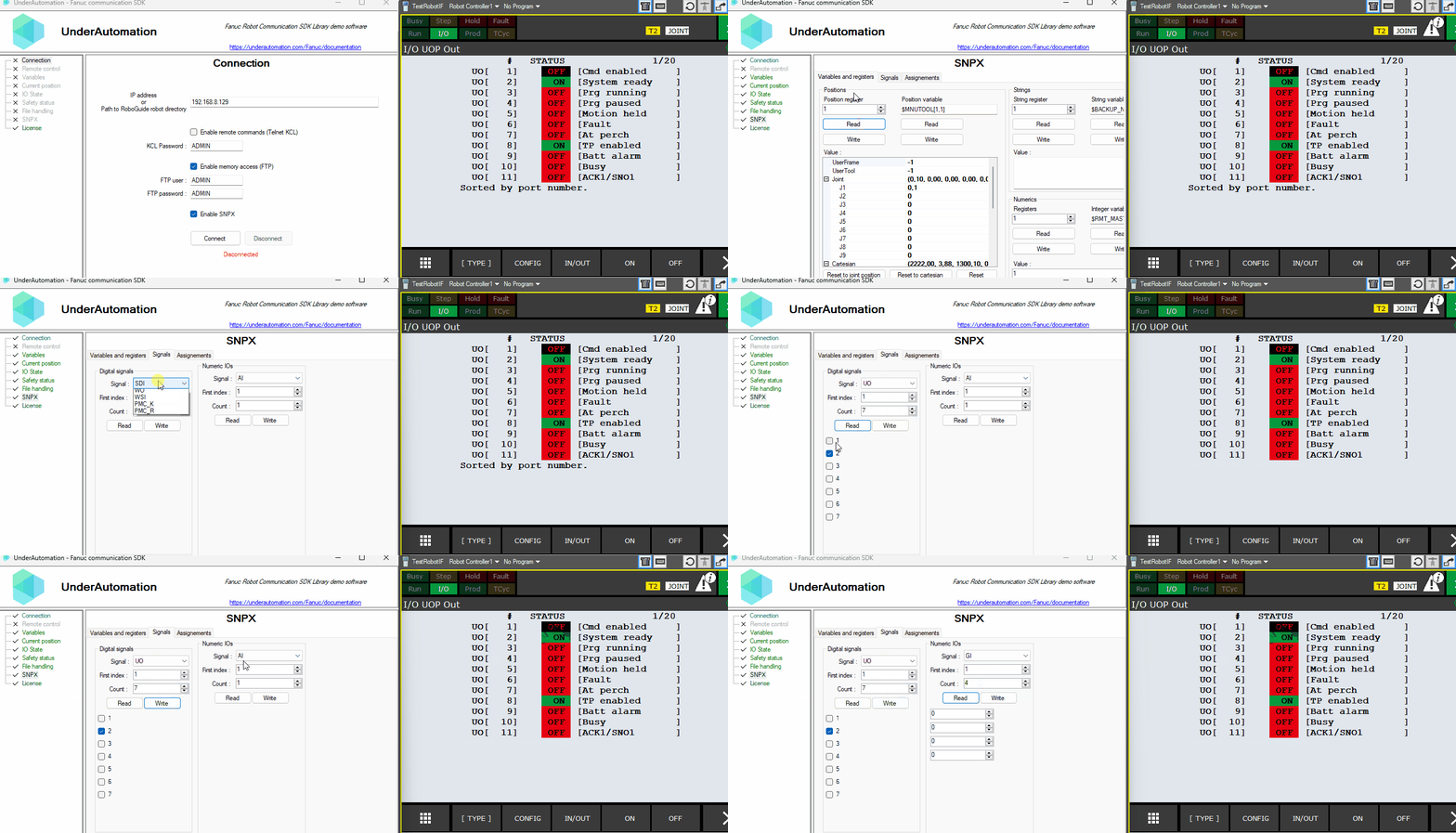
## Demonstration
You can download the Windows Forms Desktop project which implements all SNPX features from the [download page](/fanuc/download).
## API reference
**Members of Snpx.SnpxClient**
```csharp
public class SnpxClient : SnpxClientBase {
// Initializes a new instance of the class.
public SnpxClient()
// Connects to a Fanuc robot using the SNPX protocol.
public void Connect(string ip, int port = 60008)
}
```
**Members of Snpx.Internal.SnpxClientBase**
```csharp
public class SnpxClientBase {
// Analog Inputs
public NumericIO AI { get; }
// Analog Outputs
public NumericIO AO { get; }
// Current active alarms
public AlarmAccess ActiveAlarm { get; }
// Alarm history
public AlarmAccess AlarmHistory { get; }
// Clear all active alarms
public void ClearAlarms()
// Clear all assignments
public void ClearAssignments()
// Comments of registers, I/O signals and other data
public Comments Comments { get; }
protected void ConnectInternal(string ip, int port = 60008)
// Indicates if the SNPX underlying TCP client is connected to the robot
public bool Connected { get; }
// Current position in world or user frame
public CurrentPosition CurrentPosition { get; }
// Current program tasks status. Index starts from 1.
public CurrentTaskStatus CurrentTaskStatus { get; }
// List of all digital signal accessors (SDI, SDO, RDI, RDO, ...)
public DigitalSignals[] DigitalSignals { get; }
// Disconnect from the robot
public void Disconnect()
// Flags
public Flags Flags { get; }
// Group Inputs
public NumericIO GI { get; }
// Group Outputs
public NumericIO GO { get; }
// Gets all current assignments.
public Assignment[] GetAssignments()
// Integer variables
public IntegerSystemVariables IntegerSystemVariables { get; }
// IP address of the connected robot.
public string Ip { get; }
// Controller language (default is English)
public Languages Language { get; set; }
// List of all Numeric IOs accessors (GI, GO, AI, AO, ...)
public NumericIO[] NumericIOs { get; }
// Number registers R[] as floating point values
public NumericRegisters NumericRegisters { get; }
// Number registers R[] as 16-bit integer values
public NumericRegistersInt16 NumericRegistersInt16 { get; }
// Number registers R[] as 32-bit integer values
public NumericRegistersInt32 NumericRegistersInt32 { get; }
// Programmable Machine Controller Data
public NumericIO PMC_D { get; }
// Programmable Machine Controller Constants
public DigitalSignals PMC_K { get; }
// Programmable Machine Controller Relays
public DigitalSignals PMC_R { get; }
// Checks the actual connection status via an active socket polling
public bool PollAndGetUpdatedConnectedState()
// Position registers
public PositionRegisters PositionRegisters { get; }
// Position variables
public PositionSystemVariables PositionSystemVariables { get; }
// Remote Digital Inputs
public DigitalSignals RDI { get; }
// Remote Digital Outputs
public DigitalSignals RDO { get; }
// Real variables
public RealSystemVariables RealSystemVariables { get; }
// Safety Digital Inputs
public DigitalSignals SDI { get; }
// Safety Digital Outputs
public DigitalSignals SDO { get; }
// System Inputs
public DigitalSignals SI { get; }
// System Outputs
public DigitalSignals SO { get; }
// Set boolean variable without assignments.
public void SetVariable(string name, bool value)
// Set double variable without assignments.
public void SetVariable(string name, double value)
// Set integer variable without assignments.
public void SetVariable(string name, int value)
// Set string variable without assignments.
public void SetVariable(string name, string value)
// I/O simulation status
public SimulationStatus SimulationStatus { get; }
// String registers
public StringRegisters StringRegisters { get; }
// String variables
public StringSystemVariables StringSystemVariables { get; }
// User Inputs
public DigitalSignals UI { get; }
// User Outputs
public DigitalSignals UO { get; }
// Weld Inputs
public DigitalSignals WI { get; }
// Weld Outputs
public DigitalSignals WO { get; }
// Weld System Inputs
public DigitalSignals WSI { get; }
}
```