This page explains how to connect to the robot, read its status and its limits, and control the life of a Stream Motion session.
## Connect and start the monitoring
Enable Stream Motion in the connection parameters, then call `StartMonitoring()`. The robot then sends its status at every communication cycle.
**C# : StreamMotionSessionConnect**
```csharp
using UnderAutomation.Fanuc;
using UnderAutomation.Fanuc.Common;
using UnderAutomation.Fanuc.Motion;
using UnderAutomation.Fanuc.StreamMotion;
using UnderAutomation.Fanuc.StreamMotion.Data;
public class StreamMotionSessionConnect
{
static void Main()
{
/**/
var robot = new FanucRobot();
var parameters = new ConnectionParameters("192.168.0.1");
parameters.StreamMotion.Enable = true;
// Optional settings (default values)
parameters.StreamMotion.ProtocolVersion = 1; // 1, 2 or 3, not higher than $STMO.$USABLE_VER
parameters.StreamMotion.BufferLeadTime = 0.024; // positions sent in advance, in seconds
parameters.StreamMotion.PacketStackSize = 10; // same value as $STMO.$PKT_STACK
robot.Connect(parameters);
// The robot sends its status every communication cycle once the monitoring is started.
// The limits of the robot are read first, then the communication cycle is measured.
robot.StreamMotion.StartMonitoring();
Console.WriteLine($"State: {robot.StreamMotion.State}");
Console.WriteLine($"Communication cycle: {robot.StreamMotion.CycleTime * 1000} ms");
/**/
robot.Disconnect();
}
}
```
**Python : StreamMotionSessionConnect**
```python
from underautomation.fanuc.fanuc_robot import FanucRobot
from underautomation.fanuc.connection_parameters import ConnectionParameters
##
robot = FanucRobot()
parameters = ConnectionParameters("192.168.0.1")
parameters.stream_motion.enable = True
# Optional settings (default values)
parameters.stream_motion.protocol_version = 1 # 1, 2 or 3, not higher than $STMO.$USABLE_VER
parameters.stream_motion.buffer_lead_time = 0.024 # positions sent in advance, in seconds
parameters.stream_motion.packet_stack_size = 10 # same value as $STMO.$PKT_STACK
robot.connect(parameters)
# The robot sends its status every communication cycle once the monitoring is started.
# The limits of the robot are read first, then the communication cycle is measured.
robot.stream_motion.start_monitoring()
print(f"State: {robot.stream_motion.state.name}")
print(f"Communication cycle: {robot.stream_motion.cycle_time * 1000} ms")
##
robot.disconnect()
```
`StartMonitoring()` throws a `StreamMotionException` when no status is received. Check the IP address, `$STMO.$PHYS_PORT`, and that the protocol version is not higher than `$STMO.$USABLE_VER`.
### Connection settings
| Setting | Default | Description |
| --- | --- | --- |
| `ProtocolVersion` | 1 | Protocol version, see [versions](/fanuc/documentation/stream-motion#protocol_versions) |
| `BufferLeadTime` | 0.024 s | Positions are sent this time in advance, to absorb the jitter of the PC. Lower values give a faster reaction to new targets |
| `PacketStackSize` | 10 | Size of the position buffer of the robot (`$STMO.$PKT_STACK`) |
| `StatusTimeoutMs` | 1000 | The session is considered lost when no status is received during this time |
| `HighPriority` | true | Runs the communication thread with the highest priority |
| `Port` | 60015 | UDP port of the robot |
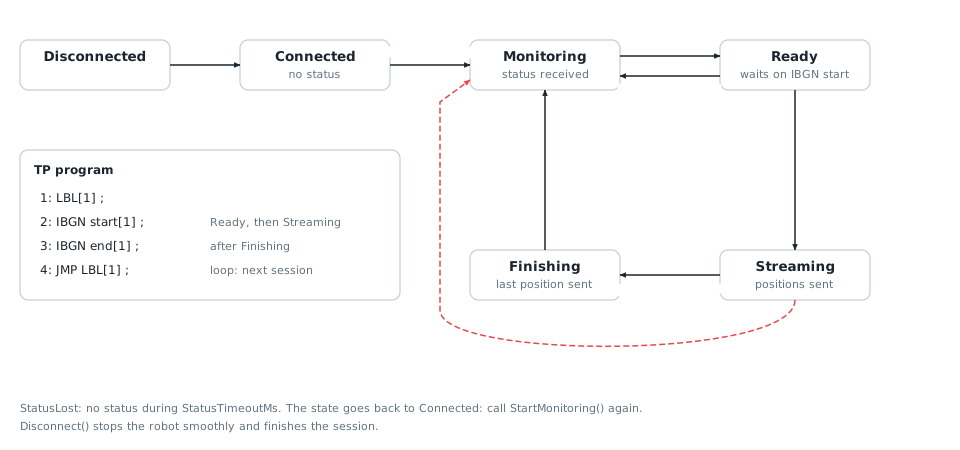
### States of the client
| `State` | Meaning |
| --- | --- |
| `Connected` | Connected, the monitoring is not started |
| `Monitoring` | The robot sends its status, no program waits on `IBGN start` |
| `Ready` | A program waits on `IBGN start`: the robot accepts positions |
| `Streaming` | A session is active: a position is sent at every cycle |
| `Finishing` | The last position was sent, the program continues after `IBGN end` |
## Read the robot status
`LastStatus` gives the joint and Cartesian positions, the motor currents and the flags of the robot. The `StatusReceived` event gives the same information as soon as a status is received.
**C# : StreamMotionSessionStatus**
```csharp
using UnderAutomation.Fanuc;
using UnderAutomation.Fanuc.Common;
using UnderAutomation.Fanuc.Motion;
using UnderAutomation.Fanuc.StreamMotion;
using UnderAutomation.Fanuc.StreamMotion.Data;
public class StreamMotionSessionStatus
{
static void Main()
{
var robot = new FanucRobot();
var parameters = new ConnectionParameters("192.168.0.1");
parameters.StreamMotion.Enable = true;
robot.Connect(parameters);
var sm = robot.StreamMotion;
sm.StartMonitoring();
/**/
// Last status, updated every communication cycle
StreamMotionStatus status = sm.LastStatus;
Console.WriteLine($"Joints: {status.JointPosition}");
Console.WriteLine($"Cartesian: {status.CartesianPosition}");
Console.WriteLine($"Waiting for positions: {status.IsWaitingForCommand}, moving: {status.IsMoving}");
// Event raised with the latest status, on a background thread
sm.StatusReceived += (sender, e) => Console.WriteLine($"J1 = {e.Status.JointPosition.J1}");
// Quality of the communication
StreamMotionStatistics statistics = sm.Statistics;
Console.WriteLine($"Lost status: {statistics.LostStatusCount}, underruns: {statistics.UnderrunCount}");
/**/
robot.Disconnect();
}
}
```
**Python : StreamMotionSessionStatus**
```python
from underautomation.fanuc.fanuc_robot import FanucRobot
from underautomation.fanuc.connection_parameters import ConnectionParameters
robot = FanucRobot()
parameters = ConnectionParameters("192.168.0.1")
parameters.stream_motion.enable = True
robot.connect(parameters)
sm = robot.stream_motion
sm.start_monitoring()
##
# Last status, updated every communication cycle
status = sm.last_status
print(f"Joints: {status.joint_position}")
print(f"Cartesian: {status.cartesian_position}")
print(f"Waiting for positions: {status.is_waiting_for_command}, moving: {status.is_moving}")
# Event raised with the latest status, on a background thread
def on_status(sender, e):
print(f"J1 = {e.status.joint_position.j1}")
sm.status_received(on_status)
# Quality of the communication
statistics = sm.statistics
print(f"Lost status: {statistics.lost_status_count}, underruns: {statistics.underrun_count}")
##
robot.disconnect()
```
The event runs on a background thread and only receives the latest status: a slow handler does not delay the communication, it just skips some status.
## Read the limits of the robot
The robot checks the velocity, acceleration and jerk of each axis at every cycle, and stops with an alarm when a limit is exceeded. `ReadLimits()` reads these limits so that your trajectories stay within them.
**C# : StreamMotionSessionLimits**
```csharp
using UnderAutomation.Fanuc;
using UnderAutomation.Fanuc.Common;
using UnderAutomation.Fanuc.Motion;
using UnderAutomation.Fanuc.StreamMotion;
using UnderAutomation.Fanuc.StreamMotion.Data;
using UnderAutomation.Robotics.Motion;
public class StreamMotionSessionLimits
{
static void Main()
{
var robot = new FanucRobot();
var parameters = new ConnectionParameters("192.168.0.1");
parameters.StreamMotion.Enable = true;
robot.Connect(parameters);
var sm = robot.StreamMotion;
/**/
// Read the limits before running the IBGN program:
// some controllers do not answer while a program waits on IBGN start
StreamMotionLimits limits = sm.ReadLimits();
// Reference limits: always safe, used by default by the client
JointLimits reference = limits.ReferenceLimits;
Console.WriteLine($"J1: {reference.Velocity[0]} deg/s, {reference.Acceleration[0]} deg/s2, {reference.Jerk[0]} deg/s3");
// Limits applied by the robot at a given flange speed (mm/s) and payload (kg)
JointLimits atSpeed = limits.ComputeLimits(500, 5, 12);
// Raw table of one axis: acceleration limit of J2 for each speed stage
LimitTable table = limits.GetTable(2, LimitType.Acceleration);
Console.WriteLine(table);
/**/
robot.Disconnect();
}
}
```
**Python : StreamMotionSessionLimits**
```python
from underautomation.fanuc.fanuc_robot import FanucRobot
from underautomation.fanuc.connection_parameters import ConnectionParameters
from underautomation.robotics.motion.limit_type import LimitType
robot = FanucRobot()
parameters = ConnectionParameters("192.168.0.1")
parameters.stream_motion.enable = True
robot.connect(parameters)
sm = robot.stream_motion
##
# Read the limits before running the IBGN program:
# some controllers do not answer while a program waits on IBGN start
limits = sm.read_limits()
# Reference limits: always safe, used by default by the client
reference = limits.reference_limits
print(f"J1: {reference.velocity[0]} deg/s, {reference.acceleration[0]} deg/s2, {reference.jerk[0]} deg/s3")
# Limits applied by the robot at a given flange speed (mm/s) and payload (kg)
at_speed = limits.compute_limits(500, 5, 12)
# Raw table of one axis: acceleration limit of J2 for each speed stage
table = limits.get_table(2, LimitType.Acceleration)
print(table)
##
robot.disconnect()
```
- `ReferenceLimits` are the values at the maximum speed with the maximum payload. They are always safe. `StartMonitoring()` reads them and stores them in `JointLimits`, used by the client to stop the robot smoothly.
- `ComputeLimits()` gives the limits applied by the robot for a given flange speed and payload, as computed by the robot when `$STMO_GRP[1].$LMT_MODE` is 0. They can be higher than the reference limits, for example with a light payload.
- `GetTable()` gives the raw values of one axis for each speed stage, without payload and with the maximum payload.
Some controllers do not answer while a program waits on `IBGN start`: call `StartMonitoring()` or `ReadLimits()` before running the TP program.
## Run several sessions
A session starts when positions are available and a program waits on `IBGN start`. `Finish()` waits until all queued motions are done and the robot is at rest, then the program continues after `IBGN end`. When the program loops, the next session starts on the next `IBGN start`.
**C# : StreamMotionSessionLifecycle**
```csharp
using UnderAutomation.Fanuc;
using UnderAutomation.Fanuc.Common;
using UnderAutomation.Fanuc.Motion;
using UnderAutomation.Fanuc.StreamMotion;
using UnderAutomation.Fanuc.StreamMotion.Data;
using UnderAutomation.Robotics.Motion;
public class StreamMotionSessionLifecycle
{
static void Main()
{
var robot = new FanucRobot();
var parameters = new ConnectionParameters("192.168.0.1");
parameters.StreamMotion.Enable = true;
robot.Connect(parameters);
var sm = robot.StreamMotion;
/**/
sm.SessionStarted += (sender, e) => Console.WriteLine($"Session {e.SessionIndex} started");
sm.SessionEnded += (sender, e) => Console.WriteLine($"Session {e.SessionIndex} ended: {e.Reason}");
sm.StartMonitoring();
var planner = new MotionPlanner(sm.JointLimits, null);
// The TP program loops on IBGN start / IBGN end: one session per loop
for (int cycle = 0; cycle < 3; cycle++)
{
// Wait until the program reaches IBGN start
if (!sm.WaitForReady(60000)) break;
JointsPosition start = sm.QueueEndJointPosition;
var target = new JointsPosition(start.Values) { J6 = start.J6 + 20 };
sm.Enqueue(planner.CreateJointPath(FanucMotion.ToJointValues(start))
.MoveJoint(FanucMotion.ToJointValues(target), 30, FanucMotion.Fine())
.MoveJoint(FanucMotion.ToJointValues(start), 30, FanucMotion.Fine())
.Build());
// Wait for the end of the motion, then release the program (IBGN end)
sm.Finish(60000);
}
/**/
robot.Disconnect();
}
}
```
**Python : StreamMotionSessionLifecycle**
```python
from underautomation.fanuc.fanuc_robot import FanucRobot
from underautomation.fanuc.connection_parameters import ConnectionParameters
from underautomation.fanuc.common.joints_position import JointsPosition
from underautomation.fanuc.motion.fanuc_motion import FanucMotion
from underautomation.robotics.motion.motion_planner import MotionPlanner
robot = FanucRobot()
parameters = ConnectionParameters("192.168.0.1")
parameters.stream_motion.enable = True
robot.connect(parameters)
sm = robot.stream_motion
##
def on_session_started(sender, e):
print(f"Session {e.session_index} started")
def on_session_ended(sender, e):
print(f"Session {e.session_index} ended: {e.reason.name}")
sm.session_started(on_session_started)
sm.session_ended(on_session_ended)
sm.start_monitoring()
planner = MotionPlanner(sm.joint_limits, None)
# The TP program loops on IBGN start / IBGN end: one session per loop
for cycle in range(3):
# Wait until the program reaches IBGN start
if not sm.wait_for_ready(60000):
break
start = sm.queue_end_joint_position
values = list(start.values)
values[5] += 20
target = JointsPosition(*values)
sm.enqueue(planner.create_joint_path(FanucMotion.to_joint_values(start))
.move_joint(FanucMotion.to_joint_values(target), 30, FanucMotion.fine())
.move_joint(FanucMotion.to_joint_values(start), 30, FanucMotion.fine())
.build())
# Wait for the end of the motion, then release the program (IBGN end)
sm.finish(60000)
##
robot.disconnect()
```
`SessionEnded` gives the reason of the end: `Finished`, `ProgramStopped` (program stopped or alarm on the robot), `StatusLost` or `Disconnected`.
## One format per session
A session uses only one format for the positions: joint or Cartesian. The first source of positions chooses it (the first queued trajectory, `StartTracking()` or `StartCallbackStreaming()`), and it stays the same until the end of the session.
### Why
The robot checks the velocity, acceleration and jerk between two consecutive positions, always on the joints: a Cartesian position is first converted into joint positions. So when the format changes, the first position in the new format must give exactly the joint position already commanded. At 2 ms, a difference of a millionth of a degree is already seen as a jump, and the robot stops with an alarm (power-off stop).
The client cannot know this position with this precision. The status gives the measured position of the robot, which is a little different from the commanded position, and the conversion between joint and Cartesian positions is done by the controller.
At the start of a session, the robot takes the first position as its starting point, so there is no jump. This is why the client only changes the format at the start of a session. This is a choice for reliability: the client never sends a change of format that could stop the robot.
There is a second reason. With Cartesian positions, the robot keeps the configuration it had at `IBGN start` (alarm MOTN-156 otherwise). After joint motions that change the configuration, for example a wrist flip, Cartesian positions need a new session anyway.
### What it means for your application
- In a session, all the queued trajectories, the target tracking and the callback streaming use the same format.
- `Enqueue()`, `StartTracking()` and `StartCallbackStreaming()` throw a `StreamMotionException` with the error `FormatMismatch` when the format is not the current one.
- The format is fixed as soon as a trajectory is queued, even before the program reaches `IBGN start`. It stays fixed while the session is open, even when the queue is empty and the robot is at rest.
- To use the other format, call `Finish()`: the program continues after `IBGN end`. The next session (the program loops back to `IBGN start`, or is started again) can use any format.
- Put the joint parts and the Cartesian parts of your task in different sessions, with a TP program that loops: `LBL[1]`, `IBGN start[1]`, `IBGN end[1]`, `JMP LBL[1]`. Each change of format costs the time of one loop of the program.
### Read the current format
`HasActiveFormat` is true when the format is fixed. `ActiveFormat` then gives the format (`Joint` or `Cartesian`).
| `HasActiveFormat` | `ActiveFormat` | Meaning |
| --- | --- | --- |
| `false` | Not used | No format is fixed: the next trajectory, target tracking or callback streaming chooses it |
| `true` | `Joint` | Only joint positions until the end of the session |
| `true` | `Cartesian` | Only Cartesian positions until the end of the session |
For example, in a user interface, disable the commands of the other format while `HasActiveFormat` is true.
**C# : StreamMotionSessionFormat**
```csharp
using UnderAutomation.Fanuc;
using UnderAutomation.Fanuc.Common;
using UnderAutomation.Fanuc.Motion;
using UnderAutomation.Fanuc.StreamMotion;
using UnderAutomation.Fanuc.StreamMotion.Data;
using UnderAutomation.Robotics.Motion;
public class StreamMotionSessionFormat
{
static void Main()
{
var robot = new FanucRobot();
var parameters = new ConnectionParameters("192.168.0.1");
parameters.StreamMotion.Enable = true;
robot.Connect(parameters);
var sm = robot.StreamMotion;
sm.StartMonitoring();
/**/
var planner = new MotionPlanner(sm.JointLimits, new CartesianLimits(250, 1000, 5000, 45, 180, 900));
// First session: joint positions
sm.WaitForReady(60000);
JointsPosition start = sm.QueueEndJointPosition;
var target = new JointsPosition(start.Values) { J1 = start.J1 + 10 };
sm.Enqueue(planner.CreateJointPath(FanucMotion.ToJointValues(start)).MoveJoint(FanucMotion.ToJointValues(target), 30, FanucMotion.Fine()).Build());
// The format is now fixed until the end of the session
if (sm.HasActiveFormat) Console.WriteLine($"Current format: {sm.ActiveFormat}"); // Joint
// A Cartesian trajectory would throw a StreamMotionException (FormatMismatch) here.
// End the session: the TP program continues after IBGN end
sm.Finish(60000);
Console.WriteLine($"Format fixed: {sm.HasActiveFormat}"); // False
// Second session, when the TP program loops back to IBGN start: Cartesian positions
sm.WaitForReady(60000);
XYZWPRPosition flange = sm.QueueEndCartesianPosition;
var down = new XYZWPRPosition(flange.X, flange.Y, flange.Z - 50, flange.W, flange.P, flange.R);
sm.Enqueue(planner.CreateCartesianPath(FanucMotion.ToCartesianPose(flange)).MoveLinear(FanucMotion.ToCartesianPose(down), 100, FanucMotion.Fine()).Build());
sm.Finish(60000);
/**/
robot.Disconnect();
}
}
```
**Python : StreamMotionSessionFormat**
```python
from underautomation.fanuc.fanuc_robot import FanucRobot
from underautomation.fanuc.connection_parameters import ConnectionParameters
from underautomation.fanuc.common.joints_position import JointsPosition
from underautomation.fanuc.common.xyzwpr_position import XYZWPRPosition
from underautomation.fanuc.motion.fanuc_motion import FanucMotion
from underautomation.robotics.motion.cartesian_limits import CartesianLimits
from underautomation.robotics.motion.motion_planner import MotionPlanner
robot = FanucRobot()
parameters = ConnectionParameters("192.168.0.1")
parameters.stream_motion.enable = True
robot.connect(parameters)
sm = robot.stream_motion
sm.start_monitoring()
##
planner = MotionPlanner(sm.joint_limits, CartesianLimits(250, 1000, 5000, 45, 180, 900))
# First session: joint positions
sm.wait_for_ready(60000)
start = sm.queue_end_joint_position
values = list(start.values)
values[0] += 10
sm.enqueue(planner.create_joint_path(FanucMotion.to_joint_values(start))
.move_joint(FanucMotion.to_joint_values(JointsPosition(*values)), 30, FanucMotion.fine()).build())
# The format is now fixed until the end of the session
if sm.has_active_format:
print(f"Current format: {sm.active_format.name}") # Joint
# A Cartesian trajectory would raise a StreamMotionException (FormatMismatch) here.
# End the session: the TP program continues after IBGN end
sm.finish(60000)
print(f"Format fixed: {sm.has_active_format}") # False
# Second session, when the TP program loops back to IBGN start: Cartesian positions
sm.wait_for_ready(60000)
flange = sm.queue_end_cartesian_position
down = XYZWPRPosition(flange.x, flange.y, flange.z - 50, flange.w, flange.p, flange.r)
sm.enqueue(planner.create_cartesian_path(FanucMotion.to_cartesian_pose(flange))
.move_linear(FanucMotion.to_cartesian_pose(down), 100, FanucMotion.fine()).build())
sm.finish(60000)
##
robot.disconnect()
```
## Use Stream Motion without FanucRobot
`StreamMotionClient` can be used alone:
**C# : StreamMotionSessionStandalone**
```csharp
using UnderAutomation.Fanuc;
using UnderAutomation.Fanuc.Common;
using UnderAutomation.Fanuc.Motion;
using UnderAutomation.Fanuc.StreamMotion;
using UnderAutomation.Fanuc.StreamMotion.Data;
public class StreamMotionSessionStandalone
{
static void Main()
{
/**/
// Stream Motion client without FanucRobot
var client = new StreamMotionClient();
client.Connect("192.168.0.1", new StreamMotionConnectParameters { ProtocolVersion = 2 });
client.StartMonitoring();
Console.WriteLine($"Communication cycle: {client.CycleTime * 1000} ms");
client.Disconnect();
/**/
}
}
```
**Python : StreamMotionSessionStandalone**
```python
from underautomation.fanuc.fanuc_robot import FanucRobot
from underautomation.fanuc.connection_parameters import ConnectionParameters
from underautomation.fanuc.stream_motion.stream_motion_client import StreamMotionClient
from underautomation.fanuc.common.stream_motion_connect_parameters import StreamMotionConnectParameters
##
# Stream Motion client without FanucRobot
client = StreamMotionClient()
parameters = StreamMotionConnectParameters()
parameters.protocol_version = 2
client.connect("192.168.0.1", parameters)
client.start_monitoring()
print(f"Communication cycle: {client.cycle_time * 1000} ms")
client.disconnect()
##
```
## API reference
**Members of StreamMotion.Data.StreamMotionStatus**
```csharp
public class StreamMotionStatus {
// Current Cartesian position of the robot (servo position) in the world frame, with extended axes.
// It is the flange center, or the tool center point when the system variable $STMO.$STAT_US_TCP is TRUE.
public ExtendedCartesianPosition CartesianPosition { get; }
public override bool Equals(object obj)
public override int GetHashCode()
// The robot received at least one position during the current IBGN start instruction
public bool IsCommandReceived { get; }
// The robot is moving
public bool IsMoving { get; }
// System ready (SYSRDY) is ON
public bool IsSystemReady { get; }
// The robot executes an IBGN start instruction and waits for positions
public bool IsWaitingForCommand { get; }
// Current joint position of the robot (servo position), in degrees (mm for linear axes)
public JointsPosition JointPosition { get; }
// Motor current of each axis, in A (9 values)
public double[] MotorCurrents { get; }
// With protocol version 3 or later, the robot sends a status once every n communication cycles when it slows down by itself,
// and this value is n. It is 1 in normal operation and with older protocol versions.
public int OutputDivider { get; }
// Raw status byte
public int RawStatus { get; }
// Index of the first I/O read in this status
public int ReadIOIndex { get; }
// Mask of the I/O read in this status
public int ReadIOMask { get; }
// Type of the I/O read in this status
public IOType ReadIOType { get; }
// State of the 16 I/O read in this status. Bit 0 is the I/O at .
public int ReadIOValue { get; }
// Sequence number of this status. It starts at 1 when the status output starts.
public long SequenceNumber { get; }
// Time stamp of the robot when the position and the motor currents were read, in ms (resolution 2 ms)
public long Timestamp { get; }
public override string ToString()
}
```
**Members of StreamMotion.Data.StreamMotionLimits**
```csharp
public class StreamMotionLimits {
// Number of axes of the robot (axes with limits)
public int AxisCount { get; }
// Computes the limits of all axes for a given flange speed and payload, as the robot does when $STMO_GRP[1].$LMT_MODE is 0.
public JointLimits ComputeLimits(double flangeSpeed, double payload, double maxPayload)
public override bool Equals(object obj)
public override int GetHashCode()
// Returns the table of limits of one axis
public LimitTable GetTable(int axis, LimitType type)
// Time interval of the intermediate check of the limits, in seconds
public double IntermediateCheckTime { get; }
// Maximum speed of the flange center (Vmax, system variable $STMO_GRP[1].$MAX_SPD), in mm/s
public double MaxSpeed { get; }
// Reference limits of each axis: values with the maximum payload at the maximum speed.
// They are equal to the system variables $STMO_GRP[1].$JNT_VEL_LIM, $JNT_ACC_LIM and $JNT_JRK_LIM, and they are always safe.
public JointLimits ReferenceLimits { get; }
public override string ToString()
}
```
**Members of StreamMotion.Data.StreamMotionStatistics**
```csharp
public class StreamMotionStatistics {
// Number of extra positions sent to fill the robot buffer again after lost or late status
public long CatchUpCommandCount { get; }
// Number of positions sent to the robot
public long CommandCount { get; }
// Estimated number of positions waiting in the robot buffer
public int EstimatedBufferLevel { get; }
// Number of status sent by the robot but not received (detected with the sequence numbers)
public long LostStatusCount { get; }
// Maximum time spent to process a status and send the positions, in seconds
public double MaxProcessingTime { get; }
// Maximum time between two received status, measured with the PC clock, in seconds
public double MaxStatusInterval { get; }
// Mean time between two received status, measured with the PC clock, in seconds
public double MeanStatusInterval { get; }
// Number of status received from the robot
public long StatusCount { get; }
public override string ToString()
// Number of times the queue became empty while the robot was moving
public long UnderrunCount { get; }
}
```
**Members of StreamMotion.Internal.StreamMotionConnectParametersBase**
```csharp
public class StreamMotionConnectParametersBase {
public StreamMotionConnectParametersBase()
// Time of positions sent in advance and kept in the robot buffer, in seconds.
// It protects against late packets from the PC, but adds the same delay to the motion.
// It is converted to a number of communication cycles, limited by minus 2. 0 disables the advance.
public double BufferLeadTime { get; set; }
// Default time of positions kept in advance in the robot buffer, in seconds
public const double DEFAULT_BUFFER_LEAD_TIME = 0.024
// Default size of the robot buffer (default value of the system variable $STMO.$PKT_STACK)
public const int DEFAULT_PACKET_STACK_SIZE = 10
// Default UDP port of the robot for Stream Motion
public const int DEFAULT_PORT = 60015
// Default protocol version. Version 1 is accepted by all controllers.
public const int DEFAULT_PROTOCOL_VERSION = 1
// Default maximum time without status from the robot, in milliseconds
public const int DEFAULT_STATUS_TIMEOUT_MS = 1000
public override bool Equals(object obj)
public override int GetHashCode()
// Runs the communication thread with a high priority to reduce delays (default: true)
public bool HighPriority { get; set; }
// Size of the robot buffer. It must be equal to the system variable $STMO.$PKT_STACK of the robot (2 to 10).
public int PacketStackSize { get; set; }
// UDP port of the robot for Stream Motion
public int Port { get; set; }
// Protocol version, from 1 to 3. The highest version accepted by a controller is in the system variable $STMO.$USABLE_VER.
// A higher version raises an alarm on the robot and no status is received.
// Version 2 sends joint positions in double precision. Version 3 lets the robot send its status less often when it slows down by itself.
// A version 4 exists on some recent controllers for ROS 2 only. It is not supported.
public int ProtocolVersion { get; set; }
// Maximum time without status from the robot before the connection is considered lost, in milliseconds
public int StatusTimeoutMs { get; set; }
public override string ToString()
}
```