## 🎉 Introduction
The Fanuc SDK unlocks a hidden gem in Fanuc robots: the ability to set **breakpoints**! 🛑🤖
Although this feature has been natively supported on Fanuc controllers for _decades_, it's remained in the shadows because it's not integrated into the TP Editor (TPE) of ROBOGUIDE or Teach Pendant. 😴
This feature is a game-changer for developers who want to edit programs , or at the very least , **pause execution at specific lines** without building complicated synchronization mechanisms using flags. 🏁✨
## ❓ What's a Breakpoint?
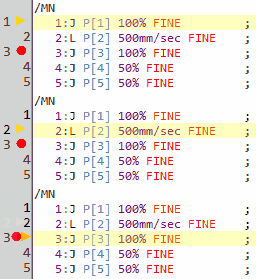
A **breakpoint** is a pause point in a program 🧘♂️. It lets you halt execution at a specific line to inspect what's going on , super handy for debugging!
You can add multiple breakpoints across your codebase , whether it's a TP program or even a Karel one! 💥📜
## 🔧 How to Add or Remove a Breakpoint?
The Telnet protocol natively supports breakpoint manipulation. 💻🔌
Here are the available commands:
- `FanucRobot.Telnet.AddBreakpoint`: Add a breakpoint at a specific line 🎯
- `FanucRobot.Telnet.GetBreakpoints`: Retrieve the list of active breakpoints 📋
- `FanucRobot.Telnet.RemoveAllBreakpoints`: Remove all current breakpoints 🧹
⚠️ _Note: Breakpoints are automatically removed when a task is aborted._
## 🧪 Example
**C# : TpEditorWithBreakpoints**
```csharp
using UnderAutomation.Fanuc;
using UnderAutomation.Fanuc.Telnet;
public class TpEditorWithBreakpoints
{
static void Main()
{
// Create a new Fanuc robot instance
FanucRobot robot = new FanucRobot();
// Set connection parameters
ConnectionParameters parameters = new ConnectionParameters("192.168.0.1");
parameters.Telnet.Enable = true;
parameters.Telnet.TelnetKclPassword = "TELNET_PASS";
// Connect to the robot
robot.Connect(parameters);
/**/
// Add a breakpoint at line 10 of TP or Karel program MyProgram
robot.Telnet.AddBreakpoint("MyProgram", 10);
// List all breakpoints of TP program MyProgram
BreakpointsResult result = robot.Telnet.GetBreakpoints("MyProgram");
foreach (Breakpoint breakpoint in result.Breakpoints)
{
Console.WriteLine($"Breakpoint at line {breakpoint.Line}");
}
// Remove all breakpoints of TP program MyProgram
robot.Telnet.RemoveAllBreakpoints("MyProgram");
/**/
}
}
```
## 🧠 What If We Prototyped a TP Editor with Breakpoints?
Well… it's actually easier than you'd think thanks to the Fanuc SDK! 😄
The hard part? Building the syntax-highlighted code editor itself. 🎨
Here's how we can quickly prototype one using **WinForms** with the following tools:
- A `TreeView` to display `*.ls` files 🌳
- A `RichTextBox` with syntax highlighting for TP code 🌈
- A "magic margin" to set breakpoints, show the execution line, and display line numbers starting from the `/MN` section 🪄
- Buttons to save, run the program, and more 🎛️
We'll use the SDK's [FTP capabilities](/fanuc/documentation/ftp) to:
- List available files 📁
- Read content of `*.ls` files 📖
- Upload modified programs 🚀
- Monitor tasks in the background: task names, call stacks, and the current line being executed 🔄
We'll also use the SDK's [Telnet features](/fanuc/documentation/telnet) to:
- Start and stop program execution ⏯️
- And hey , let's go wild , why not add **step-by-step execution** too? 🐾
💡 Check out this C# class on GitHub: [TPEditorControl](https://github.com/underautomation/Fanuc.NET/blob/main/UnderAutomation.Fanuc.Showcase.Forms/Components/TPEditorControl.cs)
And here's a quick video demo of what it looks like in action ⬇️
This sample is part of the **Showcase demo app** for Windows, available for [download here](/fanuc/download). ⬇️
## 🚀 Let's Go Even Further
The possibilities here are _endless_! 🌌 Imagine the following upgrades:
- Support for **Karel**: editing, syntax highlighting, breakpoints... you name it! 🤓
- Smart **auto-completion** ✍️
- Real-time visualization of **variables and registers** 📊
- Full **call stack display** (In our current demo, we simplify this by assuming the task and program are one and the same)
- And sure, WinForms is nice and all... but why not dream bigger?
A **VSCode extension**, perhaps? Or a full-blown modern IDE integration , with a **graphical view of TP instructions**?! 😍
_Just maybe_ that's a teaser of what UnderAutomation might be cooking up... 🔮😉