---
title: "Migrate from a brand SDK"
description: "Replace UnderAutomation.Fanuc or another brand SDK with UnderAutomation.Robotics: same namespaces, same types, same license key. Versions, error CS0433, then the common API step by step."
---
# Migrate from a brand SDK
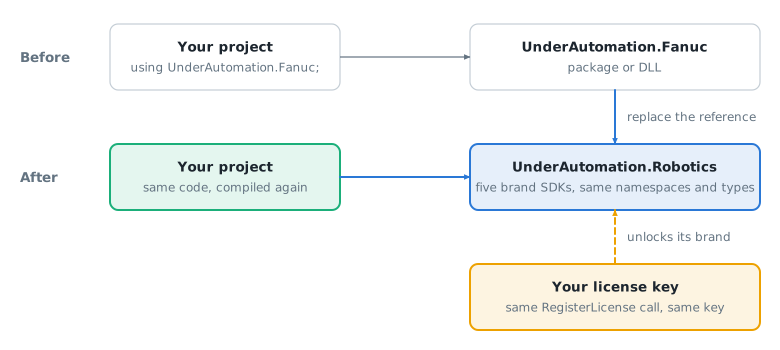
This page is for a project that already uses an UnderAutomation brand SDK (Fanuc, Yaskawa, Universal Robots, ABB or Stäubli) and moves to UnderAutomation.Robotics. Robotics contains the five brand SDKs with the same namespaces and the same types: you replace the reference, recompile, and keep your license key.
## Before you start
Check four points:
- The maintenance of your license key covers the release date of Robotics. See [Maintenance](#maintenance_of_the_key).
- The release of Robotics contains your brand SDK in the version you use, or a later one. See [Versions of the brands](#versions_of_the_brands).
- Your project references Robotics or the brand SDK, not both: they contain the same types. See [Error CS0433](#error_cs0433).
- A key of one brand does not unlock the other brands. Each brand you connect needs its own key after the trial.
## Replace the reference
### NuGet
Remove the package of the brand and add Robotics:
```bash
dotnet remove package UnderAutomation.Fanuc
dotnet add package UnderAutomation.Robotics
```
With the Package Manager console of Visual Studio:
```powershell
Uninstall-Package UnderAutomation.Fanuc
Install-Package UnderAutomation.Robotics
```
In the project file, the change is one line:
```xml
```
Do the same for every brand package of the solution: `UnderAutomation.Yaskawa`, `UnderAutomation.UniversalRobots`, `UnderAutomation.ABB`, `UnderAutomation.Staubli`. Robotics replaces all of them.
### DLL
If your project references the DLL directly, remove the reference to `UnderAutomation.Fanuc.dll` and add a reference to `UnderAutomation.Robotics.dll`, from the folder of the same target (`net35`, `net48`, `netstandard2.0`...). Where to download the DLL: see [Get started with .NET](/robotics/documentation/get-started-net).
### Python
Uninstall the package of the brand first, then install Robotics:
```bash
pip uninstall UnderAutomation.Fanuc
pip install UnderAutomation.Robotics
```
Only one UnderAutomation package can be installed in a Python environment: each package writes the same file, `underautomation/__init__.py`. Uninstall every brand package of the environment before you install Robotics. The import lines of your code do not change, for example `from underautomation.fanuc.fanuc_robot import FanucRobot`.
## Recompile
The code does not change. The namespaces (`UnderAutomation.Fanuc`, `UnderAutomation.Yaskawa`...) and the types (`FanucRobot`, `YaskawaRobot`, `UR`, `AbbController`, `StaubliController`) are the same in Robotics.
Rebuild the whole solution. .NET identifies a type by its name and by its assembly, so a project compiled against `UnderAutomation.Fanuc.dll` does not run with `UnderAutomation.Robotics.dll` until it is compiled again. Rebuild also your own libraries that used the brand SDK, and replace their reference in the same way.
## Same license key
Keep the `RegisterLicense` call of each brand, with the same licensee and the same key. Robotics checks the key of each brand with the license code of this brand.
**C# : MigrateLicense**
```csharp
using UnderAutomation.Fanuc;
using UnderAutomation.Fanuc.License;
public class MigrateLicense
{
static void Main()
{
/**/
// Same call and same key as with UnderAutomation.Fanuc
FanucRobot.RegisterLicense("YourCompanyName", "YOUR_LICENSE_KEY");
LicenseInfo info = FanucRobot.LicenseInfo;
if (info.State == LicenseState.MaintenanceNeeded)
{
// The maintenance of the key ends before the release date of this version of Robotics
Console.WriteLine($"Maintenance until {info.MaintenanceExpirationDate}, release date {info.ProductReleaseDate}");
}
/**/
}
}
```
**Python : MigrateLicense**
```python
from underautomation.fanuc.fanuc_robot import FanucRobot
from underautomation.fanuc.license.license_state import LicenseState
##
# Same call and same key as with UnderAutomation.Fanuc
FanucRobot.register_license("YourCompanyName", "YOUR_LICENSE_KEY")
info = FanucRobot.license_info
if info.state == LicenseState.MaintenanceNeeded:
# The maintenance of the key ends before the release date of this version of Robotics
print(f"Maintenance until {info.maintenance_expiration_date}, release date {info.product_release_date}")
##
```
### Maintenance of the key
A key can use the releases published before the end of its maintenance. For Robotics, the date that counts is the release date of Robotics, not the date of the brand SDK that you used before. If the maintenance of your key ends before the release date of Robotics, the license state is `MaintenanceNeeded`: renew the maintenance, or stay on the brand SDK. The license states are described in [Licensing](/robotics/documentation/license).
## Versions of the brands
Each release of Robotics contains one release of each brand SDK. The version of the brand in Robotics must be equal to or later than the version of the brand SDK you used before. With an older version, a member added later to the brand SDK is missing, and code that uses it does not compile.
The release notes of each release of Robotics give, in a table, the version of each brand SDK that it contains, with a link to the release of this brand. Example: a project that uses `UnderAutomation.Fanuc` 7.1.0 needs a release of Robotics that contains Fanuc 7.1.0 or later.
## Error CS0433
A project that references a brand SDK and Robotics at the same time does not compile. Each type of the brand is defined in both DLLs:
```text
error CS0433: The type 'FanucRobot' exists in both 'UnderAutomation.Fanuc, Version=7.1.0.0, ...' and 'UnderAutomation.Robotics, Version=...'
```
Remove the reference to the brand SDK. It can also come from another package or project of the solution: `dotnet list package --include-transitive` lists the packages that each project gets, also through another package.
Two brand SDKs in one project, for example `UnderAutomation.Fanuc` and `UnderAutomation.Yaskawa`, can also give CS0433: it occurs when your code uses one of the common types `UnderAutomation.Robotics.*` that both DLLs define, for example `CartesianPose`. Robotics replaces both with one reference.
The brand packages of the next releases log the build warning `UA0001` when a project references two of these SDKs, or a brand SDK together with Robotics, and link this section. If you keep both on purpose with an extern alias, add `UA0001` to the project to silence it.
### Keep both DLLs with extern alias
In the rare case where your project must keep the brand SDK, for example because a library that you cannot recompile needs `UnderAutomation.Fanuc.dll`, give an alias to the brand SDK. In the project file:
```xml
```
For a DLL reference, add `FanucSdk` to the `Reference` item. The names of the brand SDK then need the alias, the names without alias come from Robotics:
**C# : MigrateExternAlias**
```csharp
/**/
// First line of the file, before the using directives
extern alias FanucSdk;
using UnderAutomation.Fanuc;
/**/
public class MigrateExternAlias
{
static void Main()
{
/**/
// FanucRobot of UnderAutomation.Robotics
FanucRobot.RegisterLicense("YourCompanyName", "YOUR_LICENSE_KEY");
FanucRobot robot = new FanucRobot();
// FanucRobot of UnderAutomation.Fanuc, through its alias.
// This DLL has its own license state: register the key there too.
FanucSdk::UnderAutomation.Fanuc.FanucRobot.RegisterLicense("YourCompanyName", "YOUR_LICENSE_KEY");
FanucSdk::UnderAutomation.Fanuc.FanucRobot oldRobot = new FanucSdk::UnderAutomation.Fanuc.FanucRobot();
/**/
}
}
```
The two `FanucRobot` types are different types, and each DLL has its own license state. Use this only for the transition: the application then contains the brand code twice.
## Add the common API step by step
After the migration, your code works as before. You can then use the common API, `RobotController`, next to it, one feature at a time:
1. Create a `RobotController` and connect it with the connection parameters class of the brand SDK. The brand comes from the type of the parameters.
2. Write the new code with the services of the common API: `Info`, `State`, `Program`, `Variable`, `Io`, `Alarm`, `Motion`, `File`...
3. For your existing code, take the brand object from `robot.Native` instead of creating a second connection. It is the object of the brand SDK, on the same connection.
4. Move the calls of the brand SDK to the common API when you need them on another brand.
**C# : MigrateRobotController**
```csharp
using UnderAutomation.Fanuc;
using UnderAutomation.Robotics.Controllers;
public class MigrateRobotController
{
static void Main()
{
/**/
// Same license call as before
FanucRobot.RegisterLicense("YourCompanyName", "YOUR_LICENSE_KEY");
// The connection parameters class of the brand SDK, given to the common API
ConnectionParameters parameters = new ConnectionParameters("192.168.0.1");
RobotController robot = new RobotController();
robot.Connect(parameters);
// New code: the common API
RobotControllerInfo info = robot.Info.Read();
Console.WriteLine($"{info.Model}, {info.SoftwareVersion}");
foreach (ProgramExecution execution in robot.Program.ReadExecution())
Console.WriteLine($"{execution.Task}: {execution.Program}, line {execution.Line}");
/**/
/**/
// Existing code: the FanucRobot of the brand SDK, on the same connection
FanucRobot fanuc = (FanucRobot)robot.Native;
if (fanuc.Cgtp.Enabled)
{
var r1 = fanuc.Cgtp.ReadNumericRegisterWithComment(1);
Console.WriteLine($"R[1] = {r1}");
}
/**/
robot.Disconnect();
}
}
```
**Python : MigrateRobotController**
```python
from underautomation.fanuc.connection_parameters import ConnectionParameters
from underautomation.fanuc.fanuc_robot import FanucRobot
from underautomation.robotics.controllers.robot_controller import RobotController
##
# Same license call as before
FanucRobot.register_license("YourCompanyName", "YOUR_LICENSE_KEY")
# The connection parameters class of the brand SDK, given to the common API
parameters = ConnectionParameters("192.168.0.1")
robot = RobotController()
robot.connect(parameters)
# New code: the common API
info = robot.info.read()
print(f"{info.model}, {info.software_version}")
for execution in robot.program.read_execution():
print(f"{execution.task}: {execution.program}, line {execution.line}")
##
##
# Existing code: the FanucRobot of the brand SDK, on the same connection
fanuc = FanucRobot(robot.native)
if fanuc.cgtp.enabled:
r1 = fanuc.cgtp.read_numeric_register_with_comment(1)
print(f"R[1] = {r1}")
##
robot.disconnect()
```
| Brand | Connection parameters | Type of `robot.Native` |
| ---------------- | --------------------------------------------------- | ---------------------- |
| Fanuc | `UnderAutomation.Fanuc.ConnectionParameters` | `FanucRobot` |
| Yaskawa | `UnderAutomation.Yaskawa.ConnectParameters` | `YaskawaRobot` |
| Universal Robots | `UnderAutomation.UniversalRobots.ConnectParameters` | `UR` |
| ABB | `UnderAutomation.ABB.ConnectionParameters` | `AbbController` |
| Stäubli | `UnderAutomation.Staubli.ConnectionParameters` | `StaubliController` |
`robot.Native` is of type `object`: cast it to the type of the brand. It is `null` when the controller is not connected. It uses the protocols that the connection opened, so test that the protocol you need is open before you call it, as in the code above.
The connection checks the license of the brand of the controller: the `RegisterLicense` call of the brand is the same as before. The result objects of the common API (`RobotControllerInfo`, `ProgramExecution`, `IoValue`...) also keep the brand object they come from, in their `Native` property.
A method that a brand does not have throws `FeatureNotSupportedException`, and `IsAvailable` returns `false` before the call. The [Routing](/robotics/documentation/routing) page gives, for each method, the protocol used on each brand.
## What to read next
- [Licensing](/robotics/documentation/license): the trial, the license key of each brand, the license states.
- [Common API](/robotics/documentation/common-api): the services of `RobotController`.
- [Routing](/robotics/documentation/routing): which protocol each method uses on each brand.
- [Connect to your robot](/robotics/documentation/connect): the connection parameters of each brand.