This page explains the inverse kinematics of the Yaskawa SDK in detail: why one position has several joint solutions, how the solutions of a GP7 and of an HC10 look, and how to choose the solution to send to the robot. The computation is offline and works for the 169 models of the catalog.
## Several solutions for one position
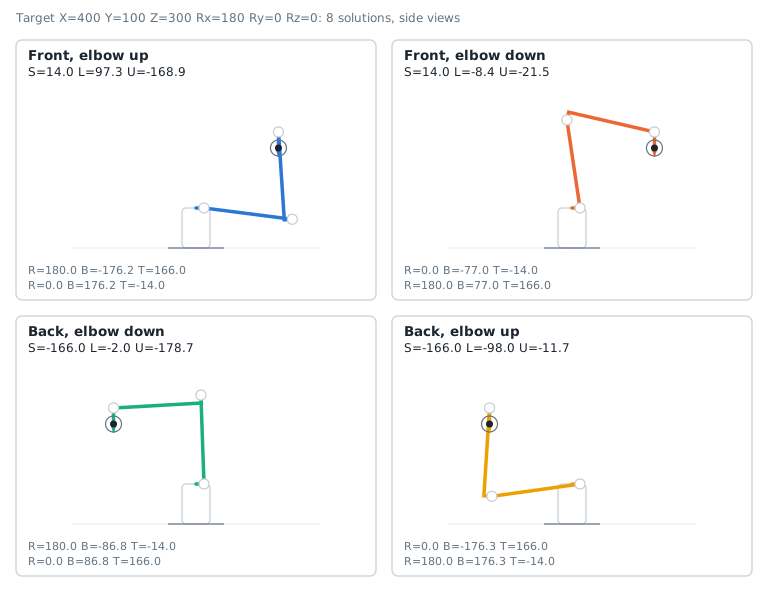
A 6-axis arm reaches most positions with several postures. `InverseKinematics` returns all of them:
- **Front or back**: the S axis turns the arm toward the target, or the opposite way and the arm reaches over its base.
- **Elbow up or elbow down**: the U axis is above or below the line from the L axis to the wrist.
- **Wrist flip**: the R axis turns by 180 degrees, the B axis changes its sign. The flange has the same position.
These 3 choices give up to 8 solutions for a robot with a spherical wrist (GP7, MH, ES...). The example of the snippet below gives 8 solutions for a GP7:
**C# : KinematicsInverse**
```csharp
using UnderAutomation.Yaskawa.Common;
using UnderAutomation.Yaskawa.Kinematics;
public class KinematicsInverse
{
static void Main()
{
/**/
DhParameters dh = DhParameters.FromArmKinematicModel(ArmKinematicModels.GP7);
// Flange position in the robot frame: mm and degrees
var target = new CartesianPosition(400, 100, 300, 180, 0, 0);
// Every joint solution, angles in (-180, 180]. Empty if the position cannot be reached.
JointsAngles[] solutions = KinematicsUtils.InverseKinematics(target, dh);
foreach (JointsAngles solution in solutions)
Console.WriteLine(solution); // S=..., L=..., U=..., R=..., B=..., T=...
/**/
}
}
```
**Python : KinematicsInverse**
```python
from underautomation.yaskawa.common.dh_parameters import DhParameters
from underautomation.yaskawa.kinematics.arm_kinematic_models import ArmKinematicModels
from underautomation.yaskawa.kinematics.kinematics_utils import KinematicsUtils
from underautomation.yaskawa.common.cartesian_position import CartesianPosition
##
dh = DhParameters.from_arm_kinematic_model(ArmKinematicModels.GP7)
# Flange position in the robot frame: mm and degrees
target = CartesianPosition(400, 100, 300, 180, 0, 0)
# Every joint solution, angles in (-180, 180]. Empty if the position cannot be reached.
solutions = KinematicsUtils.inverse_kinematics(target, dh)
for solution in solutions:
print(solution) # S=..., L=..., U=..., R=..., B=..., T=...
##
```
A cobot with a wrist offset along the B axis (HC10, HC10DT, HC20SDT) has more solutions, up to 16, because the offset of the wrist adds other ways to place the arm.
## Reachable positions
The number of solutions changes with the position. The map below counts the solutions in the vertical plane Y = 0, with the flange pointing down:
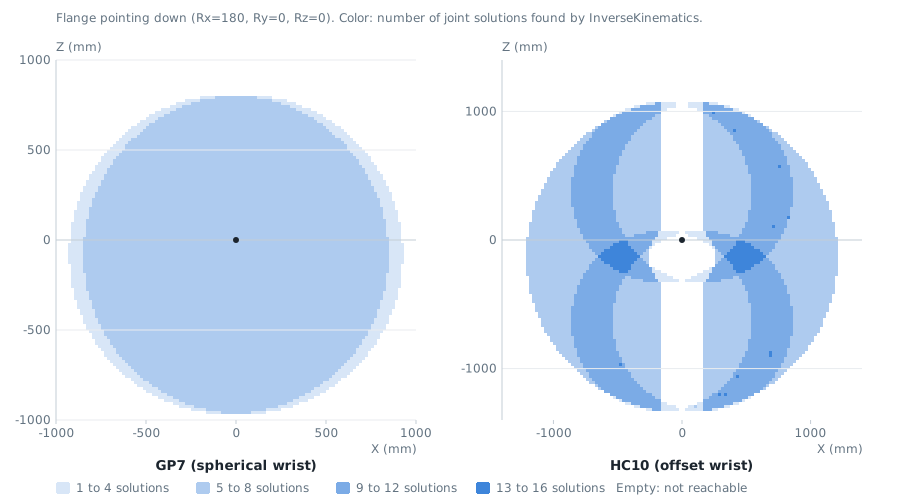
- Outside the reach of the arm, the array is empty.
- At the border of the reach, the elbow is straight and some solutions merge.
- For the HC10, the flange cannot be on the S axis with the flange pointing down: the wrist offset of 162 mm keeps it away.
The joint limits are not applied: a part of these solutions is outside the limits of the real robot.
## Choose a solution
### Closest to the current position
To move the robot with the smallest joint motion, keep the solution closest to the current joint angles. The snippet below keeps the solution with the smallest largest joint move:
**C# : KinematicsClosestSolution**
```csharp
using UnderAutomation.Yaskawa.Common;
using UnderAutomation.Yaskawa.Kinematics;
public class KinematicsClosestSolution
{
static void Main()
{
DhParameters dh = DhParameters.FromArmKinematicModel(ArmKinematicModels.GP7);
var target = new CartesianPosition(400, 100, 300, 180, 0, 0);
/**/
// The current joint angles of the robot, in degrees
var current = new JointsAngles(10, 20, -10, 0, -60, 0);
// Keep the solution with the smallest joint move
JointsAngles best = null;
double bestDistance = double.MaxValue;
foreach (JointsAngles solution in KinematicsUtils.InverseKinematics(target, dh))
{
double distance = 0;
for (int i = 0; i < 6; i++)
distance = Math.Max(distance, Math.Abs(solution.Values[i] - current.Values[i]));
if (distance < bestDistance)
{
best = solution;
bestDistance = distance;
}
}
Console.WriteLine(best == null ? "Not reachable" : $"{best}, largest joint move {bestDistance:F1} deg");
/**/
}
}
```
**Python : KinematicsClosestSolution**
```python
from underautomation.yaskawa.common.dh_parameters import DhParameters
from underautomation.yaskawa.kinematics.arm_kinematic_models import ArmKinematicModels
from underautomation.yaskawa.kinematics.kinematics_utils import KinematicsUtils
from underautomation.yaskawa.common.cartesian_position import CartesianPosition
from underautomation.yaskawa.common.joints_angles import JointsAngles
dh = DhParameters.from_arm_kinematic_model(ArmKinematicModels.GP7)
target = CartesianPosition(400, 100, 300, 180, 0, 0)
##
# The current joint angles of the robot, in degrees
current = list(JointsAngles(10, 20, -10, 0, -60, 0).values)
# Keep the solution with the smallest joint move
def largest_move(solution):
return max(abs(a - b) for a, b in zip(solution.values, current))
solutions = KinematicsUtils.inverse_kinematics(target, dh)
best = min(solutions, key=largest_move, default=None)
print("Not reachable" if best is None else f"{best}, largest joint move {largest_move(best):.1f} deg")
##
```
### Other criteria
- **Joint limits**: remove the solutions outside the limits of your robot (from its data sheet or from the soft limits of the controller).
- **Posture**: keep the front and elbow up solutions to stay in the same posture along a path.
- **Wrist singularity**: a B angle close to 0 makes the R and T axes aligned. Prefer the solutions far from it for linear moves.
## Errors
- `InverseKinematics` returns an empty array when the position cannot be reached. It does not throw.
- It throws a `NotSupportedException` for a structure that is not supported. See [Supported robots](/yaskawa/documentation/kinematics#supported_robots).
- It throws an `ArgumentNullException` when the position or the parameters are null.
## Reference
**Members of Kinematics.KinematicsUtils**
```csharp
public static class KinematicsUtils {
// Computes the flange position for the given joint angles.
public static CartesianPosition ForwardKinematics(IJointAngles joints, IDhParameters parameters)
// Computes all the joint solutions that put the flange at the given position.
// Joint limits are not checked. Angles are returned in the range (-180, 180].
public static JointsAngles[] InverseKinematics(ICartesianPosition position, IDhParameters parameters)
}
```
**Members of Common.JointsAngles**
```csharp
public class JointsAngles : IJointAngles {
// Initializes a new instance of with all angles at 0.
public JointsAngles()
// Initializes a new instance of with the specified angles (degrees).
public JointsAngles(double s, double l, double u, double r, double b, double t)
// Initializes a new instance of from an array of at least 6 angles (degrees).
// The array is copied.
public JointsAngles(double[] values)
// B axis angle (degrees).
public double B { get; set; }
// L axis angle (degrees).
public double L { get; set; }
// R axis angle (degrees).
public double R { get; set; }
// S axis angle (degrees).
public double S { get; set; }
// T axis angle (degrees).
public double T { get; set; }
public override string ToString()
// U axis angle (degrees).
public double U { get; set; }
// Angles of axes S, L, U, R, B, T in degrees.
public double[] Values { get; }
}
```
## What to read next
- [Kinematics models](/yaskawa/documentation/kinematics-models): the DH parameters of your robot.
- [Move the robot from a PC](/yaskawa/documentation/how-to-move-robot): send the target to the robot.