This page explains the offline kinematics of the Yaskawa SDK: forward kinematics (joint angles to flange position) and inverse kinematics (flange position to every set of joint angles) of 6-axis Motoman arms and cobots. The computation runs on the PC, without a controller and without a connection, for 169 robot models.
## What the kinematics do
| Function | Input | Output |
| ------------------------------------------- | ---------------------------------------- | ---------------------------------------------- |
| `KinematicsUtils.ForwardKinematics` | Joint angles in degrees (S, L, U, R, B, T) | Flange position: X, Y, Z in mm, Rx, Ry, Rz in degrees |
| `KinematicsUtils.InverseKinematics` | Flange position | Every joint solution, up to 8 or 16 |
Both take the geometry of the robot as `DhParameters`: from the catalog of models, from the `ALL.PRM` file of the controller, or from your own values. See [Kinematics models](/yaskawa/documentation/kinematics-models).
Use cases: check that a target can be reached before you send a move, choose the posture of a move, compute a position in a simulation or a planner, or compare a position read on the controller with a model.
## Conventions
- **Joint angles** are in degrees, with the signs of the pendant. They are not encoder pulses: the conversion from pulses depends on the robot and is not done by the SDK.
- **The Cartesian position** is the flange (tool 0) in the robot frame. Add your tool yourself, with `CartesianPosition.ToHomogeneousMatrix()` and a matrix product.
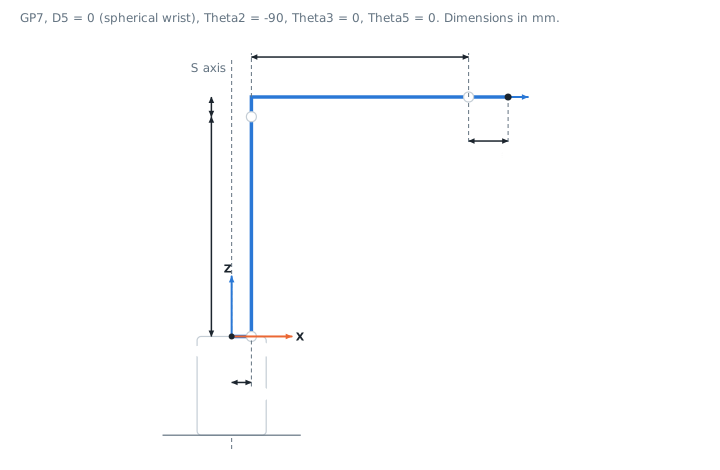
- **The robot frame** has its origin on the S axis, at the height of the L axis, X forward and Z up.
- **The angles** follow the Yaskawa convention: the orientation matrix is `R = Rz(Rz) * Ry(Ry) * Rx(Rx)`, the same as the pendant.
## Forward kinematics
`ForwardKinematics(joints, dh)` returns the flange position for a set of joint angles.
**C# : KinematicsForward**
```csharp
using UnderAutomation.Yaskawa.Common;
using UnderAutomation.Yaskawa.Kinematics;
public class KinematicsForward
{
static void Main()
{
/**/
// Geometry of the robot model
DhParameters dh = DhParameters.FromArmKinematicModel(ArmKinematicModels.GP7);
// Joint angles in degrees (S, L, U, R, B, T), with the signs of the pendant
var joints = new JointsAngles(0, 0, 0, 0, -90, 0);
// Position of the flange in the robot frame: mm and degrees
CartesianPosition flange = KinematicsUtils.ForwardKinematics(joints, dh);
Console.WriteLine(flange); // X=480, Y=0, Z=405, Rx=-180, Ry=0, Rz=0: the flange points down
/**/
}
}
```
**Python : KinematicsForward**
```python
from underautomation.yaskawa.common.dh_parameters import DhParameters
from underautomation.yaskawa.kinematics.arm_kinematic_models import ArmKinematicModels
from underautomation.yaskawa.kinematics.kinematics_utils import KinematicsUtils
from underautomation.yaskawa.common.joints_angles import JointsAngles
##
# Geometry of the robot model
dh = DhParameters.from_arm_kinematic_model(ArmKinematicModels.GP7)
# Joint angles in degrees (S, L, U, R, B, T), with the signs of the pendant
joints = JointsAngles(0, 0, 0, 0, -90, 0)
# Position of the flange in the robot frame: mm and degrees
flange = KinematicsUtils.forward_kinematics(joints, dh)
print(flange) # X=480, Y=0, Z=405, Rx=-180, Ry=0, Rz=0: the flange points down
##
```
`JointsAngles` takes the 6 angles in its constructor, or an array. `S`, `L`, `U`, `R`, `B`, `T` and `Values` read and change them.
## Inverse kinematics
`InverseKinematics(position, dh)` returns every set of joint angles that puts the flange at the position. The angles are in the range (-180, 180]. The array is empty when the position cannot be reached.
**C# : KinematicsInverse**
```csharp
using UnderAutomation.Yaskawa.Common;
using UnderAutomation.Yaskawa.Kinematics;
public class KinematicsInverse
{
static void Main()
{
/**/
DhParameters dh = DhParameters.FromArmKinematicModel(ArmKinematicModels.GP7);
// Flange position in the robot frame: mm and degrees
var target = new CartesianPosition(400, 100, 300, 180, 0, 0);
// Every joint solution, angles in (-180, 180]. Empty if the position cannot be reached.
JointsAngles[] solutions = KinematicsUtils.InverseKinematics(target, dh);
foreach (JointsAngles solution in solutions)
Console.WriteLine(solution); // S=..., L=..., U=..., R=..., B=..., T=...
/**/
}
}
```
**Python : KinematicsInverse**
```python
from underautomation.yaskawa.common.dh_parameters import DhParameters
from underautomation.yaskawa.kinematics.arm_kinematic_models import ArmKinematicModels
from underautomation.yaskawa.kinematics.kinematics_utils import KinematicsUtils
from underautomation.yaskawa.common.cartesian_position import CartesianPosition
##
dh = DhParameters.from_arm_kinematic_model(ArmKinematicModels.GP7)
# Flange position in the robot frame: mm and degrees
target = CartesianPosition(400, 100, 300, 180, 0, 0)
# Every joint solution, angles in (-180, 180]. Empty if the position cannot be reached.
solutions = KinematicsUtils.inverse_kinematics(target, dh)
for solution in solutions:
print(solution) # S=..., L=..., U=..., R=..., B=..., T=...
##
```
The joint limits of the robot are not checked: remove the solutions outside the limits of your robot, then choose one. See [Inverse kinematics](/yaskawa/documentation/kinematics-inverse).
## Supported robots
The SDK chooses the solver from the DH parameters:
| `KinematicsCategory` | Structure | Models of the catalog | Solutions |
| -------------------- | -------------------------------------------------------------------------- | --------------------- | --------- |
| `Opw` | Ortho-parallel base, spherical wrist: the R, B and T axes meet (D5 = 0) | 157 (GP, MH, ES, AR, MotoMINI, HC20DT, HC30PL...) | Up to 8 |
| `J5OffsetWrist` | Ortho-parallel base, wrist offset along the B axis (D5 is not 0, A1 and A3 are 0) | 12 (HC10, HC10DT, HC20SDT...) | Up to 16 |
These structures are not supported: T axis offset from the B axis (MA1400, MA1550, MA1800, MA1900), painting wrists with tilted axes (MPX2600, MPX3500), R axis parallel to the L and U axes (MPXL2600), palletizing robots, SCARA, delta and 7-axis robots. For them, `InverseKinematics` throws a `NotSupportedException`.
## Accuracy and speed
- Each solution is checked with the forward kinematics before it is returned: the error is below 0.00001 mm.
- The catalog gives the nominal geometry of each model. The controller can use calibrated values: compare a few positions with your robot before you rely on an offline result.
- The SDK is tested with poses measured on real GP7 and HC10 robots.
- An inverse kinematics takes about 20 µs for a GP7 and 100 µs for an HC10 on a desktop PC: 10000 targets of a path are checked in a fraction of a second.
## Reference
**Members of Kinematics.KinematicsUtils**
```csharp
public static class KinematicsUtils {
// Computes the flange position for the given joint angles.
public static CartesianPosition ForwardKinematics(IJointAngles joints, IDhParameters parameters)
// Computes all the joint solutions that put the flange at the given position.
// Joint limits are not checked. Angles are returned in the range (-180, 180].
public static JointsAngles[] InverseKinematics(ICartesianPosition position, IDhParameters parameters)
}
```
**Members of Common.JointsAngles**
```csharp
public class JointsAngles : IJointAngles {
// Initializes a new instance of with all angles at 0.
public JointsAngles()
// Initializes a new instance of with the specified angles (degrees).
public JointsAngles(double s, double l, double u, double r, double b, double t)
// Initializes a new instance of from an array of at least 6 angles (degrees).
// The array is copied.
public JointsAngles(double[] values)
// B axis angle (degrees).
public double B { get; set; }
// L axis angle (degrees).
public double L { get; set; }
// R axis angle (degrees).
public double R { get; set; }
// S axis angle (degrees).
public double S { get; set; }
// T axis angle (degrees).
public double T { get; set; }
public override string ToString()
// U axis angle (degrees).
public double U { get; set; }
// Angles of axes S, L, U, R, B, T in degrees.
public double[] Values { get; }
}
```
**Members of Common.CartesianPosition**
```csharp
public class CartesianPosition : ICartesianPosition {
// Initializes a new instance of at the origin, with zero angles.
public CartesianPosition()
// Initializes a new instance of with the specified values.
public CartesianPosition(double x, double y, double z, double rx, double ry, double rz)
// Initializes a new instance of by copying any Cartesian position,
// for example a position read from the robot.
public CartesianPosition(ICartesianPosition position)
// Creates a Cartesian position from a homogeneous matrix (3x4 or 4x4, translation in mm).
// When Ry is +90 or -90 degrees, Rx and Rz are not unique: Rz is set to 0.
public static CartesianPosition FromHomogeneousMatrix(double[,] matrix)
// Rotation around the X axis in degrees.
public double Rx { get; set; }
// Rotation around the Y axis in degrees.
public double Ry { get; set; }
// Rotation around the Z axis in degrees.
public double Rz { get; set; }
// Returns the 4x4 homogeneous matrix of this position (rotation and translation in mm).
public double[,] ToHomogeneousMatrix()
public override string ToString()
// X position in millimeters.
public double X { get; set; }
// Y position in millimeters.
public double Y { get; set; }
// Z position in millimeters.
public double Z { get; set; }
}
```
**Members of Common.KinematicsCategory**
```csharp
public enum KinematicsCategory {
// Ortho-parallel base with a wrist offset along the B axis (D5 is not 0): the R and T axes do not meet.
// Collaborative robots such as HC10, HC10DT, HC20SDT. Up to 16 inverse kinematics solutions.
J5OffsetWrist = 1
// Ortho-parallel base with a spherical wrist: the R, B and T axes meet at one point (D5 = 0).
// Most industrial arms (GP, MH, ES, HC20DT, HC30PL...). Up to 8 inverse kinematics solutions.
Opw = 0
}
```
## What to read next
- [Inverse kinematics](/yaskawa/documentation/kinematics-inverse): the solutions, the postures and how to choose one.
- [Kinematics models](/yaskawa/documentation/kinematics-models): DH parameters from the catalog, from the controller or from your values.