Edit Karel and KCL files
The Karel sources, the KCL files and the command files of a Fanuc controller: problems, outline, folding, go to definition, hover and completion, what the first version of the rules checks, KCL inside a Karel program, Compile with ktrans, the source of a Karel program opened from the Karel Programs node and how to change it, and Run in KCL Terminal on a KCL file, a command file or a KCL call of a Karel source.
- The rules are a first version
- Karel sources
- Problems
- Outline, folding, go to definition and hover
- KCL inside a Karel program
- Compile with ktrans
- Open the source of a Karel program
- Change the source of a program
- KCL files and command files
- What TouchUp checks
- Completion, hover and outline
- Run a line in the KCL Terminal
- Run a KCL call of a Karel source
- What to read next
This page explains the help that TouchUp gives for the other languages of a Fanuc controller: the Karel sources (.kl, .klh, .klt), the KCL files (.cf) and the command files (.cm). It also explains how to compile a Karel source with ktrans, how to open the source of a Karel program of a controller, and how to run a line of a KCL file in the KCL Terminal. These files exist on Fanuc controllers only. The help in the editor is local, needs no license and writes nothing.
The rules are a first version
TouchUp reads Karel and KCL with its own rules. They are written from many real Karel programs and from the common use of KCL, and they are not yet checked line by line against the Fanuc reference manuals. For this reason:
- A Karel problem is reported only when the structure of the file is wrong. TouchUp does not report a name that the file does not declare, and it does not check the arguments of the built-in routines and statements.
- An unknown KCL command is reported as an information only, never as an error: the list of commands of TouchUp may be incomplete, and a controller option can add commands. The other KCL checks are warnings.
- A problem is a hint, never a block. TouchUp does not refuse to save, compile or send a file that has problems. The controller and
ktransstay the reference.
Karel sources
A .kl file opens with the colors of Karel, from your PC or from a controller. The include files .klh and .klt get the same help.
Problems
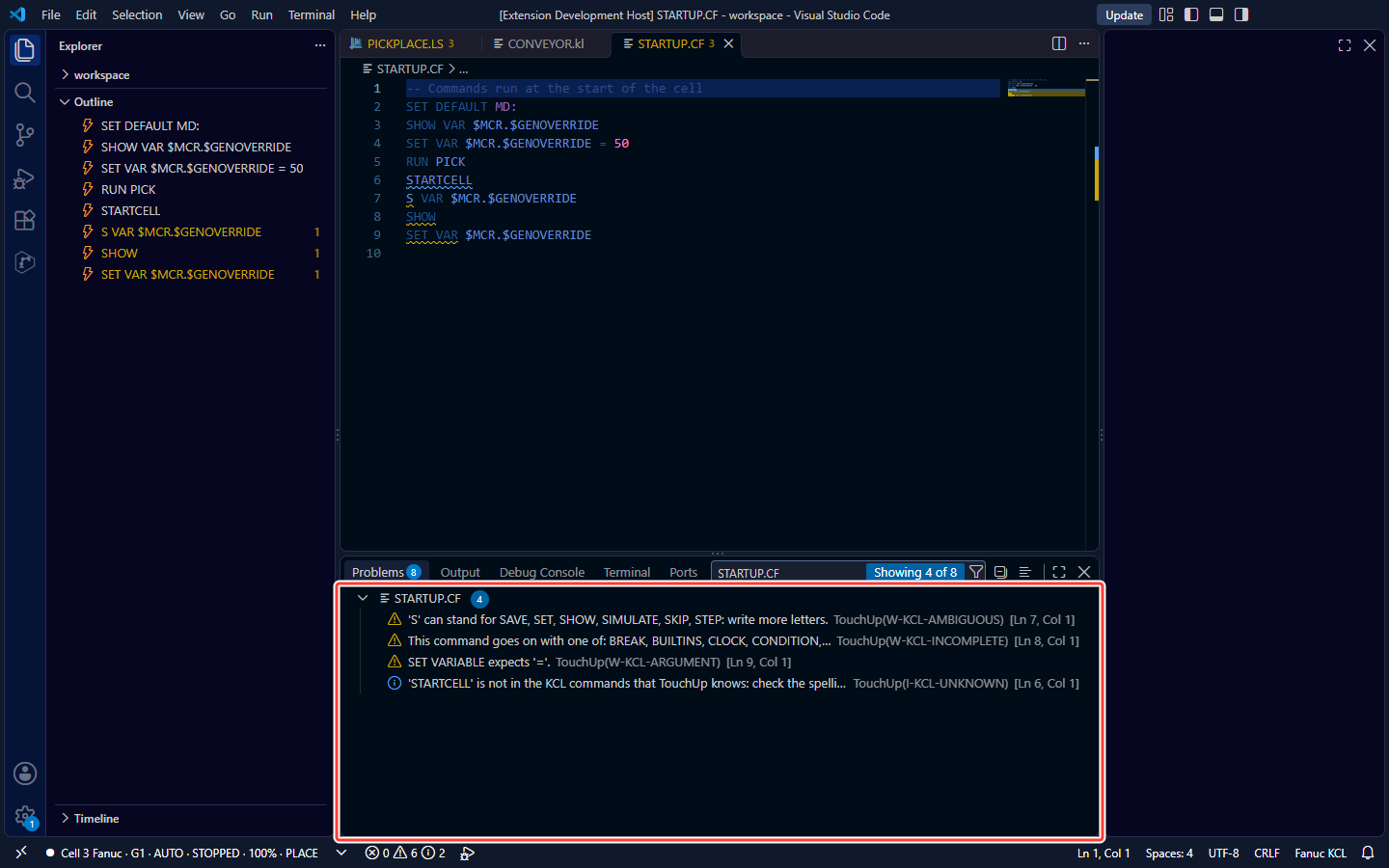
TouchUp checks the source while you type and lists the problems in the Problems panel (Ctrl+Shift+M), with the source TouchUp:
| Code | Severity | When |
|---|---|---|
E-SYNTAX | Error | A word that is not allowed at this place, with what was expected, or a missing closing word (ENDIF, ENDFOR, END...) |
E-END-NAME | Error | END name does not name the routine or the program that it closes |
E-LEX-STRING | Error | A string not closed on its line |
E-LEX-CHARACTER | Error | A character that Karel does not accept, for example !. Comments start with -- |
After an error, TouchUp goes on at the next line, so the rest of the file is still checked. The statements MOVE, READ, WRITE, OPEN FILE and the like are read, but their arguments are not checked. A file with %IFDEF ... %ELSE ... %ENDIF is read with both branches.
Outline, folding, go to definition and hover
- Outline. The Outline view lists the program, its constants, types, variables and routines, and inside each routine its parameters and local declarations.
- Folding. The editor folds the main body, the routines, the
CONST,TYPEandVARsections, the structures, the blocksIF,FOR,WHILE,REPEAT,SELECT,USING,CONDITIONandMOVE, and the series of comment lines. - Go to definition and references.
F12on a routine, a variable, a constant, a type or a label goes to its declaration,Shift+F12lists where it is used. A name is looked for in its routine first, then in the program. A built-in routine, a system variable, a field of a structure and a declaration of an included file are not followed. - Hover. The mouse on a declared name shows its declaration as written in the source, for example the header of a routine.
%INCLUDE.F12on%INCLUDE nameopensname.klof the same folder. This works for a file of your PC only: not for a file opened from a controller, and never for a file of another folder.
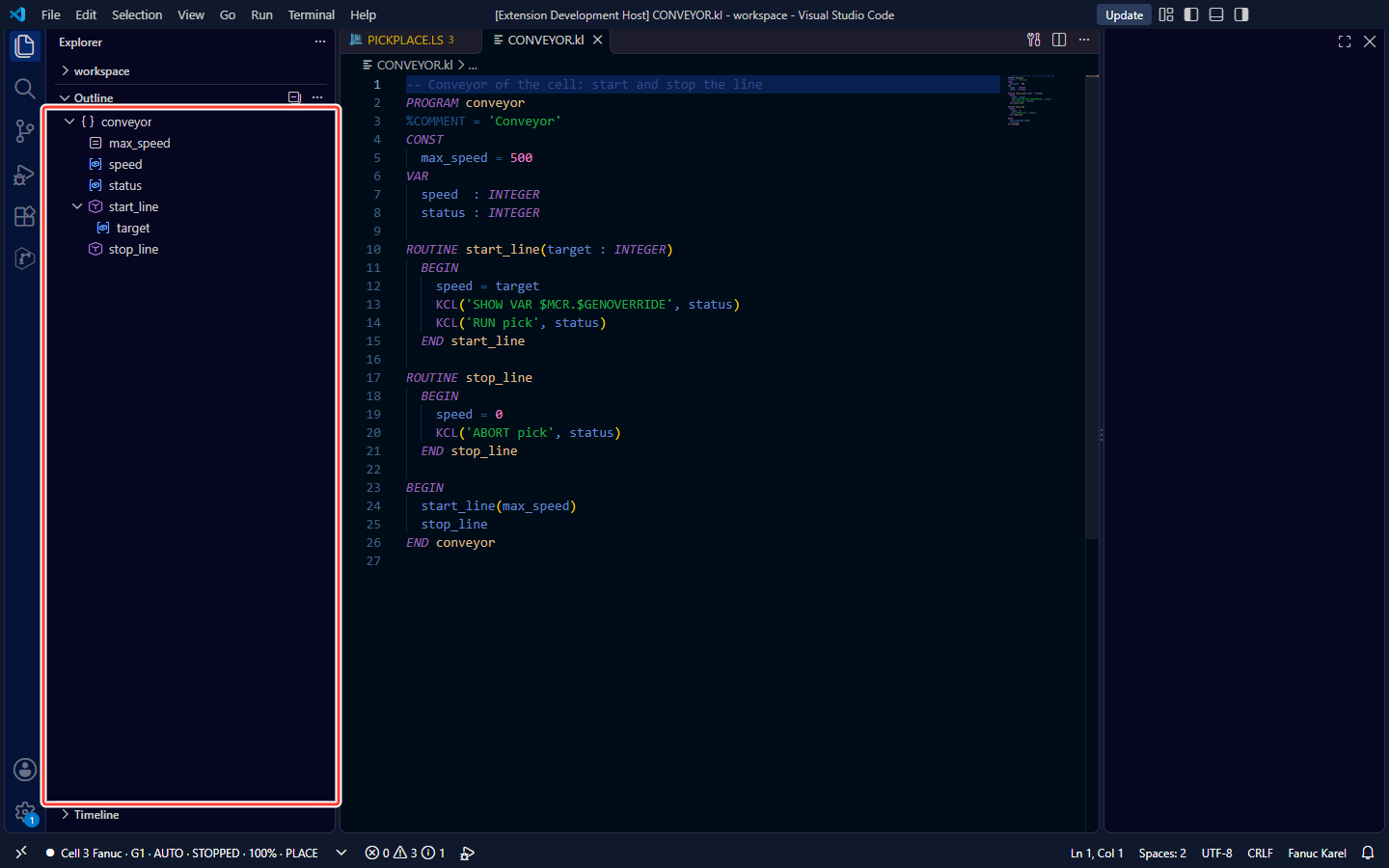
Karel has no completion of its own yet, except inside the KCL command of a KCL call, see below.
KCL inside a Karel program
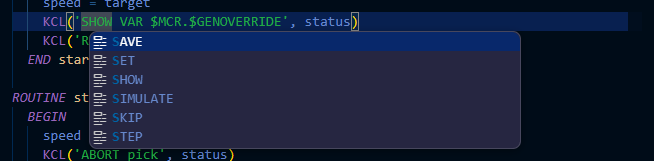
The first argument of a call KCL('...', status) is a KCL command. When it is one constant string, TouchUp reads it as a line of a KCL file:
- the KCL checks of the table below, on the characters of the string,
- the completion of the KCL commands and of their words: in VS Code, press
Ctrl+Spaceinside the string, because the editor does not offer completion inside a string by itself, - the hover of the command: its syntax and a summary.
A command built from several parts ('RUN ' + name), a variable, or a string after a & continuation gets nothing: TouchUp cannot know the text that the program will send.
Compile with ktrans
ktrans is the Karel compiler of WinOLPC and ROBOGUIDE, on your PC: it makes the .pc program from a .kl source. TouchUp does not include it. Set touchup.fanuc.winolpcPath to the folder of the WinOLPC or ROBOGUIDE tools, as for maketp and printtp. When the setting is empty, TouchUp looks in the PATH. When ktrans is not found, the message names this setting.
- Open the
.klsource. - Click
Compile with ktransin the title of the editor, or in the right click menu of the editor. - The errors and warnings of
ktransgo to the Problems panel, with the sourcektrans. Click one to go to its line. A message says<name> was compiled by ktrans., or<name>: ktrans found N error(s), see the Problems view.
TouchUp runs ktrans only when you click, never by itself. The messages of ktrans are removed from a file as soon as you change it, because their line numbers are no longer right. The whole output of ktrans is in the TouchUp output channel.
| Source | What happens |
|---|---|
| A file of your PC | The file is saved first when it has changes. It is compiled in its own folder, so that %INCLUDE finds the files beside it, and the .pc is written next to the .kl |
| A file opened from a controller, a source of a backup, or an unsaved new file | A copy is compiled in a temporary folder, which is deleted after the compile. No .pc is kept, and an %INCLUDE is not found there. Use it to check that the source compiles |
Compile with ktrans writes nothing to the controller. To load the .pc on the controller, send it as any other file, see Send a file to the controller. When the controller has a robot.ini file, TouchUp gives it to ktrans, see Choose a robot.ini. A source of more than 5 MB is not compiled, and a compile that takes more than 60 seconds is stopped.
Open the source of a Karel program
A Fanuc controller keeps only the compiled .pc of a Karel program, and TouchUp cannot turn a .pc back into a source. A click on a program of the Karel Programs node of a controller opens its .kl source of your PC instead. TouchUp looks for a .kl of the same name, in any case, in this order:
- The source that you chose before for this program of this controller.
- The folders of your workspace.
- The backups of this controller.
| TouchUp finds | What opens |
|---|---|
| One source | The source, in the normal editor of Karel, with Compile with ktrans |
| Several sources | A list of the files with their folders. Nothing opens before you choose, and TouchUp keeps your choice |
| No source | The message Source not found, with the button Choose Source File.... Pick the .kl file: it opens, and TouchUp keeps your choice |
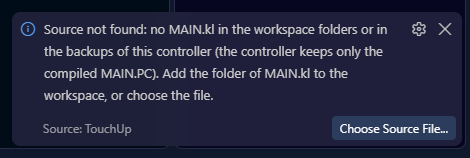
- The choice is kept for this program of this controller, in every workspace of your user account on this PC. The next click opens the same file without a question. When the file is deleted, TouchUp forgets it and looks again. When the file cannot be reached for now, for example on a network share that is offline, TouchUp keeps the choice and looks in the other places for this click.
- A source of a backup opens read-only. You cannot save it, and
Compile with ktranswrites no.pcinto the backup: it compiles a copy in a temporary folder. After a reload of the window, this read-only editor is empty: click the program again. - Opening a source reads nothing from the controller and writes nothing to it.
Change the source of a program
Once TouchUp keeps a source for a program, right click the program in the Karel Programs node. Two more commands appear:
| Command | What it does |
|---|---|
Choose Karel Source... | Opens the file dialog, as Choose Source File... does. The .kl file that you pick replaces the kept source and opens at once. It opens read-only when it is in a backup |
Forget Karel Source | TouchUp forgets the kept source. The next click on the program looks for a source again, in the order above, and asks if there are several |
Use them when TouchUp opens the wrong file, or when you moved the source. Both only change what TouchUp remembers on your PC: nothing is read from the controller and nothing is written to it.
KCL files and command files
A KCL file (.cf) holds KCL commands, one per line. A command file (.cm) holds the commands of the controller (PCLOAD, TPLOAD, SETVAR...) and lines that start with KCL, followed by a KCL command. Both open with their colors, from the Command Files node of a controller or from your PC.
What TouchUp checks
In a .cf, every line is a KCL command. A comment starts with --, and a line that ends with & goes on on the next line. In a .cm, only the lines that start with KCL are checked, and a comment starts with !. The other lines of a .cm keep their colors and are not checked.
KCL words are read in any case, and a word can be shortened to the start that names one word only: SH VAR is SHOW VAR.
| Code | Severity | When |
|---|---|---|
I-KCL-UNKNOWN | Information | The first word is not a command of the list of TouchUp. A line of a .cf that starts with / is reported too: it is a command of the KCL Terminal, not of a file |
W-KCL-AMBIGUOUS | Warning | A shortened word that starts several words, for example S (SET, SHOW...) |
W-KCL-INCOMPLETE | Warning | The words stop before a command, for example SHOW alone |
W-KCL-ARGUMENT | Warning | An argument is missing, of the wrong kind (the message says what to write), or one too many |
E-KCL-STRING | Error | A string not closed on its line |
Completion, hover and outline
- Completion. At the start of a line, the KCL commands. After a command, the words that it accepts at the cursor, for example
TO,ALLor=. In a.cm,KCLand the commands of the file at the start of a line, then the KCL commands afterKCL. Completion reads the line of the cursor only: a line after a&continuation gets none. - Hover. The mouse on a command shows its syntax and a summary.
- Outline. The Outline view lists the commands of the file, one entry per command, so you see what the file runs. A command of a
.cmis aKCLline.
There is no folding in these files.
Run a line in the KCL Terminal
In a .cf or a .cm, right click a line, then Run in KCL Terminal. TouchUp sends the command of the line to the KCL Terminal of the controller of the file. In a .cm, the word KCL is removed before the command is sent.
In a Karel source (.kl), the same command runs the KCL command of a KCL('...') call, see Run a KCL call of a Karel source.
- The file must belong to a controller: opened from the controller, or kept in the folder of a robot of your configuration, see Controllers and configuration files. Otherwise a message says
this file is not bound to a controller. - A comment line, a line of a
.cfthat starts with/, and a line of a.cmthat does not start withKCLare not sent: a message asks you to put the cursor on a line with a KCL command. - The rules of the terminal apply: the Pro edition for Fanuc, the confirmation once per connection, and the record of the command in the audit log. See KCL Terminal.
Run a KCL call of a Karel source
In a Karel source, put the cursor on a call KCL('...'), right click, then Run in KCL Terminal. TouchUp sends the command that is written in the call to the KCL Terminal of the controller of the file. The rules of the terminal above apply, and the file must belong to a controller.
- The call under the cursor. Only this call is sent, never another call of the same line or of a line before. When the call goes on to the next lines, the cursor can be on any of them.
- A closed constant string only. The command must be one string in quotes, for example
KCL('SHOW TASK', status), with the closing quote. A command built from several strings, from a variable or from a function is not sent: TouchUp cannot know what it will be at run time. The message saysput the cursor on a KCL('...') call whose command is one string in quotes. - A doubled quote is one quote. In
KCL('SET VAR $X = ''A''', status), the command sent isSET VAR $X = 'A'. - The rest of the call is not run. The other arguments, the status and the code around the call are not executed: TouchUp sends the command only. Check the KCL command before you send it, as it can start a program and move the robot.