Routing: one protocol per method, chosen at the connection
How UnderAutomation.Robotics chooses the protocol of each method on a Fanuc, Yaskawa, Universal Robots, ABB or Stäubli controller, with nothing to install. Route explorer, robot.Routing, C# and Python examples.
A robot controller has several interfaces: a web server, an FTP server, a protocol for the signals, another for the moves. For each method of the common API, UnderAutomation.Robotics chooses the interface, called a route, that answers on your Fanuc, Yaskawa, Universal Robots, ABB or Stäubli controller, and tells you which one it chose and why.
How a route is chosen
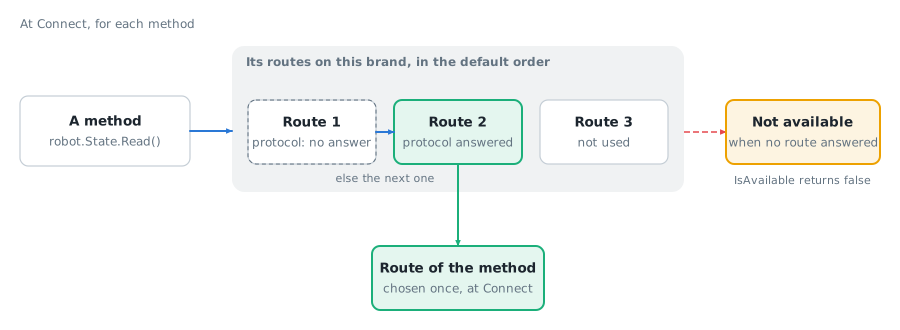
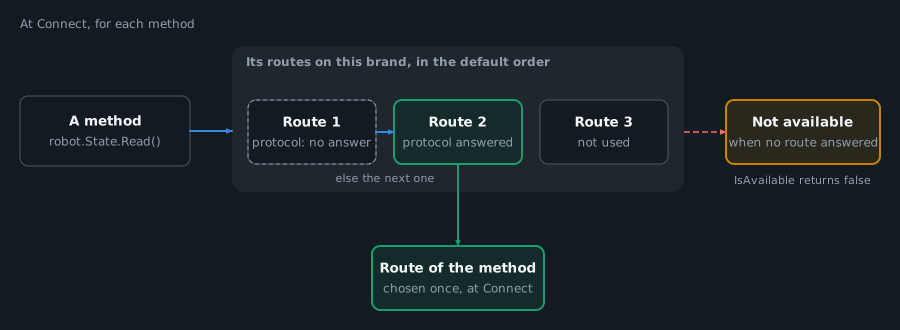
Each method has a list of routes for each brand, in a default order. A route is a protocol of the controller, sometimes in a given mode: on Fanuc, the routes Cgtp and CgtpKcl use the same web server.
At Connect, the library tests the protocols of the brand one by one and keeps open the ones that give a route to a method. Each method then takes the first route of its list whose protocol answered. A controller without the SNPX option still reads its state on Fanuc: the method takes the next route of its list. The protocols opened by the test that no method needs are closed.
Three rules follow:
- The route is chosen once, at
Connect. When a call fails, the library does not try another route. Change the settings and connect again. - Some routes take control of the robot, for example RMI on Fanuc and Interpreter Mode on Universal Robots. The library never opens them by itself: you enable them in the connection parameters of the brand. They are marked (manual) below.
- A method that has no route on a brand throws
FeatureNotSupportedException. A method whose routes all failed or are off throwsRouteUnavailableException.IsAvailableof each service returns false in both cases. One exception: on ABB, without the RAPID module,IsAvailablereturns true for the moves and the call throwsRouteUnavailableException. See Errors.
You can change the order: prefer a protocol for every method, set the routes of a group or of one method, or forbid a protocol. See Routing settings.
Route explorer
Choose a brand, then switch off the protocols and options that your controller does not have. For each method, the explorer shows the route used, the next route of its list, or "Not available". The routes marked (manual) start switched off: the library opens them only when you enable them. Without JavaScript, the table gives the routes of every brand in the default order.
The explorer is generated from the route data of the library.
| Method | Fanuc | Yaskawa | Universal Robots | ABB | Stäubli |
|---|---|---|---|---|---|
| Information | |||||
| Info.Read | CGTP (Cgtp), FTP | High Speed Ethernet Server | Dashboard Server | Robot Web Services | SOAP |
| Info.ReadGroups | CGTP (Cgtp), FTP | High Speed Ethernet Server | Dashboard Server | Robot Web Services | SOAP |
| State | |||||
| State.Read | SNPX, FTP | High Speed Ethernet Server, Ethernet Server | Dashboard Server, Primary Interface (Primary) | Robot Web Services | Not available |
| State.ServoOn | CGTP (CgtpKcl), Telnet, SNPX, RMI (manual) | High Speed Ethernet Server, Ethernet Server | Dashboard Server, REST API, Primary Interface (Primary) | Robot Web Services | SOAP |
| State.ServoOff | Not available | High Speed Ethernet Server, Ethernet Server | Dashboard Server, REST API, Primary Interface (Primary) | Robot Web Services | SOAP |
| Programs | |||||
| Program.List | CGTP (Cgtp), FTP | High Speed Ethernet Server, Ethernet Server, FTP | SFTP | Robot Web Services | SOAP, Files |
| Program.Select | CGTP (Cgtp) | High Speed Ethernet Server, Ethernet Server | Dashboard Server, REST API | Robot Web Services | SOAP |
| Program.Start | CGTP (Cgtp), CGTP (CgtpKcl), Telnet | High Speed Ethernet Server, Ethernet Server | Dashboard Server, REST API | Robot Web Services | SOAP |
| Program.Pause | CGTP (Cgtp), CGTP (CgtpKcl), Telnet | High Speed Ethernet Server, Ethernet Server | Dashboard Server, REST API | Robot Web Services | SOAP |
| Program.Resume | CGTP (CgtpKcl), Telnet | High Speed Ethernet Server, Ethernet Server | Dashboard Server, REST API | Robot Web Services | SOAP |
| Program.Stop | CGTP (Cgtp), CGTP (CgtpKcl), Telnet | Not available | Dashboard Server, REST API | Robot Web Services | SOAP |
| Program.ReadExecution | SNPX, CGTP (CgtpKcl), Telnet, FTP | High Speed Ethernet Server, Ethernet Server | Dashboard Server, REST API | Robot Web Services | SOAP |
| Program.Hold | CGTP (CgtpKcl), Telnet | High Speed Ethernet Server, Ethernet Server | Not available | Not available | Not available |
| Program.SetCycleMode | Not available | High Speed Ethernet Server, Ethernet Server | Not available | Robot Web Services | Not available |
| Program.SelectAtLine | CGTP (Cgtp) | High Speed Ethernet Server, Ethernet Server | Not available | Robot Web Services | Not available |
| Program.StartAtLine | CGTP (Cgtp) | High Speed Ethernet Server, Ethernet Server | Not available | Robot Web Services | Not available |
| Program.StopTask | CGTP (Cgtp), CGTP (CgtpKcl), Telnet | Not available | Not available | Not available | SOAP |
| Program.Position.Read | FTP, CGTP (Cgtp) | FTP, High Speed Ethernet Server | Not available | Robot Web Services | Not available |
| Program.Position.Write | CGTP (Cgtp) | Not available | Not available | Robot Web Services | Not available |
| Program.Position.SetToCurrent | CGTP (Cgtp) | Not available | Not available | Robot Web Services | Not available |
| Debug | |||||
| Debug.AddBreakpoint | CGTP (CgtpKcl), Telnet | Not available | Primary Interface (Primary) | Robot Web Services | Not available |
| Debug.RemoveBreakpoint | CGTP (CgtpKcl), Telnet | Not available | Primary Interface (Primary) | Not available | Not available |
| Debug.ReadBreakpoints | CGTP (CgtpKcl), Telnet | Not available | Not available | Robot Web Services | Not available |
| Debug.SetStepMode | CGTP (CgtpKcl), Telnet | High Speed Ethernet Server, Ethernet Server | Primary Interface (Primary) | Robot Web Services | Not available |
| Debug.Continue | CGTP (CgtpKcl), Telnet | High Speed Ethernet Server, Ethernet Server | Primary Interface (Primary) | Robot Web Services | Not available |
| Debug.SetTaskStepMode | CGTP (CgtpKcl), Telnet | Not available | Not available | Not available | Not available |
| Debug.ContinueTask | CGTP (CgtpKcl), Telnet | Not available | Not available | Not available | Not available |
| Variables | |||||
| Variable.Read | CGTP (Cgtp), SNPX | High Speed Ethernet Server, Ethernet Server | Dashboard Server, Primary Interface (Primary) | Robot Web Services | Not available |
| Variable.WriteInteger | CGTP (Cgtp), SNPX | High Speed Ethernet Server, Ethernet Server | Interpreter Mode (manual) | Robot Web Services | Not available |
| Variable.WriteReal | CGTP (Cgtp), SNPX | High Speed Ethernet Server, Ethernet Server | Interpreter Mode (manual) | Robot Web Services | Not available |
| Variable.WriteString | CGTP (Cgtp), SNPX | High Speed Ethernet Server, Ethernet Server | Interpreter Mode (manual) | Robot Web Services | Not available |
| Variable.WriteBoolean | CGTP (Cgtp), SNPX | High Speed Ethernet Server, Ethernet Server | Interpreter Mode (manual) | Robot Web Services | Not available |
| Variable.ReadPosition | CGTP (Cgtp), SNPX | Not available | Not available | Robot Web Services | Not available |
| Variable.WritePosition | CGTP (Cgtp), SNPX | Not available | Not available | Robot Web Services | Not available |
| Variable.ReadComment | CGTP (Cgtp), SNPX | High Speed Ethernet Server | Not available | Not available | Not available |
| Variable.WriteComment | CGTP (Cgtp), SNPX | High Speed Ethernet Server | Not available | Not available | Not available |
| Variable.List | CGTP (Cgtp) | High Speed Ethernet Server | Primary Interface (Primary) | Robot Web Services | Not available |
| Variable.ReadMany | CGTP (Cgtp), SNPX | High Speed Ethernet Server, Ethernet Server | Not available | Not available | Not available |
| Inputs and outputs | |||||
| Io.Read | SNPX, CGTP (Cgtp) | High Speed Ethernet Server, Ethernet Server | RTDE, Primary Interface (Primary) | Robot Web Services | SOAP |
| Io.WriteBoolean | SNPX, CGTP (Cgtp), CGTP (CgtpKcl), Telnet | High Speed Ethernet Server, Ethernet Server | Primary Interface (Script), Interpreter Mode (manual) | Robot Web Services | SOAP |
| Io.WriteNumber | SNPX, CGTP (Cgtp), CGTP (CgtpKcl), Telnet | High Speed Ethernet Server, Ethernet Server | Primary Interface (Script), Interpreter Mode (manual) | Robot Web Services | SOAP |
| Io.ReadComment | CGTP (Cgtp), SNPX | High Speed Ethernet Server | Not available | Not available | Not available |
| Io.WriteComment | CGTP (Cgtp), SNPX | High Speed Ethernet Server | Not available | Not available | Not available |
| Io.List | CGTP (Cgtp) | High Speed Ethernet Server | Not available | Robot Web Services | SOAP |
| Io.ReadMany | SNPX, CGTP (Cgtp) | High Speed Ethernet Server, Ethernet Server | Not available | Not available | SOAP |
| Io.Simulate | CGTP (Cgtp) | Not available | Not available | Not available | Not available |
| Io.Unsimulate | CGTP (Cgtp) | Not available | Not available | Not available | Not available |
| Alarms | |||||
| Alarm.ReadActive | SNPX, FTP | High Speed Ethernet Server, Ethernet Server | Primary Interface (Primary), Dashboard Server | Robot Web Services | Not available |
| Alarm.ReadHistory | SNPX, FTP | Not available | Not available | Robot Web Services | Not available |
| Alarm.Reset | SNPX, CGTP (CgtpKcl), Telnet | High Speed Ethernet Server, Ethernet Server | Dashboard Server | Not available | Not available |
| Motion | |||||
| Motion.ReadPose | SNPX, CGTP (Cgtp), RMI (manual), FTP | High Speed Ethernet Server, Ethernet Server | RTDE, Primary Interface (Primary) | Robot Web Services | SOAP |
| Motion.ReadJoints | SNPX, CGTP (Cgtp), RMI (manual), FTP | Not available | RTDE, Primary Interface (Primary) | Robot Web Services | SOAP |
| Motion.ForwardKinematics | CGTP (Cgtp) | Not available | Primary Interface (Primary) | Robot Web Services | SOAP |
| Motion.InverseKinematics | CGTP (Cgtp) | Not available | Primary Interface (Primary) | Robot Web Services | SOAP |
| Motion.ReadUserFrame | RMI (manual) | Not available | Not available | Not available | Not available |
| Motion.ReadTool | RMI (manual) | Not available | Not available | Not available | Not available |
| Motion.MoveJoint | RMI (manual) | Not available | Primary Interface (Script), Interpreter Mode (manual) | Robot Web Services | SOAP |
| Motion.MoveJointToPose | RMI (manual) | High Speed Ethernet Server, Ethernet Server | Primary Interface (Script), Interpreter Mode (manual) | Robot Web Services | SOAP |
| Motion.MoveLinear | RMI (manual) | High Speed Ethernet Server, Ethernet Server | Primary Interface (Script), Interpreter Mode (manual) | Robot Web Services | SOAP |
| Motion.MoveLinearToJoints | RMI (manual) | Not available | Primary Interface (Script), Interpreter Mode (manual) | Robot Web Services | SOAP |
| Motion.StopMotion | RMI (manual) | High Speed Ethernet Server, Ethernet Server | Primary Interface (Script), Dashboard Server | Robot Web Services | SOAP |
| Motion.WaitForMotionEnd | RMI (manual) | High Speed Ethernet Server, Ethernet Server | Dashboard Server, Primary Interface (Primary) | Robot Web Services | Not available |
| Motion.ForwardKinematicsInFrame | CGTP (Cgtp) | Not available | Not available | Not available | Not available |
| Motion.ReadKinematicModel | FTP | High Speed Ethernet Server | Not available | Not available | Not available |
| Files | |||||
| File.List | FTP, CGTP (Cgtp) | FTP, High Speed Ethernet Server, HTTP | SFTP | Robot Web Services | Files |
| File.Download | FTP | FTP, High Speed Ethernet Server, HTTP | SFTP | Robot Web Services | Files |
| File.ReadBytes | FTP | FTP, High Speed Ethernet Server, HTTP | SFTP | Robot Web Services | Files |
| File.ReadText | FTP, CGTP (Cgtp) | FTP, High Speed Ethernet Server, HTTP | SFTP | Robot Web Services | Files |
| File.Upload | FTP | FTP, High Speed Ethernet Server | SFTP | Robot Web Services | Files |
| File.WriteBytes | FTP | FTP, High Speed Ethernet Server | SFTP | Robot Web Services | Files |
| File.WriteText | FTP | FTP, High Speed Ethernet Server | SFTP | Robot Web Services | Files |
| File.Delete | FTP | FTP, High Speed Ethernet Server | SFTP | Robot Web Services | Files |
| File.Exists | FTP | FTP | SFTP | Robot Web Services | Files |
| File.Rename | FTP | Not available | SFTP | Robot Web Services | Files |
| File.CreateDirectory | FTP | Not available | SFTP | Robot Web Services | Files |
| File.DeleteDirectory | FTP | Not available | SFTP | Robot Web Services | Files |
| File.ReadBytesWithProgress | FTP | FTP, High Speed Ethernet Server, HTTP | SFTP | Robot Web Services | Files |
| File.WriteBytesWithProgress | FTP | FTP, High Speed Ethernet Server | SFTP | Robot Web Services | Files |
| Pendant | |||||
| Pendant.ShowMessage | Not available | High Speed Ethernet Server, Ethernet Server | Dashboard Server, REST API | Not available | Not available |
Prerequisites
- The license of the brand of the controller, or the 30 day trial. See Licensing.
- To read the routes: a connected
RobotController. See Connect to your robot. - To change the routes: the connection parameters of the brand, before
Connect.
Example
Read the route of each method
robot.Routing gives the result of the choice made at Connect. GetRoute returns the route of one method, or the reason why it is not available. GetReport returns the protocols and the route of every method as text, for a log or for the support.
RobotController robot = new RobotController();robot.Connect(RobotConnectionParameters.Create("fanuc", "192.168.0.1"));// Route of one method: the protocol it uses, or why it is not availableRouteInfo route = robot.Routing.GetRoute("Program.Start");Console.WriteLine(route.Available ? $"{route.Route} ({route.Protocol})" : route.Reason);// Route of every method, as textConsole.WriteLine(robot.Routing.GetReport());robot.Disconnect();}
Read the result of each protocol
GetProtocols returns the result of each protocol of the brand at Connect: open, no answer, credentials refused, disabled, not needed.
RobotController robot = new RobotController();robot.Connect(RobotConnectionParameters.Create("fanuc", "192.168.0.1"));// Result of the connection of each protocol of the brandforeach (ProtocolInfo protocol in robot.Routing.GetProtocols())Console.WriteLine($"{protocol.DisplayName}: {protocol.Status}");robot.Disconnect();}
Ask before a call
IsAvailable of each service returns false when the method has no route on the brand, or when no route of the method can be used on this connection. A user interface can hide the action.
RobotController robot = new RobotController();robot.Connect(RobotConnectionParameters.Create("staubli", "192.168.0.254"));// False when the brand has no route for the method, or no protocol of the route answeredif (robot.State.IsAvailable(StateFeature.Read)){Console.WriteLine(robot.State.Read().Mode);}try{robot.State.Read();}catch (FeatureNotSupportedException ex){Console.WriteLine($"{ex.Feature} is not supported on {ex.BrandName}");}catch (RouteUnavailableException ex){Console.WriteLine($"{ex.Feature}: {ex.Message}");}robot.Disconnect();}
Nothing to install
On the PC, there is no software of the robot maker to install: no driver, no USB key. The library is one managed DLL, or one Python package.
On the controller, the library uses the interfaces that the controller already has. For most methods, there is no program to load on the controller. There are two exceptions:
- ABB: the moves need one RAPID module, UnderAutomationMotion.mod, loaded once in the motion task of the robot. Without it, the route of the moves is still chosen and
IsAvailablereturns true, but a move throwsRouteUnavailableExceptionat the call. - Universal Robots: the variable writes need the interpreter program running on the robot (Interpreter Mode).
Nothing to install does not mean nothing to set. A protocol can need an option of the controller, a function enabled in its network settings, a user and a password, or a mode. For example on Fanuc, SNPX needs the option R553 HMI Device, and RMI needs the option R912. The route explorer below and the page Which protocol for which task give what each route needs.
Reference
In Python, the names are in snake_case: robot.routing.get_route(...), get_routes(), get_protocols(), get_report(). The properties of the results are in snake_case too: route.available, route.reason.
Methods of ControllerRouting
robot.Routing is a ControllerRouting. It reads the routes chosen at Connect. To change them, use the routing settings of the connection parameters.
| Method | What it does | Parameters | Result |
|---|---|---|---|
GetRoute | Returns the route of one method. | string feature: path of the method, for example "Program.Start" | RouteInfo |
GetRoutes | Returns the route of every method, also the methods that are not available. | None | RouteInfo[] |
GetProtocols | Returns the result of each protocol of the brand, in the order of the brand. Empty when not connected. | None | ProtocolInfo[] |
GetReport | Returns the protocols and the route of every method as readable text, for logs and support. | None | string |
GetRoute throws ArgumentException when the path is not a method of the common API.
RouteInfo
| Property | Type | Content |
|---|---|---|
Feature | string | Path of the method, for example "Program.Start". |
Route | string | Name of the route used by the method. Empty when the method is not available. |
Protocol | string | Name of the protocol of the route. Empty when the method is not available. |
Available | bool | True when the method can be called. |
Reason | string | Why this route was chosen, for example a setting of the method or the default order of the brand, or why the method is not available. The text is for display and logs: it can change in a later version, do not compare it in code. |
IsWrite | bool | True when the method changes the controller or moves the robot. False when it only reads. |
ProtocolInfo and its ProtocolStatus values are described on the page Errors.
What to read next
- Routing settings: prefer, set or forbid a route, and enable a manual route.
- Which protocol for which task: the routes of each brand and of each method.
- Errors: the exceptions of a method without a usable route.
- The pages of the services: Info, State, Program, Debug, Variable, Io, Alarm, Motion, File, Pendant.