Errors: exceptions of the common API
RobotControllerException, ControllerRefusedException, FeatureNotSupportedException and RouteUnavailableException: when they are thrown, how to catch them, the protocols of a failed Connect, and IsAvailable to avoid them.
The methods of the common API throw four exceptions of the namespace UnderAutomation.Robotics.Controllers. RobotControllerException is the base class, and FeatureNotSupportedException, RouteUnavailableException and ControllerRefusedException derive from it. Each exception tells you what to do: change the call, change the connection settings, or try again in another state of the controller. IsAvailable of each service lets you avoid the first two.
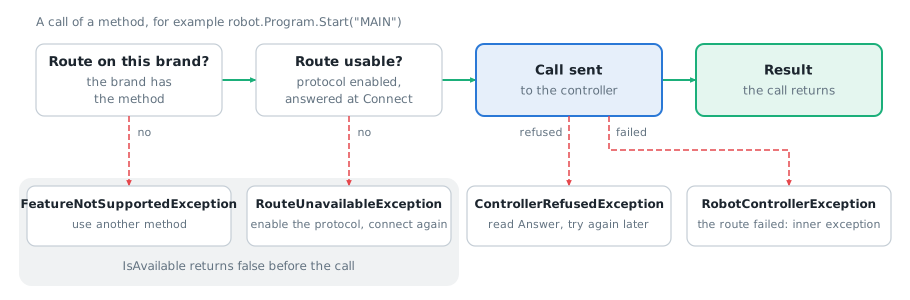
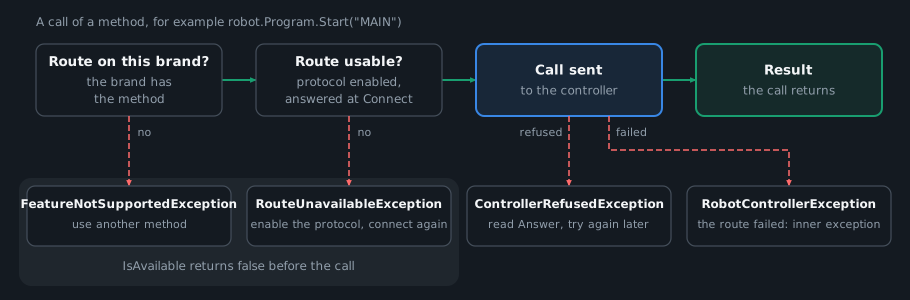
The exceptions
| Exception | When it is thrown | What to do |
|---|---|---|
RobotControllerException | Connect failed, or the route of the method failed. The inner exception is the exception of the brand SDK. | Read Protocols after a failed Connect, and the inner exception after a failed call. |
FeatureNotSupportedException | The brand of the controller has no route for the method. | Use another method, or ask IsAvailable first. The method does not work on this brand. |
RouteUnavailableException | The method has routes on this brand, but none of them can be used: the controller is not connected, or the protocols of the routes are disabled or did not answer at the connection. | Read the message, which says what to enable. Enable the protocol in the connection parameters, then connect again. |
ControllerRefusedException | The controller received the command and refused it. | Read Answer, the text of the answer of the controller. The connection is still good, and the command can work later, in another state of the controller. |
Prerequisites
- A
RobotController.Connectcan throwRobotControllerExceptiontoo: see below. - The license of the brand of the controller, or the 30 day trial. A call without a valid license throws the
InvalidLicenseExceptionof the brand, not an exception of this page. See Licensing.
Brand support
Two of the exceptions depend on the brand and on the routing. The page of each service has a table of the protocol that each method uses on each brand. A method with no route on the brand throws FeatureNotSupportedException. A method whose routes are all off throws RouteUnavailableException. The page Routing explains how the library chooses a route, and which routes you have to enable yourself.
IsAvailable returns false in both cases. The other two exceptions do not depend on the brand: the controller refused the command, or the route failed.
Example
Catch the exceptions of a call
Put the derived exceptions before RobotControllerException: it catches all of them.
RobotController robot = new RobotController();robot.Connect(RobotConnectionParameters.Create("fanuc", "192.168.0.1"));try{robot.Program.Start("MAIN");}catch (ControllerRefusedException ex){// The controller received the command and refused it: the connection is still goodConsole.WriteLine($"{ex.Feature} refused by the controller: {ex.Answer}");}catch (FeatureNotSupportedException ex){Console.WriteLine($"{ex.Feature} is not supported on {ex.BrandName}");}catch (RouteUnavailableException ex){// The message says what to enableConsole.WriteLine(ex.Message);}catch (RobotControllerException ex){// The route failed: the inner exception is the exception of the brand SDKConsole.WriteLine($"{ex.Feature} failed with the route {ex.Route}: {ex.InnerException?.Message}");}robot.Disconnect();}
In Python, the exceptions are the .NET classes. Import them from UnderAutomation.Robotics.Controllers, as in the example, and use the .NET names of their members (ex.Feature, ex.Message, ex.InnerException). The classes with the same names in underautomation.robotics.controllers are not the exceptions that the calls throw.
Avoid the exceptions with IsAvailable
IsAvailable returns true when the method can be called on the connected controller. The answer depends on the brand, on the routing settings and on the protocols that answered at the connection, not on the state of the controller. Use it to hide an action in a user interface, or to choose another method. A true answer does not mean that the call works: the controller can still refuse it.
RobotController robot = new RobotController();robot.Connect(RobotConnectionParameters.Create("staubli", "192.168.0.254"));// False when the brand has no route for the method, or no protocol of the route answeredif (robot.State.IsAvailable(StateFeature.Read)){Console.WriteLine(robot.State.Read().Mode);}try{robot.State.Read();}catch (FeatureNotSupportedException ex){Console.WriteLine($"{ex.Feature} is not supported on {ex.BrandName}");}catch (RouteUnavailableException ex){Console.WriteLine($"{ex.Feature}: {ex.Message}");}robot.Disconnect();}
Read the protocols when Connect fails
When Connect fails, RobotControllerException.Protocols has the result of each protocol of the brand, in the order of the brand. The array is empty for the other errors. A protocol that was not tested before the failure is NotTested.
static void Main(){RobotController robot = new RobotController();try{robot.Connect(RobotConnectionParameters.Create("fanuc", "192.168.0.1"));}catch (RobotControllerException ex){Console.WriteLine(ex.Message);// Result of each protocol: open, no answer, authentication failed, disabled...foreach (ProtocolInfo protocol in ex.Protocols)Console.WriteLine($"{protocol.DisplayName}: {protocol.Status} {protocol.Error}");}}}
Reference
In Python, the members of the exceptions keep the .NET names. IsAvailable is is_available(...) on each service, and the enum members keep their names.
Members
Message and InnerException are the members of Exception. When the method was sent to the controller and failed, InnerException is the exception of the brand SDK.
Error of a method of the common robot controller API. FeatureNotSupportedException, RouteUnavailableException and ControllerRefusedException derive from it. When the method was sent to the controller and failed, InnerException is the exception of the brand SDK.
| Member | Type | Description |
|---|---|---|
Feature Property read only | string | Path of the method, for example "Program.Start". Empty when the error is not related to one method. |
Protocols Property read only | ProtocolInfo[] | When Connect failed: the result of each protocol of the brand, in the order of the brand (no answer, credentials refused...). A protocol that was not tested before the failure is NotTested. Empty for the other errors. |
Route Property read only | string | Route used by the method. Empty when no route was used. |
The brand of the connected controller has no route for this method: the method is not supported on this brand
| Member | Type | Description |
|---|---|---|
BrandName Property read only | string | Name of the brand of the controller |
The controller received the command and refused it. Answer is the answer of the controller. The command can work later, in another state of the controller: the connection is still good.
| Member | Type | Description |
|---|---|---|
Answer Property read only | string | Text of the answer of the controller, for example an alarm code and its message. Empty when the controller gave no text. |
RouteUnavailableException has no member of its own. Its message names the method and says what to enable.
ProtocolInfo
Result of the connection of one protocol of the controller: open, no answer, credentials refused... Given by GetProtocols after a connection, and by Protocols when the connection failed.
| Member | Type | Description |
|---|---|---|
DisplayName Property read only | string | Name of the protocol for the messages, for example "FTP" |
Error Property read only | string | Message of the error when the protocol did not answer or refused the login. Empty otherwise. |
Protocol Property read only | string | Name of the protocol, as in the routing settings and in Protocol, for example "Ftp" |
ReplyCode Property read only | int | Reply code of the server when the protocol refused the connection or the login and gave a code, for example the FTP reply code 530 or the HTTP status code 401. 0 when there is no code. |
Status Property read only | ProtocolStatus | Result of the connection of the protocol |
ToString() Method | string |
Result of the connection of one protocol of the controller, see ProtocolInfo
| Name | Value | Description |
|---|---|---|
AuthenticationFailed | 4 | The protocol answered and refused the user name or the password |
Disabled | 5 | Forbidden by the routing settings, or, in Explicit mode, not enabled in the connect parameters |
NoAnswer | 3 | The protocol did not answer: controller not reachable, function or option not enabled on the controller, wrong port |
NotNeeded | 7 | Opened by the automatic mode, then closed because no method uses it |
NotProbed | 6 | Never opened automatically (the protocol has effects on the controller), and not enabled in the connect parameters |
NotTested | 1 | Not tested: no method needed this protocol, or the connection stopped before it |
Open | 2 | Connected, and the login was accepted when the protocol has one |
Unknown | 0 | Not known: default value, never given by the routing |
Other exceptions
ArgumentExceptionor a derived exception: an invalid argument, thrown as it is. Nothing is retried and no other route is tried.ArgumentOutOfRangeException:IsAvailablethrows only this one, for a value that is not in the enum.OperationCanceledException: a transfer of the File service with a cancellation token was cancelled.InvalidLicenseExceptionof the brand: the license is not valid. See Licensing.
A call never retries and never tries another route after a failure. The first error is the one that you get.
What to read next
- Routing: see which protocol answers each method, and enable a route.
- Connect to your robot: the connection parameters.
- Program: start a program, a call that can be refused by the controller.