Frames & orientations
Convert W, P, R angles to quaternions, interpolate orientations, and change frames between flange, tool, user frame and world frame.
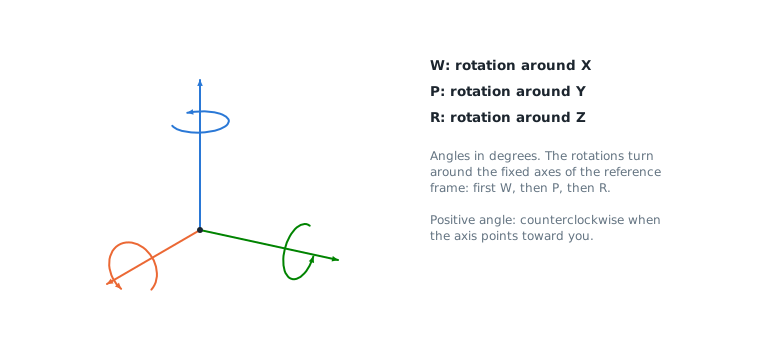
FANUC controllers give orientations as W, P, R angles, in degrees: rotation W around X, then P around Y, then R around Z, all around the axes of the reference frame. XYZWPRPosition gives conversions to quaternions and the usual frame operations. These functions work offline and can be used with any protocol of the SDK.
Quaternions
Quaternions are easier than angles to interpolate and to compare orientations.
static void Main(){var position = new XYZWPRPosition(500, 0, 300, 180, 0, 45);// W, P, R angles to quaternion, and backQuaternion q = position.GetQuaternion();position.SetQuaternion(Quaternion.FromAxisAngle(0, 0, 1, 90)); // 90 degrees around Z// Interpolation and angle between two orientationsQuaternion a = new XYZWPRPosition(0, 0, 0, 180, 0, 0).GetQuaternion();Quaternion b = new XYZWPRPosition(0, 0, 0, 180, 30, 0).GetQuaternion();Quaternion halfWay = Quaternion.Slerp(a, b, 0.5);double angle = a.AngleTo(b); // 30 degreesdouble[] axisAngle = halfWay.ToAxisAngle(); // x, y, z, angle in degrees}}
GetQuaternion()andSetQuaternion()convert between W, P, R and a quaternion (Qw,Qx,Qy,Qz).Quaternion.Slerp()interpolates on the shortest way between two orientations.AngleTo()gives the angle between two orientations, in degrees.FromAxisAngle(),ToAxisAngle(),FromRotationMatrix()andToRotationMatrix()convert to and from other representations.
Change of frame
A position is a frame: its X, Y, Z give the origin and its W, P, R the orientation. The same functions work for the positions of the robot, tool frames and user frames.
static void Main(){var tool = new XYZWPRPosition(0, 0, 150, 0, 0, 0); // tool frame, relative to the flangevar userFrame = new XYZWPRPosition(800, -200, 0, 0, 0, 90); // user frame, relative to the world framevar flange = new XYZWPRPosition(700, 0, 400, 180, 0, 0); // flange in the world frame// Flange <-> tool center pointXYZWPRPosition tcp = flange.FlangeToTcp(tool);XYZWPRPosition flangeAgain = tcp.TcpToFlange(tool);// World frame <-> user frameXYZWPRPosition tcpInUserFrame = tcp.WorldToUserFrame(userFrame);XYZWPRPosition tcpInWorld = tcpInUserFrame.UserFrameToWorld(userFrame);// General frame operationsXYZWPRPosition composed = userFrame.Multiply(tcpInUserFrame); // same as tcpInWorldXYZWPRPosition inverse = userFrame.Inverse();double[,] matrix = flange.ToHomogeneousMatrix(); // 4 x 4}}
| Need | Method |
|---|---|
| Position of the tool center point from the flange position | flange.FlangeToTcp(tool) |
| Flange position from the tool center point | tcp.TcpToFlange(tool) |
| Position in the world frame from a position in a user frame | position.UserFrameToWorld(userFrame) |
| Position in a user frame from a position in the world frame | position.WorldToUserFrame(userFrame) |
| Composition of two frames (A x B) | a.Multiply(b) |
| Inverse frame | frame.Inverse() |
| 4 x 4 homogeneous matrix | position.ToHomogeneousMatrix() |
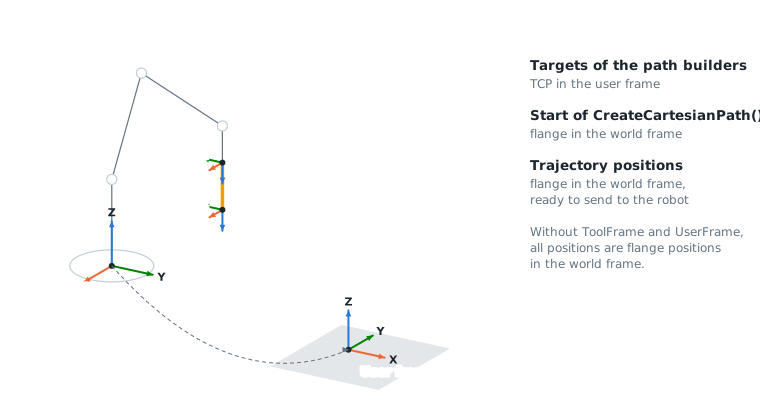
The motion planner does these conversions for you when ToolFrame and UserFrame are set (see Joint & Cartesian motions).
API reference
Quaternion that represents an orientation (Qw + Qx.i + Qy.j + Qz.k). Use GetQuaternion and SetQuaternion(Quaternion) to convert from and to W, P, R angles.
| Member | Type | Description |
|---|---|---|
Quaternion() Constructor | Creates the identity quaternion (no rotation) | |
Quaternion(double, double, double, double) Constructor | Creates a quaternion from its components
| |
Norm Property read only | double | Norm of the quaternion (1 for a rotation) |
Qw Property | double | Scalar part |
Qx Property | double | X component of the vector part |
Qy Property | double | Y component of the vector part |
Qz Property | double | Z component of the vector part |
AngleTo(Quaternion) Method | double | Angle of the rotation between the two orientations, in degrees (0 to 180)
|
Conjugate() Method | Quaternion | Returns the conjugate of this quaternion. For a rotation, it is the inverse rotation. |
Dot(Quaternion) Method | double | Dot product of the two quaternions
|
Equals(object) Method | bool | |
FromAxisAngle(double, double, double, double) Method static | Quaternion | Creates a rotation around an axis
|
FromRotationMatrix(double[,]) Method static | Quaternion | Creates a quaternion from a rotation matrix (3x3, or 4x4 homogeneous matrix)
|
GetHashCode() Method | int | |
Multiply(Quaternion) Method | Quaternion | Returns the product this x other: the rotation other applied after the rotation this, in the frame of this.
|
Normalize() Method | Quaternion | Returns this quaternion with a norm of 1 |
Slerp(Quaternion, Quaternion, double) Method static | Quaternion | Spherical linear interpolation between two orientations, on the shortest way
|
ToAxisAngle() Method | double[] | Returns the rotation axis and angle: [x, y, z, angle in degrees]. The axis is a unit vector and the angle is between 0 and 180. |
ToRotationMatrix() Method | double[,] | Returns the 3x3 rotation matrix of this orientation |
ToString() Method | string |
Cartesian position X, Y, Z with W, P, R rotations
| Member | Type | Description |
|---|---|---|
XYZWPRPosition() Constructor | Default constructor | |
XYZWPRPosition(double, double, double, double, double, double) Constructor | Constructor with position and rotations | |
P Property | double | P rotation in degrees (Ry) |
R Property | double | R rotation in degrees (Rz) |
W Property | double | W rotation in degrees (Rx) |
Equals(object) Method | bool | |
FlangeToTcp(XYZWPRPosition) Method | XYZWPRPosition | Converts a flange position to the position of the tool center point (TCP)
|
GetHashCode() Method | int | |
GetQuaternion() Method | Quaternion | Returns the orientation W, P, R as a quaternion |
Inverse() Method | XYZWPRPosition | Returns the inverse of this frame |
Multiply(XYZWPRPosition) Method | XYZWPRPosition | Returns the composition of this frame with another one: the pose other, expressed in this frame, converted to the frame where this position is expressed.
|
SetQuaternion(Quaternion) Method | void | Sets the orientation W, P, R from a quaternion. Angles are between -180 and 180 degrees.
|
TcpToFlange(XYZWPRPosition) Method | XYZWPRPosition | Converts a position of the tool center point (TCP) to the flange position
|
ToHomogeneousMatrix() Method | double[,] | Convert position to a homogeneous rotation and translation 4x4 matrix |
ToString() Method | string | |
UserFrameToWorld(XYZWPRPosition) Method | XYZWPRPosition | Converts this position, expressed in a user frame, to the world frame
|
WorldToUserFrame(XYZWPRPosition) Method | XYZWPRPosition | Converts this position, expressed in the world frame, to a user frame
|