Joint & Cartesian motions
Chain joint, linear and circular motions with FINE, CNT and CR terminations, waits and I/O, in tool and user frames.
Path builders describe a trajectory as the instructions of a TP program. Each method adds a motion and returns the builder, so the calls can be chained. Build() creates the trajectory.
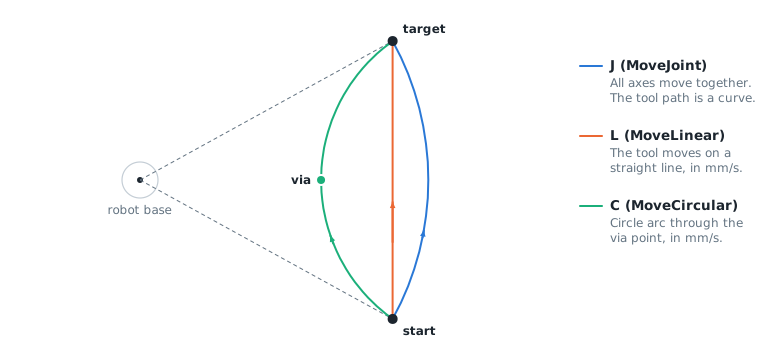
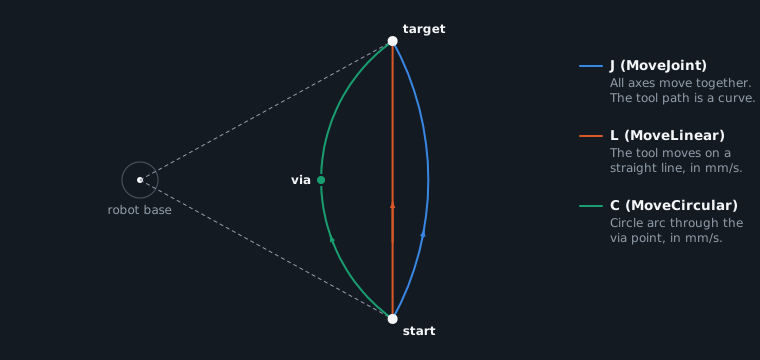
Joint motions
A joint motion moves all axes together on a straight line in joint space: they start and stop at the same time.
new double[] { 1125, 1125, 1687, 2530, 1265, 2530 });var cartesianLimits = new CartesianLimits(500, 2000, 10000, 90, 360, 1800);var planner = new MotionPlanner(jointLimits, null);var start = new JointValues(0, 0, 0, 0, -90, 0);var p1 = new JointValues(40, 0, 0, 0, -90, 0);var p2 = new JointValues(40, 30, -20, 0, -60, 0);Trajectory trajectory = planner.CreateJointPath(start).MoveJoint(p1, 100, FanucMotion.Cnt(50)) // J P[1] 100% CNT50.MoveJoint(p2, 30, FanucMotion.Fine(), 50) // J P[2] 30% FINE ACC50.SetIO(FanucMotion.Signal(IOType.DO, 1), true) // DO[1]=ON when the robot is at P[2].Wait(0.5) // WAIT 0.50(sec).MoveJointTime(start, 2.0, FanucMotion.Fine()) // back in 2 s.Build();}}
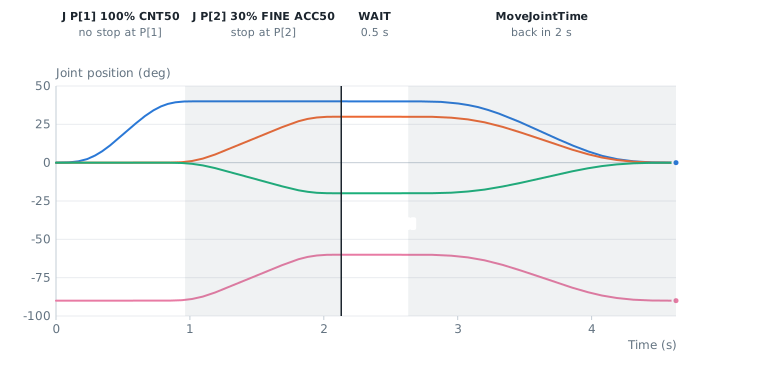
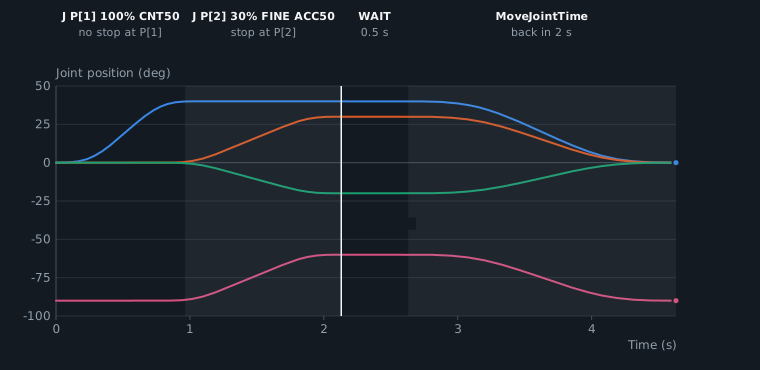
| Method | TP equivalent |
|---|---|
MoveJoint(target, speedPercent, termination, accelerationPercent) | J P[1] 50% CNT100 ACC80 |
MoveJointTime(target, duration, termination) | Joint motion in a given time (longer if the limits need it) |
Wait(duration) | WAIT 0.50(sec) |
SetIO(FanucMotion.Signal(IOType.DO, 1), true) | DO[1]=ON after the previous motion |
MoveJointSpline(points, speedPercent, termination) | Smooth motion through several positions, see Splines & shapes |
Cartesian motions
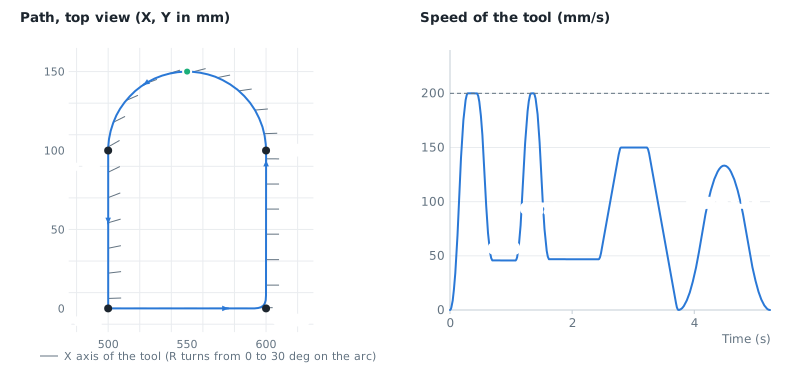
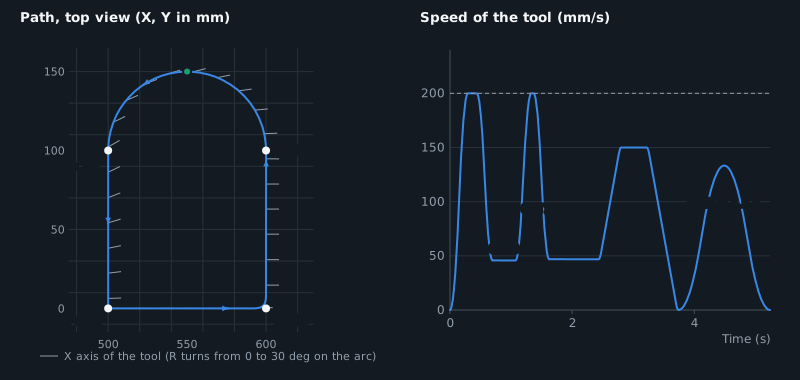
Linear and circular motions move the tool center point at the given speed in mm/s. The orientation turns progressively from the start orientation to the target orientation.
new double[] { 1125, 1125, 1687, 2530, 1265, 2530 });var cartesianLimits = new CartesianLimits(500, 2000, 10000, 90, 360, 1800);var planner = new MotionPlanner(jointLimits, cartesianLimits);// X, Y, Z, W, P, R: the W, P, R angles of FANUC use the fixed XYZ conventionFunc<double, double, double, double, double, double, CartesianPose> wpr =(x, y, z, w, p, r) => CartesianPose.FromEuler(x, y, z, w, p, r, EulerConvention.FixedXYZ);var start = wpr(500, 0, 300, 180, 0, 0);Trajectory trajectory = planner.CreateCartesianPath(start).MoveLinear(wpr(600, 0, 300, 180, 0, 0), 200, FanucMotion.Cr(10)) // L 200mm/sec CR10.MoveLinear(wpr(600, 100, 300, 180, 0, 0), 200, FanucMotion.Cnt(100)) // L 200mm/sec CNT100.MoveCircular(wpr(550, 150, 300, 180, 0, 0), // C via pointwpr(500, 100, 300, 180, 0, 30), 150, FanucMotion.Fine()) // target, 150mm/sec FINE.MoveLinearTime(start, 1.5, FanucMotion.Fine()) // back in 1.5 s.Build();// FANUC positions of the trajectory (W, P, R stay continuous)ExtendedCartesianPosition[] samples = FanucMotion.SampleCartesian(trajectory, 0.008);}}
| Method | TP equivalent |
|---|---|
MoveLinear(target, speed, termination, accelerationPercent) | L P[1] 200mm/sec CR10 |
MoveCircular(via, target, speed, termination, accelerationPercent) | C P[1] P[2] 150mm/sec FINE |
MoveLinearTime(target, duration, termination) | Linear motion in a given time |
The speed is reduced when the change of orientation, the curvature or the extended axes need it.
Terminations
| Termination | Behavior |
|---|---|
FanucMotion.Fine() | The robot stops at the target |
FanucMotion.Cnt(0..100) | The next motion starts during the deceleration of this one. CNT100 gives the smoothest motion. Joint and Cartesian |
FanucMotion.Cr(distance) | Corner region: the corner is replaced by a smooth curve that starts at this distance (mm) from the target, whatever the speed. Cartesian only, between L and C motions and splines |
These methods return a Termination of the planner: Termination.Stop(), Termination.Overlap(percent) and Termination.Corner(distance) give the same result.
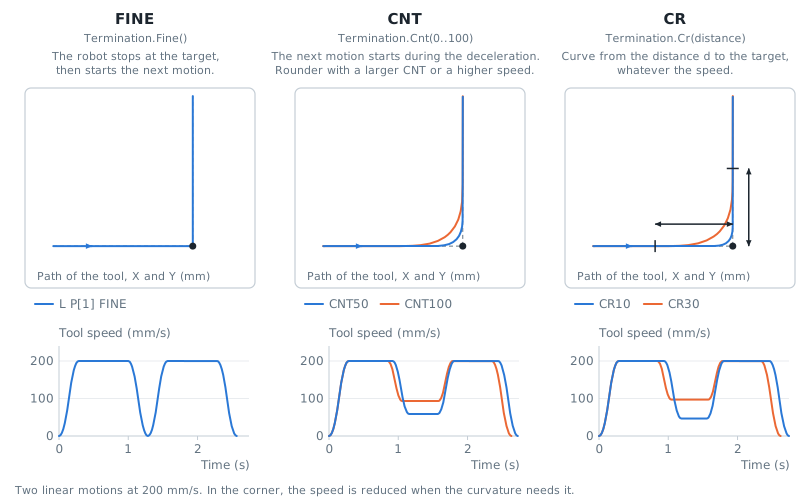
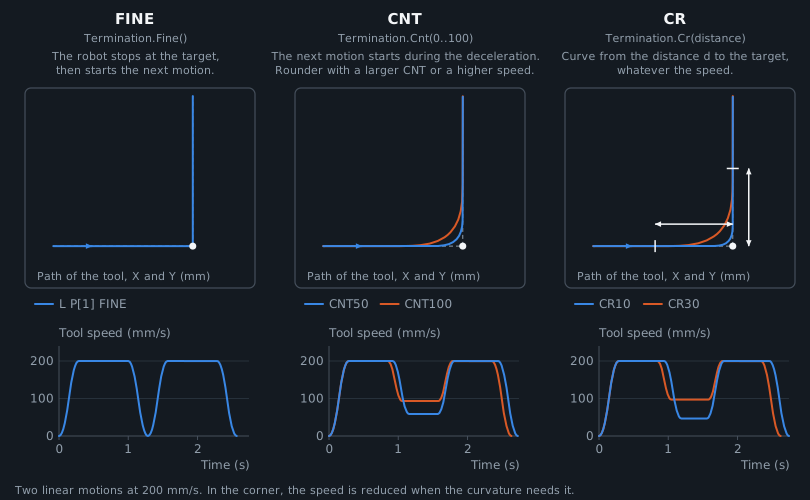
With CNT, the size of the rounded corner depends on the speed, as on a FANUC controller:
- Joint motions: the next motion starts during the deceleration of this one. The overlap is reduced automatically when the combination of both motions would exceed the limits.
- Linear and circular motions: the corner is replaced by a smooth curve that starts where the robot would start to decelerate (CNT100), or closer to the target (CNT50: half of this distance).
With CR, the corner geometry is fixed: the curve passes at about 0.12 x distance from the corner for a change of direction of 45 degrees, 0.25 x distance for 90 degrees and 0.4 x distance for 135 degrees. The distance is limited to half of the length of each motion.
In a CNT or CR curve, the speed is constant, and reduced when the curvature needs it: a sharp corner with a small distance is followed slowly. For a fast motion, use a larger CNT or CR distance.
Tool and user frames
By default, Cartesian positions are flange positions in the world frame. Set ToolFrame and UserFrame to give the targets as positions of a tool in a user frame, as with UTOOL and UFRAME on the teach pendant:
new double[] { 1125, 1125, 1687, 2530, 1265, 2530 });var cartesianLimits = new CartesianLimits(500, 2000, 10000, 90, 360, 1800);var planner = new MotionPlanner(jointLimits, cartesianLimits);// Targets are positions of this tool, in this user frameplanner.ToolFrame = FanucMotion.ToCartesianPose(new XYZWPRPosition(0, 0, 150, 0, 0, 0)); // UTOOL: 150 mm along Z of the flangeplanner.UserFrame = FanucMotion.ToCartesianPose(new XYZWPRPosition(800, -200, 0, 0, 0, 90)); // UFRAME, relative to the world frame// The start is the position of the robot (flange in the world frame)var builder = planner.CreateCartesianPath(FanucMotion.ToCartesianPose(new XYZWPRPosition(700, 0, 400, 180, 0, 0)));// EndPosition gives the same position as a tool position in the user frameCartesianPose tcp = builder.EndPosition;var target = new CartesianPose(tcp.X + 50, tcp.Y, tcp.Z, tcp.Orientation);// The trajectory gives flange positions in the world frame, ready to send to the robotTrajectory trajectory = builder.MoveLinear(target, 100, FanucMotion.Fine()).Build();}}
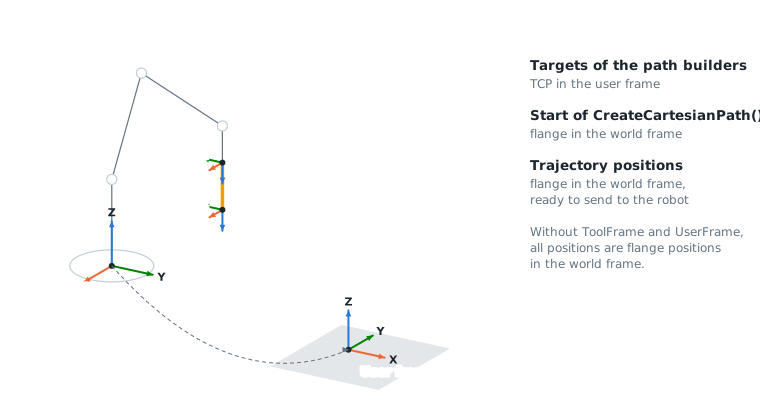
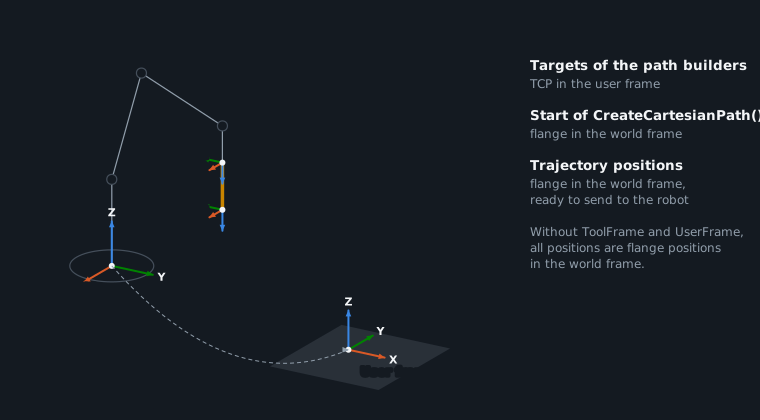
- The start of
CreateCartesianPath()is the position of the robot: flange in the world frame, for exampleFanucMotion.ToCartesianPose(StreamMotion.QueueEndCartesianPosition). EndPositiongives the end of the motions added so far, in the tool and user frames, as aCartesianPose.- The trajectory gives flange positions in the world frame, ready to send to the robot. The Cartesian limits apply to the tool center point.
API reference
Builds a joint trajectory from a sequence of joint motions. Create it with CreateJointPath(JointValues).
| Member | Type | Description |
|---|---|---|
EndPosition Property read only | JointValues | Position at the end of the motions added so far |
Build() Method | Trajectory | Creates the trajectory |
MoveJoint(JointValues, double, Termination, double) Method | JointPathBuilder | Adds a joint motion: all axes move on a straight line in joint space and arrive at the same time
|
MoveJointSpline(JointValues[], double, Termination, double) Method | JointPathBuilder | Adds a smooth joint motion that passes through a list of positions (cubic spline) and ends at the last one. The speed changes along the path so that the velocity, acceleration and jerk of each axis stay within the limits. The points must describe a smooth path: close or noisy points give high curvatures and a slow motion.
|
MoveJointTime(JointValues, double, Termination) Method | JointPathBuilder | Adds a joint motion that lasts a given time. The motion takes more time when the limits do not allow this duration.
|
SetIO(DigitalSignal, bool) Method | JointPathBuilder | Writes a digital signal when the previous motion ends
|
Wait(double) Method | JointPathBuilder | Keeps the current position during a given time
|
Builds a Cartesian trajectory from a sequence of linear and circular motions, splines and shapes. Create it with CreateCartesianPath(CartesianPose). Targets are poses of the tool of the planner, in its user frame.
| Member | Type | Description |
|---|---|---|
EndPosition Property read only | CartesianPose | Pose at the end of the motions added so far, as a pose of the tool in the user frame of the planner |
AddCircle(CartesianPose, double, double, Termination, double) Method | CartesianPathBuilder | Adds a full circle in the XY plane of a frame, counterclockwise around its Z axis. The circle starts and ends at the point (radius, 0, 0) of the frame. A linear motion to this point is added first when the tool is not there. The orientation of the tool does not change.
|
AddHelix(CartesianPose, double, double, double, double, Termination, double) Method | CartesianPathBuilder | Adds a helix around the Z axis of a frame, counterclockwise. It starts at the point (radius, 0, 0) of the frame and rises by the pitch along Z at each turn. A linear motion to the start point is added first when the tool is not there. The orientation of the tool does not change.
|
AddPolygon(CartesianPose, int, double, double, double, Termination, double) Method | CartesianPathBuilder | Adds a regular polygon centered on the origin of a frame, in its XY plane. One side is perpendicular to X: the polygon starts and ends at the middle of this side, and turns counterclockwise around Z. With a corner radius, the corners are circle arcs of this radius, and the curvature changes progressively at their ends. Without corner radius, the robot stops at each corner. A linear motion to the start point is added first when the tool is not there. The orientation of the tool does not change.
|
AddRectangle(CartesianPose, double, double, double, double, Termination, double) Method | CartesianPathBuilder | Adds a rectangle centered on the origin of a frame, in its XY plane: the width is along X and the height along Y. It starts and ends at the middle of the side at +X, the point (width / 2, 0, 0) of the frame, and turns counterclockwise around Z. With a corner radius, the corners are circle arcs of this radius, and the curvature changes progressively at their ends. Without corner radius, the robot stops at each corner. A linear motion to the start point is added first when the tool is not there. The orientation of the tool does not change.
|
AddSpiral(CartesianPose, double, double, double, double, Termination, double) Method | CartesianPathBuilder | Adds a spiral in the XY plane of a frame, counterclockwise around its Z axis. The distance to the center changes regularly from the start radius to the end radius (Archimedean spiral). It starts at the point (startRadius, 0, 0) of the frame. A linear motion to the start point is added first when the tool is not there. The orientation of the tool does not change.
|
Build() Method | Trajectory | Creates the trajectory. Its poses are flange poses in the world frame when the tool and user frames of the planner are set. |
MoveCircular(CartesianPose, CartesianPose, double, Termination, double) Method | CartesianPathBuilder | Adds a circular motion: the tool moves on the circle arc that passes through the via point and ends at the target. The orientation turns from the current orientation to the orientation of the target (the orientation of the via point is not used).
|
MoveLinear(CartesianPose, double, Termination, double) Method | CartesianPathBuilder | Adds a linear motion: the tool moves on a straight line and its orientation turns on the shortest way.
|
MoveLinearTime(CartesianPose, double, Termination) Method | CartesianPathBuilder | Adds a linear motion that lasts a given time. The motion takes more time when the limits do not allow this duration.
|
MoveSpline(CartesianPose[], double, Termination, double) Method | CartesianPathBuilder | Adds a smooth motion that passes through a list of positions (cubic spline) and ends at the last one. The orientation passes through the orientation of each position. The speed is constant along the path, except where the curvature, the change of orientation or the external axes need a lower speed. The points must describe a smooth path: close or noisy points give high curvatures and a slow motion.
|
SetIO(DigitalSignal, bool) Method | CartesianPathBuilder | Writes a digital signal when the previous motion ends
|
Wait(double) Method | CartesianPathBuilder | Keeps the current position during a given time
|
Termination of a motion: stop at the target, overlap with the next motion, or corner region of a given size
| Member | Type | Description |
|---|---|---|
Type Property read only | TerminationType | Type of termination |
Value Property read only | double | Overlap in percent (0 to 100), or corner distance in mm. 0 for a stop. |
Corner(double) Method static | Termination | Corner region: the corner is replaced by a smooth curve at constant speed. Only between Cartesian motions.
|
Equals(object) Method | bool | |
GetHashCode() Method | int | |
Overlap(double) Method static | Termination | The next motion starts during the deceleration of this one
|
Stop() Method static | Termination | The robot stops at the target position |
ToString() Method | string |