Connection, status & session
Connect to the robot, read its status and its velocity, acceleration and jerk limits, and run one or several Stream Motion sessions.
This page explains how to connect to the robot, read its status and its limits, and control the life of a Stream Motion session.
Connect and start the monitoring
Enable Stream Motion in the connection parameters, then call StartMonitoring(). The robot then sends its status at every communication cycle.
static void Main(){var robot = new FanucRobot();var parameters = new ConnectionParameters("192.168.0.1");parameters.StreamMotion.Enable = true;// Optional settings (default values)parameters.StreamMotion.ProtocolVersion = 1; // 1, 2 or 3, not higher than $STMO.$USABLE_VERparameters.StreamMotion.BufferLeadTime = 0.024; // positions sent in advance, in secondsparameters.StreamMotion.PacketStackSize = 10; // same value as $STMO.$PKT_STACKrobot.Connect(parameters);// The robot sends its status every communication cycle once the monitoring is started.// The limits of the robot are read first, then the communication cycle is measured.robot.StreamMotion.StartMonitoring();Console.WriteLine($"State: {robot.StreamMotion.State}");Console.WriteLine($"Communication cycle: {robot.StreamMotion.CycleTime * 1000} ms");robot.Disconnect();}
StartMonitoring() throws a StreamMotionException when no status is received. Check the IP address, $STMO.$PHYS_PORT, and that the protocol version is not higher than $STMO.$USABLE_VER.
Connection settings
| Setting | Default | Description |
|---|---|---|
ProtocolVersion | 1 | Protocol version, see versions |
BufferLeadTime | 0.024 s | Positions are sent this time in advance, to absorb the jitter of the PC. Lower values give a faster reaction to new targets |
PacketStackSize | 10 | Size of the position buffer of the robot ($STMO.$PKT_STACK) |
StatusTimeoutMs | 1000 | The session is considered lost when no status is received during this time |
HighPriority | true | Runs the communication thread with the highest priority |
Port | 60015 | UDP port of the robot |
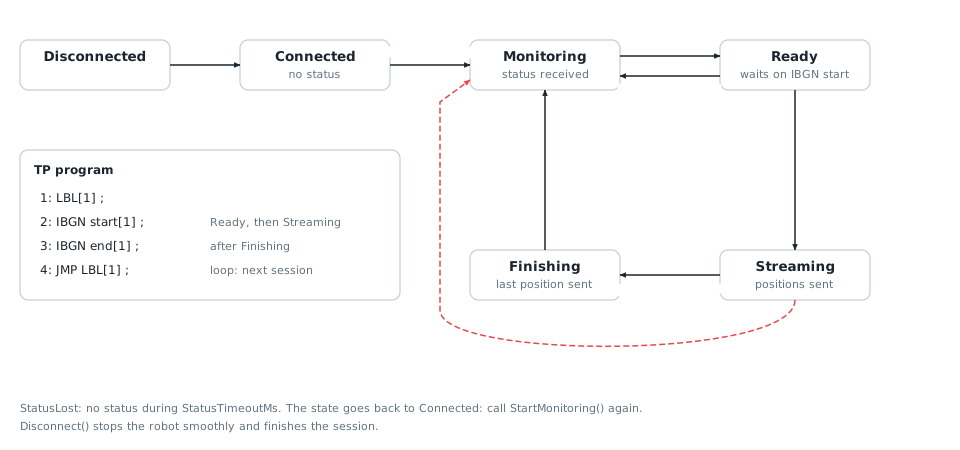
States of the client
State | Meaning |
|---|---|
Connected | Connected, the monitoring is not started |
Monitoring | The robot sends its status, no program waits on IBGN start |
Ready | A program waits on IBGN start: the robot accepts positions |
Streaming | A session is active: a position is sent at every cycle |
Finishing | The last position was sent, the program continues after IBGN end |
Read the robot status
LastStatus gives the joint and Cartesian positions, the motor currents and the flags of the robot. The StatusReceived event gives the same information as soon as a status is received.
var sm = robot.StreamMotion;sm.StartMonitoring();// Last status, updated every communication cycleStreamMotionStatus status = sm.LastStatus;Console.WriteLine($"Joints: {status.JointPosition}");Console.WriteLine($"Cartesian: {status.CartesianPosition}");Console.WriteLine($"Waiting for positions: {status.IsWaitingForCommand}, moving: {status.IsMoving}");// Event raised with the latest status, on a background threadsm.StatusReceived += (sender, e) => Console.WriteLine($"J1 = {e.Status.JointPosition.J1}");// Quality of the communicationStreamMotionStatistics statistics = sm.Statistics;Console.WriteLine($"Lost status: {statistics.LostStatusCount}, underruns: {statistics.UnderrunCount}");robot.Disconnect();}
The event runs on a background thread and only receives the latest status: a slow handler does not delay the communication, it just skips some status.
Read the limits of the robot
The robot checks the velocity, acceleration and jerk of each axis at every cycle, and stops with an alarm when a limit is exceeded. ReadLimits() reads these limits so that your trajectories stay within them.
robot.Connect(parameters);var sm = robot.StreamMotion;// Read the limits before running the IBGN program:// some controllers do not answer while a program waits on IBGN startStreamMotionLimits limits = sm.ReadLimits();// Reference limits: always safe, used by default by the clientJointLimits reference = limits.ReferenceLimits;Console.WriteLine($"J1: {reference.Velocity[0]} deg/s, {reference.Acceleration[0]} deg/s2, {reference.Jerk[0]} deg/s3");// Limits applied by the robot at a given flange speed (mm/s) and payload (kg)JointLimits atSpeed = limits.ComputeLimits(500, 5, 12);// Raw table of one axis: acceleration limit of J2 for each speed stageLimitTable table = limits.GetTable(2, LimitType.Acceleration);Console.WriteLine(table);robot.Disconnect();}
ReferenceLimitsare the values at the maximum speed with the maximum payload. They are always safe.StartMonitoring()reads them and stores them inJointLimits, used by the client to stop the robot smoothly.ComputeLimits()gives the limits applied by the robot for a given flange speed and payload, as computed by the robot when$STMO_GRP[1].$LMT_MODEis 0. They can be higher than the reference limits, for example with a light payload.GetTable()gives the raw values of one axis for each speed stage, without payload and with the maximum payload.
Some controllers do not answer while a program waits on IBGN start: call StartMonitoring() or ReadLimits() before running the TP program.
Run several sessions
A session starts when positions are available and a program waits on IBGN start. Finish() waits until all queued motions are done and the robot is at rest, then the program continues after IBGN end. When the program loops, the next session starts on the next IBGN start.
robot.Connect(parameters);var sm = robot.StreamMotion;sm.SessionStarted += (sender, e) => Console.WriteLine($"Session {e.SessionIndex} started");sm.SessionEnded += (sender, e) => Console.WriteLine($"Session {e.SessionIndex} ended: {e.Reason}");sm.StartMonitoring();var planner = new MotionPlanner(sm.JointLimits, null);// The TP program loops on IBGN start / IBGN end: one session per loopfor (int cycle = 0; cycle < 3; cycle++){// Wait until the program reaches IBGN startif (!sm.WaitForReady(60000)) break;JointsPosition start = sm.QueueEndJointPosition;var target = new JointsPosition(start.Values) { J6 = start.J6 + 20 };sm.Enqueue(planner.CreateJointPath(FanucMotion.ToJointValues(start)).MoveJoint(FanucMotion.ToJointValues(target), 30, FanucMotion.Fine()).MoveJoint(FanucMotion.ToJointValues(start), 30, FanucMotion.Fine()).Build());// Wait for the end of the motion, then release the program (IBGN end)sm.Finish(60000);}robot.Disconnect();}
SessionEnded gives the reason of the end: Finished, ProgramStopped (program stopped or alarm on the robot), StatusLost or Disconnected.
One format per session
A session uses only one format for the positions: joint or Cartesian. The first source of positions chooses it (the first queued trajectory, StartTracking() or StartCallbackStreaming()), and it stays the same until the end of the session.
Why
The robot checks the velocity, acceleration and jerk between two consecutive positions, always on the joints: a Cartesian position is first converted into joint positions. So when the format changes, the first position in the new format must give exactly the joint position already commanded. At 2 ms, a difference of a millionth of a degree is already seen as a jump, and the robot stops with an alarm (power-off stop).
The client cannot know this position with this precision. The status gives the measured position of the robot, which is a little different from the commanded position, and the conversion between joint and Cartesian positions is done by the controller.
At the start of a session, the robot takes the first position as its starting point, so there is no jump. This is why the client only changes the format at the start of a session. This is a choice for reliability: the client never sends a change of format that could stop the robot.
There is a second reason. With Cartesian positions, the robot keeps the configuration it had at IBGN start (alarm MOTN-156 otherwise). After joint motions that change the configuration, for example a wrist flip, Cartesian positions need a new session anyway.
What it means for your application
- In a session, all the queued trajectories, the target tracking and the callback streaming use the same format.
Enqueue(),StartTracking()andStartCallbackStreaming()throw aStreamMotionExceptionwith the errorFormatMismatchwhen the format is not the current one.- The format is fixed as soon as a trajectory is queued, even before the program reaches
IBGN start. It stays fixed while the session is open, even when the queue is empty and the robot is at rest. - To use the other format, call
Finish(): the program continues afterIBGN end. The next session (the program loops back toIBGN start, or is started again) can use any format. - Put the joint parts and the Cartesian parts of your task in different sessions, with a TP program that loops:
LBL[1],IBGN start[1],IBGN end[1],JMP LBL[1]. Each change of format costs the time of one loop of the program.
Read the current format
HasActiveFormat is true when the format is fixed. ActiveFormat then gives the format (Joint or Cartesian).
HasActiveFormat | ActiveFormat | Meaning |
|---|---|---|
false | Not used | No format is fixed: the next trajectory, target tracking or callback streaming chooses it |
true | Joint | Only joint positions until the end of the session |
true | Cartesian | Only Cartesian positions until the end of the session |
For example, in a user interface, disable the commands of the other format while HasActiveFormat is true.
var sm = robot.StreamMotion;sm.StartMonitoring();var planner = new MotionPlanner(sm.JointLimits, new CartesianLimits(250, 1000, 5000, 45, 180, 900));// First session: joint positionssm.WaitForReady(60000);JointsPosition start = sm.QueueEndJointPosition;var target = new JointsPosition(start.Values) { J1 = start.J1 + 10 };sm.Enqueue(planner.CreateJointPath(FanucMotion.ToJointValues(start)).MoveJoint(FanucMotion.ToJointValues(target), 30, FanucMotion.Fine()).Build());// The format is now fixed until the end of the sessionif (sm.HasActiveFormat) Console.WriteLine($"Current format: {sm.ActiveFormat}"); // Joint// A Cartesian trajectory would throw a StreamMotionException (FormatMismatch) here.// End the session: the TP program continues after IBGN endsm.Finish(60000);Console.WriteLine($"Format fixed: {sm.HasActiveFormat}"); // False// Second session, when the TP program loops back to IBGN start: Cartesian positionssm.WaitForReady(60000);XYZWPRPosition flange = sm.QueueEndCartesianPosition;var down = new XYZWPRPosition(flange.X, flange.Y, flange.Z - 50, flange.W, flange.P, flange.R);sm.Enqueue(planner.CreateCartesianPath(FanucMotion.ToCartesianPose(flange)).MoveLinear(FanucMotion.ToCartesianPose(down), 100, FanucMotion.Fine()).Build());sm.Finish(60000);robot.Disconnect();}
Use Stream Motion without FanucRobot
StreamMotionClient can be used alone:
static void Main(){// Stream Motion client without FanucRobotvar client = new StreamMotionClient();client.Connect("192.168.0.1", new StreamMotionConnectParameters { ProtocolVersion = 2 });client.StartMonitoring();Console.WriteLine($"Communication cycle: {client.CycleTime * 1000} ms");client.Disconnect();}}
API reference
Status sent by the robot every communication cycle
| Member | Type | Description |
|---|---|---|
CartesianPosition Property read only | ExtendedCartesianPosition | Current Cartesian position of the robot (servo position) in the world frame, with extended axes. It is the flange center, or the tool center point when the system variable $STMO.$STAT_US_TCP is TRUE. |
IsCommandReceived Property read only | bool | The robot received at least one position during the current IBGN start instruction |
IsMoving Property read only | bool | The robot is moving |
IsSystemReady Property read only | bool | System ready (SYSRDY) is ON |
IsWaitingForCommand Property read only | bool | The robot executes an IBGN start instruction and waits for positions |
JointPosition Property read only | JointsPosition | Current joint position of the robot (servo position), in degrees (mm for linear axes) |
MotorCurrents Property read only | double[] | Motor current of each axis, in A (9 values) |
OutputDivider Property read only | int | With protocol version 3 or later, the robot sends a status once every n communication cycles when it slows down by itself, and this value is n. It is 1 in normal operation and with older protocol versions. |
RawStatus Property read only | int | Raw status byte |
ReadIOIndex Property read only | int | Index of the first I/O read in this status |
ReadIOMask Property read only | int | Mask of the I/O read in this status |
ReadIOType Property read only | IOType | Type of the I/O read in this status |
ReadIOValue Property read only | int | State of the 16 I/O read in this status. Bit 0 is the I/O at ReadIOIndex. |
SequenceNumber Property read only | long | Sequence number of this status. It starts at 1 when the status output starts. |
Timestamp Property read only | long | Time stamp of the robot when the position and the motor currents were read, in ms (resolution 2 ms) |
Equals(object) Method | bool | |
GetHashCode() Method | int | |
ToString() Method | string |
Allowable velocity, acceleration and jerk limits of the robot axes, read from the robot. The robot stops with an alarm when a position sent to it exceeds these limits.
| Member | Type | Description |
|---|---|---|
AxisCount Property read only | int | Number of axes of the robot (axes with limits) |
IntermediateCheckTime Property read only | double | Time interval of the intermediate check of the limits, in seconds |
MaxSpeed Property read only | double | Maximum speed of the flange center (Vmax, system variable $STMO_GRP[1].$MAX_SPD), in mm/s |
ReferenceLimits Property read only | JointLimits | Reference limits of each axis: values with the maximum payload at the maximum speed. They are equal to the system variables $STMO_GRP[1].$JNT_VEL_LIM, $JNT_ACC_LIM and $JNT_JRK_LIM, and they are always safe. |
ComputeLimits(double, double, double) Method | JointLimits | Computes the limits of all axes for a given flange speed and payload, as the robot does when $STMO_GRP[1].$LMT_MODE is 0.
|
Equals(object) Method | bool | |
GetHashCode() Method | int | |
GetTable(int, LimitType) Method | LimitTable | Returns the table of limits of one axis
|
ToString() Method | string |
Communication statistics of a Stream Motion client, since the status output was started
| Member | Type | Description |
|---|---|---|
CatchUpCommandCount Property read only | long | Number of extra positions sent to fill the robot buffer again after lost or late status |
CommandCount Property read only | long | Number of positions sent to the robot |
EstimatedBufferLevel Property read only | int | Estimated number of positions waiting in the robot buffer |
LostStatusCount Property read only | long | Number of status sent by the robot but not received (detected with the sequence numbers) |
MaxProcessingTime Property read only | double | Maximum time spent to process a status and send the positions, in seconds |
MaxStatusInterval Property read only | double | Maximum time between two received status, measured with the PC clock, in seconds |
MeanStatusInterval Property read only | double | Mean time between two received status, measured with the PC clock, in seconds |
StatusCount Property read only | long | Number of status received from the robot |
UnderrunCount Property read only | long | Number of times the queue became empty while the robot was moving |
ToString() Method | string |
Connection parameters for Stream Motion (J519 option)
| Member | Type | Description |
|---|---|---|
StreamMotionConnectParametersBase() Constructor | ||
BufferLeadTime Property | double | Time of positions sent in advance and kept in the robot buffer, in seconds. It protects against late packets from the PC, but adds the same delay to the motion. It is converted to a number of communication cycles, limited by PacketStackSize minus 2. 0 disables the advance. |
HighPriority Property | bool | Runs the communication thread with a high priority to reduce delays (default: true) |
PacketStackSize Property | int | Size of the robot buffer. It must be equal to the system variable $STMO.$PKT_STACK of the robot (2 to 10). |
Port Property | int | UDP port of the robot for Stream Motion |
ProtocolVersion Property | int | Protocol version, from 1 to 3. The highest version accepted by a controller is in the system variable $STMO.$USABLE_VER. A higher version raises an alarm on the robot and no status is received. Version 2 sends joint positions in double precision. Version 3 lets the robot send its status less often when it slows down by itself. A version 4 exists on some recent controllers for ROS 2 only. It is not supported. |
StatusTimeoutMs Property | int | Maximum time without status from the robot before the connection is considered lost, in milliseconds |
DEFAULT_BUFFER_LEAD_TIME Field | double | Default time of positions kept in advance in the robot buffer, in seconds |
DEFAULT_PACKET_STACK_SIZE Field | int | Default size of the robot buffer (default value of the system variable $STMO.$PKT_STACK) |
DEFAULT_PORT Field | int | Default UDP port of the robot for Stream Motion |
DEFAULT_PROTOCOL_VERSION Field | int | Default protocol version. Version 1 is accepted by all controllers. |
DEFAULT_STATUS_TIMEOUT_MS Field | int | Default maximum time without status from the robot, in milliseconds |
Equals(object) Method | bool | |
GetHashCode() Method | int | |
ToString() Method | string |