Read the operating hours of a Yaskawa robot
Read the control power, servo power, playback and moving times of a Motoman controller from a PC, log them every day for the maintenance, and find the same counters in SYSTEM.SYS.
How many hours has a Yaskawa robot worked, and how many of them did it really move? The controller counts it, on the pendant in SYSTEM INFO > MONITORING TIME. This page shows how to read the same counters from a PC with the SDK, and log them every day to plan the maintenance of a whole line.
The counters
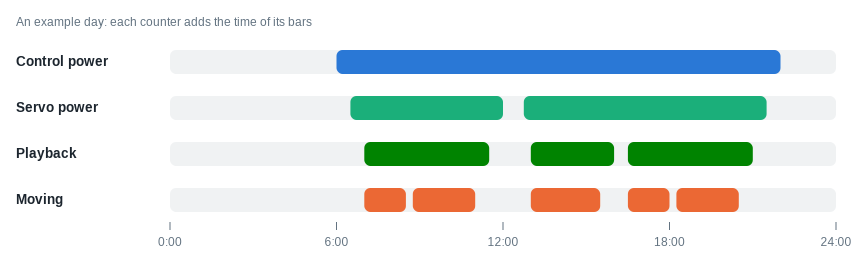
| Counter | What it counts | SDK call |
|---|---|---|
| Control power | Time with the controller switched on | GetManagementTime(ManagementTimeType.ControlPowerOnTime) |
| Servo power | Time with the servo power on, per robot (R1 to R8) or station (S1 to S24) | ServoPowerOnTimR1ToR8, ServoPowerOnTimeS1ToS24 |
| Playback | Time spent running jobs in play mode | PlayBackTimeR1ToR8, PlayBackTimeS1ToS24 |
| Moving | Time the axes really move | MotionTimeR1ToR8, MotionTimeS1ToS24 |
| Operation | Operating time of an application (welding...) | OperationTimeApplication1To8 |
The index is the robot or the station number: 1 for R1. The totals of all robots (ServoPowerOnTimeTotal, PlayBackTimeTotal, MotionTimeTotal) take the index 0. See System information.
Log the hours every day
The program reads the robot model, the software version and the four counters of the first robot, prints them, and adds one line to a CSV file. Start it once a day from the task scheduler of Windows, or from cron.
using UnderAutomation.Yaskawa;using UnderAutomation.Yaskawa.HighSpeedEServer;public class OperatingHoursLog{static void Main(){var robot = new YaskawaRobot();robot.Connect("192.168.0.1");// Robot model and software version, to know which manual appliesRobotSystemInformation info = robot.HighSpeedEServer.GetSystemInformation();// The four counters of the first robot (index 1 is R1)var counters = new (string Name, ManagementTimeType Type, int Index)[]{("Control power", ManagementTimeType.ControlPowerOnTime, 0),("Servo power", ManagementTimeType.ServoPowerOnTimR1ToR8, 1),("Playback", ManagementTimeType.PlayBackTimeR1ToR8, 1),("Moving", ManagementTimeType.MotionTimeR1ToR8, 1),};var row = new List<string> { DateTime.Now.ToString("s"), info.Name, info.SoftwareVersion };foreach (var counter in counters){RobotManagementTimeData time = robot.HighSpeedEServer.GetManagementTime(counter.Type, counter.Index);Console.WriteLine($"{counter.Name}: {time.EllapseTime} since {time.StartTime}");row.Add(time.EllapseTime);}// One line per run: start it once a day from the task schedulerFile.AppendAllText("operating-hours.csv", string.Join(";", row) + Environment.NewLine);robot.Disconnect();}}
The SDK gives StartTime and EllapseTime as the texts of the controller. Store them as they are, and convert them in your report. These calls only read: they work in any mode, also during production.
What to do with the hours
- Maintenance. The manual of the manipulator gives the inspection and grease intervals. Compare them with the counter that the manual refers to, robot by robot, not with the calendar.
- Use rate of a cell. Moving time divided by control power time, day by day, shows the cells that wait.
- Fleet. Loop on the IP addresses of the line: one file gives the hours of every robot.
The same counters in SYSTEM.SYS
SYSTEM.SYS (SYSTEM DATA folder of a backup) is a small text file with the identity of the controller: system software version, parameter version, application, robot model, and the same counters. On a DX200 the lines look like this (invented values):
//CONTROL POWERTOTAL : 2026/01/05 07:30,01310:22'15//SERVO POWERTOTAL : 2026/01/05 07:30,01234:56'07R1 : 2026/01/05 07:30,01230:10'45
Each line gives the start date of the counter, then the hours, minutes and seconds. Keep SYSTEM.SYS with each backup: it tells, years later, which software and which robot the backup comes from. It is in the /SYS folder of the FTP server, and the program of the backup page downloads it with the ftp account. The SDK reads the same values one by one with GetSystemInformation and GetManagementTime.
Without code
TouchUp, the robot workbench for VS Code, saves SYSTEM.SYS in the All data and SYSTEM DATA backups of a Yaskawa controller. It never sends this file back to a controller. See Back up a controller.
See also
- System information and parameters: the reference of these methods
- Yaskawa controller files: what a backup contains
- Export the alarm history
- Monitor the state of the robot