Back up and compare the frames of a fleet
Save the tool and user frames (sysframe.va) of every Fanuc robot of a plant in one run, and find the UTOOL or UFRAME that changed since the last backup.
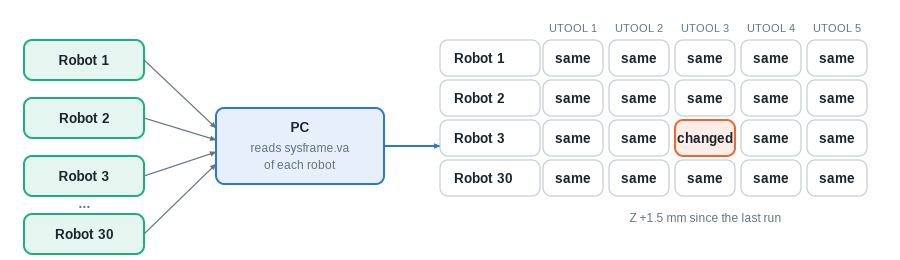
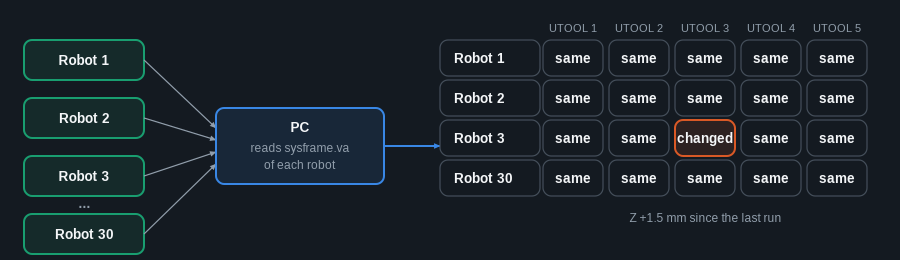
Somebody changed a tool frame on one of your 30 robots, and the parts are now 1.5 mm off. Which robot, which tool, and what were the old values? A daily read of the frames of every robot answers it, and gives the values back after a controller swap.
Where the frames are
| File | Content | Note |
|---|---|---|
sysframe.sv | Tool frames $MNUTOOL, user frames $MNUFRAME, active numbers $MNUTOOLNUM, $MNUFRAMENUM | Binary. Loaded only at a controlled start. Belongs to one robot |
sysframe.va | The same variables as text | Readable by a person and by the SDK |
framevar.* | Setup data and comments of the frames | Binary, not read by the SDK |
The usual way to get an old tool back is long: load the old backup on the robot, read the values on the pendant, load the new files again. With the .va listing, the old values are read on the PC.
Back up and compare the frames of every robot
The loop connects to each robot by FTP, keeps a dated copy of sysframe.va, reads the tools and user frames of group 1, and compares them with the last run. The difference is printed when a value moved by more than 0.01 mm or 0.01°.
static void Main(){string[] robots = { "192.168.0.11", "192.168.0.12", "192.168.0.13" };foreach (string ip in robots){var parameters = new ConnectionParameters(ip);parameters.Ftp.Enable = true;var robot = new FanucRobot();robot.Connect(parameters);// Dated copy of the listing, readable in any text editorrobot.Ftp.DirectFileHandling.DownloadFileFromController($"{ip}-{DateTime.Now:yyyy-MM-dd}-sysframe.va", "md:/sysframe.va");SysframeFile frames = robot.Ftp.KnownVariableFiles.GetSysframeFile();robot.Disconnect();// Tools and user frames of group 1, by namevar now = new Dictionary<string, double[]>();for (int n = 0; n < frames.Mnutool.GetLength(1); n++) now[$"UTOOL {n + 1}"] = Values(frames.Mnutool[0, n]);for (int n = 0; n < frames.Mnuframe.GetLength(1); n++) now[$"UFRAME {n + 1}"] = Values(frames.Mnuframe[0, n]);// Compare with the last run, 0.01 mm or degree of tolerancestring last = $"frames-{ip}.json";if (File.Exists(last)){var before = JsonSerializer.Deserialize<Dictionary<string, double[]>>(File.ReadAllText(last));foreach (var item in now)if (before.TryGetValue(item.Key, out double[] old) && old.Zip(item.Value, (a, b) => Math.Abs(a - b)).Max() > 0.01)Console.WriteLine($"{ip} {item.Key} changed: {string.Join(" ", old)} -> {string.Join(" ", item.Value)}");}File.WriteAllText(last, JsonSerializer.Serialize(now));}}
Run it once a day with the Windows task scheduler or cron. Add the other groups with Mnutool[g - 1, n], and write to a database or a CSV file instead of JSON if your plant needs it.
The dated .va copies are a history: open two of them in a text editor or a diff tool to see what changed and when.
After a controller swap
- Write the old values back one by one: on the pendant, or from the PC with RMI
WriteUTool(n, frame)andWriteUFrame(n, frame), see RMI frames, I/O & status. - Never load the
sysframeorsysmastfile of another robot. The frames and the mastering belong to the arm they were taught on. - Check the programs at low speed after the write.
Cautions
- Change a tool or a user frame and every Cartesian point taught with it moves. The comparison tells you which frame changed, not whether the change was right: ask who changed it before you write the old value back.
- The comparison in the code is simple: an angle that goes from 179.99° to -179.99° shows as a change.
- The SDK reads
.vafiles, not.svfiles. A backup made on the pendant that holds only.svfiles cannot be read on the PC: download the.vafiles by FTP, as the code does.
Without code
TouchUp, the robot workbench for VS Code, backs up a Fanuc controller into a dated folder and compares two backups, or the robot with its last backup. The section User frames and tools of the compare lists only the frames that changed, with the difference (for example Z +1.5 mm). It reads the frames of a controller or of a backup. It does not write them in this version.
See also
- Tool frames: $MNUTOOL and $MNUTOOLNUM
- User frames: $MNUFRAME and the active UFRAME
- Upload, download & backup files
- Offline file parsing: read old
.vafiles in .NET, without a robot