Tool frames: $MNUTOOL and $MNUTOOLNUM
What $MNUTOOL and $MNUTOOLNUM hold on a Fanuc controller, and how to read the 10 tool frames (UTOOL) and the active tool from a PC, in C# or Python.
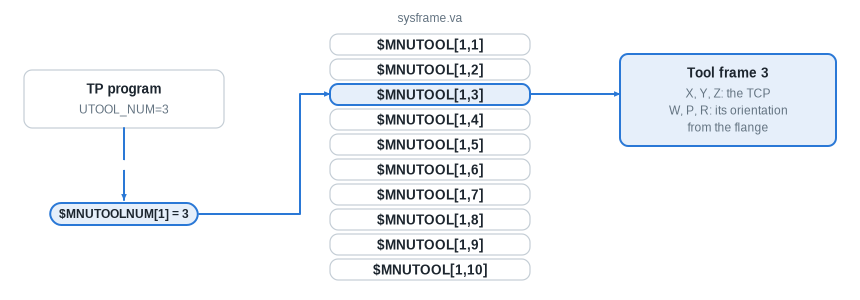
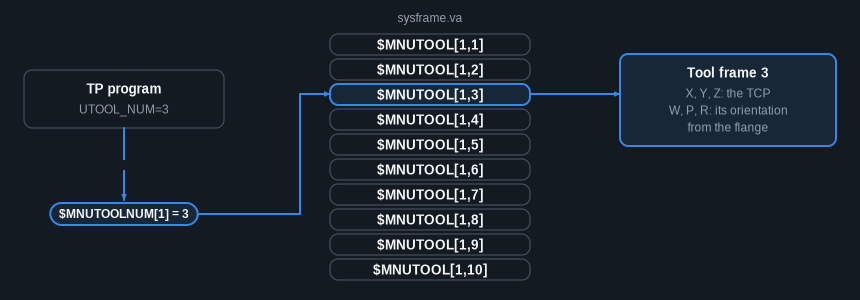
Where does a Fanuc controller store its tool frames, and how do you read the TCP of every tool from a PC? The tool frames are the system variable $MNUTOOL, and the active tool is $MNUTOOLNUM. Both are in the file sysframe.va.
The variables
| Variable | Type | Meaning | File |
|---|---|---|---|
$MNUTOOL[g,n] | POSITION | Tool frame n of motion group g: X, Y, Z, W, P, R. n is 1 to 10 on a standard controller | sysframe.va |
$MNUTOOLNUM[g] | BYTE | Number of the active tool of group g | sysframe.va |
In a TP program, UTOOL_NUM=2 selects tool 2. The variable $MNUTOOLNUM[1] tells which tool is active, for example to copy it in a register: R[1]=$MNUTOOLNUM[1].
Read every tool in one request
GetSysframeFile() reads sysframe.va once and returns the tools and the user frames of every group. Then ReadVariable reads the active tool by name, through the web server of the controller.
parameters.Cgtp.Enable = true;robot.Connect(parameters);// sysframe.va holds every tool of every group: one readSysframeFile frames = robot.Ftp.KnownVariableFiles.GetSysframeFile();// .NET arrays start at 0: $MNUTOOL[1,n] is Mnutool[0, n - 1]int active = frames.Mnutoolnum[0];for (int n = 1; n <= frames.Mnutool.GetLength(1); n++){CartesianPositionVariable t = frames.Mnutool[0, n - 1];if (t == null) continue; // uninitialized in the filestring mark = n == active ? " <- active" : "";Console.WriteLine($"UTOOL {n}: X={t.X} Y={t.Y} Z={t.Z} W={t.W} P={t.P} R={t.R}{mark}");}// Active tool now, read by name through the web serverint activeNow = robot.Cgtp.ReadVariable("$MNUTOOLNUM[1]").IntegerValue;}}
The .NET array starts at 0: $MNUTOOL[1,3] is Mnutool[0, 2]. In Python, mnutool is one flat list with the tools of group 1 first.
Read or write one tool with RMI
With the RMI option (R912), ReadUTool(n) reads one tool and WriteUTool(n, frame) writes it. GetUFrameUTool() gives the active numbers.
parameters.Rmi.Enable = true;robot.Connect(parameters);// Read UFRAME 1RmiIndexedFrameResponse uf = robot.Rmi.ReadUFrame(1);Console.WriteLine($"UFrame 1: X={uf.Frame.X:F1} Y={uf.Frame.Y:F1} Z={uf.Frame.Z:F1}");// Write UFRAME 1robot.Rmi.WriteUFrame(1, new XYZWPRPosition { X = 100, Y = 0, Z = 0, W = 0, P = 0, R = 0 });// Read UTOOL 1RmiIndexedFrameResponse ut = robot.Rmi.ReadUTool(1);Console.WriteLine($"UTool 1: X={ut.Frame.X:F1} Y={ut.Frame.Y:F1} Z={ut.Frame.Z:F1}");// Write UTOOL 1robot.Rmi.WriteUTool(1, new XYZWPRPosition { X = 0, Y = 0, Z = 200, W = 0, P = 0, R = 0 });// Get current UFRAME and UTOOL numbersRmiUFrameUToolNumbersResponse current = robot.Rmi.GetUFrameUTool();Console.WriteLine($"Active UFRAME={current.Frame} UTOOL={current.Tool}");// Set the active UFRAME and UTOOLrobot.Rmi.SetUFrameUTool(uframe: 1, utool: 2);robot.Disconnect();}
Over a fleet
The same read on every robot gives the tools of a whole plant and shows a tool that somebody changed. See Back up and compare the frames of a fleet.
Cautions
- A taught point keeps the number of its tool, not the values of the tool. Change the tool frame and the robot goes somewhere else for every Cartesian point taught with this tool. Check the programs at low speed after a change.
- A tool overwritten by mistake is a classic. Keep a copy of
sysframe.vabefore any change, so that the old values can be read again. sysframebelongs to one robot. Do not load it on another robot to copy one tool: write the 6 values of that tool instead.
Without code
TouchUp, the robot workbench for VS Code, shows the tools 1 to 10 and the active tool of a connected Fanuc controller, or of a backup, as a table and in 3D. It reads them only: it does not write a tool frame in this version. See User frames and tools.