I/O during motion
Read and write digital I/O with each position sent to the robot, and switch outputs at a precise point of a trajectory.
Each position sent to the robot can also read a range of I/O and write I/O. This gives I/O synchronized with the motion, without another protocol. I/O are only read and written during a session.
Read I/O
Add the ranges of I/O to read. A range is 16 consecutive I/O. Each position reads one range, so several ranges are read one after the other.
var sm = robot.StreamMotion;sm.StartMonitoring();// Ranges of 16 I/O read during the session (one range per position sent)sm.AddIOMonitor(IOType.DI, 1); // DI[1] to DI[16]sm.AddIOMonitor(IOType.DO, 17); // DO[17] to DO[32]// ... later, during the sessionbool di3 = sm.GetIO(IOType.DI, 3);foreach (IOValue range in sm.IOValues)Console.WriteLine($"{range.Type}[{range.Index}..{range.Index + 15}] = {range.Value} (age {range.Age} cycles)");robot.Disconnect();}
GetIO() returns false while the range was never read. Age gives the number of cycles since the last reading of the range.
Write I/O
Write an I/O immediately with WriteIO(), or up to 16 consecutive I/O with WriteIOGroup(). To switch an I/O at a precise point of the motion, add it to the trajectory:
sm.StartMonitoring();var planner = new MotionPlanner(sm.JointLimits, null);// Write immediately, with the next position sentsm.WriteIO(IOType.DO, 1, true);sm.WriteIOGroup(IOType.DO, 9, mask: 0x000F, value: 0x0005); // DO[9] and DO[11] ON, DO[10] and DO[12] OFF// Write at a precise point of a trajectoryJointsPosition start = sm.QueueEndJointPosition;var target = new JointsPosition(start.Values) { J1 = start.J1 + 20 };Trajectory trajectory = planner.CreateJointPath(FanucMotion.ToJointValues(start)).MoveJoint(FanucMotion.ToJointValues(target), 30, FanucMotion.Fine()).SetIO(FanucMotion.Signal(IOType.DO, 2), true) // when the previous motion ends.MoveJoint(FanucMotion.ToJointValues(start), 30, FanucMotion.Fine()).Build();trajectory.AddIOEvent(0.5, FanucMotion.Signal(IOType.DO, 3), true); // 0.5 s after the start of the trajectory// Compensate the delay between the position sent and the real motionsm.IOAnticipation = 0.03;sm.WaitForMotion(sm.Enqueue(trajectory), 30000);robot.Disconnect();}
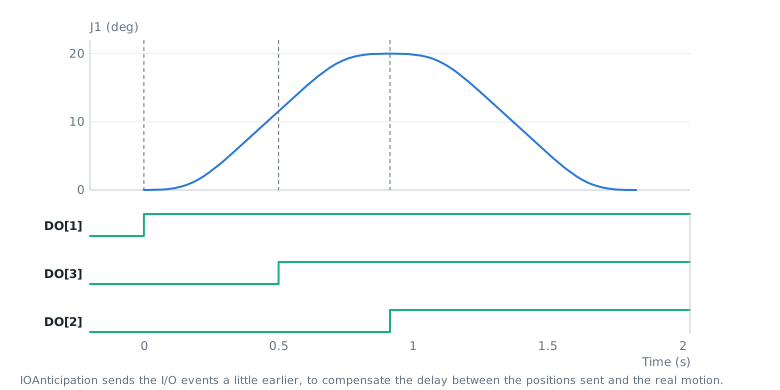
SetIO()in a path builder writes the I/O when the previous motion ends. Create the signal withFanucMotion.Signal(IOType.DO, 2).AddIOEvent()writes the I/O at a given time of the trajectory.IOAnticipationsends the I/O events earlier, to compensate the delay between the position sent and the real motion of the robot.
Writing an I/O that is not assigned raises an alarm on the robot (PRIO-023).
Supported I/O types
IOType | I/O |
|---|---|
DI, DO | Digital inputs and outputs |
RI, RO | Robot inputs and outputs |
SI, SO | System inputs and outputs |
UI, UO | User operator panel inputs and outputs |
WI, WO, WSI, WSO | Weld inputs and outputs |
F | Flags |
M | Markers |
API reference
State of 16 consecutive I/O read by Stream Motion
| Member | Type | Description |
|---|---|---|
Age Property read only | int | Number of status received since this value was read. -1 if it was never read. |
Index Property read only | int | Index of the first I/O of the range |
Type Property read only | IOType | I/O type |
Value Property read only | int | State of the 16 I/O. Bit 0 is the I/O at Index. |
RangeSize Field | int | Number of I/O read in one range |
Equals(object) Method | bool | |
GetHashCode() Method | int | |
GetState(int) Method | bool | Returns the state of one I/O of the range
|
ToString() Method | string |