Inputs and outputs
List the physical I/O of a Staubli controller, read several I/O in one request and write outputs, without a VAL 3 program.
This page shows how to list, read and write the physical inputs and outputs of a Staubli CS8 or CS9 controller with the SDK: digital, analog and the other I/O of the boards of the controller. No VAL 3 program is needed.
List the I/O
GetAllPhysicalIos() returns every physical I/O of the controller, with its name, its type and its description.
var controller = new StaubliController();controller.Connect("192.168.0.254");// Every physical I/O of the controllerPhysicalIo[] ios = controller.Soap.GetAllPhysicalIos();foreach (PhysicalIo io in ios){// TypeStr: din, dout, ain, serial...Console.WriteLine($"{io.Name} [{io.TypeStr}] {io.Description} lockable={io.Lockable}");}controller.Disconnect();}
The name identifies the I/O in the read and write methods. It contains the board and the I/O, separated by a backslash, for example BasicIO-1\%I0. The boards depend on the configuration of each controller: read the names with GetAllPhysicalIos(), do not guess them. In C#, write the name as a verbatim string (@"BasicIO-1\%I0"), in Python as a raw string (r"BasicIO-1\%I0").
TypeStr gives the type, for example din or dout for a digital input or output, ain for an analog input, serial for a serial line.
Read I/O
ReadIos(names) reads several I/O in one request. It returns one PhysicalIoState per name, in the same order.
var controller = new StaubliController();controller.Connect("192.168.0.254");// Names as returned by GetAllPhysicalIosstring[] names = { @"BasicIO-1\%I0", @"BasicIO-1\%Q0" };// One state per name, in the same orderPhysicalIoState[] states = controller.Soap.ReadIos(names);for (int i = 0; i < names.Length; i++){PhysicalIoState state = states[i];// State tells if the name exists on this controllerif (state.State != PhysicalIoEnumState.Defined){Console.WriteLine($"{names[i]}: {state.State}");continue;}Console.WriteLine($"{names[i]} = {state.Value} locked={state.Locked} simulated={state.Simulated}");}controller.Disconnect();}
StateisDefinedwhen the name exists,UndefinedorInvalidNameotherwise. Test it before you use the value.Valueis a number:0or1for a digital I/O.LockedandSimulatedtell if the I/O is locked or simulated on the controller.
Write I/O
WriteIos(names, values) writes several outputs in one request. The two arrays have the same length.
var controller = new StaubliController();controller.Connect("192.168.0.254");string[] names = { @"BasicIO-1\%Q0", @"BasicIO-1\%Q1" };// One value per name. Digital outputs: 1 is on, 0 is offdouble[] values = { 1, 0 };PhysicalIoWriteResponse[] responses = controller.Soap.WriteIos(names, values);for (int i = 0; i < names.Length; i++){if (!responses[i].Found)Console.WriteLine($"{names[i]}: unknown name");else if (!responses[i].Success)Console.WriteLine($"{names[i]}: write refused");}controller.Disconnect();}
The answer has one PhysicalIoWriteResponse per name:
Foundisfalsewhen the name does not exist.Successisfalsewhen the controller refused the write, for example for an input.
Try it in the demo application
Everything on this page can be tried without writing code, in the Physical IOs page of the demo application.
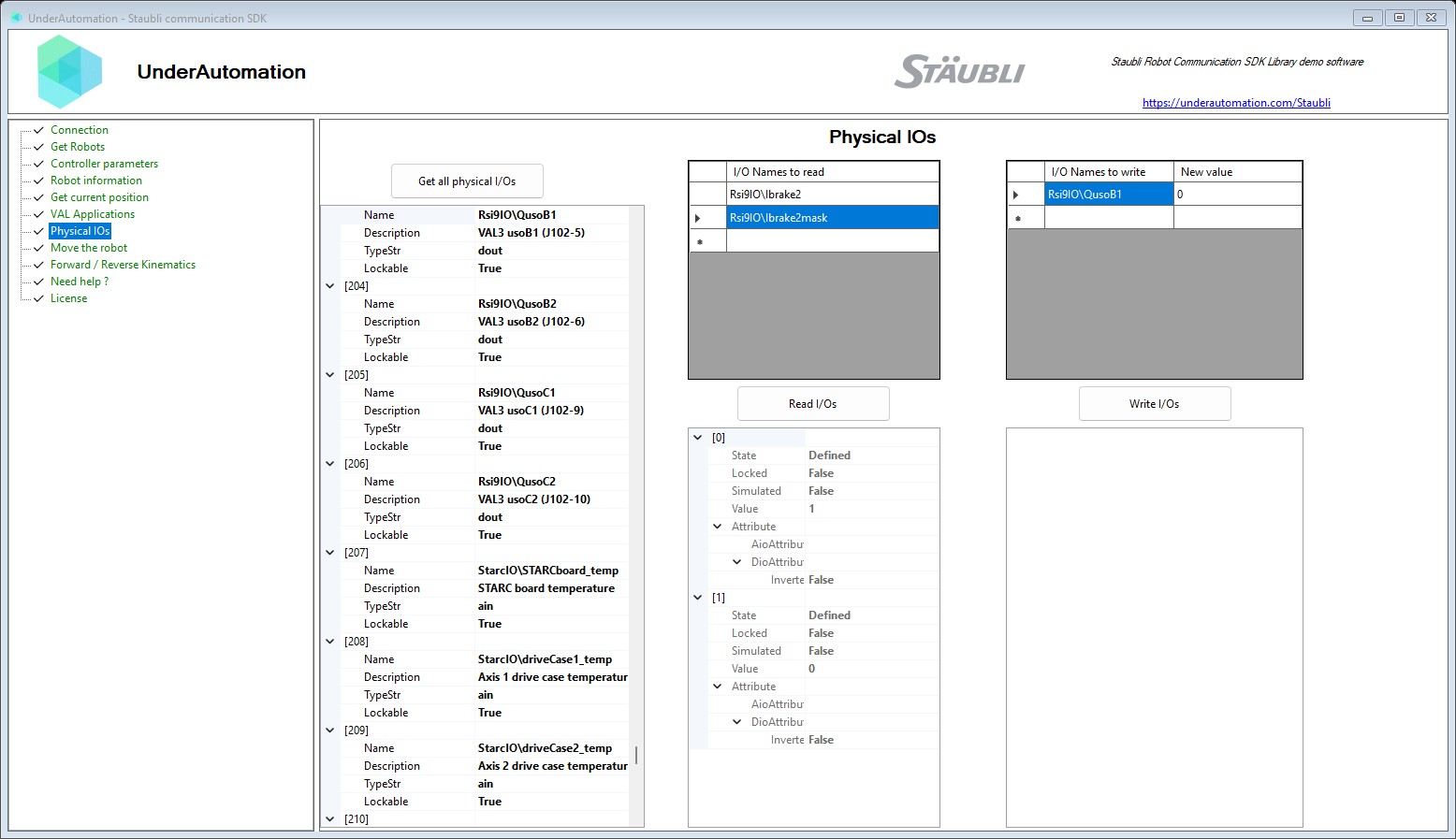
The demo application is open source. The C# source of this page is PhysicalIosControl.cs.
Reference
Methods of SoapClientBase :// Get all the physical I/O values of the controllerPhysicalIo[] GetAllPhysicalIos();// Read the state of specified physical I/OsPhysicalIoState[] ReadIos(string[] ios);// Write values to specified physical I/OsPhysicalIoWriteResponse[] WriteIos(string[] ios, double[] values);
Represents a physical I/O on the robot.
| Member | Type | Description |
|---|---|---|
PhysicalIo() Constructor | ||
Description Property | string | Description of the physical I/O. |
Lockable Property | bool | Indicates whether the physical I/O is lockable. |
Name Property | string | Name of the physical I/O. |
TypeStr Property | string | Type of the physical I/O (e.g., din, dout, ain, serial, ...). |
Equals(object) Method | bool | |
GetHashCode() Method | int | |
ToString() Method | string |
Current state and value of a physical I/O.
| Member | Type | Description |
|---|---|---|
PhysicalIoState() Constructor | Initializes a new instance of the PhysicalIoState class. | |
Attribute Property | PhysicalIoAttribute | I/O type-specific attributes (analog or digital). |
Locked Property | bool | Indicates whether the I/O is locked. |
Simulated Property | bool | Indicates whether the I/O is in simulation mode. |
State Property | PhysicalIoEnumState | Definition state of the I/O. |
Value Property | double | Current numeric value of the I/O. |
Equals(object) Method | bool | |
GetHashCode() Method | int | |
ToString() Method | string |
Definition state of a physical I/O.
| Name | Value | Description |
|---|---|---|
Defined | 0 | The I/O is defined and available. |
InvalidName | 2 | The I/O name is invalid. |
Undefined | 1 | The I/O is not defined. |
Result of a physical I/O write operation.
| Member | Type | Description |
|---|---|---|
PhysicalIoWriteResponse() Constructor | Initializes a new instance of the PhysicalIoWriteResponse class. | |
Found Property | bool | Indicates whether the specified I/O was found. |
Success Property | bool | Indicates whether the write operation succeeded. |
Equals(object) Method | bool | |
GetHashCode() Method | int | |
ToString() Method | string |
Physical I/O attribute containing either analog or digital specific attributes.
| Member | Type | Description |
|---|---|---|
PhysicalIoAttribute() Constructor | Initializes a new instance of the PhysicalIoAttribute class. | |
AioAttribute Property | PhysicalAioAttribute | Analog I/O specific attributes (null if digital). |
DioAttribute Property | PhysicalDioAttribute | Digital I/O specific attributes (null if analog). |
Equals(object) Method | bool | |
GetHashCode() Method | int | |
ToString() Method | string |