Kinematics
Compute the forward and inverse kinematics of a Staubli robot on the controller, with the configuration of the arm and the joint ranges.
This page shows how to compute the forward and inverse kinematics of a Staubli robot with the SDK. The controller computes them with the geometry of the real arm: the result is the one that the CS8 or CS9 controller uses for its own moves.
Forward kinematics
ForwardKinematics(robot, joints) returns the flange frame for joint values in radians, and the configuration of the arm for these joints.
var controller = new StaubliController();controller.Connect("192.168.0.254");// Joint values in radians, here the current onesdouble[] joints = controller.Soap.GetCurrentJointPosition(robot: 0);// The controller computes the flange frame for these jointsIForwardKinematics fk = controller.Soap.ForwardKinematics(robot: 0, joints);// Position of the frame origin, and its orientation as a rotation matrixFrame frame = fk.Position;Console.WriteLine($"P = [{frame.Px}, {frame.Py}, {frame.Pz}]");// Configuration of the arm for this position (shoulder, elbow, wrist)Config config = fk.Config;Console.WriteLine(config);controller.Disconnect();}
The result is a Frame: the origin Px, Py, Pz in meters, and a rotation matrix given by its three columns:
| Column | Properties | Axis of the frame |
|---|---|---|
| N | Nx, Ny, Nz | X axis |
| O | Ox, Oy, Oz | Y axis |
| A | Ax, Ay, Az | Z axis, approach axis |
Configuration
A Cartesian position can be reached with several joint positions: shoulder on the left or on the right, elbow up or down, wrist flipped or not. The Config object selects one of them. It has one part per type of arm:
AnthroConfigfor 6 axis arms:Shoulder(Lefty,Righty),ElbowandWrist(Positive,Negative);ScaraConfigfor SCARA arms:Shoulder;VrbxConfigfor the other kinematics.
Each value can also be Same (keep the current configuration) or Free (any configuration).
Inverse kinematics
ReverseKinematics(robot, joints, target, config, jointRange) returns the joints for a target frame. The controller starts from joints, keeps the configuration config, and rejects a solution out of jointRange.
var controller = new StaubliController();controller.Connect("192.168.0.254");double[] current = controller.Soap.GetCurrentJointPosition(robot: 0);JointRange range = controller.Soap.GetJointRange(robot: 0);// Target: the current flange frame, 50 mm higherIForwardKinematics fk = controller.Soap.ForwardKinematics(robot: 0, current);Frame target = fk.Position;target.Pz += 0.050;// Keep the current configuration of the armIReverseKinematics ik = controller.Soap.ReverseKinematics(robot: 0, current, target, fk.Config, range);if (ik.Result == ReversingResult.Success)Console.WriteLine(string.Join(", ", ik.Joint));elseConsole.WriteLine($"No solution: {ik.Result}"); // OutOfWorkspace, JointOutOfRange...controller.Disconnect();}
Always test Result before you use the joints:
ReversingResult | Meaning |
|---|---|
Success | Joint holds the solution |
OutOfWorkspace | The target is out of reach |
JointOutOfRange | The solution is out of the joint ranges |
InvalidConfiguration | No solution with this configuration |
NoConvergence | The computation did not find a solution |
Try it in the demo application
Everything on this page can be tried without writing code, in the Forward / Reverse Kinematics page of the demo application.
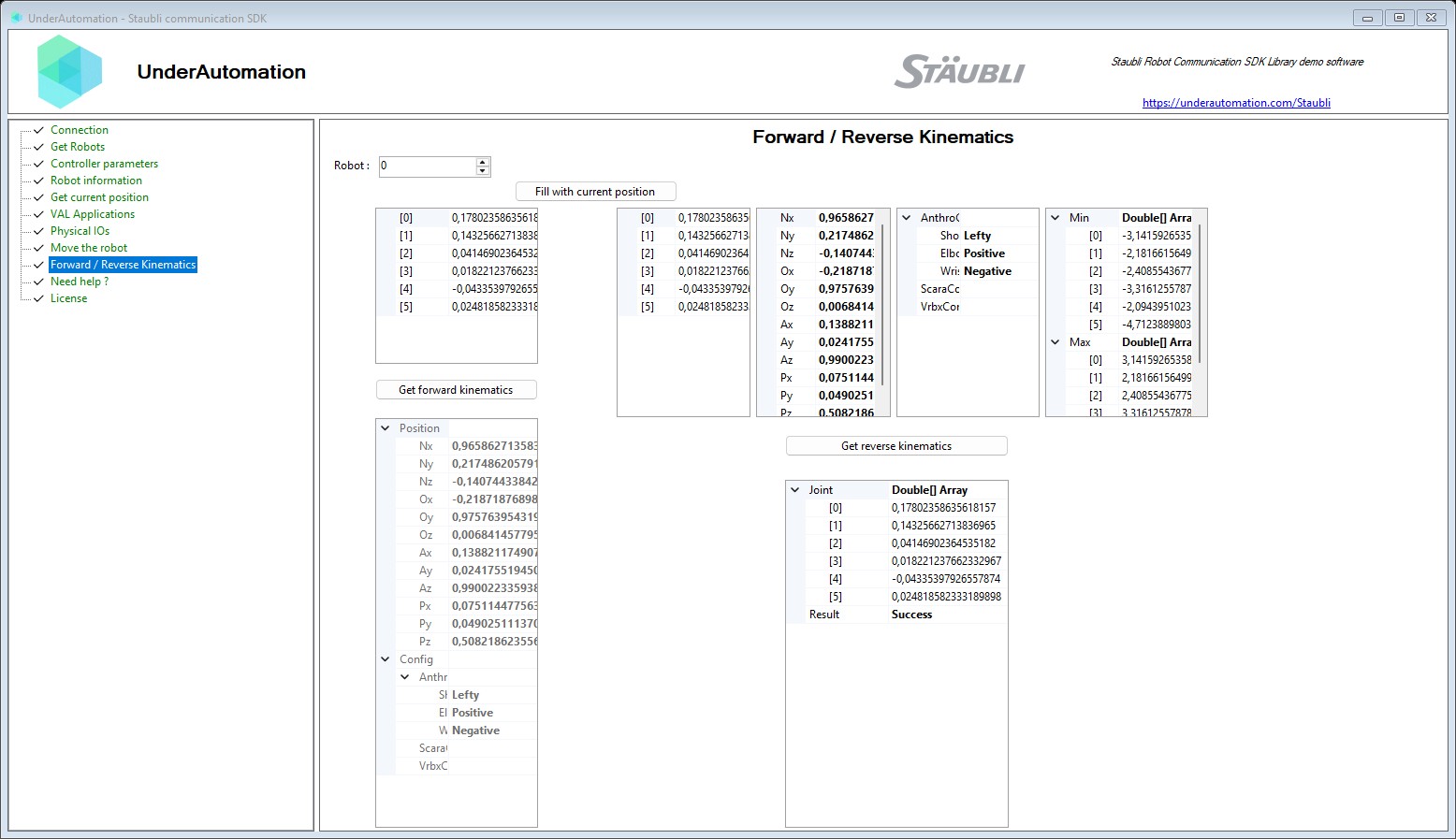
The demo application is open source. The C# source of this page is KinematicsControl.cs.
Reference
Methods of SoapClientBase :// Calculate the forward kinematics of a robot based on its joint positionsIForwardKinematics ForwardKinematics(int robot, double[] joints);// Calculate the reverse kinematics of a robot to reach a target position and orientationIReverseKinematics ReverseKinematics(int robot, double[] joint, Frame target, Config config, JointRange jointRange);
Represents the result of a forward kinematics computation.
| Member | Type | Description |
|---|---|---|
Config Property read only | Config | Robot configuration associated with the computed position. |
Position Property read only | Frame | Cartesian position resulting from the forward kinematics computation. |
Represents the result of a reverse (inverse) kinematics computation.
| Member | Type | Description |
|---|---|---|
Joint Property read only | double[] | Joint angles resulting from the reverse kinematics computation. |
Result Property read only | ReversingResult | Result code indicating the outcome of the reverse kinematics computation. |
Result code for reverse kinematics computation.
| Name | Value | Description |
|---|---|---|
InvalidConfiguration | 4 | The specified configuration is invalid. |
InvalidErrorCode | 8 | Invalid error code returned. |
InvalidOrientation | 5 | The specified orientation is invalid. |
JointOutOfRange | 2 | The computed joint position is out of range. |
NoConvergence | 1 | The algorithm did not converge to a solution. |
OutOfWorkspace | 3 | The target is outside the robot workspace. |
Success | 0 | Reverse kinematics succeeded. |
UnconstrainedFrame | 7 | The frame is unconstrained. |
UnsupportedKinematics | 6 | The robot kinematics type is not supported. |
Represents a 3D transformation composed of orientation (a 3x3 rotation matrix) and position (a translation vector) in space. Used to define the pose of a robot or tool in a 3D environment. Matrix representation: [ Nx Ox Ax Px ] [ Ny Oy Ay Py ] [ Nz Oz Az Pz ] [ 0 0 0 1 ]
| Member | Type | Description |
|---|---|---|
Frame() Constructor | Default constructor. | |
Ax Property | double | X component of the local Z-axis vector (Approach X). |
Ay Property | double | Y component of the local Z-axis vector (Approach Y). |
Az Property | double | Z component of the local Z-axis vector (Approach Z). |
Nx Property | double | X component of the local X-axis vector (Normal X). |
Ny Property | double | Y component of the local X-axis vector (Normal Y). |
Nz Property | double | Z component of the local X-axis vector (Normal Z). |
Ox Property | double | X component of the local Y-axis vector (Orientation X). |
Oy Property | double | Y component of the local Y-axis vector (Orientation Y). |
Oz Property | double | Z component of the local Y-axis vector (Orientation Z). |
Px Property | double | X coordinate of the frame's origin in global space (Pose X). |
Py Property | double | Y coordinate of the frame's origin in global space (Pose Y). |
Pz Property | double | Z coordinate of the frame's origin in global space (Pose Z). |
Equals(object) Method | bool | |
GetHashCode() Method | int | |
ToString() Method | string |
Robot configuration containing kinematic-specific settings.
| Member | Type | Description |
|---|---|---|
Config() Constructor | Initializes a new instance of the Config class. | |
AnthroConfig Property | AnthroConfig | Anthropomorphic robot configuration. |
ScaraConfig Property | ScaraConfig | SCARA robot configuration. |
VrbxConfig Property | VrbxConfig | VRBX robot configuration. |
Equals(object) Method | bool | |
GetHashCode() Method | int | |
ToString() Method | string |
Configuration for an anthropomorphic robot (shoulder, elbow, wrist).
| Member | Type | Description |
|---|---|---|
AnthroConfig() Constructor | Initializes a new instance of the AnthroConfig class. | |
Elbow Property | PositiveNegativeConfig | Elbow configuration. |
Shoulder Property | ShoulderConfig | Shoulder configuration. |
Wrist Property | PositiveNegativeConfig | Wrist configuration. |
Equals(object) Method | bool | |
GetHashCode() Method | int | |
ToString() Method | string |