System information and parameters
Read the software version, the axis names, the operating times and the system parameters (S1CG, RS...) of a Yaskawa controller.
This page shows how to read the identity and the configuration of a Yaskawa Motoman controller with the SDK: software version, axis names, operating times and system parameters. All these methods only read: they work in any mode.
Software version and robot model
GetSystemInformation() reads the system software version, the model of the first robot (R1) and the version of its parameters.
var robot = new YaskawaRobot();robot.Connect("192.168.0.1");// Software version, robot model and parameter version of the first robot (R1)RobotSystemInformation info = robot.HighSpeedEServer.GetSystemInformation();Console.WriteLine($"{info.SoftwareVersion} {info.Name} {info.Parameter}");robot.Disconnect();}
Log these values with the data of your application: the answers of the controller can depend on its software version.
GetSystemInformation(RobotSystemTypeData) reads the same values for another robot, a station or an application, on the controllers that have several. In Python 2.2.0, only this form exists: pass RobotSystemTypeData.Default for the first robot.
Axis names
GetConfigurationInformation(group) reads the names of the axes of a control group, for example S L U R B T for a 6 axis robot. Use it to check the number of axes before you read the joint positions.
var robot = new YaskawaRobot();robot.Connect("192.168.0.1");// Names of the axes of the first robot, for example S, L, U, R, B, Tvar group = new RobotControlGroup(ControlGroup.RobotPulseValue, 1);RobotAxisConfigData config = robot.HighSpeedEServer.GetConfigurationInformation(group);Console.WriteLine(string.Join(" ", config.Axes));robot.Disconnect();}
RobotControlGroup selects the robot, the base axes or the station, and its number. See Positions.
Operating times
GetManagementTime(type, index) reads an operating time of the controller: its start date and the elapsed time, as texts of the controller.
var robot = new YaskawaRobot();robot.Connect("192.168.0.1");// Time since the control power was switched onRobotManagementTimeData power = robot.HighSpeedEServer.GetManagementTime(ManagementTimeType.ControlPowerOnTime);Console.WriteLine($"Since {power.StartTime}: {power.EllapseTime}");// Servo power time and motion time of the first robot (index 1 is R1)RobotManagementTimeData servo = robot.HighSpeedEServer.GetManagementTime(ManagementTimeType.ServoPowerOnTimR1ToR8, 1);RobotManagementTimeData motion = robot.HighSpeedEServer.GetManagementTime(ManagementTimeType.MotionTimeR1ToR8, 1);Console.WriteLine($"Servo on: {servo.EllapseTime}, moving: {motion.EllapseTime}");robot.Disconnect();}
ManagementTimeType | Time | index |
|---|---|---|
ControlPowerOnTime | Control power on | 0 |
ServoPowerOnTimR1ToR8 | Servo power on of a robot | 1 to 8 for R1 to R8 |
ServoPowerOnTimeS1ToS24 | Servo power on of a station | 1 to 24 for S1 to S24 |
PlayBackTimeR1ToR8 | Playback of a robot | 1 to 8 |
PlayBackTimeS1ToS24 | Playback of a station | 1 to 24 |
MotionTimeR1ToR8 | Motion of a robot | 1 to 8 |
OperationTimeApplication1To8 | Operation of an application | 1 to 8 |
The totals (ServoPowerOnTimeTotal, PlayBackTimeTotal, MotionTimeTotal) take the index 0. These times help to plan the maintenance, or to measure the use of a cell over a shift.
System parameters
GetSystemParameter(type, number, group) reads one system parameter of the controller as an unsigned integer. For example, RS029 and RS214 must be 1 to overwrite files (see Connect to your robot).
var robot = new YaskawaRobot();robot.Connect("192.168.0.1");// Parameter RS029 of the controller (RS parameters have no group)RobotSystemParamData rs029 = robot.HighSpeedEServer.GetSystemParameter(SystemParameterTypes.RS, 29, group: 0);Console.WriteLine($"RS029 = {rs029.Value}");// Parameter S1CG000 of the first robot (group 1)RobotSystemParamData s1cg = robot.HighSpeedEServer.GetSystemParameter(SystemParameterTypes.S1CG, 0, group: 1);Console.WriteLine($"S1CG000 = {s1cg.Value}");robot.Disconnect();}
SystemParameterTypes | group |
|---|---|
S2C, S3C, S4C, RS | 0: these parameters have no group |
S1CG, AP, SE | The number of the group, from 1 |
The meaning of each parameter is in the parameter manual of your controller. The SDK reads the parameters, it does not write them.
Try it in the demo application
Everything on this page can be tried without writing code, in the System Parameters page of the demo application.
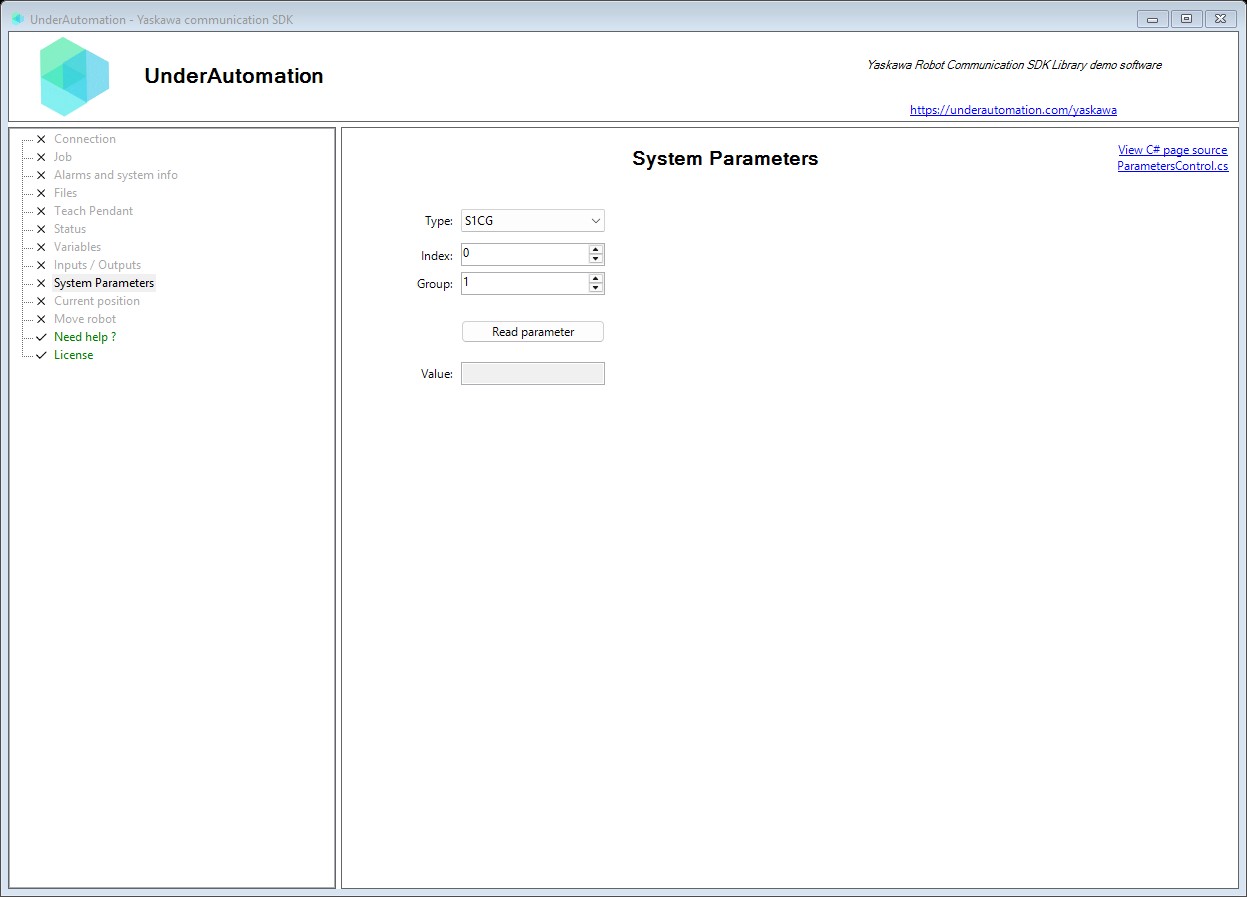
The demo application is open source. The C# source of this page is ParametersControl.cs.
Reference
Methods of HighSpeedEServerClientBase :// Reads axis configuration information for the default robot control group. Returns axis type names for each of the 8 possible axes.RobotAxisConfigData GetConfigurationInformation();// Reads axis configuration information for a specified control group. Returns axis type names (e.g., "S", "L", "U", "R", "B", "T") for each axis.RobotAxisConfigData GetConfigurationInformation(RobotControlGroup type);// Retrieves management time statistics from the robot controller. Can query various timing metrics like control power ON time, servo ON time, etc.RobotManagementTimeData GetManagementTime(ManagementTimeType type, int index = 0);// Retrieves system information about the default robot system (R1). Returns software version, robot name, and parameter file information.RobotSystemInformation GetSystemInformation();// Retrieves system information for a specific robot system or control group. Use for multi-robot controllers or to query specific axes groups.RobotSystemInformation GetSystemInformation(RobotSystemTypeData type);// Reads a system parameter from the robot controller.RobotSystemParamData GetSystemParameter(SystemParameterTypes type, int number, int group = 1);
Contains system information about the robot controller including software version and configuration. Retrieved using the system information acquiring command.
| Member | Type | Description |
|---|---|---|
Name Property read only | string | Gets the system/robot name or model identifier. Maximum 16 characters. |
Parameter Property read only | string | Gets parameter file or configuration information. Maximum 8 characters. |
SoftwareVersion Property read only | string | Gets the controller software version string. Format typically includes model and version number. Maximum 24 characters. |
ToString() Method | string | Returns a string representation of the system information. |
Contains management time information for tracking robot operation statistics. Provides uptime and usage metrics for maintenance planning and reporting.
| Member | Type | Description |
|---|---|---|
EllapseTime Property read only | string | Gets the elapsed time for the tracked metric. Format: "HHHH:MM:SS.ss" or similar time duration format (12 characters). |
StartTime Property read only | string | Gets the start time of the tracked period. Format: "YYYY/MM/DD HH:MM" (16 characters). |
Specifies the type of management time data to retrieve. Different metrics track various aspects of robot operation.
| Name | Value | Description |
|---|---|---|
ControlPowerOnTime | 1 | Total time the controller power has been on. |
MotionTimeR1ToR8 | 210 | Motion time for robots R1 through R8. Pass the robot number (1 to 8) as index of GetManagementTime. |
MotionTimeS1ToS24 | 220 | Motion time for stations S1 through S24. Pass the station number (1 to 24) as index of GetManagementTime. |
MotionTimeTotal | 210 | Total motion time across all robots. |
OperationTimeApplication1To8 | 300 | Operation time for applications 1 through 8. Add application number (0-7) to get specific application. |
PlayBackTimeR1ToR8 | 110 | Playback time for robots R1 through R8. Pass the robot number (1 to 8) as index of GetManagementTime. |
PlayBackTimeS1ToS24 | 120 | Playback time for stations S1 through S24. Pass the station number (1 to 24) as index of GetManagementTime. |
PlayBackTimeTotal | 110 | Total playback time across all robots. |
ServoPowerOnTimR1ToR8 | 10 | Servo power on time for robots R1 through R8. Pass the robot number (1 to 8) as index of GetManagementTime. |
ServoPowerOnTimeS1ToS24 | 20 | Servo power on time for stations S1 through S24. Pass the station number (1 to 24) as index of GetManagementTime. |
ServoPowerOnTimeTotal | 10 | Total servo power on time across all robots. |
Contains a system parameter value read from the robot controller.
| Member | Type | Description |
|---|---|---|
Value Property read only | uint | Gets the raw system parameter value returned by the controller. |
ToString() Method | string | Returns a string representation of the system parameter value. |
Specifies the category of a system parameter to read from the controller. Types S1CG, AP, and SE require a group number when reading.
| Name | Value | Description |
|---|---|---|
AP | 5 | AxP. Requires a group number. |
RS | 4 | RS |
S1CG | 0 | S1CxG. requires group number. |
S2C | 1 | S2C |
S3C | 2 | S3C |
S4C | 3 | S4C |
SE | 6 | SxE. Requires a group number. |