Robot 3D
The Robot 3D tab: a simple 3D drawing of the robot of the active controller at its live pose, grey when the pose is older than 2 seconds, the kinematic data of the robot kept with its source and date, Refresh Kinematic Data, and the reasons shown in place of the robot (CRX arm, FTP off, Yaskawa group above 1).
This page explains the Robot 3D tab of TouchUp: a simple 3D drawing of the robot of the active controller, at the pose that the robot has now. It covers Fanuc controllers, including the CRX collaborative robots, and Yaskawa controllers. It is free, it only reads, and it never writes to the controller. The same robot is also drawn in the position editor, see The robot in the position editor.
The drawing is a simple model: links, joints and the flange. It helps you see a pose at a glance. It is not a simulation, it has no shape of the real robot, and it does not check a collision.
Open the tab
Run TouchUp: Open Robot 3D in the Command Palette. TouchUp opens one tab, Robot 3D, for the active controller and its active group, see Change the active controller or group. A second run shows the tab that is already open.
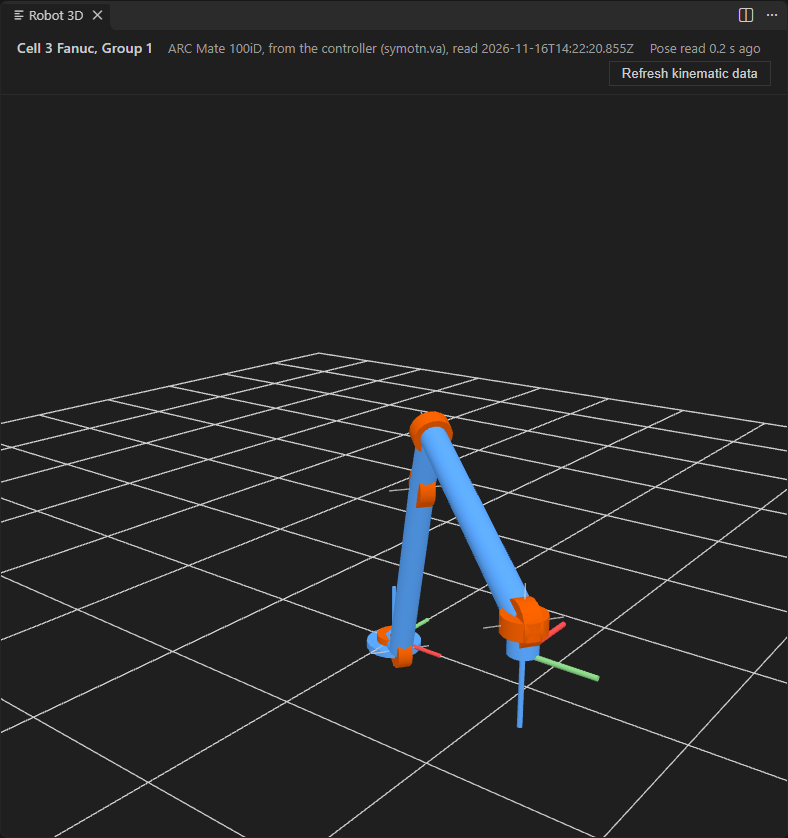
Above the drawing, the tab shows:
- the name of the controller and the motion group,
- the model of the robot, where its data come from and when TouchUp read it,
- the age of the pose, for example
Pose read 0.4 s ago, - the button
Refresh kinematic data.
Drag in the drawing to turn the view, and use the mouse wheel to zoom. The tab follows the active controller and group: when you change them, the tab shows the other robot. The drawing has a text label for screen readers: the robot, where its model comes from, and the pose, or the reason when nothing is drawn. The drawing is not a stop of the Tab key, so the keyboard goes through the buttons of the tab only.
When no controller is configured, the tab says Connect a controller to see its robot. When the controller is not connected, it says <controller> is not connected.
The live pose
While the tab is visible, TouchUp reads the position of the robot about every half second and moves the drawing. Nothing is read while the tab is hidden behind another tab, and the reading starts again when you show it.
The age of the pose is counted in the tab. When the last reading is older than 2 seconds, for example because the controller is slow or the link is lost, the robot is drawn in grey and the line says grey: too old. Before the first reading, the robot is drawn grey at its zero pose.
Only the six joints of the arm are drawn. An extended axis, such as a rail, is not.
The data of the robot
The drawing is built from the kinematic data of the robot, which TouchUp reads from the controller:
| Brand | Where the data come from |
|---|---|
| Fanuc | The robot file of the controller, read over FTP. FTP must be enabled, see Prepare a Fanuc controller |
| Yaskawa | The catalog of robot models, found with the model that the controller reports. When the model is not in the catalog, the parameter file of the controller is read |
TouchUp keeps these data with the group of the controller in .touchup/config.json, with their source and the date of the reading, see Controllers and configuration files. Later openings of the tab use the kept data and read nothing from the controller. TouchUp reads them again when the software version of the controller changes.
To read them again at once, click Refresh kinematic data in the tab, or run TouchUp: Refresh Kinematic Data (it works without the tab). TouchUp says where the data were read from, and whether it could keep them in the configuration. When it cannot, for example because the file is held by another program, the tab still shows the robot. TouchUp never creates a configuration file for this on its own.
When the robot is not drawn
The tab shows the reason in place of the robot, and reads no pose, when:
- the data come from a Fanuc controller and FTP is not enabled,
- the group is not an arm of 6 axes, for example a positioner or a group with extended axes,
- the group of a Yaskawa controller is above 1,
- the controller refuses to give its data (the reason is the one of the controller).
Two limits keep the drawing, with a notice:
- Yaskawa. The robot is drawn at its zero pose: the live pose of a Yaskawa robot in degrees is not available yet. The tab says
The live pose is not available for this robot yet: the model is drawn at its zero pose. - No live position. When the controller cannot give its current position, or the group has fewer than 6 joints, the robot is drawn at its zero pose and the notice gives the reason.
When the window has no 3D support, the tab says that the 3D view needs WebGL and to turn on the hardware acceleration of VS Code or of your browser.