Motion
Move a Yaskawa robot from a PC: linear and joint moves to a Cartesian target, relative moves, moves in pulses, speed units, frames and posture.
This page shows how to move a Yaskawa Motoman robot from a PC with the SDK, without a job: Cartesian moves in mm and degrees, relative moves, and joint moves in pulses. The moves need the remote mode and the servo power.
Prerequisites
- The controller accepts the remote commands: see Connect to your robot.
- No alarm is active, and the robot is not held.
- The servo power is on:
SetServo(true).
A move sent by the SDK is a real move of the robot. Test at low speed, in a cell with its safety functions active.
Cartesian move
MoveCartesian moves the tool center point to a position given in mm and degrees, in a frame.
var robot = new YaskawaRobot();robot.Connect("192.168.0.1");// The servo must be on, the controller in remote moderobot.HighSpeedEServer.SetServo(true);// Linear move to an absolute position of the robot frame, at 50 mm/srobot.HighSpeedEServer.MoveCartesian(x: 850, y: 0, z: 400, // mmrx: 180, ry: 0, rz: 0, // degreesPositionCommandClassification.Cartesian_MM_S,speed: 50,PositionCommandOperationCoordinate.Robot,commandtype: PositionCommandType.StraightAbsolute);// Joint interpolated move to the same target, at 10 % of the maximum speedrobot.HighSpeedEServer.MoveCartesian(850, 0, 400, 180, 0, 0,PositionCommandClassification.LinkPercent,speed: 10,PositionCommandOperationCoordinate.Robot,commandtype: PositionCommandType.LinkAbsolute);robot.Disconnect();}
| Argument | Meaning |
|---|---|
x, y, z | Position, in mm |
rx, ry, rz | Orientation, in degrees |
classification | Unit of speed, see below |
speed | Speed of the move |
coordinate | Frame of the position: Base, Robot, User or Tool |
posture | Posture of the target, see below. null: the default posture |
commandtype | Absolute or relative move, see below. Default: StraightIncrement |
RobotControlGroup, StationControlGroup | Robot and station that move. Default: robot 1, no station |
tool | Tool number. Default: 0 |
userCoordinate | User frame number, when coordinate is User. Default: 0 |
Command type
PositionCommandType | Path | Target |
|---|---|---|
LinkAbsolute | Joint interpolated | The position given |
StraightAbsolute | Straight line | The position given |
StraightIncrement | Straight line | The current position plus the values given |
The default command type of MoveCartesian is StraightIncrement: without commandtype, the values are an offset from the current position. Always pass commandtype when you give an absolute position.
Speed
PositionCommandClassification | Unit of speed |
|---|---|
LinkPercent | Percent of the maximum joint speed |
Cartesian_MM_S | mm/s of the tool center point |
Cartesian_DEG_S | Degrees/s of the orientation |
Use LinkPercent with LinkAbsolute, and a Cartesian speed with the straight moves.
Relative move
With StraightIncrement, the values are an offset. The frame gives the direction of the offset: Base to move along the axes of the base, Tool to move along the axes of the tool.
var robot = new YaskawaRobot();robot.Connect("192.168.0.1");robot.HighSpeedEServer.SetServo(true);// Move the tool 20 mm up in the base frame, in a straight line at 20 mm/s.// StraightIncrement is the default command type of MoveCartesianrobot.HighSpeedEServer.MoveCartesian(0, 0, 20, 0, 0, 0,PositionCommandClassification.Cartesian_MM_S,speed: 20,PositionCommandOperationCoordinate.Base,commandtype: PositionCommandType.StraightIncrement);// Move 10 mm along the Z axis of tool 1robot.HighSpeedEServer.MoveCartesian(0, 0, 10, 0, 0, 0,PositionCommandClassification.Cartesian_MM_S,speed: 20,PositionCommandOperationCoordinate.Tool,commandtype: PositionCommandType.StraightIncrement,tool: 1);robot.Disconnect();}
Joint move
MoveJoints moves each axis to a position in pulses, the unit of GetRobotJointPosition.
var robot = new YaskawaRobot();robot.Connect("192.168.0.1");robot.HighSpeedEServer.SetServo(true);// Read the current pulses and change the first axisint[] target = robot.HighSpeedEServer.GetRobotJointPosition().Axes;target[0] += 10000;// Joint interpolated move to absolute pulses, at 5 % of the maximum speedrobot.HighSpeedEServer.MoveJoints(target,PositionCommandClassification.LinkPercent,speed: 5,PositionCommandType.LinkAbsolute,RobotControlGroup: 1,StationControlGroup: 0);robot.Disconnect();}
Pass the command type LinkAbsolute and the speed in LinkPercent, as above. axesPulse has one value per axis, up to 8: start from the current pulses and change the axes you want to move.
Posture
A Cartesian position can be reached with several postures: arm in front or behind, upper or lower arm, wrist flipped or not, and the ranges of some axes. RobotPosture selects one. The posture of the current position is the Form of GetRobotCartesianPosition(): pass it to stay in the same configuration.
var robot = new YaskawaRobot();robot.Connect("192.168.0.1");// The posture of the current positionRobotPosture current = robot.HighSpeedEServer.GetRobotCartesianPosition().Form;Console.WriteLine(current);// A posture written field by fieldvar posture = new RobotPosture(orientation: OrientationFlipInformation.Front,arm: ArmFlipInformation.Upper,flip: FlipNoFlipInformation.Flip);// The posture selects one of the joint solutions of the Cartesian targetrobot.HighSpeedEServer.MoveCartesian(850, 0, 400, 180, 0, 0,PositionCommandClassification.Cartesian_MM_S, 50,PositionCommandOperationCoordinate.Robot,posture: posture,commandtype: PositionCommandType.StraightAbsolute);robot.Disconnect();}
In Python, create a posture with RobotPosture.from_integer(0), then set its fields.
End of the move
MoveCartesian and MoveJoints return when the controller accepts the move, not at the end of the move. To wait for the end, read the position until it reaches the target: see Move the robot from a PC.
To stop a move, hold the robot: SetHold(true).
Try it in the demo application
Everything on this page can be tried without writing code, in the Move robot page of the demo application.
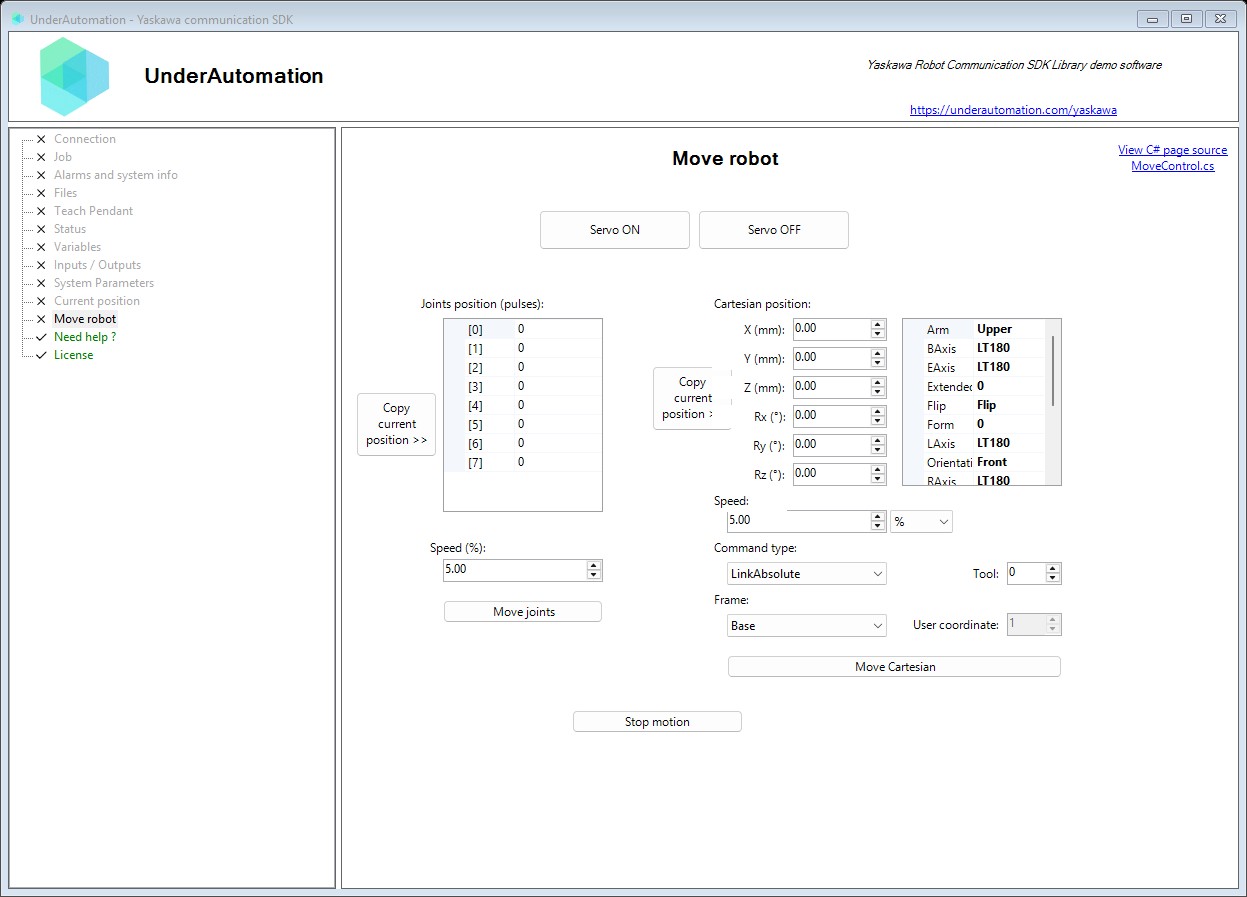
The demo application is open source. The C# source of this page is MoveControl.cs.
Reference
Methods of HighSpeedEServerClientBase :// Commands the robot to move to a Cartesian position (X, Y, Z, Rx, Ry, Rz). Movement is relative to the specified coordinate system.RobotDataHeader MoveCartesian(double x, double y, double z, double rx, double ry, double rz, PositionCommandClassification classification, double speed, PositionCommandOperationCoordinate coordinate, RobotPosture posture = null, PositionCommandType commandtype = PositionCommandType.StraightIncrement, int RobotControlGroup = 1, int StationControlGroup = 0, int tool = 0, int userCoordinate = 0);// Commands the robot to move using joint (pulse) positions. This specifies the position of each axis directly in encoder pulses.RobotDataHeader MoveJoints(int[] axesPulse, PositionCommandClassification classification, double speed, PositionCommandType commandtype = PositionCommandType.StraightIncrement, int RobotControlGroup = 1, int StationControlGroup = 1, int tool = 0);
Specifies the type of position command (motion instruction) to execute. Determines the path type and whether position is absolute or incremental.
| Name | Value | Description |
|---|---|---|
LinkAbsolute | 1 | Link (joint interpolated) motion to an absolute position. All joints move simultaneously to reach the target, resulting in non-linear TCP path. |
StraightAbsolute | 2 | Straight (linear interpolated) motion to an absolute position. TCP moves in a straight line to the target position. |
StraightIncrement | 3 | Straight (linear interpolated) motion by an incremental offset. TCP moves in a straight line relative to current position. |
Specifies the speed classification (units) for motion commands. Determines how the speed value is interpreted by the controller.
| Name | Value | Description |
|---|---|---|
Cartesian_DEG_S | 2 | Speed in degrees per second for rotational motion. Valid range depends on robot model. |
Cartesian_MM_S | 1 | Speed in millimeters per second for linear motion. Valid range depends on robot model. |
LinkPercent | 0 | Speed as percentage of maximum link (joint) speed. Valid range: 0.01 to 100.00 percent. |
Specifies the coordinate system for position command interpretation. Determines how X, Y, Z, Rx, Ry, Rz values are interpreted.
| Name | Value | Description |
|---|---|---|
Base | 16 | Base coordinate system (world frame at robot base). Fixed reference frame typically aligned with robot mounting. |
Robot | 17 | Robot coordinate system. Reference frame at the robot's origin point. |
Tool | 18 | Tool coordinate system. Reference frame at the tool center point (TCP). |
User | 19 | User-defined coordinate system. Custom reference frame defined for specific workpiece or fixture. |
Represents the complete robot posture (form) configuration. Encodes the kinematic configuration choices that determine which of multiple inverse kinematics solutions is used to reach a Cartesian position.
| Member | Type | Description |
|---|---|---|
RobotPosture() Constructor | Creates a new RobotPosture with default values. | |
RobotPosture(int, int) Constructor | Creates a new RobotPosture with specified form values.
| |
RobotPosture(OrientationFlipInformation, ArmFlipInformation, FlipNoFlipInformation, AxisFlipInformation, AxisFlipInformation, AxisFlipInformation, OrientationFlipInformation, RegardedReversePositionSpecified, AxisFlipInformation, AxisFlipInformation, AxisFlipInformation, AxisFlipInformation, AxisFlipInformation) Constructor | Creates a new RobotPosture with specified configuration values.
| |
Arm Property | ArmFlipInformation | Gets or sets the upper/lower arm configuration based on L and U axis positions. |
BAxis Property | AxisFlipInformation | Gets or sets the B-axis (wrist bend) angle range configuration from extended form. |
EAxis Property | AxisFlipInformation | Gets or sets the E-axis (external/elbow) angle range configuration from extended form. |
ExtendedForm Property | int | Gets or sets the extended form byte for additional axis configurations. Bit-encoded: L-axis, U-axis, B-axis, E-axis, W-axis range flags. |
Flip Property | FlipNoFlipInformation | Gets or sets the flip/no-flip wrist configuration. |
Form Property | int | Gets or sets the primary form byte encoding basic posture flags. Bit-encoded: orientation, arm, flip, R-axis, T-axis, S-axis, redundant, reverse position. |
LAxis Property | AxisFlipInformation | Gets or sets the L-axis (lower arm) angle range configuration from extended form. |
Orientation Property | OrientationFlipInformation | Gets or sets the front/back orientation configuration. Specifies where the B-axis rotation center locates relative to the S-axis when viewing the L and U axes from the right-hand side. |
RAxis Property | AxisFlipInformation | Gets or sets the R-axis (wrist rotation) angle range configuration. |
Redundant Property | OrientationFlipInformation | Gets or sets the redundant axis orientation configuration (for 7+ axis robots). |
RegardedReversePositionSpecified Property | RegardedReversePositionSpecified | Gets or sets the reverse position specification mode. |
SAxis Property | AxisFlipInformation | Gets or sets the S-axis (base rotation) angle range configuration. |
TAxis Property | AxisFlipInformation | Gets or sets the T-axis (tool rotation) angle range configuration. |
UAxis Property | AxisFlipInformation | Gets or sets the U-axis (upper arm) angle range configuration from extended form. |
WAxis Property | AxisFlipInformation | Gets or sets the W-axis angle range configuration from extended form. |
Default Field static | RobotPosture | Default posture with Form=0 and ExtendedForm=0. |
Equals(object) Method | bool | |
FromInteger(int) Method static | RobotPosture | Creates a RobotPosture from a combined 16-bit integer value.
|
GetHashCode() Method | int | |
ToInteger() Method | int | Converts the posture to a single 16-bit integer value. Form is stored in the low byte, ExtendedForm in the high byte. |
ToString() Method | string |