I/O signals, devices & networks
Read and write digital, analog and group signals, pulse or invert a signal, and browse the I/O devices and networks of the controller.
robot.Rws.Io reads and writes the I/O of the controller. The I/O system has three levels: a network carries devices, a device carries signals. A signal is identified by the three names together, for example Local, Board10 and DO_Gripper.
A shorter introduction with a complete example is given in Read & write I/O signals.
Signals
GetSignal reads one signal, GetSignals reads every signal of the controller in one call.
IoSignalType | Values |
|---|---|
DigitalInput, DigitalOutput | 0 or 1 |
AnalogInput, AnalogOutput | A real value inside the range configured on the controller |
GroupInput, GroupOutput | An integer coded on several bits |
Unknown | The controller reports a type this library does not know |
AbbController robot = new AbbController();robot.Connect("192.168.0.1");// A signal is identified by its network, its device and its nameIoSignalItem signal = robot.Rws.Io.GetSignal("Local", "Board10", "DO_Gripper");Console.WriteLine(signal.Path); // Local/Board10/DO_GripperConsole.WriteLine(signal.Type); // DigitalOutputConsole.WriteLine(signal.LogicalValue); // 1Console.WriteLine(signal.LogicalState); // NotSimulatedConsole.WriteLine(signal.PhysicalValue); // 1Console.WriteLine(signal.PhysicalState); // Valid// Every signal of the controller, in one callIoSignalItem[] signals = robot.Rws.Io.GetSignals();foreach (IoSignalItem item in signals){Console.WriteLine($"{item.Path} = {item.LogicalValue} ({item.Type})");}robot.Disconnect();}
LogicalValue is the value seen by the RAPID programs, PhysicalValue the one on the hardware. They differ when the signal is simulated. LogicalState says whether it is simulated, PhysicalState whether the physical value is valid.
A controller usually declares several hundreds of signals, so GetSignals returns a large answer. Prefer SearchSignals when you only need part of them.
Write a signal
SetSignalValue writes the logical value of a signal. The value is a float, which covers the digital, the analog and the group signals with one method.
AbbController robot = new AbbController();robot.Connect("192.168.0.1");// A digital signal takes 0 or 1robot.Rws.Io.SetSignalValue("Local", "Board10", "DO_Gripper", 1);// An analog or a group signal takes any value inside its rangerobot.Rws.Io.SetSignalValue("Local", "Board10", "AO_Speed", 12.5f);// The last argument writes the change in the event log of the controllerrobot.Rws.Io.SetSignalValue("Local", "Board10", "DO_Gripper", 0, true);// The controller applies the value 500 ms later, and answers immediatelyrobot.Rws.Io.SetSignalValueDelayed("Local", "Board10", "DO_Gripper", 1, 500);robot.Disconnect();}
Writing a signal needs no mastership, but the user account needs the write access on it, and the signal must accept a write from a remote client in the current operating mode. That is what GetSignalConfiguration reports, see below. The controller refuses the write with an RwsException when the signal is read only or when the value is outside its range.
SetSignalValueDelayed asks the controller to apply the value after a delay in milliseconds. The call returns immediately, the controller does the waiting.
Pulse, toggle and invert
AbbController robot = new AbbController();robot.Connect("192.168.0.1");// Three pulses to 1, 200 ms active and 200 ms passiverobot.Rws.Io.PulseSignal("Local", "Board10", "DO_Gripper", 1, 3, 200, 200);// Same, with the pulse lengths configured on the controllerrobot.Rws.Io.PulseSignal("Local", "Board10", "DO_Gripper", 1, 1);// Toggle pulses the signal by starting from the opposite of its current valuerobot.Rws.Io.ToggleSignal("Local", "Board10", "DO_Gripper", 1, 2, 200, 200);// Invert writes the opposite of the current value, oncerobot.Rws.Io.InvertSignal("Local", "Board10", "DO_Gripper", 1);robot.Disconnect();}
Only the digital and the group signals can be pulsed, toggled or inverted, an analog signal is refused. The three methods take a value even though they compute the written value themselves, because the controller rejects a write that carries none. Leave the two pulse lengths null to use the ones configured on the controller.
Simulate a signal
A simulated signal keeps the value written by the client and stops following its device. This is how an input is forced during a test, without any wiring.
AbbController robot = new AbbController();robot.Connect("192.168.0.1");// Simulate an input: it keeps the value written by the clientrobot.Rws.Io.SetSignalState("Local", "Board10", "DI_PartPresent", true);robot.Rws.Io.SetSignalValue("Local", "Board10", "DI_PartPresent", 1);IoSignalItem signal = robot.Rws.Io.GetSignal("Local", "Board10", "DI_PartPresent");Console.WriteLine(signal.LogicalState); // Simulated// Give the signal back to its devicerobot.Rws.Io.SetSignalState("Local", "Board10", "DI_PartPresent", false);// Or stop simulating every simulated signal of the controller at oncerobot.Rws.Io.UnblockSignals();robot.Disconnect();}
SetSignalState only turns the simulation on and off, the value is still written with SetSignalValue. UnblockSignals stops the simulation of every simulated signal of the controller at once, which is a good thing to call at the end of a test run.
Search signals
SearchSignals narrows the result down with an IoSignalSearchCriteria. Every property of the criteria is optional, and an empty criteria matches every signal.
AbbController robot = new AbbController();robot.Connect("192.168.0.1");// Every digital output of one deviceIoSignalSearchCriteria criteria = new IoSignalSearchCriteria();criteria.DeviceName = "Board10";criteria.Type = IoSignalType.DigitalOutput;IoSignalItem[] outputs = robot.Rws.Io.SearchSignals(criteria);foreach (IoSignalItem signal in outputs){Console.WriteLine($"{signal.Name} = {signal.LogicalValue}");}// The extended search also reports the physical value and the write access levelIoSignalItem[] extended = robot.Rws.Io.SearchSignalsExtended(criteria, null, 0, 50);Console.WriteLine(extended[0].PhysicalValue);Console.WriteLine(extended[0].Quality);Console.WriteLine(extended[0].WriteAccessLevel);// A second inverted criteria excludes what it matches, here the safety signalsIoSignalSearchCriteria exclude = new IoSignalSearchCriteria();exclude.Category = "safety";exclude.Invert = true;IoSignalItem[] withoutSafety = robot.Rws.Io.SearchSignals(criteria, exclude);robot.Disconnect();}
SearchSignalsExtended returns the same signals with their physical value, their time stamps, their quality and their write access level. It costs more on the controller, so use the simple search when the logical value is enough.
A second criteria can be passed. A signal is returned only when it matches both. Set Invert on one of the two to exclude what it matches, otherwise the result is the same as with a single criteria. start and limit page through a long result.
Signal configuration
GetSignalConfiguration reports how the signal was declared in the I/O configuration of the controller: its width in bits, and who is allowed to write it.
AbbController robot = new AbbController();robot.Connect("192.168.0.1");IoSignalConfiguration config = robot.Rws.Io.GetSignalConfiguration("Local", "Board10", "DO_Gripper");Console.WriteLine(config.SignalName); // DO_GripperConsole.WriteLine(config.SignalBits); // 1// Who is allowed to write the signal, and in which operation modeConsole.WriteLine(config.Rapid); // a RAPID programConsole.WriteLine(config.LocalManual); // the teach pendant, in manual modeConsole.WriteLine(config.LocalAuto); // the teach pendant, in auto modeConsole.WriteLine(config.RemoteManual); // a remote client, in manual modeConsole.WriteLine(config.RemoteAuto); // a remote client, in auto moderobot.Disconnect();}
Rapid, LocalManual, LocalAuto, RemoteManual and RemoteAuto are the write rights. Your application is a remote client, so RemoteAuto and RemoteManual are the two to check before a write. A write refused by the configuration gives an RwsException, not a silent failure.
// Gets a single I/O signal, including its physical value and time stamps (synchronous)IoSignalItem GetSignal(string network, string device, string signal);// Gets the runtime configuration properties of an I/O signal (synchronous)IoSignalConfiguration GetSignalConfiguration(string network, string device, string signal);// Gets every I/O signal defined in the controller (synchronous) A controller usually exposes several hundreds of signals. Use Nullable%7bSystem.Int32%7d) to narrow the result down to a network, a device, a category or a signal type.IoSignalItem[] GetSignals();// Inverts the value of an I/O signal (synchronous) Only digital and group signals can be inverted.void InvertSignal(string network, string device, string signal, float value, bool logToEventLog = false);// Pulses the value of an I/O signal (synchronous) Only digital and group signals can be pulsed.void PulseSignal(string network, string device, string signal, float value, int pulses, int? activePulseLength = null, int? passivePulseLength = null, bool logToEventLog = false);// Searches the I/O signals matching the given criteria (synchronous) The returned signals carry their name, type, category, logical value and logical state. Use Nullable%7bSystem.Int32%7d) to also get their physical value, time stamps and write access level.IoSignalItem[] SearchSignals(IoSignalSearchCriteria criteria = null, IoSignalSearchCriteria secondCriteria = null, int? start = null, int? limit = null);// Searches the I/O signals matching the given criteria and returns their extended properties (synchronous) In addition to Nullable%7bSystem.Int32%7d), the returned signals carry their physical value, quality, time stamps and write access level.IoSignalItem[] SearchSignalsExtended(IoSignalSearchCriteria criteria = null, IoSignalSearchCriteria secondCriteria = null, int? start = null, int? limit = null);// Simulates or stops simulating an I/O signal (synchronous) A simulated signal keeps the logical value written by the client and no longer follows its physical value.void SetSignalState(string network, string device, string signal, bool simulated);// Writes the value of an I/O signal (synchronous)void SetSignalValue(string network, string device, string signal, float value, bool logToEventLog = false);// Writes the value of an I/O signal in "queued delayed" mode (synchronous) The controller queues the write and applies it once the delay has elapsed.void SetSignalValueDelayed(string network, string device, string signal, float value, int delay, bool logToEventLog = false);// Pulses an I/O signal by toggling its current value (synchronous) Only digital and group signals can be toggled.void ToggleSignal(string network, string device, string signal, float value, int pulses, int? activePulseLength = null, int? passivePulseLength = null, bool logToEventLog = false);// Removes the simulation of every simulated I/O signal of the controller (synchronous)void UnblockSignals();
Every method also exists in an asynchronous version, with the same name followed by Async and an optional CancellationToken.
I/O signal defined in the robot controller. Returned by IoService.GetSignals(), IoService.GetSignal(), IoService.SearchSignals() and IoService.SearchSignalsExtended(). Depending on the method used, only a subset of the properties is filled in: the signal lists carry the name, type, category, logical value and logical state only.
| Member | Type | Description |
|---|---|---|
IoSignalItem() Constructor | Initializes a new instance of the IoSignalItem class | |
Category Property | string | Category the signal belongs to, for example "safety" |
DeviceName Property | string | Name of the device the signal is connected to, for example "DRV_1" |
LogicalState Property | IoSignalLogicalState | Logical state of the signal (simulated or not) |
LogicalTimeMicroseconds Property | long? | Microseconds part of the global time at which the logical value was updated, null when not reported |
LogicalTimeSeconds Property | long? | Seconds part of the global time at which the logical value was updated, null when not reported |
LogicalValue Property | float? | Logical value of the signal, null when the controller did not report it |
Name Property | string | Name of the signal, for example "DRV1BRAKE" |
NetworkName Property | string | Name of the network the signal belongs to, for example "Local" |
Path Property | string | Full path of the signal, "{network}/{device}/{signal}" (for example "Local/DRV_1/DRV1BRAKE") |
PhysicalState Property | IoSignalPhysicalState | Physical state of the signal. Only reported when reading a single signal with IoService.GetSignal(). |
PhysicalTimeMicroseconds Property | long? | Microseconds part of the global time at which the physical value was updated, null when not reported |
PhysicalTimeSeconds Property | long? | Seconds part of the global time at which the physical value was updated, null when not reported |
PhysicalValue Property | float? | Physical value of the signal, null when the controller did not report it. Only reported by IoService.GetSignal() and IoService.SearchSignalsExtended(). |
Quality Property | string | Quality of the signal, reported as a numeric code by IoService.GetSignal() and as a textual value (for example "good") by IoService.SearchSignalsExtended() |
Type Property | IoSignalType | Type of the signal |
WriteAccessLevel Property | string | Access level required to write the signal, for example "None". Only reported by IoService.SearchSignalsExtended(). |
ToString() Method | string | Returns a string representation of this signal |
Criteria used to search I/O signals with IoService.SearchSignals() and IoService.SearchSignalsExtended(). Every property is optional: the properties left to null are not sent to the controller, and an empty criteria matches every signal. Two criteria can be combined by passing a second instance to the search methods, in which case a signal is returned only when it matches both. One of the two criteria should then have Invert set to true, otherwise the result is the same as with a single criteria.
| Member | Type | Description |
|---|---|---|
IoSignalSearchCriteria() Constructor | Initializes a new instance of the IoSignalSearchCriteria class | |
Blocked Property | bool? | Whether only the blocked (simulated) signals are searched |
Category Property | string | Category of the searched signals, for example "safety" |
CategoryPrefix Property | string | Category prefix of the searched signals |
DeviceName Property | string | Name of the device the searched signals are connected to |
Invert Property | bool? | Whether the criteria is inverted: the signals matching it are excluded from the result |
Name Property | string | Name of the searched signals |
NetworkName Property | string | Name of the network the searched signals belong to |
Type Property | IoSignalType? | Type of the searched signals, null to search every type |
ToString() Method | string | Returns a string representation of this search criteria |
Runtime configuration properties of an I/O signal. Returned by IoService.GetSignalConfiguration().
| Member | Type | Description |
|---|---|---|
IoSignalConfiguration() Constructor | Initializes a new instance of the IoSignalConfiguration class | |
LocalAuto Property | bool? | Whether a local client can write the signal in auto mode |
LocalManual Property | bool? | Whether a local client can write the signal in manual mode |
Rapid Property | bool? | Whether a RAPID client can write the signal in both manual and auto mode |
RemoteAuto Property | bool? | Whether a remote client can write the signal in auto mode |
RemoteManual Property | bool? | Whether a remote client can write the signal in manual mode |
SetByDeviceTransfer Property | bool? | Whether the bits of this signal are set by a device transfer operation. Not reported by every controller, null when absent from the response. |
SignalBits Property | int? | Number of bits of the signal, null when not reported |
SignalName Property | string | Name of the signal, for example "DRV1CHAIN2" |
ToString() Method | string | Returns a string representation of this signal configuration |
Type of an I/O signal
| Name | Value | Description |
|---|---|---|
AnalogInput | 4 | Analog input |
AnalogOutput | 3 | Analog output |
DigitalInput | 2 | Digital input |
DigitalOutput | 1 | Digital output |
GroupInput | 5 | Group input |
GroupOutput | 6 | Group output |
Unknown | 0 | The signal type could not be determined |
Logical state of an I/O signal
| Name | Value | Description |
|---|---|---|
NotSimulated | 2 | The signal is not simulated |
Simulated | 1 | The signal is simulated: its logical value is forced and no longer follows the physical value |
Unknown | 0 | The logical state could not be determined |
Physical state of an I/O signal
| Name | Value | Description |
|---|---|---|
Invalid | 2 | The physical value of the signal is not valid |
Unknown | 0 | The physical state could not be determined |
Valid | 1 | The physical value of the signal is valid |
I/O devices
A device is a physical or a virtual I/O board. GetDevices lists them all, GetDevice reads one with its input and output data.
AbbController robot = new AbbController();robot.Connect("192.168.0.1");// Every device of every networkIoDeviceItem[] devices = robot.Rws.Io.GetDevices();foreach (IoDeviceItem item in devices){Console.WriteLine($"{item.Path} ({item.Type}) {item.PhysicalState} {item.LogicalState}");}// One device, with its input and output dataIoDeviceItem device = robot.Rws.Io.GetDevice("Local", "Board10");Console.WriteLine(device.Address);Console.WriteLine(device.InputData);Console.WriteLine(device.OutputData);// Number of bits and write rights of the deviceIoDeviceConfiguration config = robot.Rws.Io.GetDeviceConfiguration("Local", "Board10");Console.WriteLine($"{config.InputBits} input bits, {config.OutputBits} output bits");// Disable a device, then enable it againrobot.Rws.Io.SetDeviceState("Local", "Board10", IoDeviceLogicalState.Disabled);robot.Rws.Io.SetDeviceState("Local", "Board10", IoDeviceLogicalState.Enabled);// Search by name, by logical state, or by both, optionally inside one networkIoDeviceItem[] enabled = robot.Rws.Io.SearchDevices(null, IoDeviceLogicalState.Enabled, "Local");// Force the first input byte of a device, on a virtual controller only.// The mask selects the written bits, here the two lowest ones.robot.Rws.Io.SetDeviceInputData("Local", "Board10", 0, 0x03, 0x03);robot.Rws.Io.SetDeviceOutputData("Local", "Board10", 0, 0x01, 0x01);// Firmware state of a device and of its modules, on a real controller onlyIoDeviceUpgradeInfo upgrade = robot.Rws.Io.GetDeviceUpgradeInfo("EtherNetIP", "Local_IO");Console.WriteLine($"{upgrade.State} {upgrade.Status} {upgrade.ModuleCount} modules");foreach (IoFirmwareModuleInfo module in upgrade.Modules){Console.WriteLine($"{module.Index} {module.ProgramName} {module.SerialNumber}");}// Send a command to a device, on a real controller only.// The last two arguments are the length of the value and the timeout in milliseconds.robot.Rws.Io.SendDeviceCommand("EtherNetIP", "Local_IO", "FIRMWARE_INFO", "", 0, 5000);robot.Disconnect();}
PhysicalState is the state of the hardware: Running, Error, Unconnected, Unconfigured, Deactivated, Startup, Init or Halted. LogicalState is what the controller was asked to do with the device, Enabled or Disabled, and SetDeviceState changes it. Disabling a device stops its signals from being updated.
GetDeviceConfiguration reports the number of input and output bits of the device and the same write rights as for a signal.
Three methods depend on the kind of controller:
SetDeviceInputDataandSetDeviceOutputDataforce one byte of the data of a device, on a virtual controller only. The mask selects the written bits, a bit at zero is left unchanged. A real controller refuses the request.GetDeviceUpgradeInforeports the firmware state of a device and of its modules, on a real controller only.SendDeviceCommandsends a command to a device, on a real controller only.valueLengthis used on an IRC5, an OmniCore computes it from the value itself and ignores the argument.
// Gets a single I/O device, including its input and output data (synchronous)IoDeviceItem GetDevice(string network, string device);// Gets the runtime configuration properties of an I/O device (synchronous)IoDeviceConfiguration GetDeviceConfiguration(string network, string device);// Gets the firmware upgrade status of an I/O device and of each of its modules (synchronous) Only available on a real controller.IoDeviceUpgradeInfo GetDeviceUpgradeInfo(string network, string device);// Gets every I/O device defined in the controller (synchronous)IoDeviceItem[] GetDevices();// Searches the I/O devices matching a name and/or a logical state (synchronous)IoDeviceItem[] SearchDevices(string name = null, IoDeviceLogicalState? logicalState = null, string network = null);// Sends a command to an I/O device (synchronous) Only available on a real controller.void SendDeviceCommand(string network, string device, string commandName, string value, int valueLength, int timeout);// Writes one byte of the input data of an I/O device (synchronous) Only supported on a virtual controller.void SetDeviceInputData(string network, string device, int startByte, int signalData, int dataMask);// Writes one byte of the output data of an I/O device (synchronous) Only supported on a virtual controller.void SetDeviceOutputData(string network, string device, int startByte, int signalData, int dataMask);// Enables or disables an I/O device (synchronous)void SetDeviceState(string network, string device, IoDeviceLogicalState logicalState);
Every method also exists in an asynchronous version, with the same name followed by Async and an optional CancellationToken.
I/O device (unit) connected to an I/O network of the robot controller. Returned by IoService.GetDevices(), IoService.GetDevice() and IoService.SearchDevices().
| Member | Type | Description |
|---|---|---|
IoDeviceItem() Constructor | Initializes a new instance of the IoDeviceItem class | |
Address Property | string | Address of the device on its network, "-" when the network has no addressing |
InputData Property | string | Input data of the device, as an hexadecimal string (for example "1FFFE063"). Only reported when reading a single device with IoService.GetDevice(). |
InputMask Property | string | Input mask of the device, as an hexadecimal string. A bit set to zero is an input bit that is not written. Only reported when reading a single device with IoService.GetDevice(). |
LogicalState Property | IoDeviceLogicalState | Logical state of the device |
Name Property | string | Name of the device, for example "DRV_1" or "PANEL" |
NetworkName Property | string | Name of the network the device is connected to, for example "Local" |
OutputData Property | string | Output data of the device, as an hexadecimal string (for example "0000000E"). Only reported when reading a single device with IoService.GetDevice(). |
OutputMask Property | string | Output mask of the device, as an hexadecimal string. A bit set to zero is an output bit that is not written. Only reported when reading a single device with IoService.GetDevice(). |
Path Property | string | Full path of the device, "{network}/{device}" (for example "Local/DRV_1") |
PhysicalState Property | IoDevicePhysicalState | Physical state of the device |
Type Property | string | Type of the device, for example "DRV_1_TYPE". Not reported by every controller, null when absent. A virtual controller leaves it out. |
ToString() Method | string | Returns a string representation of this device |
Runtime configuration properties of an I/O device. Returned by IoService.GetDeviceConfiguration().
| Member | Type | Description |
|---|---|---|
IoDeviceConfiguration() Constructor | Initializes a new instance of the IoDeviceConfiguration class | |
DenyDeactivate Property | bool? | Whether deactivating the device is denied |
DeviceAddress Property | string | Address of the device on its network, "-" when the network has no addressing |
DeviceName Property | string | Name of the device, for example "DN_Internal_Device" |
InputBits Property | int? | Number of input bits of the device, null when not reported |
LocalAuto Property | bool? | Whether a local client can access the device in auto mode |
LocalManual Property | bool? | Whether a local client can access the device in manual mode |
NetworkName Property | string | Name of the industrial network the device belongs to, for example "DeviceNet" |
OutputBits Property | int? | Number of output bits of the device, null when not reported |
Rapid Property | bool? | Whether a RAPID client can access the device in both manual and auto mode |
RemoteAuto Property | bool? | Whether a remote client can access the device in auto mode |
RemoteManual Property | bool? | Whether a remote client can access the device in manual mode |
ToString() Method | string | Returns a string representation of this device configuration |
Firmware upgrade status of an I/O device and of each of its modules. Returned by IoService.GetDeviceUpgradeInfo(). Only applicable to a real controller.
| Member | Type | Description |
|---|---|---|
IoDeviceUpgradeInfo() Constructor | Initializes a new instance of the IoDeviceUpgradeInfo class | |
ModuleCount Property read only | int | Number of modules reported by the controller |
Modules Property | IoFirmwareModuleInfo[] | Firmware status of each module of the device, empty when the controller reported none |
State Property | IoFirmwareUpgradeState | Overall progress of the firmware upgrade of the device |
Status Property | IoFirmwareUpgradeStatus | Overall result of the firmware upgrade of the device |
ToString() Method | string | Returns a string representation of this upgrade information |
Firmware upgrade status of one module of an I/O device. Returned by IoService.GetDeviceUpgradeInfo().
| Member | Type | Description |
|---|---|---|
IoFirmwareModuleInfo() Constructor | Initializes a new instance of the IoFirmwareModuleInfo class | |
HardwareRevision Property | string | Hardware revision of the module, for example "C.1" |
Index Property | string | Index of the module inside the device ("0", "1", ...) |
LatestProgramNameAvailable Property | string | Name of the latest program available for the module |
ProgramName Property | string | Name of the program installed on the module, for example "A_HYPIOM_B_3_8" |
SerialNumber Property | string | Serial number of the module |
State Property | IoFirmwareUpgradeState | Progress of the firmware upgrade of this module |
Status Property | IoFirmwareUpgradeStatus | Result of the firmware upgrade of this module |
ToString() Method | string | Returns a string representation of this module |
Logical state of an I/O device
| Name | Value | Description |
|---|---|---|
Disabled | 2 | The device is disabled |
Enabled | 1 | The device is enabled |
Unknown | 0 | The logical state could not be determined |
Physical state of an I/O device
| Name | Value | Description |
|---|---|---|
Deactivated | 1 | The device is deactivated |
Error | 3 | The device reports an error |
Halted | 8 | The device is halted |
Init | 7 | The device is initializing |
Running | 2 | The device is running |
Startup | 6 | The device is starting up |
Unconfigured | 5 | The device is not configured |
Unconnected | 4 | The device is not connected |
Unknown | 0 | The physical state could not be determined |
Progress of a firmware upgrade of an I/O device
| Name | Value | Description |
|---|---|---|
Allocate | 4 | The upgrade resources are being allocated |
Automatic | 1 | The upgrade is performed automatically |
Check | 12 | The upgraded firmware is being verified |
Deallocate | 13 | The upgrade resources are being released |
Finished | 14 | The upgrade is finished |
Info | 3 | The firmware information is being collected |
Manual | 2 | The upgrade has to be started manually |
Running | 6 | The upgrade is running |
RunningBurnInProgress | 10 | The firmware is being written to the device |
RunningCheckInProgress | 8 | The firmware is being checked |
RunningEndReceived | 11 | The device acknowledged the end of the upgrade |
RunningEraseInProgress | 9 | The device memory is being erased |
RunningStartReceived | 7 | The device acknowledged the start of the upgrade |
Start | 5 | The upgrade is starting |
Unknown | 0 | The state is unknown, or could not be parsed |
Result of a firmware upgrade of an I/O device
| Name | Value | Description |
|---|---|---|
Error | 1 | The upgrade failed |
Ok | 2 | The upgrade finished, the firmware was already up to date |
Pending | 4 | The upgrade is pending |
Unknown | 0 | The controller did not report a status, or it could not be parsed |
Upgraded | 3 | The upgrade finished, the firmware was updated |
I/O networks
A network groups the devices connected the same way. Local is the internal network of the controller, a fieldbus such as EtherNet/IP or PROFINET is another one.
AbbController robot = new AbbController();robot.Connect("192.168.0.1");// Every network of the controllerIoNetworkItem[] networks = robot.Rws.Io.GetNetworks();foreach (IoNetworkItem item in networks){Console.WriteLine($"{item.Name}: {item.PhysicalState}, {item.LogicalState}");}IoNetworkItem network = robot.Rws.Io.GetNetwork("Local");IoNetworkConfiguration config = robot.Rws.Io.GetNetworkConfiguration("Local");Console.WriteLine($"{config.NetworkName} {config.NetworkType} {config.NetworkAddress}");// Stop a network, then start it again. Every device of the network follows.robot.Rws.Io.SetNetworkState("Local", IoNetworkLogicalState.Stopped);robot.Rws.Io.SetNetworkState("Local", IoNetworkLogicalState.Started);// Search by name, by physical state, or by bothIoNetworkItem[] running = robot.Rws.Io.SearchNetworks(null, IoNetworkPhysicalState.Running);// Run the auto configuration of a fieldbus network.// This rewrites the I/O configuration and cannot be undone.IoClientAction action = robot.Rws.Io.SetNetworkConfigurationType("DeviceNet", IoNetworkConfigurationType.Scan);if (action == IoClientAction.Restart){Console.WriteLine("Restart the controller to apply the new configuration");}// Names of the I/O resources the controller exposesstring[] resources = robot.Rws.Io.GetResources();robot.Disconnect();}
SetNetworkState starts and stops a network. Every device of the network follows, so stopping a network stops the signals of all its devices at once.
GetNetworkConfiguration returns the type and the address of the network. GetResources returns the names of the I/O resources the controller exposes, which is mostly useful to check what a given controller supports.
Auto configuration
SetNetworkConfigurationType runs the auto configuration of a fieldbus network. It rewrites part of the I/O configuration of the controller and cannot be undone, so keep it out of a production application.
IoNetworkConfigurationType | Configures |
|---|---|
Scan | Scans the network for the connected devices |
Units | The devices of the network |
Bits | The signals of the network |
Groups | The signal groups of the network |
Both | The signals and the signal groups |
The returned IoClientAction says what to do next: None when nothing is needed, Info when the result should be shown to the user, Restart when the controller has to be restarted for the new configuration to take effect. An IRC5 does not report it, Unknown is then always returned.
// Gets a single I/O network (synchronous)IoNetworkItem GetNetwork(string network);// Gets the runtime configuration properties of an I/O network (synchronous)IoNetworkConfiguration GetNetworkConfiguration(string network);// Gets every I/O network defined in the controller (synchronous)IoNetworkItem[] GetNetworks();// Gets the names of the I/O sub resources exposed by the controller (synchronous)string[] GetResources();// Searches the I/O networks matching a name and/or a physical state (synchronous)IoNetworkItem[] SearchNetworks(string name = null, IoNetworkPhysicalState? physicalState = null);// Runs the auto configuration of an I/O network (synchronous)IoClientAction SetNetworkConfigurationType(string network, IoNetworkConfigurationType configurationType);// Starts or stops an I/O network (synchronous)void SetNetworkState(string network, IoNetworkLogicalState logicalState);
Every method also exists in an asynchronous version, with the same name followed by Async and an optional CancellationToken.
I/O network defined in the robot controller. Returned by IoService.GetNetworks(), IoService.GetNetwork() and IoService.SearchNetworks().
| Member | Type | Description |
|---|---|---|
IoNetworkItem() Constructor | Initializes a new instance of the IoNetworkItem class | |
LogicalState Property | IoNetworkLogicalState | Logical state of the network |
Name Property | string | Name of the network, for example "Local", "Virtual" or "EtherNetIP" |
Path Property | string | Full path of the network, which is its name for a network (for example "Local") |
PhysicalState Property | IoNetworkPhysicalState | Physical state of the network |
ToString() Method | string | Returns a string representation of this network |
Runtime configuration properties of an I/O network. Returned by IoService.GetNetworkConfiguration().
| Member | Type | Description |
|---|---|---|
IoNetworkConfiguration() Constructor | Initializes a new instance of the IoNetworkConfiguration class | |
NetworkAddress Property | string | Industrial network address, "-" when the network has no addressing |
NetworkName Property | string | Name of the network, for example "Local" |
NetworkType Property | string | Type of the network, for example "Local" or "LOC" |
ToString() Method | string | Returns a string representation of this network configuration |
Logical state of an I/O network
| Name | Value | Description |
|---|---|---|
Started | 1 | The network is started |
Stopped | 2 | The network is stopped |
Unknown | 0 | The logical state could not be determined |
Physical state of an I/O network
| Name | Value | Description |
|---|---|---|
Error | 3 | The network reports an error |
Halted | 1 | The network is halted |
Init | 5 | The network is initializing |
Running | 2 | The network is running |
Startup | 4 | The network is starting up |
Unknown | 0 | The physical state could not be determined |
Configuration type applied to an I/O network by IoService.SetNetworkConfigurationType()
| Name | Value | Description |
|---|---|---|
Bits | 0 | Configure the signals of the network |
Both | 2 | Configure both the signals and the signal groups |
Groups | 1 | Configure the signal groups of the network |
Scan | 3 | Scan the network for connected devices |
Units | 4 | Configure the devices of the network |
Action the client is expected to take after an I/O network auto configuration, returned by IoService.SetNetworkConfigurationType(). Only available when connected with version 2.
| Name | Value | Description |
|---|---|---|
Info | 2 | The user should be informed of the configuration result |
None | 1 | Nothing to do |
Restart | 3 | The controller has to be restarted for the configuration to take effect |
Unknown | 0 | The controller did not report any client action. Always returned when connected with version 1, which does not report this information. |
Try it in the demo application
Everything on this page can be tried without writing code, in the IO (RWS) page of the demo application.
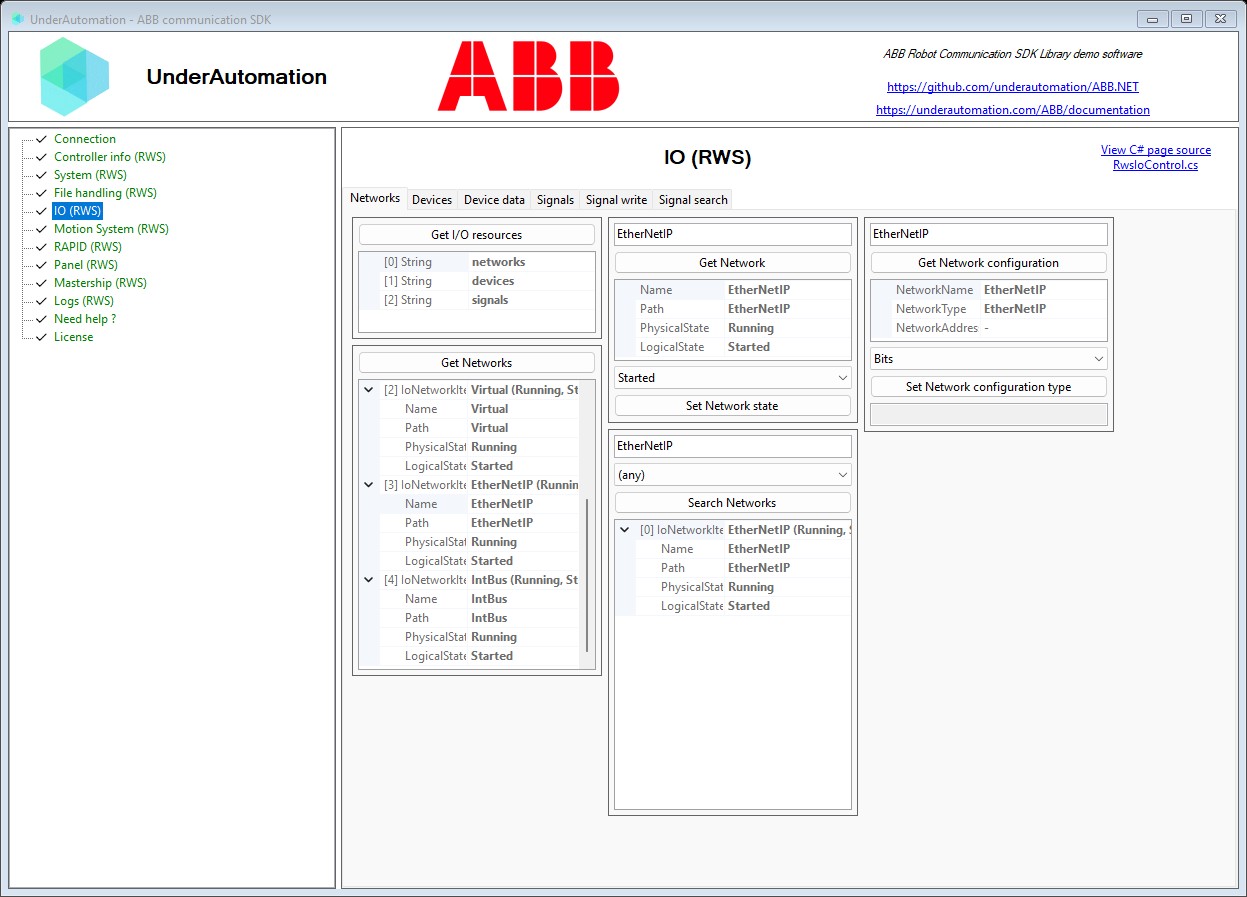
The demo application is open source. The C# source of this page is RwsIoControl.cs.