RAPID tasks & program execution
List RAPID tasks, start and stop program execution, follow the execution state, move the program pointer, load and unload modules.
- Tasks
- Activate and deactivate a task
- Build a task
- Load a module
- Start and stop the program
- Cycles and entry point
- Stop
- Hold-to-run
- Execution trace
- Program pointer and motion pointer
- Synchronization and change counters
- Call stack
- Answer an operator dialogue
- Signals renamed by the program
- Position of the robot
- Try it in the demo application
robot.Rws.Rapid is the service of the program the robot runs. This page covers the tasks the program is split into, starting and stopping the execution, and moving the program pointer. The variables of the program are on RAPID variables & symbols, the source of the modules on RAPID modules & program files.
Reading never needs anything special. Every write of this page needs the Rapid mastership, and most of them also need the controller to be in the right operation mode. None of these resources answers while the controller runs in boot mode.
Tasks
A controller runs one RAPID task per robot, plus the background tasks the system needs. GetTasks lists them all, GetTask returns everything the controller knows about one of them.
AbbController robot = new AbbController();robot.Connect("192.168.0.1");// Every RAPID task of the controllerforeach (RapidTaskItem task in robot.Rws.Rapid.GetTasks()){Console.WriteLine(task.Name); // T_ROB1Console.WriteLine(task.Type); // Normal, Static or SemiStaticConsole.WriteLine(task.TaskState); // Linked when the program is ready to runConsole.WriteLine(task.ExecutionState); // Started, Stopped, ReadyConsole.WriteLine(task.Active); // null when the controller did not report itConsole.WriteLine(task.MotionTask); // true for the task that drives the robot}// Everything the controller knows about one taskRapidTaskInfo info = robot.Rws.Rapid.GetTask("T_ROB1");Console.WriteLine(info.ExecutionLevel); // Normal, Trap, User, NoneConsole.WriteLine(info.ExecutionCycle); // Forever, Once, OnceDoneConsole.WriteLine(info.ExecutionMode); // Continuous, StepIn, StepOver, ...Console.WriteLine(info.ProductionEntryPoint);Console.WriteLine(info.Trust);robot.Disconnect();}
RapidTaskType | What the task is |
|---|---|
Normal | A task holding a program an operator starts and stops |
Static | A task started with the controller and never stopped |
SemiStatic | A task started with the controller and restarted at every program reset |
Unknown | The controller reported a type the SDK does not know |
TaskState says whether the task can run. Only Linked means that the modules of the task were turned into a runnable program. Empty means the task holds nothing, Loaded that the modules are there but not linked yet.
RapidTaskExecutionState | Meaning |
|---|---|
Ready | The task is ready to run but is not running |
Started | The task is running |
Stopped | The task was stopped before its end |
Uninitialized | The task is not usable yet |
Activate and deactivate a task
A deactivated task is not started when the program starts. The selection panel of the FlexPendant shows the same thing, GetTaskSelection reads it. UserModify says whether an operator is allowed to change the selection of that task from the pendant.
AbbController robot = new AbbController();robot.Connect("192.168.0.1");// Which tasks the operator panel has selected, and which of them an operator may changeforeach (RapidTaskSelectionItem item in robot.Rws.Rapid.GetTaskSelection()){Console.WriteLine(item.Name + " selected=" + item.Selected + " userModify=" + item.UserModify);}// Activating or deactivating a task is a write, so it needs the mastershiprobot.Rws.Mastership.Request(MastershipDomain.Rapid);try{robot.Rws.Rapid.ActivateTask("T_ROB1");robot.Rws.Rapid.DeactivateTask("T_ROB2");// Same thing for every task at oncerobot.Rws.Rapid.ActivateTasks();robot.Rws.Rapid.DeactivateTasks();}finally{robot.Rws.Mastership.Release(MastershipDomain.Rapid);}robot.Disconnect();}
GetTaskProgramPointerSyncState and GetTaskMotionPointerSyncState, listed below, are described in the program pointer section of this page.
// Activates one task (synchronous)void ActivateTask(string task);// Activates every task of the controller (synchronous)void ActivateTasks();// Deactivates one task (synchronous)void DeactivateTask(string task);// Deactivates every task of the controller (synchronous)void DeactivateTasks();// Gets everything the controller reports about one task (synchronous)RapidTaskInfo GetTask(string task);// Gets whether the motion pointer of one task is synchronized with the others (synchronous)RapidPointerSyncState GetTaskMotionPointerSyncState(string task);// Gets whether the program pointer of one task is synchronized with the others (synchronous)RapidPointerSyncState GetTaskProgramPointerSyncState(string task);// Gets the task selection panel: which tasks are selected, and which of them an operator is allowed to change the selection of (synchronous)RapidTaskSelectionItem[] GetTaskSelection();// Gets every RAPID task of the controller and what each of them is doing (synchronous)RapidTaskItem[] GetTasks();
Every method also exists in an asynchronous version, with the same name followed by Async and an optional CancellationToken.
A RAPID task of the controller, as listed by RapidService.GetTasks(). RapidService.GetTask() returns a RapidTaskInfo, which adds everything the controller reports for a single task only.
| Member | Type | Description |
|---|---|---|
RapidTaskItem() Constructor | Initializes a new instance of the RapidTaskItem class | |
Active Property | bool? | Whether the task is active, null when the controller did not report it |
ExecutionState Property | RapidTaskExecutionState | Whether the task is running, and whether it could be |
MotionTask Property | bool? | Whether the task can move a mechanical unit, null when the controller did not report it |
Name Property | string | Name of the task, for example "T_ROB1" |
TaskState Property | RapidTaskState | How far the controller has got in preparing the program of the task |
Type Property | RapidTaskType | Kind of task, which decides when the controller runs it |
ToString() Method | string | Returns a string representation of this task |
Everything the controller reports about one RAPID task. Returned by RapidService.GetTask(); the task lists only carry the properties of the RapidTaskItem base class.
| Member | Type | Description |
|---|---|---|
RapidTaskInfo() Constructor | Initializes a new instance of the RapidTaskInfo class | |
BindReference Property | bool? | Whether the task is bound to a configured task number, null when the controller did not report it |
ExecutionCycle Property | RapidExecutionCycle | Number of cycles the task is set to run. Only reported over a connection established with version 2, and left to Unknown otherwise. |
ExecutionLevel Property | RapidExecutionLevel | Level at which the code of the task is currently executing |
ExecutionMode Property | RapidTaskExecutionMode | Stepping mode the task was last started with |
ExecutionType Property | RapidExecutionType | What kind of code the task is currently running |
ProductionEntryPoint Property | string | Routine the program pointer moves to when it is reset, for example "main" |
TaskId Property | int? | Identifier of the task, null when the controller did not report it |
TaskInForeground Property | string | Name of the task running in the foreground, empty when there is none |
Trust Property | RapidTaskTrustLevel | What the controller does to the system when this task stops unexpectedly |
One line of the task selection panel, telling whether a task is selected and whether an operator is allowed to change that. Returned by RapidService.GetTaskSelection().
| Member | Type | Description |
|---|---|---|
RapidTaskSelectionItem() Constructor | Initializes a new instance of the RapidTaskSelectionItem class | |
MotionTask Property | bool? | Whether the task can move a mechanical unit, null when the controller did not report it |
Name Property | string | Name of the task, for example "T_ROB1" |
Selected Property | bool? | Whether the task is selected, null when the controller did not report it |
UserModify Property | bool? | Whether an operator is allowed to change the selection of this task, null when the controller did not report it |
ToString() Method | string | Returns a string representation of this task selection |
Kind of RAPID task, which decides when the controller runs it
| Name | Value | Description |
|---|---|---|
Normal | 1 | A task started and stopped together with the program |
SemiStatic | 3 | A task restarted from its beginning every time the controller starts |
Static | 2 | A task that keeps its program pointer where it was when the controller was switched off |
Unknown | 0 | The controller reported a type this library does not know |
How far the controller has got in preparing the program of a task
| Name | Value | Description |
|---|---|---|
Empty | 1 | The task holds no program |
Initiated | 2 | The task has been created but its program is not linked yet |
Linked | 3 | The program of the task is linked and ready to run |
Loaded | 4 | A program is loaded into the task but not linked yet |
Uninitialized | 5 | The task is not initialized |
Unknown | 0 | The controller reported a state this library does not know |
Whether a single task is running, and whether it could be
| Name | Value | Description |
|---|---|---|
Ready | 1 | The task is ready to be started |
Started | 3 | The task is running |
Stopped | 2 | The task was running and has been stopped |
Uninitialized | 4 | The task is not initialized |
Unknown | 0 | The controller reported a state this library does not know |
Stepping mode a task was last started with
| Name | Value | Description |
|---|---|---|
Continuous | 1 | The task runs without stepping |
StepBack | 5 | The task steps backwards |
StepIn | 3 | The task steps into the routine calls |
StepLast | 6 | The task steps to the last instruction |
StepOutOf | 4 | The task steps out of the current routine |
StepOver | 2 | The task steps over the routine calls |
StepWise | 7 | The task advances one instruction at a time |
Unknown | 0 | The controller reported a mode this library does not know |
What the controller does to the system when a task that is not a normal one stops unexpectedly
| Name | Value | Description |
|---|---|---|
None | 1 | The system carries on |
SystemFailure | 2 | The whole system fails |
SystemHalt | 3 | The system halts |
SystemStop | 4 | The system stops |
Unknown | 0 | The controller reported a level this library does not know |
Build a task
BuildTask links the modules a task holds into a runnable program. The controller accepts the request even when the program does not compile, so read GetBuildErrors afterwards and check that the task state became Linked.
AbbController robot = new AbbController();robot.Connect("192.168.0.1");robot.Rws.Mastership.Request(MastershipDomain.Rapid);try{// Link the modules of the task into a runnable programrobot.Rws.Rapid.BuildTask("T_ROB1");}finally{robot.Rws.Mastership.Release(MastershipDomain.Rapid);}// The controller does not fail the build request, it reports what it refused afterwardsforeach (RapidBuildError error in robot.Rws.Rapid.GetBuildErrors("T_ROB1")){Console.WriteLine(error.ModuleName + " " + error.Row + "," + error.Column + ": " + error.Error);}// The task is runnable when its state is LinkedConsole.WriteLine(robot.Rws.Rapid.GetTask("T_ROB1").TaskState);robot.Disconnect();}
The build errors are described in RAPID modules & program files.
Methods of RapidService :// Links the program of a task, which is what turns the modules it holds into something runnable (synchronous) Read GetBuildErrors() afterwards to find out what the controller refused.void BuildTask(string task);
Every method also exists in an asynchronous version, with the same name followed by Async and an optional CancellationToken.
Load a module
LoadModule loads one module file into a task. The file has to be on the file system of the controller already, so upload it first with the file system service. Set replace to true when a module of the same name is already loaded, otherwise the controller refuses the request.
AbbController robot = new AbbController();robot.Connect("192.168.0.1");robot.Rws.Mastership.Request(MastershipDomain.Rapid);try{// The file has to be on the controller already. Upload it first with robot.Rws.File.// On OmniCore the call answers the name of what was loaded, on IRC5 it answers null.string loaded = robot.Rws.Rapid.LoadModule("T_ROB1", "$HOME/mymodule.mod", true);Console.WriteLine(loaded);robot.Rws.Rapid.UnloadModule("T_ROB1", "mymodule");}finally{robot.Rws.Mastership.Release(MastershipDomain.Rapid);}robot.Disconnect();}
UnloadModule takes the name of the module, not the name of the file. A module that was never saved is lost when it is unloaded.
Loading a whole program instead of one module is done with LoadProgram, see RAPID modules & program files.
// Loads a module file into a task (synchronous)string LoadModule(string task, string modulePath, bool replace = false);// Unloads a module from a task (synchronous)void UnloadModule(string task, string module);
Every method also exists in an asynchronous version, with the same name followed by Async and an optional CancellationToken.
Start and stop the program
Starting a program from your application fails when one of these conditions is not met:
- The controller is in automatic mode, or in manual mode with the enabling device held. The mode is read with the control panel service.
- The motors are on,
Panel.SetControllerState(ControllerState.MotorsOn). - The task is active and its state is
Linked. - The program pointer is set, which
ResetProgramPointerdoes for every task. - Your connection holds the
Rapidmastership.
AbbController robot = new AbbController();robot.Connect("192.168.0.1");// 1. The controller has to be in automatic modeif (robot.Rws.Panel.GetOperationMode() != OperationMode.Automatic)throw new Exception("Turn the key of the controller to automatic mode");robot.Rws.Mastership.Request(MastershipDomain.Rapid);try{// 2. Motors onrobot.Rws.Panel.SetControllerState(ControllerState.MotorsOn);// 3. Program pointer back to the entry point of every taskrobot.Rws.Rapid.ResetProgramPointer();// 4. Startrobot.Rws.Rapid.Start(RapidRegainMode.Continue,RapidExecutionMode.Continue,RapidExecutionCycle.Forever,RapidStartCondition.None,false, // do not stop at breakpointsfalse); // normal tasks only}finally{robot.Rws.Mastership.Release(MastershipDomain.Rapid);}// 5. Check that it really started, the call above only means the request was acceptedRapidExecutionInfo execution = robot.Rws.Rapid.GetExecutionState();Console.WriteLine(execution.State); // Running or StoppedConsole.WriteLine(execution.Cycle); // Forever, Once, OnceDonerobot.Disconnect();}
Start returns as soon as the controller accepts the request, not when the robot moves. Read GetExecutionState afterwards to know what really happened.
RapidRegainMode | What the robot does when execution resumes |
|---|---|
Continue | Resume from the current position, without going back to the path |
Regain | Move back onto the path first |
Clear | Drop the path and resume from the current position |
EnterConsume | Resume by entering the path already computed |
RapidExecutionMode | How far the program advances |
|---|---|
Continue | Run until something stops it |
StepIn | Enter the routine called by the current instruction |
StepOver | Run the current instruction whole, without entering the routine it calls |
StepOut | Run until the current routine returns |
StepBack | Step one instruction backwards |
StepLast | Step to the last instruction |
StepMotion | Step to the next motion instruction |
RapidStartCondition.CallChain asks the controller to start only when the call chain of the program pointer is still valid, which is a way to refuse a start after the source was edited.
Cycles and entry point
SetExecutionCycle takes Once or Forever, the other values of the enum are only reported by the controller. StartFromProductionEntry starts at the production entry point of the task instead of the current program pointer.
AbortExecutionLevel leaves the routine running now and goes back to the level under it. This is how a trap or a service routine started by hand is abandoned without stopping the program below it.
AbbController robot = new AbbController();robot.Connect("192.168.0.1");robot.Rws.Mastership.Request(MastershipDomain.Rapid);try{// Only Once and Forever are accepted hererobot.Rws.Rapid.SetExecutionCycle(RapidExecutionCycle.Once);// Start from the production entry point instead of the current program pointerrobot.Rws.Rapid.StartFromProductionEntry();// Leave the routine that is running now and go back to the level below it.// This is how a trap or a service routine is abandoned without stopping the program under it.robot.Rws.Rapid.AbortExecutionLevel("T_ROB1");}finally{robot.Rws.Mastership.Release(MastershipDomain.Rapid);}robot.Disconnect();}
Stop
AbbController robot = new AbbController();robot.Connect("192.168.0.1");// Stop at the end of the current instruction, normal tasks onlyrobot.Rws.Rapid.Stop(RapidStopMode.Stop, RapidTaskScope.Normal);// Let the robot finish the cycle it is in, then stoprobot.Rws.Rapid.Stop(RapidStopMode.Cycle, RapidTaskScope.Normal);// Stop everything at once, including the static and semi static tasksrobot.Rws.Rapid.Stop(RapidStopMode.QuickStop, RapidTaskScope.AllTasks);// Wait until the controller confirms the program is stoppedwhile (robot.Rws.Rapid.GetExecutionState().State != RapidExecutionState.Stopped)System.Threading.Thread.Sleep(200);robot.Disconnect();}
RapidStopMode | How the program stops |
|---|---|
Cycle | At the end of the current cycle |
Instruction | At the end of the current instruction |
Stop | As soon as the robot can decelerate along its path |
QuickStop | As fast as the robot can, leaving the path |
RapidTaskScope.Normal stops the normal tasks only, AllTasks also stops the static and semi static ones. Stop returns before the robot has stopped, so wait until GetExecutionState reports Stopped.
Hold-to-run
In manual mode the program only runs while a client keeps saying that the hold-to-run control is held. Send Press, then Held about every two seconds. The controller stops the program as soon as it stops hearing from your application.
AbbController robot = new AbbController();robot.Connect("192.168.0.1");// Manual mode only. Press, then keep sending Held, the controller stops the// program as soon as it stops hearing from your application.robot.Rws.Rapid.SetHoldToRun(RapidHoldToRunState.Press);robot.Rws.Rapid.Start(RapidRegainMode.Continue, RapidExecutionMode.Continue);for (int i = 0; i < 10; i++){robot.Rws.Rapid.SetHoldToRun(RapidHoldToRunState.Held);System.Threading.Thread.Sleep(1000);}robot.Rws.Rapid.SetHoldToRun(RapidHoldToRunState.Release);robot.Disconnect();}
This is only honoured by a virtual controller, and only for a client the controller considers local. A real cabinet expects the physical device.
A complete example, with the checks around it, is given in Start & stop a RAPID program.
Methods of RapidService :// Abandons the routine the task is currently running and returns to the level below it (synchronous) This is how a trap or a service routine started by hand is left without stopping the program underneath it.void AbortExecutionLevel(string task);// Gets whether the controller is executing RAPID code, and how many cycles it is set to run (synchronous)RapidExecutionInfo GetExecutionState();// Moves the program pointer of every task back to the entry point of its program (synchronous)void ResetProgramPointer();// Sets how many times the program runs before stopping (synchronous)void SetExecutionCycle(RapidExecutionCycle cycle);// Drives the hold-to-run control that lets the program run in manual mode (synchronous) Send RapidHoldToRunState.Press to allow execution to start, then RapidHoldToRunState.Held about every two seconds to keep it running; the controller stops the program as soon as it stops hearing from the client. Send RapidHoldToRunState.Release to stop it at once.void SetHoldToRun(RapidHoldToRunState state);// Starts executing the RAPID program from where the program pointer stands (synchronous) The controller has to be in automatic mode with the motors on, or in manual mode with the enabling device held. Reset the program pointer first with RapidService.ResetProgramPointer to start from the beginning.void Start(RapidRegainMode regain = RapidRegainMode.Continue, RapidExecutionMode executionMode = RapidExecutionMode.Continue, RapidExecutionCycle cycle = RapidExecutionCycle.Forever, RapidStartCondition condition = RapidStartCondition.None, bool stopAtBreakpoint = false, bool allTasksBySelection = false);// Starts executing from the production entry point of the program rather than from where the program pointer stands (synchronous)void StartFromProductionEntry();// Starts recording the RAPID execution trace into a file (synchronous) The trace names every instruction the controller runs, which is what it takes to find out why a program took a branch it should not have.void StartSpy(string logFile);// Stops the RAPID execution (synchronous)void Stop(RapidStopMode stopMode = RapidStopMode.Stop, RapidTaskScope scope = RapidTaskScope.Normal);// Stops recording the RAPID execution trace (synchronous)void StopSpy();
Every method also exists in an asynchronous version, with the same name followed by Async and an optional CancellationToken.
Overall RAPID execution state of the controller. Returned by RapidService.GetExecutionState().
| Member | Type | Description |
|---|---|---|
RapidExecutionInfo() Constructor | Initializes a new instance of the RapidExecutionInfo class | |
Cycle Property | RapidExecutionCycle | Number of cycles the program is set to run |
State Property | RapidExecutionState | Whether RAPID code is currently running |
ToString() Method | string | Returns a string representation of this execution state |
Whether the controller is currently executing RAPID code
| Name | Value | Description |
|---|---|---|
Running | 1 | RAPID execution is running |
Stopped | 2 | RAPID execution is stopped |
Unknown | 0 | The controller reported a state this library does not know |
How many times the controller runs the program before stopping
| Name | Value | Description |
|---|---|---|
AsIs | 2 | The cycle currently configured is left untouched |
Forever | 1 | The program runs again every time it reaches its end |
Once | 3 | The program runs once and stops at its end |
OnceDone | 4 | The program was asked to run once and has finished doing so |
Unknown | 0 | The controller reported a cycle this library does not know |
How far the program advances when execution is started
| Name | Value | Description |
|---|---|---|
Continue | 0 | Run until something stops it |
StepBack | 4 | Step one instruction backwards |
StepIn | 1 | Step into the routine called by the current instruction |
StepLast | 5 | Step to the last instruction |
StepMotion | 6 | Step to the next motion instruction |
StepOut | 3 | Run until the current routine returns |
StepOver | 2 | Run the current instruction whole, without entering the routine it calls |
What the robot does about the distance between where it stands and where the path it is about to resume expects it to be
| Name | Value | Description |
|---|---|---|
Clear | 2 | Drop the path and resume from the current position |
Continue | 0 | Resume from the current position without moving back to the path |
EnterConsume | 3 | Resume by entering the consumption of the already generated path |
Regain | 1 | Move back onto the path before resuming |
How abruptly RAPID execution is stopped
| Name | Value | Description |
|---|---|---|
Cycle | 0 | Stop when the current cycle ends |
Instruction | 1 | Stop when the current instruction ends |
QuickStop | 3 | Stop as fast as the robot can, leaving the path |
Stop | 2 | Stop as soon as the robot can decelerate along its path |
Condition the controller checks before it starts executing
| Name | Value | Description |
|---|---|---|
CallChain | 1 | Start only when the call chain of the program pointer is still valid |
None | 0 | Start without any additional check |
Whether an execution command applies to the normal tasks only or to every task
| Name | Value | Description |
|---|---|---|
AllTasks | 1 | Apply to every task of the system |
Normal | 0 | Apply to the tasks the task selection panel has enabled |
State of the hold-to-run control that gates RAPID execution in manual mode
| Name | Value | Description |
|---|---|---|
Held | 1 | Confirm that execution may keep running, which has to be repeated about every two seconds |
Press | 0 | Ask for execution to be allowed to start |
Release | 2 | Stop execution immediately |
Execution trace
The controller can write every instruction it runs into a file. It is the fastest way to find out why a program took a branch it should not have. The two calls take the mastership by themselves, your code does not have to.
AbbController robot = new AbbController();robot.Connect("192.168.0.1");// The trace names every instruction the controller runs. No mastership needed,// the controller takes it by itself for these two calls.robot.Rws.Rapid.StartSpy("$HOME/trace.log");Console.WriteLine(robot.Rws.Rapid.GetSpyStatus()); // Logging or NotLoggingSystem.Threading.Thread.Sleep(5000);robot.Rws.Rapid.StopSpy();// Then download the file with the file servicestring trace = robot.Rws.File.GetFileAsText("$HOME/trace.log");Console.WriteLine(trace);robot.Disconnect();}
The file is written on the controller, download it afterwards with the file system service. A trace grows fast, do not leave it running.
Execution trace of RapidService :// Gets whether the controller is recording the RAPID execution trace to a file (synchronous)RapidSpyStatus GetSpyStatus();
Every method also exists in an asynchronous version, with the same name followed by Async and an optional CancellationToken.
Whether the controller is recording the RAPID execution trace to a file
| Name | Value | Description |
|---|---|---|
Logging | 1 | The execution trace is being written |
NotLogging | 2 | No execution trace is being written |
Unknown | 0 | The controller reported a status this library does not know |
Program pointer and motion pointer
Each task has two pointers. The program pointer says which instruction runs next, the motion pointer which one the robot is really executing. They drift apart because the controller plans the path ahead of the movement.
AbbController robot = new AbbController();robot.Connect("192.168.0.1");// Where the two pointers of the task standRapidPointers pointers = robot.Rws.Rapid.GetPointers("T_ROB1");if (pointers.ProgramPointer.Available){Console.WriteLine(pointers.ProgramPointer.Module + "/" + pointers.ProgramPointer.Routine);Console.WriteLine(pointers.ProgramPointer.BeginRow + "," + pointers.ProgramPointer.BeginColumn);}// The motion pointer is behind the program pointer, the controller plans the path// ahead of the movement. It is not available in a task that has not moved yet.Console.WriteLine(pointers.MotionPointer.Available);// The piece of source the program pointer covers. The controller refuses the request// when the task has no program pointer, reset it or start the program first.RapidProgramCounterPosition position = robot.Rws.Rapid.GetProgramCounterPosition("T_ROB1");Console.WriteLine(position.Module + " " + position.StartLine + "," + position.StartColumn);// Moving the pointer is a write, it needs the RAPID mastershiprobot.Rws.Mastership.Request(MastershipDomain.Rapid);try{// To the beginning of a routine. The module name is used by an IRC5 only,// an OmniCore looks the routine up in the whole task.robot.Rws.Rapid.SetProgramPointerToRoutine("T_ROB1", "MainModule", "main");// To a service routine, which has to be entered at user levelrobot.Rws.Rapid.SetProgramPointerToRoutineUrl("T_ROB1", "RAPID/T_ROB1/BASEFUN/LoadIdentify", true);// To one position of the source. The routine name is used by an IRC5 only,// an OmniCore works it out from the position itself.robot.Rws.Rapid.SetProgramPointerToCursor("T_ROB1", "MainModule", "main", 12, 1);// One instruction forward or backward, automatic mode onlyrobot.Rws.Rapid.SetProgramPointerToNextInstruction("T_ROB1");robot.Rws.Rapid.SetProgramPointerToPreviousInstruction("T_ROB1");}finally{robot.Rws.Mastership.Release(MastershipDomain.Rapid);}robot.Disconnect();}
SetProgramPointerToRoutine takes a module name and SetProgramPointerToCursor a routine name. An IRC5 refuses the request without them, an OmniCore ignores them and finds the routine by itself. Pass them in both cases, your code then works on the two generations.
A few things to know before moving the pointer:
- Moving the pointer needs the
Rapidmastership, and the program has to be stopped. SetProgramPointerToNextInstructionandSetProgramPointerToPreviousInstructionare refused outside automatic mode.- A service routine has to be entered at user level, so pass
trueforuserLevel.GetServiceRoutinesgives the pathsSetProgramPointerToRoutineUrltakes. GetProgramCounterPositionis refused when the task has no program pointer at all. Reset it or start the program first.GetProgramreturns the name of the program the task holds and the routineResetProgramPointergoes back to.
Synchronization and change counters
GetProgramPointerSyncState and GetMotionPointerSyncState say whether the pointers of the tasks are synchronized with each other, for the whole controller or for one task. GetStructuralChangeCount returns two counters that only move when something changed in the task, which is cheaper than downloading the modules again to find out that nothing moved.
AbbController robot = new AbbController();robot.Connect("192.168.0.1");// For the whole controllerRapidPointerSyncState program = robot.Rws.Rapid.GetProgramPointerSyncState();RapidPointerSyncState motion = robot.Rws.Rapid.GetMotionPointerSyncState();Console.WriteLine(program + " / " + motion); // On or Off// For one taskConsole.WriteLine(robot.Rws.Rapid.GetTaskProgramPointerSyncState("T_ROB1"));Console.WriteLine(robot.Rws.Rapid.GetTaskMotionPointerSyncState("T_ROB1"));// Two counters that say whether anything changed in the task, cheaper than// downloading the modules again to find out that nothing movedRapidStructuralChangeCount counters = robot.Rws.Rapid.GetStructuralChangeCount("T_ROB1");Console.WriteLine(counters.ChangeCount);Console.WriteLine(counters.StructuralChangeCount);robot.Disconnect();}
// Gets whether the motion pointers of every task are synchronized with each other (synchronous)RapidPointerSyncState GetMotionPointerSyncState();// Gets where the program pointer and the motion pointer of a task stand (synchronous) The program pointer says which instruction runs next, the motion pointer which one the robot is actually executing; they drift apart because the controller plans the path ahead of the movement.RapidPointers GetPointers(string task);// Gets the program loaded into a task (synchronous)RapidProgramInfo GetProgram(string task);// Gets which piece of source the program pointer of a task points at (synchronous)RapidProgramCounterPosition GetProgramCounterPosition(string task);// Gets whether the program pointers of every task are synchronized with each other (synchronous)RapidPointerSyncState GetProgramPointerSyncState();// Gets the two counters a task keeps of what has changed in it (synchronous) Comparing them with what a previous reading gave is cheaper than fetching the modules again to find out that nothing moved.RapidStructuralChangeCount GetStructuralChangeCount(string task);// Moves the program pointer of a task to a position of a module (synchronous)void SetProgramPointerToCursor(string task, string module, string routine, int row, int column);// Moves the program pointer of a task forward by one instruction (synchronous)void SetProgramPointerToNextInstruction(string task);// Moves the program pointer of a task back by one instruction (synchronous)void SetProgramPointerToPreviousInstruction(string task);// Moves the program pointer of a task to the beginning of a routine (synchronous)void SetProgramPointerToRoutine(string task, string module, string routine, bool userLevel = false);// Moves the program pointer of a task to a routine named by its path (synchronous) This is what the paths GetServiceRoutines() reports are for.void SetProgramPointerToRoutineUrl(string task, string routineUrl, bool userLevel = false);
Every method also exists in an asynchronous version, with the same name followed by Async and an optional CancellationToken.
The program pointer and the motion pointer of a task, read in one request. Returned by RapidService.GetPointers(). The program pointer says which instruction runs next, the motion pointer which one the robot is actually executing; they drift apart because the controller plans the path ahead of the movement.
| Member | Type | Description |
|---|---|---|
RapidPointers() Constructor | Initializes a new instance of the RapidPointers class | |
MotionPointer Property | RapidPointerPosition | Instruction the robot is currently moving for |
ProgramPointer Property | RapidPointerPosition | Instruction the task will execute next |
ToString() Method | string | Returns a string representation of the two pointers |
Where one of the two pointers of a task stands. Carried by RapidPointers. Available tells apart a pointer that is really placed somewhere from one the controller could not report, which happens for the motion pointer whenever the task has not moved yet.
| Member | Type | Description |
|---|---|---|
RapidPointerPosition() Constructor | Initializes a new instance of the RapidPointerPosition class | |
Available Property | bool | Whether the controller reported a position for this pointer at all |
BeginColumn Property | int? | Column the pointer begins at, null when the controller did not report it |
BeginRow Property | int? | Line the pointer begins at, null when the controller did not report it |
ChangeCount Property | int? | How many times the pointer has been moved, null when the controller did not report it |
EndColumn Property | int? | Column the pointer ends at, null when the controller did not report it |
EndRow Property | int? | Line the pointer ends at, null when the controller did not report it |
ExecutionType Property | RapidExecutionType | What kind of code the pointer is standing in |
Module Property | string | Name of the module the pointer stands in |
Routine Property | string | Name of the routine the pointer stands in |
ToString() Method | string | Returns a string representation of this pointer position |
Where the program pointer of a task stands, expressed as the piece of source it points at. Returned by RapidService.GetProgramCounterPosition(). The controller refuses the request when the task has no program pointer set, so reset it or start the program first.
| Member | Type | Description |
|---|---|---|
RapidProgramCounterPosition() Constructor | Initializes a new instance of the RapidProgramCounterPosition class | |
EndColumn Property | int? | Column the pointed instruction ends at, null when the controller did not report it |
EndLine Property | int? | Line the pointed instruction ends at, null when the controller did not report it |
Module Property | string | Name of the module the pointer stands in |
Routine Property | string | Name of the routine the pointer stands in |
StartColumn Property | int? | Column the pointed instruction starts at, null when the controller did not report it |
StartLine Property | int? | Line the pointed instruction starts at, null when the controller did not report it |
ToString() Method | string | Returns a string representation of this position |
Whether the pointers of every task are synchronized with each other
| Name | Value | Description |
|---|---|---|
Off | 2 | The pointers are not synchronized |
On | 1 | The pointers are synchronized |
Unknown | 0 | The controller reported a state this library does not know |
The two counters a task keeps of what has changed in it, so that a client can tell whether it needs to read the task again instead of fetching everything periodically. Returned by RapidService.GetStructuralChangeCount().
| Member | Type | Description |
|---|---|---|
RapidStructuralChangeCount() Constructor | Initializes a new instance of the RapidStructuralChangeCount class | |
ChangeCount Property | int? | Counter the controller increments whenever anything relevant changes in the task |
StructuralChangeCount Property | int? | Counter the controller increments when a module is loaded, unloaded or renamed. A rename counts as an unload followed by a load. |
ToString() Method | string | Returns a string representation of these counters |
What kind of code a task is currently running
| Name | Value | Description |
|---|---|---|
EventRoutine | 6 | An event routine is running |
ExternalInterrupt | 4 | An external interrupt is running |
Interrupt | 3 | An interrupt is running |
None | 1 | Nothing is running |
Normal | 2 | The normal program is running |
Unknown | 0 | The controller reported a type this library does not know |
UserRoutine | 5 | A user routine is running |
Call stack
GetActivationRecord reads one frame of the call stack. Frame 1 holds the program pointer, and the number grows towards the entry point of the program. The controller refuses the request when the task has no program pointer, or when the stack is not that deep.
AbbController robot = new AbbController();robot.Connect("192.168.0.1");// Frame 1 is the one holding the program pointer, the number grows towards the entry pointfor (int frame = 1; frame <= 5; frame++){RapidActivationRecord record = robot.Rws.Rapid.GetActivationRecord("T_ROB1", frame);Console.WriteLine(record.RoutineUrl);Console.WriteLine(record.BeginRow + "," + record.BeginColumn);Console.WriteLine(record.ExecutionLevel);}// The routines the program pointer may be moved to, service routines includedforeach (RapidServiceRoutineItem routine in robot.Rws.Rapid.GetServiceRoutines("T_ROB1")){Console.WriteLine(routine.Name + " -> " + routine.Url + " service=" + routine.IsServiceRoutine);}robot.Disconnect();}
RapidExecutionLevel | Where execution stands |
|---|---|
Normal | In the program itself |
Trap | In a trap routine |
User | In a routine started by hand, such as a service routine |
None | Nothing is running at this level |
Unknown | The controller reported a level the SDK does not know |
// Gets one frame of the call stack of a task: which routine is running and where execution stands in it (synchronous)RapidActivationRecord GetActivationRecord(string task, int stackFrame = 1);// Gets the routines of a task the program pointer can be moved to (synchronous)RapidServiceRoutineItem[] GetServiceRoutines(string task, int? start = null, int? limit = null);
Every method also exists in an asynchronous version, with the same name followed by Async and an optional CancellationToken.
One frame of the call stack of a task: which routine is running and where the execution stands in it. Returned by RapidService.GetActivationRecord(). Frame 1 is the routine holding the program pointer, and the number grows towards the entry point of the program.
| Member | Type | Description |
|---|---|---|
RapidActivationRecord() Constructor | Initializes a new instance of the RapidActivationRecord class | |
BeginColumn Property | int? | Column the executing statement starts at, null when the controller did not report it |
BeginRow Property | int? | Line the executing statement starts at, null when the controller did not report it |
EndColumn Property | int? | Column the executing statement ends at, null when the controller did not report it |
EndRow Property | int? | Line the executing statement ends at, null when the controller did not report it |
ExecutionLevel Property | RapidExecutionLevel | Level at which this frame is executing |
RoutineUrl Property | string | Path of the routine this frame is executing |
StackUrl Property | string | Path identifying this stack frame, which the UI instruction resources also take |
ToString() Method | string | Returns a string representation of this stack frame |
A routine of a task the program pointer can be moved to. Returned by RapidService.GetServiceRoutines().
| Member | Type | Description |
|---|---|---|
RapidServiceRoutineItem() Constructor | Initializes a new instance of the RapidServiceRoutineItem class | |
IsServiceRoutine Property | bool? | Whether this is a service routine rather than an ordinary one, null when the controller did not report it |
Name Property | string | Name of the routine, for example "LoadIdentify" |
Url Property | string | Path of the routine, which RapidService.SetProgramPointerToRoutineUrl() takes |
ToString() Method | string | Returns a string representation of this routine |
Level at which the code of a task is currently executing
| Name | Value | Description |
|---|---|---|
None | 1 | Nothing is executing |
Normal | 2 | The normal user code is executing |
Trap | 3 | A trap routine is executing |
Unknown | 0 | The controller reported a level this library does not know |
User | 4 | A user routine is executing |
Answer an operator dialogue
A RAPID program can stop and ask the operator something. The controller then reports one pending instruction, and the program waits until it is answered. GetActiveUiInstruction returns null when nothing is pending.
AbbController robot = new AbbController();robot.Connect("192.168.0.1");// Null when the program is not asking the operator for anything right nowRapidUiInstruction question = robot.Rws.Rapid.GetActiveUiInstruction();if (question != null){Console.WriteLine(question.Instruction); // name of the RAPID instruction waitingConsole.WriteLine(question.Message);Console.WriteLine(question.Event); // Send, Post or Abort// What the program passed in, and what it is waiting for. The names of the// parameters depend on the instruction, so read them before writing one.foreach (RapidUiInstructionParameter parameter inrobot.Rws.Rapid.GetUiInstructionParameters(question.StackUrl)){Console.WriteLine(parameter.Name + " = " + parameter.Value);}// Answering is a write, so it needs the mastershiprobot.Rws.Mastership.Request(MastershipDomain.Rapid);try{// Write the parameter carrying the answer, then the one marking it as completedrobot.Rws.Rapid.SetUiInstructionParameter(question.StackUrl, "TPCompleted", "TRUE");}finally{robot.Rws.Mastership.Release(MastershipDomain.Rapid);}Console.WriteLine(robot.Rws.Rapid.GetUiInstructionParameter(question.StackUrl, "TPCompleted"));}robot.Disconnect();}
The names of the parameters depend on the instruction the program used, so read them with GetUiInstructionParameters before writing one. The answer is written first, then the parameter marking the dialogue as completed. Writing a parameter needs the Rapid mastership, and fails when the instruction is no longer pending.
// Gets the dialogue a running RAPID program is currently asking an operator for (synchronous) Answering it means writing its parameters with String%2cSystem.String), addressed by the path this returns.RapidUiInstruction GetActiveUiInstruction();// Gets the value of one parameter of a pending UI instruction (synchronous)string GetUiInstructionParameter(string stackUrl, string parameter);// Gets every parameter of a pending UI instruction: what the program passed in, and what it is waiting for (synchronous)RapidUiInstructionParameter[] GetUiInstructionParameters(string stackUrl);// Answers a pending UI instruction by writing one of its parameters (synchronous) An instruction is normally answered by writing the parameter carrying the answer and then the one marking it as completed.void SetUiInstructionParameter(string stackUrl, string parameter, string value);
Every method also exists in an asynchronous version, with the same name followed by Async and an optional CancellationToken.
The dialogue a running RAPID program is currently asking an operator for. Returned by RapidService.GetActiveUiInstruction(), which returns null when no instruction is pending. Answering one means writing its parameters with RapidService.SetUiInstructionParameter(), using StackUrl to address them.
| Member | Type | Description |
|---|---|---|
RapidUiInstruction() Constructor | Initializes a new instance of the RapidUiInstruction class | |
Event Property | RapidUiInstructionEvent | What the instruction is asking of the client |
ExecutionLevel Property | RapidExecutionLevel | Level at which the instruction is executing |
Instruction Property | string | Name of the RAPID instruction that opened the dialogue, for example "TPReadNum" |
Message Property | string | Text the instruction displays |
StackUrl Property | string | Path identifying the call, which the parameter methods take |
ToString() Method | string | Returns a string representation of this instruction |
One parameter of the pending UI instruction: what the program passed in, or what it is waiting for. Returned by RapidService.GetUiInstructionParameters(). The parameters carrying the answer are the ones to write, typically named after a function key or after the completion flag of the instruction.
| Member | Type | Description |
|---|---|---|
RapidUiInstructionParameter() Constructor | Initializes a new instance of the RapidUiInstructionParameter class | |
Name Property | string | Name of the parameter, for example "TPCompleted" |
Value Property | string | Value of the parameter, written the way RAPID writes it |
ToString() Method | string | Returns a string representation of this parameter |
What a UI instruction is asking of the client
| Name | Value | Description |
|---|---|---|
Abort | 3 | The instruction has been abandoned and no answer is expected any more |
Post | 2 | The instruction only displays something and expects no answer |
Send | 1 | The instruction is waiting for an answer |
Unknown | 0 | The controller reported an event this library does not know |
Signals renamed by the program
A RAPID program can give another name to an I/O signal. GetAliasIo lists these names as long as the program declaring them is loaded. The signals themselves are read and written with the I/O service.
AbbController robot = new AbbController();robot.Connect("192.168.0.1");// The signals a loaded program gave another name to. Empty when no program declares any.foreach (RapidAliasIoItem alias in robot.Rws.Rapid.GetAliasIo()){Console.WriteLine(alias.AliasName + " -> " + alias.SignalName + " (" + alias.Type + ")");}robot.Disconnect();}
// Gets the I/O signals a running RAPID program has given an alias to (synchronous)RapidAliasIoItem[] GetAliasIo(int? start = null, int? limit = null);
Every method also exists in an asynchronous version, with the same name followed by Async and an optional CancellationToken.
An I/O signal a running RAPID program has given an alias to with the AliasIO instruction. Returned by RapidService.GetAliasIo(). The controller only knows about an alias while the program that declares it is loaded, so this list is empty on a controller holding no such program.
| Member | Type | Description |
|---|---|---|
RapidAliasIoItem() Constructor | Initializes a new instance of the RapidAliasIoItem class | |
AliasName Property | string | Name the RAPID program refers to the signal by |
SignalName Property | string | Name of the I/O signal the alias points at |
Type Property | IoSignalType | Type of the aliased signal |
ToString() Method | string | Returns a string representation of this alias |
Position of the robot
The position of the robot, its mechanical units and the external axes of a task are read from the motion system service.
Try it in the demo application
Everything on this page can be tried without writing code, in the RAPID (RWS) page of the demo application.
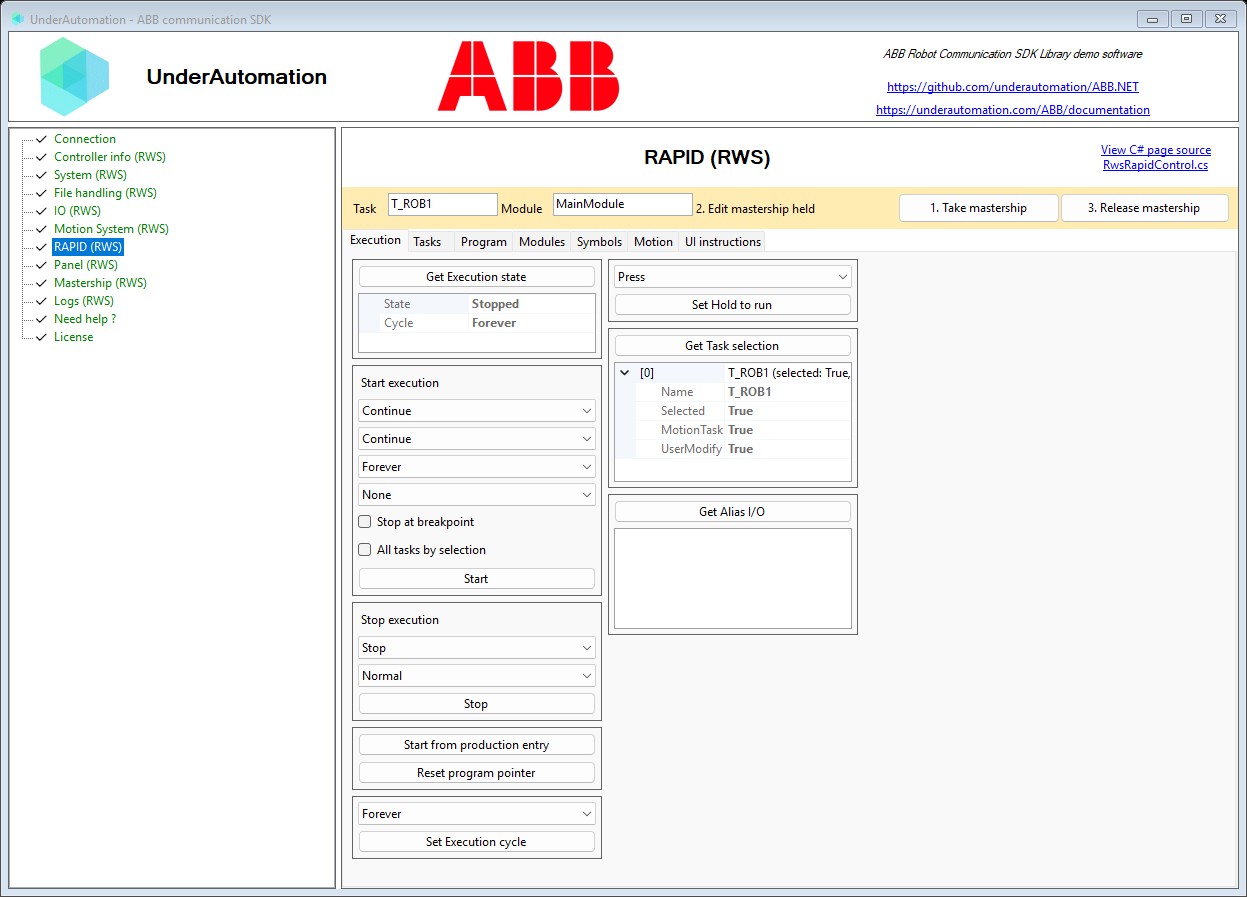
The demo application is open source. The C# source of this page is RwsRapidControl.cs.