Control panel & operation mode
Read and change the operation mode, the controller state (motors on/off), the speed ratio, and the collision detection state.
robot.Rws.Panel is the control panel of the controller. It reads and changes what an operator sees on the teach pendant: the operating mode, the state of the motors, the speed the programs run at, and the collision detection.
Operating mode
GetOperationMode returns the mode currently selected on the controller. The mode decides what a remote client is allowed to do. A program is normally started from the network in automatic mode only.
OperationMode | Meaning |
|---|---|
Automatic | Automatic mode, the program runs without an operator in the cell |
ManualReducedSpeed | Manual mode, the operator holds the enabling device |
ManualFullSpeed | Manual mode at full speed |
AutomaticChangeRequest | The change to automatic mode is waiting for an acknowledgement |
ManualFullSpeedChangeRequest | The change to manual full speed is waiting for an acknowledgement |
Init | The controller is starting |
Undefined, Unknown | The controller reports no mode, or one this library does not know |
The mode itself is selected with the key on the cabinet, an application cannot change it. What the SDK can do is confirm a change the operator has already started, with AcknowledgeOperationMode.
AbbController robot = new AbbController();robot.Connect("192.168.0.1");OperationMode mode = robot.Rws.Panel.GetOperationMode();switch (mode){case OperationMode.Automatic:Console.WriteLine("Automatic mode, a program can be started remotely");break;case OperationMode.ManualReducedSpeed:case OperationMode.ManualFullSpeed:Console.WriteLine("Manual mode, the operator holds the enabling device");break;case OperationMode.AutomaticChangeRequest:// The key was turned to automatic, the change waits for a confirmationrobot.Rws.Panel.AcknowledgeOperationMode(OperationModeAcknowledgement.Automatic);break;case OperationMode.ManualFullSpeedChangeRequest:robot.Rws.Panel.AcknowledgeOperationMode(OperationModeAcknowledgement.ManualFullSpeed);break;}robot.Disconnect();}
The controller refuses the acknowledgement when no change is waiting for one, and when the connected client is not the local client of the controller. Both cases give an RwsException.
OperationModeAcknowledgement.CollisionDetection uses the same method to confirm a collision, see below.
Mode selector lock
The mode selector can be locked with a pin code, so that the mode cannot be changed until the same code is given back.
OperationModeLockState | Meaning |
|---|---|
Unlocked | The operating mode can be changed freely |
Locked | Locked, UnlockOperationMode releases it with the pin code it was locked with |
PermanentlyLocked | Locked for good, the pin code no longer releases it |
PendingPermanentLock | A permanent lock was asked for and is not effective yet |
Error, Unknown | The controller reports an error on the lock, or a state this library does not know |
AbbController robot = new AbbController();robot.Connect("192.168.0.1");OperationModeLockState lockState = robot.Rws.Panel.GetOperationModeLockState();Console.WriteLine($"Mode selector : {lockState}");if (lockState == OperationModeLockState.Unlocked){// Four digits, needed again to unlock the selectorrobot.Rws.Panel.LockOperationMode("1234");}else if (lockState == OperationModeLockState.Locked){robot.Rws.Panel.UnlockOperationMode("1234");}// A permanent lock cannot be released with UnlockOperationModerobot.Rws.Panel.LockOperationMode("1234", true);robot.Disconnect();}
The pin code is exactly four digits, the SDK throws an ArgumentException for anything else. The permanent lock needs the grant to lock the safety controller configuration on the user account.
A controller built without the key-less mode selector option answers 403 on the three lock methods, including the read. The SDK catches that case and explains it in the message of the RwsException, because the controller error only says that an option is missing.
Motors on and off
GetControllerState reports whether the robot can move. SetControllerState accepts MotorsOn and MotorsOff only, the other values are read only states of the controller and passing one throws an ArgumentException.
ControllerState | Meaning |
|---|---|
MotorsOn | The robot is ready to move, by jogging or by running a program |
MotorsOff | Standby, there is no power on the motors |
Init | The controller is starting, it goes to MotorsOff when it is up |
GuardStop | Stopped because the safety runchain is open, for example a cell door |
EmergencyStop | Stopped by the emergency stop |
EmergencyStopReset | The emergency stop is released, the transition is not confirmed yet |
SystemFailure | The controller needs a restart |
Unknown | The state could not be determined |
AbbController robot = new AbbController();robot.Connect("192.168.0.1");ControllerState state = robot.Rws.Panel.GetControllerState();Console.WriteLine($"Controller state : {state}");if (state == ControllerState.MotorsOff){// The robot can move once the motors are onrobot.Rws.Panel.SetControllerState(ControllerState.MotorsOn);}// The state change is not immediate, wait for the controller to report itwhile (robot.Rws.Panel.GetControllerState() != ControllerState.MotorsOn){Thread.Sleep(200);}// Motors off puts the robot back in standby, it cannot move any morerobot.Rws.Panel.SetControllerState(ControllerState.MotorsOff);robot.Disconnect();}
The controller answers before the state has really changed. Read the state again until it reports MotorsOn, as in the example above, instead of assuming the robot is ready right after the call.
Speed ratio
The speed ratio is the percentage of their programmed speed the programs run at. GetSpeedRatio returns it, SetSpeedRatio changes it.
AbbController robot = new AbbController();robot.Connect("192.168.0.1");int speedRatio = robot.Rws.Panel.GetSpeedRatio();Console.WriteLine($"The programs run at {speedRatio} % of their programmed speed");// Percentage between 0 and 100, accepted in automatic mode onlyrobot.Rws.Panel.SetSpeedRatio(25);// Take the mastership yourself when several writes follow each otherrobot.Rws.Mastership.Request();robot.Rws.Panel.SetSpeedRatio(100, false);robot.Rws.Mastership.Release();robot.Disconnect();}
The value is between 0 and 100, the controller answers 400 for anything else. The controller accepts the change in automatic mode.
On an OmniCore, writing the speed ratio needs the mastership. The SDK takes it for the time of the request, this is what the useImplicitMastership argument does. Set it to false when your own code already holds the mastership, otherwise the controller refuses a second request on a domain you already hold. An IRC5 needs no mastership here and ignores the argument.
Collision detection
GetCollisionDetectionState tells whether the robot stopped because it touched something.
CollisionDetectionState | Meaning |
|---|---|
Init | No collision since the controller started |
Triggered | A collision was detected and is waiting to be confirmed |
Confirmed | A detected collision was confirmed |
TriggeredAcknowledged | A detected collision was acknowledged by an operator |
Unknown | The state could not be determined |
AbbController robot = new AbbController();robot.Connect("192.168.0.1");CollisionDetectionState state = robot.Rws.Panel.GetCollisionDetectionState();if (state == CollisionDetectionState.Triggered || state == CollisionDetectionState.Confirmed){Console.WriteLine("A collision was detected, the robot is stopped");// Acknowledge the collision from the applicationrobot.Rws.Panel.AcknowledgeOperationMode(OperationModeAcknowledgement.CollisionDetection);}robot.Disconnect();}
A collision is acknowledged with AcknowledgeOperationMode, the same method as an operating mode change, with OperationModeAcknowledgement.CollisionDetection.
Language and restart
SetLanguage changes the language the controller writes its messages in, with a two letter code such as en, de or sv. The language must be installed on the controller, otherwise the request fails. The controller service changes the same setting with its own SetLanguage, either one can be used.
Restart restarts the controller. The control panel accepts Restart, IStart, PStart and BStart. Use robot.Rws.Controller.Restart for the other modes, they are described on the controller page.
AbbController robot = new AbbController();robot.Connect("192.168.0.1");// Language the controller reports its messages in.// The language must be installed on the controller.robot.Rws.Panel.SetLanguage("en");// Warm restart. The connection is lost as soon as the controller shuts down.robot.Rws.Panel.Restart(ControllerRestartMode.Restart);robot.Disconnect();}}
The connection is lost as soon as the controller starts shutting down. A call that succeeded is normally followed by failing requests until the controller is up again, so disconnect right after it and connect again later. On an OmniCore the restart needs the mastership on every domain, taken implicitly by default like for the speed ratio.
Try it in the demo application
Everything on this page can be tried without writing code, in the Panel (RWS) page of the demo application.
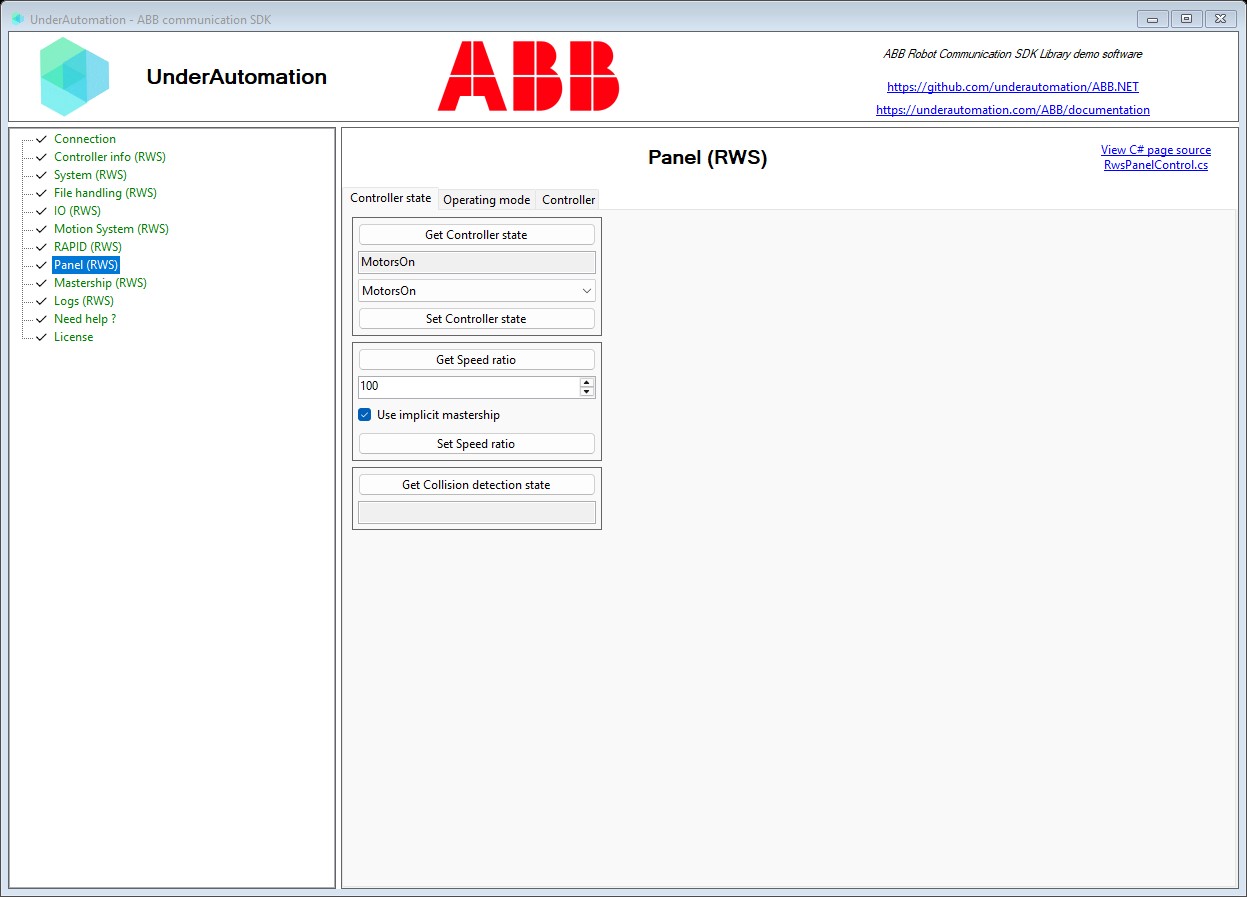
The demo application is open source. The C# source of this page is RwsPanelControl.cs.
API reference
Methods of PanelService :// Confirms a pending operating mode change (synchronous) The controller waits for this confirmation whenever the mode selector is turned, unless it is configured to acknowledge the change on its own.void AcknowledgeOperationMode(OperationModeAcknowledgement acknowledgement);// Gets the collision detection state of the controller (synchronous)CollisionDetectionState GetCollisionDetectionState();// Gets the state of the controller (synchronous)ControllerState GetControllerState();// Gets the operating mode the controller runs in (synchronous)OperationMode GetOperationMode();// Gets the lock state of the operating mode selector (synchronous)OperationModeLockState GetOperationModeLockState();// Gets the speed ratio the controller runs the programs at (synchronous)int GetSpeedRatio();// Locks the operating mode selector with a pin code (synchronous)void LockOperationMode(string pin, bool permanent = false);// Restarts the controller (synchronous)void Restart(ControllerRestartMode mode, bool useImplicitMastership = true);// Turns the motors of the robot on or off (synchronous)void SetControllerState(ControllerState state);// Sets the language the controller reports its messages in (synchronous)void SetLanguage(string languageCode);// Sets the speed ratio the controller runs the programs at (synchronous) Only accepted while the controller runs in automatic mode.void SetSpeedRatio(int speedRatio, bool useImplicitMastership = true);// Releases the lock of the operating mode selector (synchronous)void UnlockOperationMode(string pin);
Every method also exists in an asynchronous version, with the same name followed by Async and an optional CancellationToken.
Operating mode selected on the robot controller
| Name | Value | Description |
|---|---|---|
Automatic | 6 | Automatic mode |
AutomaticChangeRequest | 2 | A change to the automatic mode has been requested and is waiting to be acknowledged |
Init | 1 | The controller is initializing |
ManualFullSpeed | 5 | Manual mode at full speed |
ManualFullSpeedChangeRequest | 3 | A change to the manual full speed mode has been requested and is waiting to be acknowledged |
ManualReducedSpeed | 4 | Manual mode at reduced speed |
Undefined | 7 | The controller reports an undefined operating mode |
Unknown | 0 | The operating mode could not be determined |
Pending change that an operating mode acknowledgement confirms
| Name | Value | Description |
|---|---|---|
Automatic | 0 | Confirms the switch to the automatic mode |
CollisionDetection | 2 | Confirms a collision detection |
ManualFullSpeed | 1 | Confirms the switch to the manual full speed mode |
Lock state of the operating mode selector
| Name | Value | Description |
|---|---|---|
Error | 1 | The controller reports an error on the mode selector lock |
Locked | 3 | The operating mode is locked and can be unlocked again with the pin code it was locked with |
PendingPermanentLock | 5 | A permanent lock has been requested and is not effective yet |
PermanentlyLocked | 4 | The operating mode is permanently locked |
Unknown | 0 | The lock state could not be determined |
Unlocked | 2 | The operating mode can be changed freely |
State of the robot controller, as reported by the control panel
| Name | Value | Description |
|---|---|---|
EmergencyStop | 5 | The robot is stopped because the emergency stop was activated |
EmergencyStopReset | 6 | The robot is ready to leave the emergency stop state: the emergency stop is no longer activated, but the state transition is not confirmed yet. |
GuardStop | 4 | The robot is stopped because the safety runchain is opened, for instance because a door of its cell is open |
Init | 1 | The robot is starting up. It will shift to MotorsOff once it has started. |
MotorsOff | 2 | The robot is in a standby state where there is no power to its motors. The state has to be shifted to MotorsOn before the robot can move. |
MotorsOn | 3 | The robot is ready to move, either by jogging or by running programs |
SystemFailure | 7 | The robot is in a system failure state and requires a restart |
Unknown | 0 | The state could not be determined |
State of the collision detection of the robot controller
| Name | Value | Description |
|---|---|---|
Confirmed | 3 | A detected collision has been confirmed |
Init | 1 | No collision has been detected since the controller started |
Triggered | 2 | A collision has been detected and is waiting to be confirmed |
TriggeredAcknowledged | 4 | A detected collision has been acknowledged by an operator |
Unknown | 0 | The collision detection state could not be determined |
Restart mode of the robot controller
| Name | Value | Description |
|---|---|---|
BStart | 5 | The controller will be restarted. The last automatically saved system state will be loaded. Should be used to recover from a system crash. |
IStart | 3 | The controller will be restarted. The current system parameter settings and RAPID programs will be discarded, and the original system installation settings will be used. |
PStart | 4 | The controller will be restarted. The current RAPID programs and data will be discarded, but not the system parameter settings. |
Restart | 0 | The controller will be restarted. The state is saved and any changed system parameter settings will be activated after the restart. |
Shutdown | 1 | The main computer will be shut down. Should be used if the controller UPS is broken. |
XStart | 2 | The controller will be restarted and the Boot Application will be started. The current system is saved and deactivated (the controller is non-functional, for advanced maintenance only). |