Event log
Read the controller event log, filter by domain and language, get the arguments of a message, and clear the log.
robot.Rws.Elog reads the event log of the controller, the same list of events the operator sees on the teach pendant. It is the first place to look when the robot stopped and you do not know why.
The log is split in domains. Each domain keeps its own messages, in a buffer of a fixed size, and the oldest message is dropped when the buffer is full.
Domains
GetDomains lists the domains of the controller with the number of messages each one holds. The number of a domain is what every other method of the service takes as its first argument.
AbbController robot = new AbbController();robot.Connect("192.168.0.1");// Pass a language to get the names of the domainsElogDomain[] domains = robot.Rws.Elog.GetDomains("en");foreach (ElogDomain item in domains){Console.WriteLine($"{item.Number} {item.Name}: {item.MessageCount}/{item.BufferSize}");}// The counters of one domain, without its nameElogDomain domain = robot.Rws.Elog.GetDomain(1);Console.WriteLine(domain.MessageCount);Console.WriteLine(domain.BufferSize);robot.Disconnect();}
Pass a language code to get the names of the domains, for example Common, Operational or Safety. Without a language the names are null and only the numbers and the counters are read, which is faster. The common domain is always there, the other ones depend on the options installed on the controller.
GetDomain reads the counters of one domain. The controller does not report the name there, read it from GetDomains.
Read messages
GetMessages returns the messages of one domain. The SDK reads the pages of the answer for you and returns one array, so a domain holding hundreds of messages is read in one call.
AbbController robot = new AbbController();robot.Connect("192.168.0.1");// The 20 most recent messages of the domain 1, with their full text in EnglishElogMessage[] messages = robot.Rws.Elog.GetMessages(1, ElogMessageOrder.NewestFirst, "en", 20);foreach (ElogMessage message in messages){Console.WriteLine($"{message.Timestamp:yyyy-MM-dd HH:mm:ss} [{message.Type}] {message.Code} {message.Title}");}// Titles only, much faster on a domain holding hundreds of messagesElogMessage[] titles = robot.Rws.Elog.GetMessageTitles(1, "en", ElogMessageOrder.NewestFirst, 50);// The oldest messages first, without any text, so no language is neededElogMessage[] oldest = robot.Rws.Elog.GetMessages(1, ElogMessageOrder.OldestFirst, null, 10);foreach (ElogMessage message in oldest){Console.WriteLine($"{message.SequenceNumber} {message.Code} {message.Type} {message.SourceName}");}robot.Disconnect();}
| Argument | Effect |
|---|---|
domain | Number of the domain, from GetDomains |
order | NewestFirst or OldestFirst |
language | Two letter code of the language of the texts, null to skip the texts |
maxCount | Stops the reading early, which is what a "latest events" view needs |
Leave language null when you only need the code, the severity and the timestamp of each event. The controller then sends much less text, and the texts of ElogMessage stay null.
GetMessageTitles is the middle ground: it returns the short text of each message and leaves out the long texts and the arguments. On a busy domain it is a lot faster than GetMessages.
ElogMessageType | Meaning |
|---|---|
Information | State change or informational event |
Warning | Warning event |
Error | Error event |
Unknown | The controller reports a severity this library does not know |
Code is the number printed on the teach pendant for that kind of event. SequenceNumber identifies the message inside its domain, and the messages are numbered in the order they were logged, so a higher number is a more recent message.
Read one message
GetMessage returns one message with everything the controller knows about it: the long description, the consequences for the robot, the probable causes, the actions to take, and the arguments.
AbbController robot = new AbbController();robot.Connect("192.168.0.1");// One message of a domain, from its sequence numberElogMessage message = robot.Rws.Elog.GetMessage(1, 42, "en");Console.WriteLine(message.Title);Console.WriteLine(message.Description);Console.WriteLine(message.Consequences);Console.WriteLine(message.Causes);Console.WriteLine(message.Actions);// The values the controller substitutes into the text of the messageforeach (ElogMessageArgument argument in message.Arguments){Console.WriteLine($"{argument.Index}: {argument.Value} ({argument.Type})");}// OmniCore only: the same message, without naming the domain it belongs toElogMessage direct = robot.Rws.Elog.GetMessageBySequenceNumber(42, "en");robot.Disconnect();}
The arguments are the values the controller substitutes into the text of the message, for example the name of the task that was started. Each one carries its position in the message, its type as reported by the controller and its value as text.
GetMessageBySequenceNumber reads a message without naming its domain. Only an OmniCore exposes it. On an IRC5 the SDK throws an RwsException that says to use GetMessage with the domain instead.
Clear and export the log
ClearMessages empties one domain, ClearAllMessages empties them all. The messages are gone for good, the controller keeps no copy of what it cleared. ClearAllMessages leaves the internal domain the controller reserves for itself untouched.
AbbController robot = new AbbController();robot.Connect("192.168.0.1");// Delete every message of one domainrobot.Rws.Elog.ClearMessages(1);// Delete every message of every domainrobot.Rws.Elog.ClearAllMessages();// Ask the controller to write the whole event log to one file of its own file system.// The call returns before the file is complete.robot.Rws.Elog.SaveInSystemDumpFormat("$temp/elog.txt");// Read the result back with the file servicestring dump = robot.Rws.File.GetFileAsText("$temp/elog.txt");robot.Disconnect();}
SaveInSystemDumpFormat asks the controller to write the whole event log to one file of its own file system. This is the format ABB support asks for. The controller accepts the request and writes the file afterwards, so the call returns before the file is complete. Read the destination with the file system service to know when it is there, and to bring it back on your PC.
Try it in the demo application
Everything on this page can be tried without writing code, in the Logs (RWS) page of the demo application.
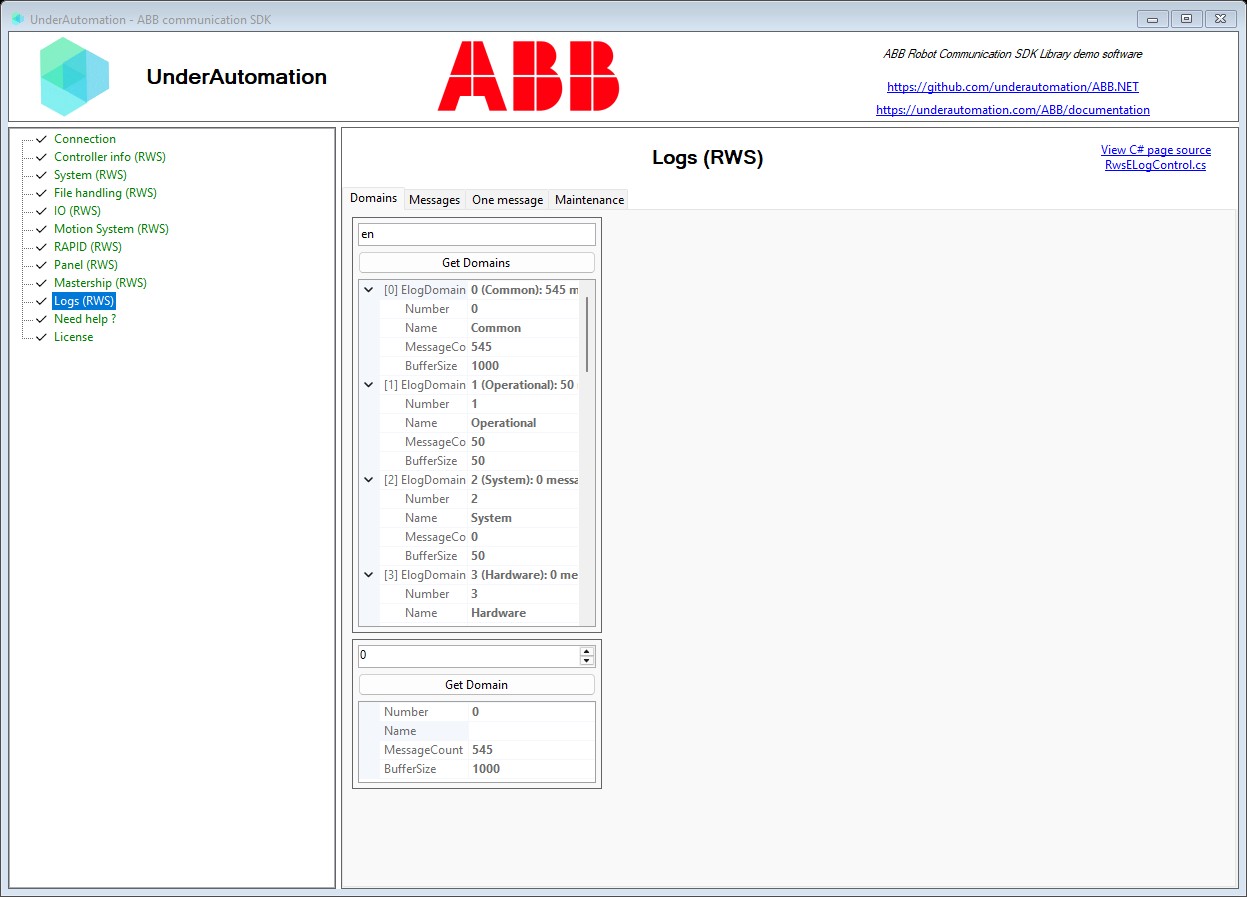
The demo application is open source. The C# source of this page is RwsELogControl.cs.
API reference
Methods of ElogService :// Deletes every message of every event log domain (synchronous)void ClearAllMessages();// Deletes every message of one event log domain (synchronous)void ClearMessages(int domain);// Gets the number of messages one event log domain holds and the number it can hold (synchronous)ElogDomain GetDomain(int domain);// Gets every event log domain of the controller, with the number of messages each one holds (synchronous)ElogDomain[] GetDomains(string language = null);// Gets one message of an event log domain (synchronous)ElogMessage GetMessage(int domain, int sequenceNumber, string language = null);// Gets one message from its sequence number alone, without naming the domain it belongs to (synchronous)ElogMessage GetMessageBySequenceNumber(int sequenceNumber, string language = null);// Gets the messages held by one event log domain, with their short text only (synchronous)ElogMessage[] GetMessageTitles(int domain, string language, ElogMessageOrder order = ElogMessageOrder.NewestFirst, int? maxCount = null);// Gets the messages held by one event log domain (synchronous)ElogMessage[] GetMessages(int domain, ElogMessageOrder order = ElogMessageOrder.NewestFirst, string language = null, int? maxCount = null);// Asks the controller to write the whole event log to one file on its own file system (synchronous)void SaveInSystemDumpFormat(string path);
Every method also exists in an asynchronous version, with the same name followed by Async and an optional CancellationToken.
One event log domain of the controller, for example the common, the operational or the safety log. Returned by ElogService.GetDomains() and ElogService.GetDomain().
| Member | Type | Description |
|---|---|---|
ElogDomain() Constructor | Initializes a new instance of the ElogDomain class | |
BufferSize Property | int? | Number of messages the domain can hold before the oldest ones are discarded, null when the controller did not report it |
MessageCount Property | int? | Number of messages currently held by the domain, null when the controller did not report it |
Name Property | string | Name of the domain, for example "Operational" or "Safety". Only filled when a language was asked for, null otherwise. |
Number Property | int | Number identifying the domain, which is the value to pass to the methods reading its messages |
ToString() Method | string | Returns a string representation of this domain |
One message of the controller event log. Returned by ElogService.GetMessages(), ElogService.GetMessageTitles(), ElogService.GetMessage() and ElogService.GetMessageBySequenceNumber(). The texts (Title, Description, Consequences, Causes and Actions) are only filled when a language was asked for.
| Member | Type | Description |
|---|---|---|
ElogMessage() Constructor | Initializes a new instance of the ElogMessage class | |
Actions Property | string | Text describing the recommended actions. Only filled when a language was asked for. |
ArgumentCount Property read only | int | Number of arguments of the message |
Arguments Property | ElogMessageArgument[] | Values the controller substitutes into the text of the message |
Causes Property | string | Text describing the probable causes of the event. Only filled when a language was asked for. |
Code Property | int? | Number identifying the kind of event, the one printed on the teach pendant |
Consequences Property | string | Text describing what the event implies for the robot. Only filled when a language was asked for. |
Description Property | string | Long text describing what happened. Only filled when a language was asked for. |
DomainNumber Property | int? | Number of the domain the message belongs to, null when the controller did not report it |
SequenceNumber Property | int? | Number identifying the message inside its domain. Messages are numbered in the order they were logged, so a higher number is a more recent message. |
SourceName Property | string | Part of the controller that logged the message, for example "MC0" |
Timestamp Property | DateTime? | Moment the event was logged, null when the controller did not report it |
Title Property | string | Short text of the message. Only filled when a language was asked for. |
Type Property | ElogMessageType | Severity of the message |
ToString() Method | string | Returns a string representation of this message |
One argument of an event log message. The arguments are the values the controller substitutes into the text of the message, for example the name of the task that was started. Held by Arguments.
| Member | Type | Description |
|---|---|---|
ElogMessageArgument() Constructor | Initializes a new instance of the ElogMessageArgument class | |
Index Property | int | Position of the argument in the message, starting at 1 |
Type Property | string | Type of the argument reported by the controller, for example "string", "long" or "float" |
Value Property | string | Value of the argument, always as text |
ToString() Method | string | Returns a string representation of this argument |
Severity of an event log message
| Name | Value | Description |
|---|---|---|
Error | 3 | Error event |
Information | 1 | State change, or informational event |
Unknown | 0 | The message type could not be determined |
Warning | 2 | Warning event |