CGTP overview
CGTP is an HTTP-based protocol providing the richest feature set: program management, variables, registers, I/O, kinematics, batch operations, and file access.
CGTP is the web server running on Fanuc robots (port 80/3080). It provides HTTP-based access to programs, variables, registers, I/O, positions, and files.
Key features
- Program management: Create, delete, rename, run, pause, abort programs
- Variables & registers: Read/write any variable, numeric/position/string registers
- I/O control: Read, write, simulate, and unsimulate I/O ports
- Position reading: Read current Cartesian and joint positions
- Online kinematics: Forward and inverse kinematics on the controller
- Batch operations: Read/write groups of registers and variables in one request
- Comments: Read/write register, I/O, and user alarm descriptions
- File access: List and download controller files via HTTP
- KCL commands: Execute KCL commands over CGTP, in place of Telnet KCL
Quick example
using UnderAutomation.Fanuc;using UnderAutomation.Fanuc.Common;using UnderAutomation.Fanuc.Cgtp;public class Cgtp{public static void Main(){FanucRobot robot = new FanucRobot();ConnectionParameters parameters = new ConnectionParameters("192.168.0.1");parameters.Cgtp.Enable = true;robot.Connect(parameters);// Read a variableCgtpVariableValue var = robot.Cgtp.ReadVariable("$RMT_MASTER");int rmtMaster = var.IntegerValue;// Write a variablerobot.Cgtp.WriteVariable("$RMT_MASTER", 1);// Read a numeric register with commentNumericRegisterWithComment reg = robot.Cgtp.ReadNumericRegisterWithComment(1);// Read I/Oint di1 = robot.Cgtp.ReadIo(CgtpIoPortType.DI, 1);// Write I/Orobot.Cgtp.WriteIo(CgtpIoPortType.DO, 1, 1);// Read current Cartesian positionCartesianPosition pos = robot.Cgtp.ReadCartesianPosition();// Run a programrobot.Cgtp.RunProgram("MY_PROGRAM");}}
Robot options
CGTP does not require any additional options. The robot typically listens on port 80 or 3080.
Most features require firmware V8.30 or later. Some features (program management, position reading) require V9.10+.
Firmware compatibility
| Feature | Min. firmware |
|---|---|
| Variable read/write | V8.30 |
| I/O read/write/simulate | V8.30 |
| Program management | V9.10 |
| Position reading | V9.10 |
| Program execution (Run) | V9.30 |
| KCL commands with a result | V8.30 |
| KCL commands without result (Unsafe) | V9.30 |
| File listing | V9.40 |
Connection
static void Main(){// Via FanucRobotvar robot = new FanucRobot();var parameters = new ConnectionParameters("192.168.0.1");parameters.Cgtp.Enable = true; // enabled by defaultparameters.Cgtp.Port = 80; // default portparameters.Cgtp.RequestTimeoutMs = 3000; // default timeoutrobot.Connect(parameters);// Or standalonevar cgtp = new CgtpClient();cgtp.Connect("192.168.0.1");}}
Authentication
Some robots require authentication. Pass credentials during connection:
FanucRobot robot = new FanucRobot();var parameters = new ConnectionParameters("192.168.0.1");// Via FanucRobotparameters.Cgtp.Login = "admin";parameters.Cgtp.Password = "password";robot.Connect(parameters);// Or standalonevar cgtp = new CgtpClient();cgtp.Connect("192.168.0.1", login: "admin", password: "password");}}
KCL over CGTP
CGTP provides an embedded KCL client accessible via robot.Cgtp.Kcl. It executes the KCL commands of robot.Telnet without a Telnet connection, and replaces Telnet KCL for new developments:
FanucRobot robot = new FanucRobot();robot.Connect("192.168.0.1");robot.Cgtp.Kcl.SetVariable("$RMT_MASTER", 1);TaskInformationResult taskInfo = robot.Cgtp.Kcl.GetTaskInformation("MY_PROGRAM");robot.Cgtp.Kcl.AddBreakpoint("MY_PROGRAM", line: 10);}}
Some commands (Run, Pause, Abort...) return no result through CGTP. See KCL commands.
Try it in the demo application
Everything on this page can be tried without writing code, in the CGTP page of the demo application.
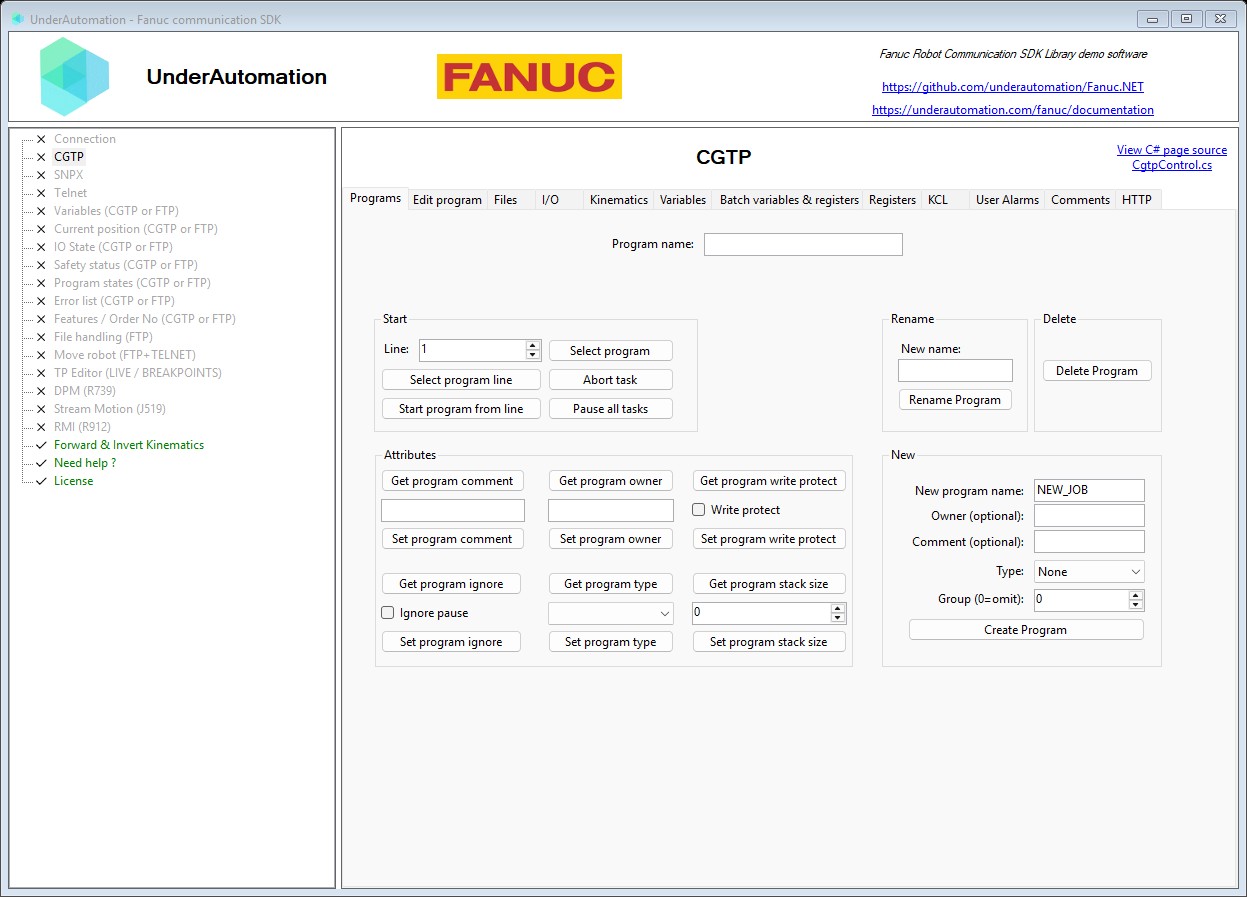
The demo application is open source. The C# source of this page is CgtpControl.cs.
Next steps
- Program management : Create, run, pause, abort programs
- Registers & variables : Read/write registers and variables
- Inputs & Outputs : Read, write, simulate I/O
- Position & kinematics : Read position, FK/IK
- Alarms, comments & files : Comments, user alarms, file listing
- KCL commands : KCL commands in place of Telnet KCL
API reference
Standalone CGTP Web Server client for direct use without FanucRobot.
| Member | Type | Description |
|---|---|---|
CgtpClient() Constructor | Creates a new instance of the CGTP Web Server client. | |
Connect(string, int, int, string, string) Method | void | Connect to the CGTP Web Server on the controller.
|
Base implementation for the CGTP Web Server client.
| Member | Type | Description |
|---|---|---|
CgtpClientBase() Constructor | ||
Enabled Property read only | bool | Indicates whether the client is currently connected to the CGTP Web Server. |
Http Property read only | CgtpHttpClient | Provides methods to download and decode files from the controller via HTTP. |
Kcl Property read only | CgtpKclClient | KCL client for executing KCL commands over CGTP. Use it instead of the Telnet KCL client, which is a legacy protocol. Some commands are sent in Unsafe mode: the controller returns no status, so the result cannot tell if the command was executed. To start a program, prefer RunProgram(). |
Language Property | Languages | Controller language (default is English) |
AbortTask(string) Method | void | Abort the task specified by progName. Set to null to abort all user tasks. From firmware 9.10 |
ChangeActiveProgram(string) Method | void | Change the active TP program to progName. From firmware 9.10 |
CreateProgram(string, string, string, int, CgtpProgramSubType) Method | void | Create a new TP program on the controller. From firmware 9.10
|
DeleteProgram(string) Method | void | Delete the program progName from the controller. From firmware 9.10
|
DeleteSourceLines(string, int, int) Method | void | Delete count lines starting at lineNum in program progName. From firmware 9.10 |
Disconnect() Method | void | Disconnect from the CGTP Web Server. After calling this method, the client must be reconnected before it can be used again. |
ForwardKinematics(int, JointsPosition, int, int) Method | CartesianPosition | Compute the forward kinematics on the controller: convert joint angles to a Cartesian position.
|
GetComments(CgtpCommentType) Method | string[] | Read all comments for the specified element type. For I/O types (RI, RO, DI, DO, GI, GO, AI, AO), returns the input or output comments accordingly.
|
GetFileAsString(string) Method | string | Download the content of a file from the controller as a string. From firmware 9.10
|
GetIoComments(CgtpCommentIoType) Method | IOComments | Read all I/O comments for the specified I/O type.
|
GetIoSimulationStatus(CgtpIoPortType, int) Method | bool | Check whether I/O port at index of type portType is simulated. From firmware 8.30 |
GetProgramComment(string) Method | string | Get the comment of program progName. From firmware 9.10 |
GetProgramIgnorePause(string) Method | bool | Get whether program progName ignores pause requests. From firmware 9.10 |
GetProgramOwner(string) Method | string | Get the owner of program progName. From firmware 9.10 |
GetProgramStackSize(string) Method | int | Get the stack size of program progName. From firmware 9.10 |
GetProgramSubType(string) Method | CgtpProgramSubType | Get the sub-type of program progName. From firmware 9.10 |
GetProgramWriteProtect(string) Method | bool | Get whether program progName is write-protected. From firmware 9.10 |
InsertSourceLine(string, string, int) Method | void | Insert a source line before lineNum in program progName. From firmware 9.10 |
InvertKinematics(int, CartesianPosition, int, int) Method | JointsPosition | Compute the inverse kinematics on the controller: convert a Cartesian position to joint angles.
|
ListFiles(string) Method | string[] | List files at the specified path on the controller. From firmware 9.40 |
ListPrograms(CgtpProgramType, CgtpProgramSubType) Method | string[] | List all TP or Karel programs on the controller
|
ListTpPrograms() Method | string[] | List all TP programs on the controller, regardless of their sub-type. |
PauseAllPrograms() Method | void | Pause program execution on the controller. From firmware 9.10 |
ReadBatchVariables(CgtpBatchVariables) Method | CgtpBatchReadResult | Read multiple variables from the controller in a single batch operation. Each variable in variables will be updated with the value read from the controller.
|
ReadCartesianPosition(int) Method | CartesianPosition | Read the current Cartesian position of motion group groupNum. From firmware 9.10 |
ReadIo(CgtpIoPortType, int) Method | int | Read the value of I/O port at index of type portType. From firmware 8.30 |
ReadJointPosition(int) Method | JointsPosition | Read the current joint angles of motion group groupNum. From firmware 9.10 |
ReadNumericRegisterWithComment(int) Method | NumericRegisterWithComment | Read the numeric register (R[]) at index. From firmware 9.10 |
ReadNumericRegistersWithComment() Method | NumericRegisterWithComment[] | Read all numeric registers (R[]) with their comments and values. |
ReadPositionRegisterWithComment(int, int) Method | PositionRegisterWithComment | Read the position register (PR[]) at index for motion group groupNum. From firmware 9.10 |
ReadStringRegistersWithComment() Method | StringRegisterWithComment[] | Read all string registers (SR[]) with their comments and values. |
ReadUserAlarms() Method | UserAlarmDefinition[] | Read all user alarm definitions with their comments and severity. |
ReadVariable(string, string) Method | CgtpVariableValue | Read the typed value of variable varName in program progName. From firmware 9.10
|
ReadVariableAsString(string, string) Method | string | Read the value of variable varName in program progName. From firmware 9.10 |
RenameProgram(string, string) Method | void | Rename program sourceName to newName. From firmware 9.10 |
ReplaceSourceLine(string, string, int) Method | void | Replace the source line at lineNum in program progName. From firmware 9.10 |
RunProgram(string, int) Method | void | Run the specified program starting at lineNum. From firmware 9.30 |
SelectProgram(string, int) Method | void | Open the TP program progName and move cursor to lineNum. From firmware 9.10 |
SetComment(CgtpCommentType, int, string) Method | void | Set the comment of a register or I/O port identified by type and index.
|
SetProgramComment(string, string) Method | void | Set the comment of program progName. From firmware 9.10 |
SetProgramIgnorePause(string, bool) Method | void | Set whether program progName ignores pause requests. From firmware 9.10 |
SetProgramOwner(string, string) Method | void | Set the owner of program progName. From firmware 9.10 |
SetProgramPosition(string, int, Position) Method | void | Set position at index positionIndex in program progName to the given position. Supports both joint and Cartesian representations. Only the first motion group is supported via CGTP. From firmware 9.10
|
SetProgramPositionToCurrentCartesianPosition(string, int, int) Method | CartesianPosition | Set position at index positionIndex to the current Cartesian position in program progName and return the updated position. |
SetProgramStackSize(string, int) Method | void | Set the stack size of program progName. From firmware 9.10 |
SetProgramSubType(string, CgtpProgramSubType) Method | void | Set the sub-type of program progName. From firmware 9.10 |
SetProgramWriteProtect(string, bool) Method | void | Set whether program progName is write-protected. From firmware 9.10 |
SetUserAlarmSeverity(int, int) Method | void | Set the severity of a user alarm.
|
SimulateIo(CgtpIoPortType, int) Method | void | Set I/O port at index of type portType to simulated. From firmware 8.30 |
UnsimulateIo(CgtpIoPortType, int) Method | void | Remove simulation from I/O port at index of type portType. From firmware 8.30 |
WriteBatchVariables(CgtpBatchVariables) Method | CgtpBatchWriteResult | Write multiple variables to the controller in a single batch operation.
|
WriteIo(CgtpIoPortType, int, int) Method | void | Set the value of I/O port at index of type portType. From firmware 8.30 |
WriteNumericRegisterAsDouble(int, double) Method | void | Write a real (double) value to numeric register R[ index].
|
WriteNumericRegisterAsInteger(int, int) Method | void | Write an integer value to numeric register R[ index].
|
WritePositionRegisterAsCartesian(int, CartesianPosition, int) Method | void | Write a cartesian position value to a position register (PR[])
|
WritePositionRegisterAsJoint(int, JointsPosition, int) Method | void | Write a joint position value to a position register (PR[])
|
WriteStringRegister(int, string) Method | void | Write a string value to string register SR[ index].
|
WriteVariable(string, double, string) Method | void | Write a real (double) value to variable varName in program progName. From firmware 8.30 |
WriteVariable(string, int, string) Method | void | Write an integer value to variable varName in program progName. From firmware 8.30 |
WriteVariable(string, string, string) Method | void | Write value to variable varName in program progName. From firmware 8.30 |