Navigate across a robot
Go to definition, find references and workspace symbols across the programs of a robot, the index of every controller made in the background, Index This Robot, the warning for a program that is not there, and the Variable Map with the free and used indexes.
This page explains how to follow a program, a register, a variable or a signal across all the files of a robot: go to definition, find references, workspace symbols, TouchUp: Index This Robot, the warning for a program that is not in the robot, and the Variable Map. It works for Fanuc TP programs (.ls) and Yaskawa INFORM jobs (.jbi, CIOPRG.LST). Nothing needs a license or a connection: TouchUp reads files, it writes nothing.
What a robot is
A robot is a folder with its programs: a folder of your workspace, or a backup. The folders of your workspace are read when you ask for something that needs more than one file. The controllers you declared are read in the background, see below.
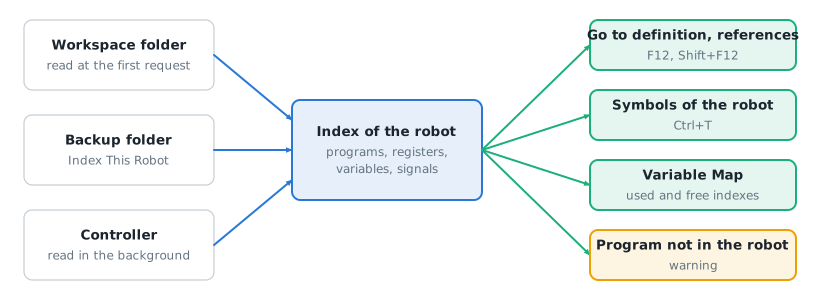
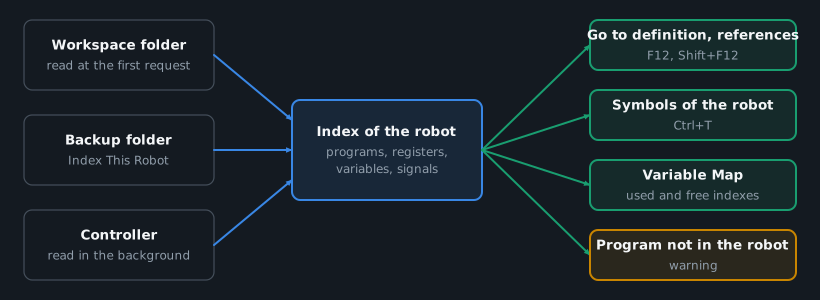
A Fanuc R[5] and a Yaskawa R005 are never the same thing, and the R[5] of another robot is not listed.
Go to definition, find references and symbols
Put the cursor on a name and press F12 to go to where it is defined, or Shift+F12 to list where it is used. Ctrl+T searches a symbol in all the robots.
| Name | Go to definition | Find references |
|---|---|---|
A called program (CALL PICK, RUN, CALL JOB:PICK, JUMP JOB:) | The /PROG or //NAME of each file that defines it | The calls and the definitions |
A register, a variable or an output (R[5], PR[1], DO[3], B005, P001), a ladder register M010 | Where it is written. A register has no declaration, and one that is only read has no definition | Every read and write, the disabled lines included |
A signal (IN#(5), OT#(1), #10010 of CIOPRG.LST) | Where it is written, also by a group that covers it (OG#(1) for OT#(1)) | The uses of the relay in the jobs and in the ladder, also through the groups, bytes and words that cover it |
The labels and the positions of a file are still followed inside the file, see Edit a program.
Ctrl+T lists the programs at their definition, and every other name once, at its first write or its first use, written as in the program: R[5], B005, IN#(5). Type the characters in order: R5 finds R[5]. The list stops at 1,000 symbols.
The text you are editing counts before you save it.
The index of your controllers
You do not have to ask for the index of a controller. TouchUp makes it for you, so that go to definition, find references and the Variable Map work on the programs of the controller as soon as you need them. It only reads: nothing is written to the controller.
- At startup. TouchUp loads what it kept of the last session for every controller you declared, the last one you used first. A controller that has no such copy uses its latest TouchUp backup, when there is one. This works for a controller that is not connected.
- After a connection. When a controller connects, TouchUp downloads its program files in the background. The first time it downloads all of them, then only the files that changed. You can keep working.
- After a save or a send. A program you save on the controller, or send to it, is downloaded again alone.
- When you come back to the window. After a few minutes away, TouchUp compares each connected controller with what it has, and downloads the files that changed. You see nothing unless a file changed.
- Before a cross-reference. When you use go to definition, find references or
Ctrl+T, and the last check of the controller is older than 1 minute, TouchUp checks its files again. The answer comes at once from the index it has, and the index is updated when the check ends. A controller is checked once a minute at most, and a controller that does not answer changes nothing: you see no message.
While TouchUp downloads, the status bar shows Indexing Cell 3 Fanuc with the percentage. The item says paused (transfer) while a backup, a comparison or a write to the same controller runs, and goes on after it. Click the item to cancel.
The tooltip of a controller in the Controllers view tells where its index comes from and when: Robot index: downloaded 24 files, 2026-11-03 10:42, cache of the last session, ... or last backup, ....
A failure never interrupts you. When the controller cannot be read, TouchUp uses what it kept of the last session, or the latest backup. When there is neither, a warning says that the controller could not be indexed, with two buttons: Index a Folder, which runs TouchUp: Index This Robot, and Retry.
The setting touchup.index.onConnect (on by default) turns all of this off: with it off, TouchUp indexes a controller only when you run TouchUp: Index This Robot from Controller.
Index This Robot
A folder of your workspace is read the first time you use one of the commands above on one of its files, or Ctrl+T. It takes about 2 seconds for 200 files. To read another folder, for example a backup, run TouchUp: Index This Robot:
- Choose a folder of your workspace, or
Choose a folder (a backup)...and pick the folder in the dialog. A folder from a USB backup or a MotoSim folder works too. - A notification shows the progress, then the counts: for example
3 files, 17 symbols, 0 errors.
The command is also in the context menu of a backup of the Backups view and of a folder of the Explorer: it does not ask for a folder then.
A new Index This Robot replaces the folder of the previous one: one robot on demand at a time, beside the folders of your workspace and the indexes of your controllers. A folder that is too large (more than 5,000 robot files, or a file of more than 4 MB) is read in part, and TouchUp warns you with the reason. A folder that cannot be read gives a warning too.
Index a connected controller
To index a controller that is connected, run TouchUp: Index This Robot from Controller, or right-click the controller in the Controllers view:
- Choose the controller if the command asks for one. It needs a connection that can read files.
- TouchUp downloads only the text files that the index needs: the programs and variable files (
.ls,.va) on Fanuc, the jobs (.jbi) andCIOPRG.LSTon Yaskawa. The data, condition and parameter files of a Yaskawa controller (.dat,.cnd,.prm) are not downloaded: the index does not read them. A copy made by an earlier version of TouchUp loses them at the next check of the controller. It is lighter than a backup, and it changes nothing on the controller. A progress notification has a Cancel button. - The counts appear with the date of the download, for example
downloaded 24 files, 2026-11-03 10:42. The Variable Map panel shows the same date. A file that the controller refuses is listed in a warning, and the others are still read.
Run the command again to read the controller again: the new download replaces the previous one. If it fails or you cancel it, the previous download stays. When the controller is already being indexed in the background, the command says so and joins it: it does not download twice.
Compiled programs (.pc, .tp, .jbr) are not downloaded. A call to one of them can show the warning "Program ... is not in the robot". A backup contains them, so index a backup when you need them. See Back up a controller.
Program not in the robot
When a program calls another program that no file of the robot defines, TouchUp shows a warning on its name: "Program PACKING is not in the robot: no file of the index defines it." The code is W-CALL-UNKNOWN.
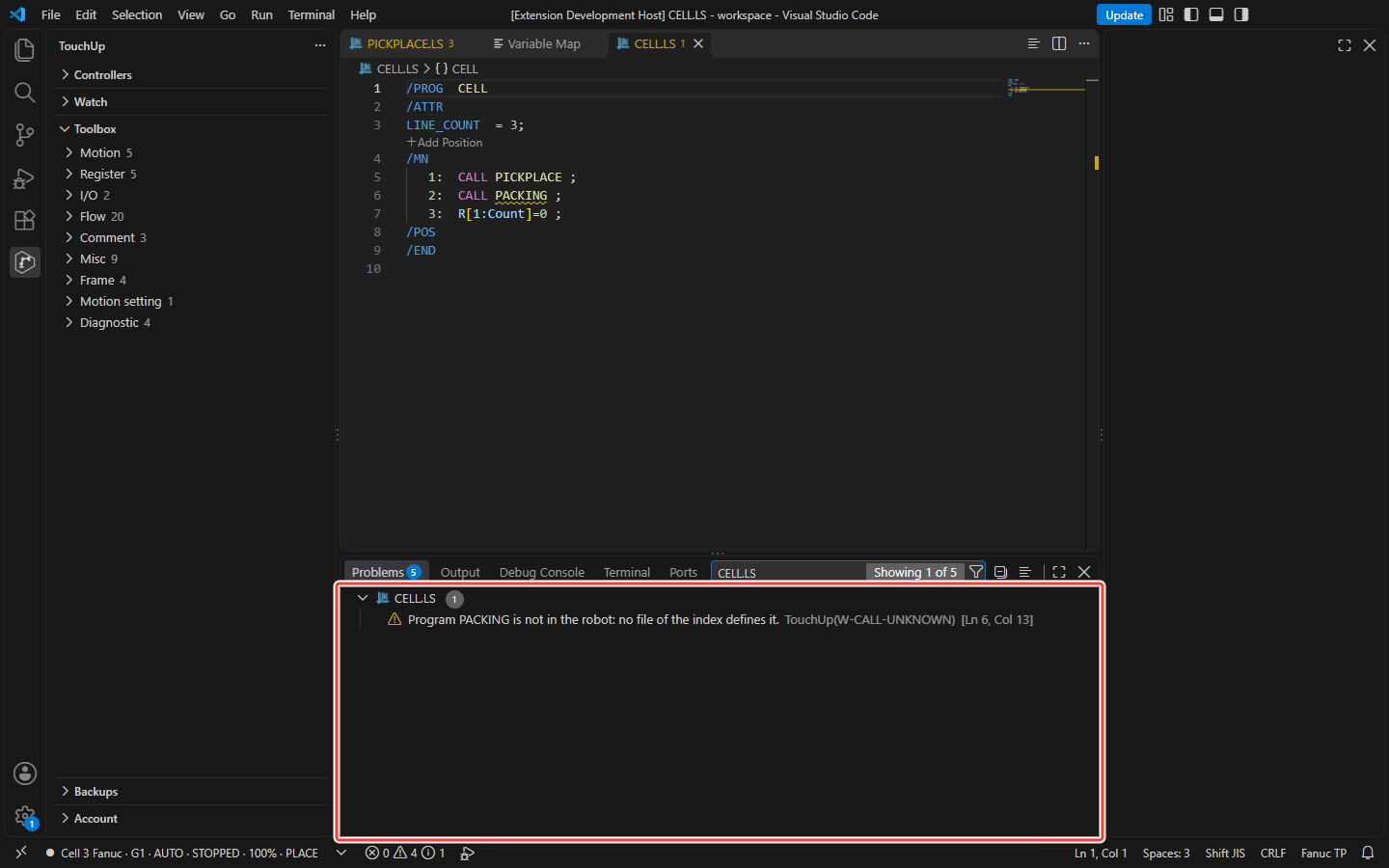
The warning is shown only when TouchUp is sure to know the whole robot:
- the folder is read completely, without a file that could not be read and without a limit reached,
- the folder is a robot: a folder you indexed with
Index This Robot, or a folder of your workspace that has at least one other program of the same brand, - the file you edit is read with the folder: not in a hidden folder.
A file opened alone never gets it, and the warning never starts the reading of a folder: it shows after a request that read it. A program that exists only as a compiled file (.pc, .tp on Fanuc, .jbr on Yaskawa) is a program that is present. A call on a disabled line, and a call by a variable (CALL SR[1]), are not checked. The warning is updated when a file of the folder is created, deleted or changed on disk, not while you edit another file without saving it.
Variable Map
The Variable Map is a panel of the editor area. It shows which registers, variables and I/O the programs of a robot use, and which indexes are free: the question before you add one to a program. It opens when Index This Robot ends (also from a backup of the Backups view), from Data > Variable Map under a controller, and with the command TouchUp: Open Variable Map.
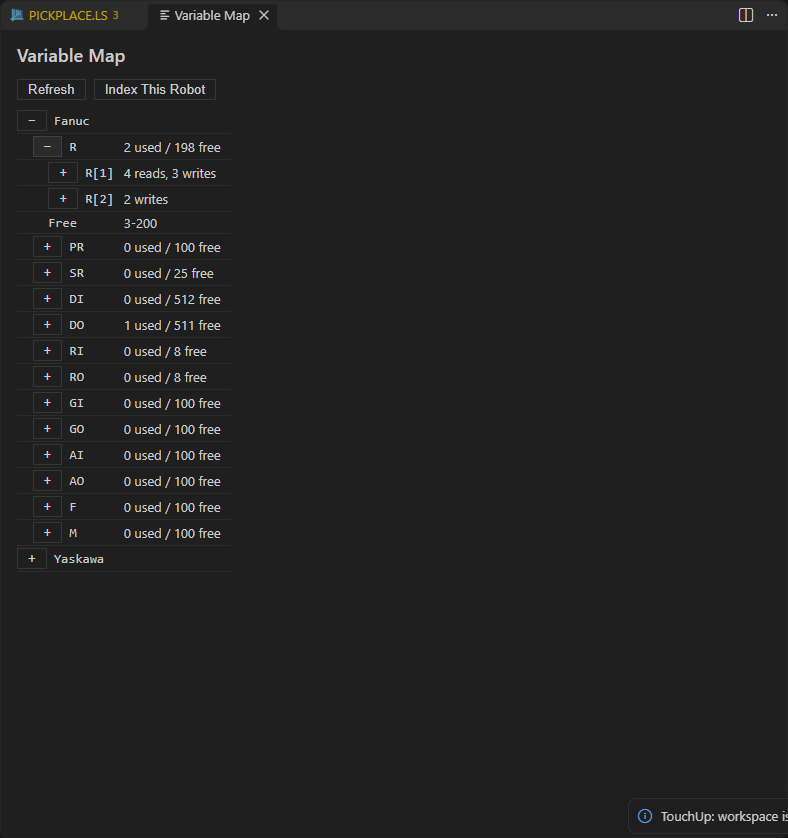
Until a robot is indexed, the panel says "No variable to show yet. Index This Robot reads the programs of a robot (a backup, or a connected controller) and lists the variables they use.", with the button Index This Robot.
The view shows one robot at a time. It follows the last index that you asked for or that TouchUp made for a connection or a save: the controller that just connected, a folder you indexed with Index This Robot. Before any, it shows the cache loaded at startup, then the workspace folder of the active editor. The description of the view gives the origin and the date, for example downloaded 24 files, 2026-11-03 10:42.
The index of another controller, made in the background, is kept but does not change the view, unless the view shows that controller. The checks when you come back to the window and before a cross-reference never change the view.
- A node per type, with
N used / M free. When the folder holds Fanuc and Yaskawa files, a brand level comes first. - Under a type: the used indexes (
R[5]on Fanuc,B005on Yaskawa) with their uses, for example2 reads, 1 write. Open an index to see its users: file and line, the kind of use, and "(disabled)" on a disabled line. A click opens the file at the use. A use on a disabled line counts as used. - Last, the node Free, with the free indexes as ranges:
1, 4-99. The tooltip has the whole list.
| Brand | Types | First index |
|---|---|---|
| Fanuc | R, PR, SR, DI, DO, RI, RO, GI, GO, AI, AO, F, M | 1 |
| Yaskawa | B, I, D, R, S, P, BP, EX | 0 |
The relays are not in the view: a relay number is not an index that counts.
How many indexes a controller has
TouchUp does not know the number of indexes of your controller: the free indexes are counted from a usual number.
| Fanuc | Number | Yaskawa | Number |
|---|---|---|---|
R | 200 | B, I, D, R, S | 100 |
PR | 100 | P, BP, EX | 128 |
SR | 25 | ||
DI, DO | 512 | ||
RI, RO | 8 | ||
GI, GO, AI, AO, F, M | 100 |
If your controller has another number, set it in touchup.variableMap.capacity, with the brand and the type as the key: { "fanuc.R": 300, "yaskawa.B": 256 }. An index used beyond the number is listed as used, and counted in N used: it is only not part of the free ranges.
Refresh
The view is updated after an index of the robot it shows (Index This Robot, the connection of the controller, the save of one of its programs), when you change touchup.variableMap.capacity, and, while nothing was indexed, when the active editor moves to another workspace folder. It is not updated when you save a file of your PC: click the refresh button of the view.