Get started with Python
Install UnderAutomation.Robotics for Python: pythonnet, Linux and macOS, one package per environment, a first program on a Fanuc then a Yaskawa controller.
- Prerequisites
- Install
- With pip
- One UnderAutomation package per environment
- From the sources
- First program
- Connect and read the identity of the controller
- The same code for another brand
- License
- How it works
- The package
- Windows
- Linux and macOS
- How the names are written
- Methods, properties and enumerations
- Modules
- Differences with the .NET API
- Errors
- Examples
- Use the library with an AI agent
- What to read next
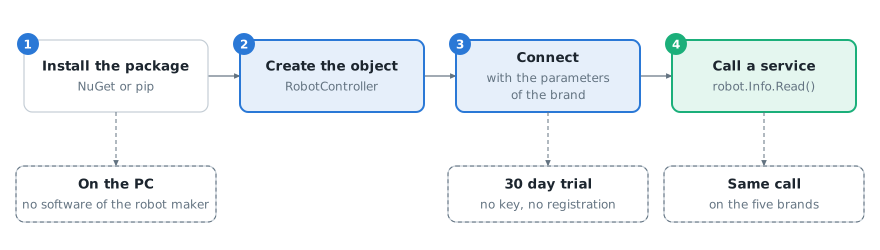
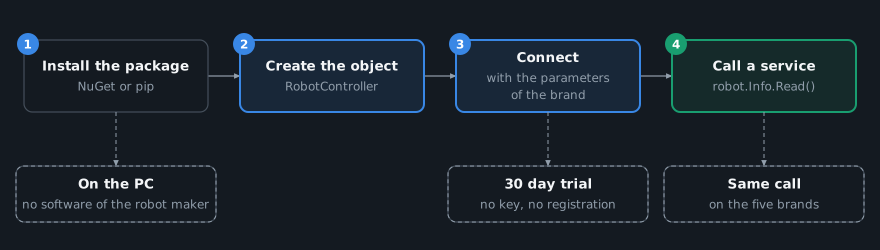
This page shows how to install UnderAutomation.Robotics for Python and write a first program for a Fanuc, Yaskawa, Universal Robots, ABB or Stäubli controller. The Python package has the same services as the .NET library, with Python names: only the connection parameters change from one brand to the other.
Your environment already has a brand package, for example UnderAutomation.Fanuc? Uninstall it before you install Robotics, and keep your code and your license key, if its maintenance covers the release date of Robotics: see Migrate from a brand SDK.
Prerequisites
- Python 3.7 to 3.13.
- On Linux and macOS, the .NET runtime: see Linux and macOS.
- A controller of one of the five brands on the network, or the simulator of its robot maker (not Yaskawa): see Work without a robot.
- The settings of the controller for the methods you call, for example the remote mode for the commands: see Connect to your robot.
Install
With pip
Install the package in a virtual environment. On Linux and macOS, install the .NET runtime first: see Linux and macOS.
python -m venv .venv# Windows.venv\Scripts\activate# Linux and macOSsource .venv/bin/activatepip install UnderAutomation.Robotics
One UnderAutomation package per environment
Install only one UnderAutomation package in a Python environment: each package writes the same file, underautomation/__init__.py. Robotics contains the five brands, with the same modules as the brand packages. Never install a brand package (UnderAutomation.Fanuc, UnderAutomation.Yaskawa...) next to Robotics: uninstall it first, see Migrate from a brand SDK.
From the sources
git clone https://github.com/underautomation/Robotics.py.gitcd Robotics.pypip install -e .
First program
Connect and read the identity of the controller
Import RobotController and the connection parameters of the brand, connect and read a value.
static void Main(){// No key is needed during the 30 day trial.// After the trial, register the license key of each brand once, before the first connection.// FanucRobot.RegisterLicense("YourCompanyName", "YOUR_FANUC_LICENSE_KEY");// The brand comes from the type of the parameters: here a Fanuc controllerRobotController robot = new RobotController();robot.Connect(new ConnectionParameters("192.168.0.1"));// Identity of the controllerRobotControllerInfo info = robot.Info.Read();Console.WriteLine($"{info.BrandName} {info.Model}, software {info.SoftwareVersion}");robot.Disconnect();}}
The brand comes from the class of the connection parameters. Here, ConnectionParameters of the module underautomation.fanuc.connection_parameters connects to a Fanuc controller.
The same code for another brand
For a Yaskawa controller, only the connection parameters change. The rest of the code is the same: this example reads the identity of a Fanuc and of a Yaskawa controller with one loop.
static void Main(){// A cell with a Fanuc and a Yaskawa controller: only the connection parameters changeRobotConnectionParameters[] cell ={new UnderAutomation.Fanuc.ConnectionParameters("192.168.0.1"),new UnderAutomation.Yaskawa.ConnectParameters("192.168.0.2"),};foreach (RobotConnectionParameters parameters in cell){// The same code for both brandsRobotController robot = new RobotController();robot.Connect(parameters);RobotControllerInfo info = robot.Info.Read();Console.WriteLine($"{info.BrandName} {info.Model}, software {info.SoftwareVersion}");robot.Disconnect();}}}
| Brand | Connection parameters |
|---|---|
| Fanuc | from underautomation.fanuc.connection_parameters import ConnectionParameters |
| Yaskawa | from underautomation.yaskawa.connect_parameters import ConnectParameters |
| Universal Robots | from underautomation.universal_robots.connect_parameters import ConnectParameters |
| ABB | from underautomation.abb.connection_parameters import ConnectionParameters |
| Stäubli | from underautomation.staubli.connection_parameters import ConnectionParameters |
The identity of the controller, as in this example, is available on the five brands. Some other methods are not: a method that a brand does not have raises FeatureNotSupportedException, and is_available returns False before the call. The Routing page gives, for each method, the protocol used on each brand.
License
Each brand runs for 30 days without a key, from the first use of the library, with no registration. A trial license key from the license page of underautomation.com extends the trial of one brand. After the trial, buy the license of each brand you connect and call register_license of this brand, once, before the first connection. A key of one brand does not unlock the other brands. Robotics has no license of its own: see Licensing.
How it works
The package
The package UnderAutomation.Robotics contains the .NET library UnderAutomation.Robotics.dll and a Python layer that calls it through pythonnet. pythonnet runs .NET code in the Python process. No software of the robot maker is needed on the PC.
| Item | Supported |
|---|---|
| Python | 3.7 to 3.13 |
| pythonnet | 3.0.5, installed with the package |
| Operating system | Windows, Linux, macOS |
| Brands | Fanuc, Yaskawa, Universal Robots, ABB, Stäubli |
Windows
The DLL runs on the .NET Framework 4.x of Windows. Nothing else to install.
Linux and macOS
Install the .NET runtime (for example .NET 8), then select it for pythonnet before you start Python. Without this, pythonnet uses Mono, its default runtime on Linux and macOS.
sudo apt-get install -y dotnet-runtime-8.0export PYTHONNET_RUNTIME=coreclr
Always write the export: a variable set without it does not reach the Python process. The same choice can be made in code, with from pythonnet import load then load("coreclr"), before the first import of the package.
How the names are written
Methods, properties and enumerations
The Python package follows the .NET API, with Python names. Every page of this documentation has a Python tab next to the C# code.
| .NET | Python |
|---|---|
robot.Info.Read().SoftwareVersion | robot.info.read().software_version |
robot.Program.IsAvailable(...) | robot.program.is_available(...) |
FanucRobot.RegisterLicense(...) | FanucRobot.register_license(...) |
RobotBrand.Yaskawa | RobotBrand.Yaskawa, an IntEnum |
(FanucRobot)robot.Native | FanucRobot(robot.native) |
An array, like byte[] | A list, like typing.List[int] |
A nullable value, like int? | int | None |
Methods and properties become snake_case. Enumeration values keep the name they have in .NET.
Modules
Each type is in its own module, named after it in snake_case. The modules follow the .NET namespaces. The common API is in underautomation.robotics.controllers, for example from underautomation.robotics.controllers.robot_controller import RobotController. Import each type from its own module: the __init__.py files are empty, so from underautomation.robotics.controllers import RobotController fails. The brand types keep the modules of the brand packages, for example underautomation.fanuc.fanuc_robot.
Differences with the .NET API
- An optional text argument has no default value in Python: pass it. For example,
robot.program.start("")starts the selected program, andRobotConnectionParameters.create(brand, address, "")takes the routing settings as text, empty for no setting. The other optional arguments keep their .NET default:robot.motion.read_pose()reads motion group 1. - The file methods with a progress callback and a cancellation token (
ReadBytesWithProgress,WriteBytesWithProgress) are not in the Python package. Userobot.file.read_bytes(...)androbot.file.write_bytes(...). robot.nativeis the .NET object of the brand. Wrap it in the Python class of the brand to call its methods:FanucRobot(robot.native).
Errors
A failure of the library raises the .NET exception, for example InvalidLicenseException when the license of the brand is not valid, or FeatureNotSupportedException when the brand does not have the method. It is a Python exception: catch it with except Exception as e and read str(e).
Examples
Every page of this documentation has a Python tab next to the C# code, with the same example. The C# console examples of Robotics.NET use the same API, with the .NET names: variables, signals, programs, alarms, files.
Use the library with an AI agent
An AI agent such as Claude Code, Codex, GitHub Copilot or Cursor can write your Python code with the library. Without help, it does not know which methods a brand has, which protocol each method uses, or the Python names of the API. The UnderAutomation skill gives it the documentation of this version of the library: routes of each brand, native names, Python names, errors and safety rules for robot motion.
With the skill installed, you can ask for example:
Install the skill in your project:
npx skills add underautomation/skills --skill underautomation-robotics-python
Or paste this prompt to your agent: "Install the UnderAutomation Robotics skill: follow https://underautomation.com/robotics/documentation/ai-skills.md". The other installation modes are in AI agent skills.
What to read next
- How it works: the library in four diagrams.
- Connect to your robot: the connection parameters of each brand and the settings of the controllers.
- How-to articles: variables, IO, programs, position, alarms, files, state and moves: one code per task, and the brands that support it.
- Work without a robot: the simulators of the robot makers.
- Common API: the services of
RobotController. - Routing: which protocol each method uses on each brand.
- Licensing: the trial and the license key of each brand.
- AI agent skills: install the Python skill of the library in Claude Code, Codex, GitHub Copilot or Cursor.