Connect to your robot
Connect a RobotController to a Fanuc, Yaskawa, Universal Robots, ABB or Stäubli controller: the connection parameters of each brand, a connection from a configuration file, the protocols after the connection and the connection errors. C# and Python examples.
- A first connection
- Connect with the parameters of a brand
- Prerequisites
- Example
- Change the parameters of a protocol
- Options of the other brands
- Connect from a configuration file
- Read the protocols after the connection
- Read the error of a failed connection
- Use the object of the brand SDK
- Reference
- Parameters of every brand
- Parameters of each brand
- Methods and properties of the connection
- What to read next
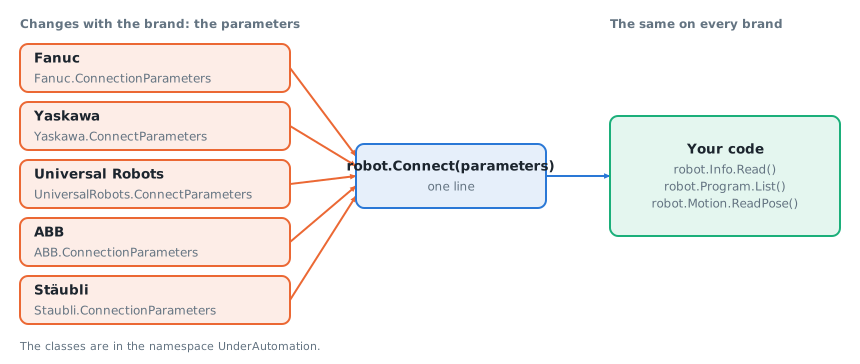
This page explains how to connect a RobotController to a Fanuc, Yaskawa, Universal Robots, ABB or Stäubli controller. The connection parameters are the ones of the brand SDK: their class gives the brand, and everything after Connect uses the same API on every brand.
A first connection
Connect with the parameters of a brand
Create the connection parameters of the brand with the address of the controller and pass them to Connect. The brand comes from the class of the parameters. After the connection, Brand and Address tell which controller this is.
static void Main(){// The brand comes from the type of the parametersRobotController robot = new RobotController();robot.Connect(new ConnectionParameters("192.168.0.1"));Console.WriteLine($"{robot.Brand} controller at {robot.Address}, connected: {robot.Connected}");robot.Disconnect();}}
The methods a brand has depend on the brand: see the Brand support table of each service page. The rest of this page covers the parameters of a protocol, a connection from a configuration file, the protocols that answer after the connection and the connection errors.
Prerequisites
- The PC reaches the controller on the network. By default,
Connectpings the controller first and stops when it does not answer. SetPingBeforeConnecttofalsewhen a firewall blocks ICMP. - The firewalls between the PC and the controller let the ports of the protocols through. The ports and the settings of the controller are public information of the robot makers. They are on the connect page of each brand SDK, see the table in the Reference section.
- The settings of the controller for the methods you call. They depend on the brand and on the method: a protocol to enable, a controller option, a user and a password, the remote mode. The table "Brand support" of each service page gives the protocol of each method, and
(manual)marks a route that you enable yourself in the parameters. - The license of the brand of the controller, or the 30 day trial. See Licensing.
The library installs nothing on the PC and nothing on the controller. Some methods need something on the controller: read the page of the service and the connect page of the brand.
Example
Change the parameters of a protocol
The parameters of a brand have one object per protocol: Snpx, Rmi, Rtde, Soap... Change them before Connect. This example of a Fanuc controller disables SNPX and RMI, which the controller of the example does not have, and the ping.
static void Main(){// The parameters of the brand SDK, with the settings of the common APIConnectionParameters parameters = new ConnectionParameters("192.168.0.1");parameters.PingBeforeConnect = false;// This controller has no SNPX option: keep the library away from itparameters.Routing.Forbid(new[] { FanucProtocol.Snpx });RobotController robot = new RobotController();robot.Connect(parameters);robot.Disconnect();}
Options of the other brands
Each brand has the settings of its own protocols. This example sets one of each brand: a protocol that the library never opens by itself (RMI of Fanuc, Interpreter Mode of Universal Robots), a timeout, the version of the web services of an ABB IRC5 controller, and the user of a Stäubli controller. The other parameters keep the default values of the brand SDK.
static void Main(){// Fanuc: RMI is never opened automatically, enable it in the parametersUnderAutomation.Fanuc.ConnectionParameters fanuc = new UnderAutomation.Fanuc.ConnectionParameters("192.168.0.1");fanuc.Rmi.Enable = true;// Yaskawa: wait longer for the answers of the controller on a slow networkUnderAutomation.Yaskawa.ConnectParameters yaskawa = new UnderAutomation.Yaskawa.ConnectParameters("192.168.0.2");yaskawa.HighSpeedEServer.DataTimeoutMilliseconds = 3000;// Universal Robots: Interpreter Mode is never opened automatically eitherUnderAutomation.UniversalRobots.ConnectParameters ur = new UnderAutomation.UniversalRobots.ConnectParameters("192.168.0.3");ur.InterpreterMode.Enable = true;// ABB: the default is OmniCore, an IRC5 controller needs its own version of Robot Web ServicesUnderAutomation.ABB.ConnectionParameters abb = new UnderAutomation.ABB.ConnectionParameters("192.168.125.1");abb.Rws.Version = UnderAutomation.ABB.Rws.RwsVersion.Irc5_V1_0;// Stäubli: the user and the password of the controllerUnderAutomation.Staubli.ConnectionParameters staubli = new UnderAutomation.Staubli.ConnectionParameters("192.168.0.5");staubli.Soap.User = "maintenance";staubli.Soap.Password = "my password";RobotConnectionParameters[] cell = { fanuc, yaskawa, ur, abb, staubli };foreach (RobotConnectionParameters parameters in cell){RobotController robot = new RobotController();robot.Connect(parameters);Console.WriteLine($"{robot.Brand}: {robot.Address}");robot.Disconnect();}}}
Connect from a configuration file
When the brand and the address come from a configuration file, RobotConnectionParameters.Create(brand, address) creates the parameters from the name of the brand: fanuc, yaskawa, universalrobots, abb or staubli. The result is the class of the brand, with the default values of the brand SDK. Cast it to the class of the brand to change the parameters of a protocol.
static void Main(){// Brand and address from a configuration file: fanuc, yaskawa, universalrobots, abb or staublistring brand = "yaskawa";string address = "192.168.0.2";RobotController robot = new RobotController();robot.Connect(RobotConnectionParameters.Create(brand, address));// The same code works for every brandConsole.WriteLine(robot.Info.Read().Model);robot.Disconnect();}}
The third argument is the routing settings as text, the same text that ToText of the routing settings writes: settings separated by ;, each one path=routes. This example sends the methods of the Program service to the CGTP route of Fanuc. The names of the routes are the ones of the brand. An invalid text throws an ArgumentException, and a route that the brand does not have is refused at the connection. See Routing.
static void Main(){// Three values of a configuration file: the brand, the address and the routing settings as textstring brand = "fanuc";string address = "192.168.0.10";string routing = "Program.*=Cgtp";RobotController robot = new RobotController();robot.Connect(RobotConnectionParameters.Create(brand, address, routing));Console.WriteLine($"{robot.Brand} controller at {robot.Address}, connected: {robot.Connected}");robot.Disconnect();}}
Read the protocols after the connection
robot.Routing.GetProtocols() returns the result of each protocol of the brand at the connection, in the order of the brand. Use it to see which interfaces of the controller answered and why one did not.
RobotController robot = new RobotController();robot.Connect(RobotConnectionParameters.Create("fanuc", "192.168.0.1"));// Result of the connection of each protocol of the brandforeach (ProtocolInfo protocol in robot.Routing.GetProtocols())Console.WriteLine($"{protocol.DisplayName}: {protocol.Status}");robot.Disconnect();}
A protocol that no method needed, or that was not reached before the connection stopped, is NotTested. A protocol that the library never opens by itself and that you did not enable is NotProbed. The other values and their causes are in the page Errors.
Read the error of a failed connection
When Connect fails, RobotControllerException.Protocols has the same list. Read it before you look at the controller: the status of each protocol says if the controller did not answer, refused the user or the password, or if the protocol was disabled.
static void Main(){RobotController robot = new RobotController();try{robot.Connect(RobotConnectionParameters.Create("fanuc", "192.168.0.1"));}catch (RobotControllerException ex){Console.WriteLine(ex.Message);// Result of each protocol: open, no answer, authentication failed, disabled...foreach (ProtocolInfo protocol in ex.Protocols)Console.WriteLine($"{protocol.DisplayName}: {protocol.Status} {protocol.Error}");}}}
Use the object of the brand SDK
The common API does not cover every function of a brand. robot.Native gives the object of the brand SDK, on the same connections.
RobotController robot = new RobotController();robot.Connect(new ConnectionParameters("192.168.0.1"));// The object of the brand SDK, on the same connections: features that the common API does not haveif (robot.Brand == RobotBrand.Fanuc){FanucRobot fanuc = (FanucRobot)robot.Native;Console.WriteLine(fanuc.Cgtp.Enabled);}robot.Disconnect();}
Reference
In Python, the names are in snake_case: robot.connect(...), robot.routing.get_protocols(). RobotConnectionParameters.create takes its three arguments: pass an empty text for no routing settings. The classes of the brand parameters are in the modules listed on Get started with Python.
Parameters of every brand
RobotConnectionParameters is the base class of the parameters of every brand.
| Member | Type | Content |
|---|---|---|
Address | string | Address of the controller, an IP address or a host name. |
PingBeforeConnect | bool | True to check with a ping that the controller answers before the connection. |
CheckComments | bool | True to check the comment written in the name of a variable or of a signal against the comment of the controller. False by default: the comment is ignored. |
Routing | RoutingSettings | Which route each method uses. Without settings, the library chooses. See Routing. |
Parameters of each brand
The main objects of parameters of each class are listed. The connect page of the brand SDK describes each parameter, the TCP and UDP ports of the protocols and the settings of the controller. The common API uses some of these protocols only. Its route tables show which ones.
| Brand | Class of the parameters | Objects of parameters | Ports, options and settings of the controller |
|---|---|---|---|
| Fanuc | UnderAutomation.Fanuc.ConnectionParameters | Cgtp, Snpx, Telnet, Ftp, Rmi, StreamMotion | Protocols and controller options |
| Yaskawa | UnderAutomation.Yaskawa.ConnectParameters | HighSpeedEServer, EServer, Http, Ftp | Prerequisites and settings of the controller and Choose a protocol |
| Universal Robots | UnderAutomation.UniversalRobots.ConnectParameters | PrimaryInterface, Dashboard, Rtde, InterpreterMode, Rest, Ssh, XmlRpc, SocketCommunication | Interfaces and ports |
| ABB | UnderAutomation.ABB.ConnectionParameters | Rws | What the controller needs and IRC5 or OmniCore |
| Stäubli | UnderAutomation.Staubli.ConnectionParameters | Soap, File | Prerequisites |
The address is Address on Fanuc, ABB and Stäubli, and IP on Yaskawa and Universal Robots. Address of the base class works on every brand.
Methods and properties of the connection
| Member | Content |
|---|---|
RobotController.Connect(parameters) | Opens the connections that the brand needs. Throws RobotControllerException when it fails. |
RobotController.Disconnect() | Closes the connections. |
RobotController.Brand, Address, Connected | The brand and the address of the connected controller, and the state of the connection. |
RobotController.Routing.GetProtocols() | A ProtocolInfo for each protocol of the brand. |
RobotController.Native | The object of the brand SDK: FanucRobot, YaskawaRobot, UR, AbbController or StaubliController. Null when the controller is not connected. |
ProtocolInfo and ProtocolStatus are described on the page Errors.
What to read next
- How-to articles: the first calls after the connection, one code per task.
- Work without a robot: the simulators of the robot makers.
- Errors: the exceptions of
Connectand of the methods. - Routing: which protocol each method uses on each brand, and how to change it.
- Common API: the services of
RobotController. - Licensing: the trial and the license key of each brand.