Connect to your robot
The protocols of the SDK, their options and setup on the controller, the connection parameters, and the connection to a real Fanuc robot or to ROBOGUIDE.
This page explains how to connect the Fanuc SDK to a real controller or to a ROBOGUIDE virtual robot: the protocols to enable, their setup on the controller and the connection parameters. The ConnectionParameters class lists the protocols, and each protocol is enabled on its own.
Prerequisites
Network
The PC and the controller are on the same network, and the PC can ping the controller. Each protocol uses its own TCP port: allow it in the firewalls between the PC and the controller.
Protocols and controller options
| Protocol | What it gives | Controller option | Setup |
|---|---|---|---|
| CGTP | Programs, variables, registers, I/O, position, kinematics, files | None, firmware V8.30 or later | CGTP overview |
| SNPX | Fast access to registers, variables, I/O, position, alarms | R553 with the FANUC America parameters (R650 FRA), none with R651 FRL | SNPX overview |
| Telnet KCL | Program control, variables, ports, breakpoints | None | Enable Telnet |
| FTP | Files, variable files, diagnostics | None | FTP overview |
| RMI | Motion instructions sent from the PC | R912 | RMI overview |
| Stream Motion | A position at every communication cycle | J519 | Stream Motion overview |
Connect
Quick connection
The simplest way to connect is to pass an IP address. This enables only the CGTP protocol, which is enabled by default.
static void Main(){var robot = new FanucRobot();robot.Connect("192.168.0.1");}}
Several protocols
To use several protocols, create a ConnectionParameters object and enable each protocol you need.
using UnderAutomation.Fanuc;using UnderAutomation.Fanuc.Common;public class Connect{static void Main(){// Create a robot instanceFanucRobot robot = new FanucRobot();// Configure connection parametersConnectionParameters parameters = new ConnectionParameters("192.168.0.1");// Enable Telnet KCL for remote commandsparameters.Telnet.Enable = true;parameters.Telnet.TelnetKclPassword = "your_password";// Enable FTP for file and variable accessparameters.Ftp.Enable = true;parameters.Ftp.FtpUser = "";parameters.Ftp.FtpPassword = "";// Enable SNPX for high-speed register and I/O accessparameters.Snpx.Enable = true;// Enable CGTP Web Server (enabled by default)parameters.Cgtp.Enable = true;// Enable RMI for remote motion commandsparameters.Rmi.Enable = true;// Connect to the robotrobot.Connect(parameters);// Check connection statusbool isConnected = robot.Enabled;// Disconnect when donerobot.Disconnect();}}
ROBOGUIDE
Instead of an IP address, pass the folder of a robot of a ROBOGUIDE workcell. The SDK reads the file services.txt of that folder to find the TCP ports of the virtual robot. See Test with ROBOGUIDE.
{FanucRobot robot = new FanucRobot();var parameters = new ConnectionParameters(@"C:\Users\you\Documents\My Workcells\CRX 10iA L\Robot_1");parameters.Telnet.Enable = true;parameters.Telnet.TelnetKclPassword = "";parameters.Ftp.Enable = true;parameters.Ftp.FtpUser = "";parameters.Ftp.FtpPassword = "";robot.Connect(parameters);}}
Connection options
Ping
When PingBeforeConnect is true (default), the SDK pings the controller before it opens any connection. If the controller does not answer within 100 ms, Connect throws an exception at once. Set it to false when ICMP is blocked on your network.
Language of the controller
Set the Language property to the language of the controller, so that the strings read with SNPX, FTP and Telnet are decoded correctly: English (ASCII, default), Japanese (Shift-JIS) or Chinese (GB2312).
FanucRobot robot = new FanucRobot();ConnectionParameters parameters = new ConnectionParameters("192.168.0.1");// Ping before connecting (default: true)parameters.PingBeforeConnect = true;// Set to false for ROBOGUIDE or when ICMP is blocked// Controller language for correct string decodingparameters.Language = Languages.English; // default (ASCII)// parameters.Language = Languages.Japanese; // Shift-JIS// parameters.Language = Languages.Chinese; // GB2312robot.Connect(parameters);}
Standalone protocol clients
Each protocol can also be used without FanucRobot, when you only need one protocol:
static void Main(){// Standalone SNPX clientvar snpx = new SnpxClient();snpx.Connect("192.168.0.1");// Standalone Telnet clientvar telnet = new TelnetClient();telnet.Connect("192.168.0.1", "telnet_password");// Standalone CGTP clientvar cgtp = new CgtpClient();cgtp.Connect("192.168.0.1");}}
Disconnect
Always disconnect when you are done, to close the connections of every protocol.
FanucRobot robot = new FanucRobot();robot.Connect("192.168.0.1");robot.Disconnect();}}
Try it in the demo application
Everything on this page can be tried without writing code, in the Connection page of the demo application.
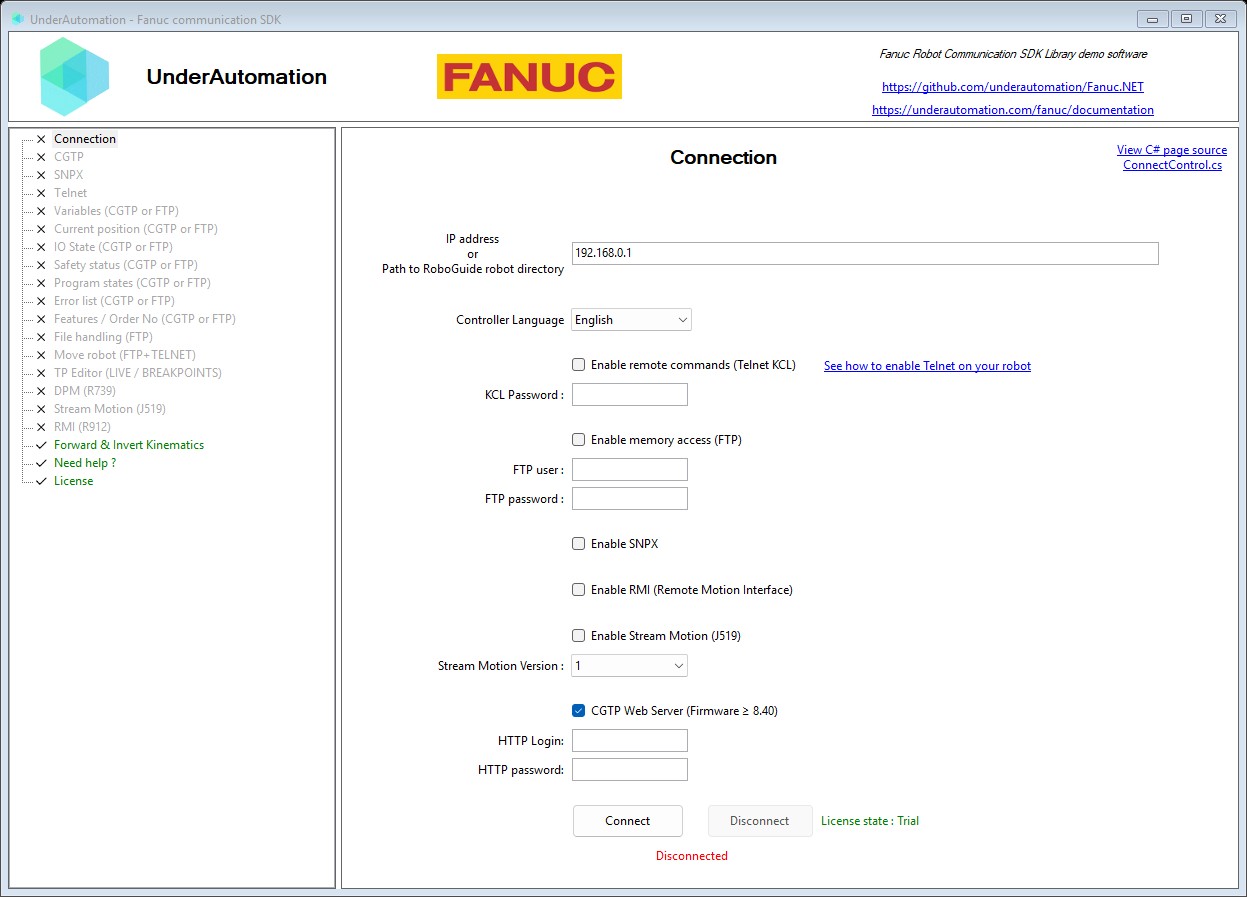
The demo application is open source. The C# source of this page is ConnectControl.cs.
Reference
Connection parameters
| Member | Type | Description |
|---|---|---|
ConnectionParameters() Constructor | Instanciate a new connection parameters | |
ConnectionParameters(string) Constructor | Instanciate a new connection parameters with a specified address | |
Address Property | string | Address of the robot (IP, host name, or path to ROBOGUIDE project folder) |
Cgtp Property | CgtpConnectParameters | Parameters of the CGTP client, which uses the web server of the controller (HTTP) |
Ftp Property | FtpConnectParameters | Access controller internal memory to read variables, IO, positions, diagnosis, ... |
Language Property | Languages | Controller language (default: English) |
PingBeforeConnect Property | bool | Send a ping command before initializing any connections |
Rmi Property | RmiConnectParameters | Parameters for RMI (Remote Motion Interface) |
Snpx Property | SnpxConnectParameters | Read and write IOs, read and clear alarms, read current program tasks |
StreamMotion Property | StreamMotionConnectParameters | Parameters for Stream Motion (J519 option) - real-time streaming motion control over UDP |
Telnet Property | TelnetConnectParameters | Parameters of the Telnet KCL client, which sends commands to the robot for remote control. Telnet KCL is a legacy protocol: it is not secured (password and commands are sent in clear text), and its behavior changes with the firmware version and on ROBOGUIDE. The same KCL commands are available on the web server of the controller with robot.Cgtp.Kcl (firmware V8.30 and later): prefer it for new developments. |
Connection parameters of the Telnet KCL client (remote commands). Telnet KCL is a legacy protocol: it is not secured (password and commands are sent in clear text), and its behavior changes with the firmware version and on ROBOGUIDE. The same KCL commands are available on the web server of the controller with robot.Cgtp.Kcl (firmware V8.30 and later): prefer it for new developments.
| Member | Type | Description |
|---|---|---|
TelnetConnectParameters() Constructor | ||
Enable Property | bool | Should use this service (default: false). Prefer robot.Cgtp.Kcl, enabled by default, for new developments. |
Memory access parameters
| Member | Type | Description |
|---|---|---|
FtpConnectParameters() Constructor | ||
Enable Property | bool | Should enable memory access for this connection (default: true) |
SNPX parameters
| Member | Type | Description |
|---|---|---|
SnpxConnectParameters() Constructor | ||
Enable Property | bool | Should enable SNPX for this connection (default: false) |
CGTP Web Server connection parameters
| Member | Type | Description |
|---|---|---|
CgtpConnectParameters() Constructor | ||
Enable Property | bool | Should enable CGTP Web Server for this connection (default: true) |
RMI parameters
| Member | Type | Description |
|---|---|---|
RmiConnectParameters() Constructor | ||
Enable Property | bool | Should enable RMI for this connection (default: false) |
Stream Motion connection parameters (J519 option)
| Member | Type | Description |
|---|---|---|
StreamMotionConnectParameters() Constructor | ||
Enable Property | bool | Should enable Stream Motion for this connection (default: false) |
Ip Property | string | IP address of the robot for standalone Stream Motion connections |
What to read next
- Test with ROBOGUIDE: work without a real robot.
- Demo application: try the connection without writing code.
- The protocol pages: CGTP, SNPX, Telnet, FTP, RMI, Stream Motion.