Connect to your robot
Connect to a CS8 or CS9 controller over its SOAP server: network, port, user and password, connection parameters, errors and disconnection.
This page explains how to connect the SDK to a Staubli CS8 or CS9 controller: the settings of the controller, the connection parameters, the errors and the disconnection. The SDK uses the SOAP server of the controller over TCP/IP. Nothing is installed on the controller.
Prerequisites
- The PC reaches the controller on the network. Its address is shown in the network settings of the controller, on the pendant.
- The SOAP server of the controller answers on its port, 851 by default. Staubli Robotics Suite uses the same server: if Staubli Robotics Suite connects to the controller, the SDK can connect too.
- A user of the controller, with its password. The rights of this user limit what the SDK can do, as for a person on the pendant.
- To power the arm and move it, the controller must be in remote mode.
Quick connection
Pass the address of the controller. The other parameters keep their default values.
static void Main(){var controller = new StaubliController();// Default parameters: SOAP port 851, user "default", password "default"controller.Connect("192.168.0.254");bool connected = controller.Enabled;controller.Disconnect();}
StaubliController gives access to every function of the SDK, through its Soap property, and to the files of the controller through its File property (see Files overview).
Connection parameters
ConnectionParameters holds every option. Use it when the controller has another port, user or password.
static void Main(){var parameters = new ConnectionParameters("192.168.0.254");// Ping the controller first, so an unreachable controller fails in 100 msparameters.PingBeforeConnect = true;parameters.Soap.Enable = true;// 0 (default): automatic, 851 on a real controller (SoapConnectParameters.DEFAULT_PORT)parameters.Soap.Port = 0;parameters.Soap.User = "default";parameters.Soap.Password = "default";var controller = new StaubliController();controller.Connect(parameters);controller.Disconnect();}
| Parameter | Default | Meaning |
|---|---|---|
Address | none | IP address or host name of the controller. For the emulator of Staubli Robotics Suite, the path of the .controller file of the emulated controller (see the emulator) |
PingBeforeConnect | true | Send a ping first. The connection fails if there is no answer in 100 ms |
Soap.Enable | true | Open the SOAP session |
Soap.Port | 0 | TCP port of the SOAP server. 0: automatic, 851 on a real controller (SoapConnectParameters.DEFAULT_PORT), port of the configuration of an emulated controller |
Soap.User | "default" | User of the controller |
Soap.Password | "default" | Password of this user |
File.Enable | false | Connect the file client. The other File parameters are on Files overview |
Set PingBeforeConnect to false when a firewall blocks ICMP between the PC and the controller.
The address localhost is replaced by 127.0.0.1, to avoid a slow name resolution.
One controller, several robots
A controller can drive more than one arm. The methods that concern an arm take a robot argument: 0 is the first robot of GetRobots(). With one arm, always pass 0. See Controller and robots.
Standalone SOAP client
SoapClient opens a SOAP session without StaubliController. The methods are then directly on the client: soap.GetRobots() instead of controller.Soap.GetRobots().
static void Main(){// A SOAP client without StaubliControllervar soap = new SoapClient();soap.Connect("192.168.0.254", "default", "default", SoapConnectParameters.DEFAULT_PORT);// The services are directly on the clientdouble[] joints = soap.GetCurrentJointPosition(robot: 0);soap.Disconnect();}}
Errors
{var controller = new StaubliController();try{controller.Connect("192.168.0.254");controller.Soap.TaskKill("myTask", "Disk://myProject/myProject.pjx");}catch (InvalidLicenseException ex){// No valid license: the trial is over, or the key is wrongConsole.WriteLine(ex.LicenseInfo);}catch (CustomSoapException ex) when (ex.ErrorCode == SoapErrorCode.InvalidCredentials){Console.WriteLine("Wrong user or password");}catch (CustomSoapException ex){// The controller refused the requestConsole.WriteLine($"{ex.ErrorCode} : {ex.Description}");}catch (WebException ex){// No answer on the SOAP portConsole.WriteLine(ex.Message);}catch (Exception ex){// For example, no answer to the pingConsole.WriteLine(ex.Message);}}}
| Exception | When |
|---|---|
InvalidLicenseException | Connect is called without a valid license. See Licensing |
CustomSoapException | The controller refused the request. ErrorCode gives the reason, Description the text of the controller |
WebException | No answer on the SOAP port, or a network error |
ArgumentException | The address is a path but not a .controller file |
FileNotFoundException | The address is a .controller file that does not exist |
InvalidOperationException | A method is called before Connect, or after Disconnect |
Exception | No answer to the ping |
Frequent values of CustomSoapException.ErrorCode:
SoapErrorCode | Meaning |
|---|---|
InvalidCredentials | Wrong user or password |
InvalidSessionIdCode | The session has expired: connect again |
InvalidRobotIdCode | The robot argument does not match a robot of GetRobots() |
WriteAccessErrorCode | The user has no right to change this |
ApplicationNotFound | No VAL 3 application with this name |
TaskNotFound | No task with this name and this creator |
Disconnect
Disconnect closes the session on the controller. Call it when your application ends, or when it no longer needs the controller.
var controller = new StaubliController();controller.Connect("192.168.0.254");try{double[] joints = controller.Soap.GetCurrentJointPosition(robot: 0);}finally{// Close the session on the controllercontroller.Disconnect();}}}
Enabled is true while the session is open.
Try it in the demo application
Everything on this page can be tried without writing code, in the Connection page of the demo application.
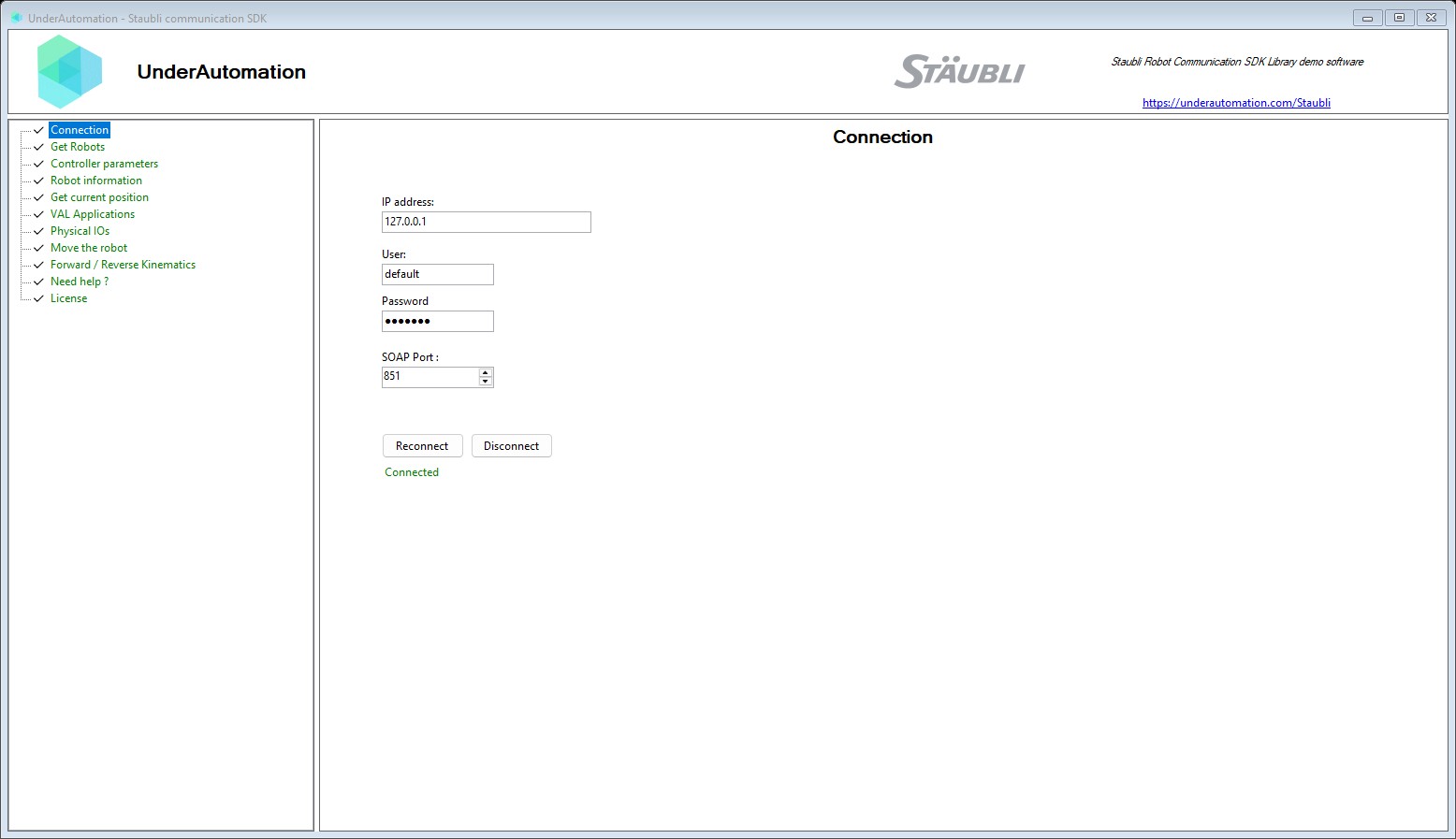
The demo application is open source. The C# source of this page is ConnectControl.cs.
Reference
Connection parameters
| Member | Type | Description |
|---|---|---|
ConnectionParameters() Constructor | Instanciate a new connection parameters | |
ConnectionParameters(string) Constructor | Instanciate a new connection parameters with a specified address | |
Address Property | string | Address of the robot: IP or host name of a real controller. For a controller emulated by Staubli Robotics Suite, path of the .controller file of the controller in the cell (for example C:\...\MyCell\Controller1\Controller1.controller): the SOAP client then connects to the local computer, and the file client uses the folder of this file. Give a UNC path when the emulation runs on another computer: the SOAP client then connects to this computer. A path that is not a .controller file is refused. |
File Property | FileConnectParameters | File client connection parameters (upload, download, listing and management of the files of the controller) |
PingBeforeConnect Property | bool | Send a ping command before initializing any connections |
Soap Property | SoapConnectParameters | Soap connection parameters |
Equals(object) Method | bool | |
GetHashCode() Method | int | |
ToString() Method | string |
SOAP connection parameters for communicating with the Staubli robot controller.
| Member | Type | Description |
|---|---|---|
SoapConnectParameters() Constructor | ||
Enable Property | bool | Should use this service (default: true) |
DEFAULT_PORT Field | int | Default port of the SOAP server of a real controller (851), used when Port is 0 |
Base class for SOAP connection parameters
| Member | Type | Description |
|---|---|---|
SoapConnectParametersBase() Constructor | ||
Password Property | string | Password for the SOAP service (default: default) |
Port Property | int | Port of the SOAP service. Default: 0 (automatic). With 0, the SDK uses 851 for a real controller, and the SOAP port of the network configuration of a controller emulated by Staubli Robotics Suite (851 when it is not found). |
User Property | string | Username for the SOAP service (default: default) |
Custom exception class for handling SOAP errors with specific error codes and descriptions.
| Member | Type | Description |
|---|---|---|
Description Property read only | string | A human-readable description of the error, providing additional context about the failure. |
ErrorCode Property read only | SoapErrorCode | The error code as an enum value, parsed from the ErrorCodeText. |
ErrorCodeText Property read only | string | The error code text as received from the SOAP response, formatted as a kebab-case string. |
Message Property read only | string | Gets the error message that describes the current exception. |
Error codes returned by the SOAP service.
| Name | Value | Description |
|---|---|---|
ApplicationNotFound | 7 | The specified application was not found. |
CannotStartApplication | 14 | Cannot start the application. |
ClientAlreadyConnected | 15 | A client is already connected. |
ClientCommunicationError | 17 | Client communication error. |
InvalidCredentials | 0 | The provided credentials are invalid. |
InvalidRobotIdCode | 20 | The specified robot ID is invalid. |
InvalidSessionIdCode | 12 | The session ID is invalid or expired. |
IoWriteAccessErrorCode | 16 | I/O write access error. |
IoWriteAccessErrorValidation | 18 | I/O write access validation error. |
IoWriteAccessErrorWorkingMode | 19 | I/O write access error due to working mode. |
MismatchedCode | 2 | Mismatched code error. |
ProgramLineNotFound | 9 | The specified program line was not found. |
ProgramNotFound | 3 | The specified program was not found. |
ReadAccessErrorCode | 10 | Read access error. |
SchedulingModeError | 6 | Scheduling mode error. |
SetPosNotSimulCode | 11 | Cannot set position outside simulation mode. |
SinReturnCodeNok | 5 | SIN return code indicates failure. |
StackFrameNotFound | 8 | The specified stack frame was not found. |
TaskAlreadyLocked | 4 | The task is already locked by another client. |
TaskNotFound | 1 | The specified task was not found. |
Unknown | -1 | Unknown or unrecognized error code. |
WriteAccessErrorCode | 13 | Write access error. |