Real-time control
Make the robot follow a target that changes at any time, or compute the position of the robot at every cycle with a callback.
When the motion is not known in advance, for example with a camera, a force sensor or a joystick, the robot must react to new data while it moves. Stream Motion offers two ways to do this.
| Need | Use |
|---|---|
| The robot goes to a target that changes at any time | Target tracking |
| Your application computes the position at every cycle | Callback streaming |
Follow a target
With target tracking, the robot goes to the last target as fast as the limits allow, and stops on it. You can change the target at any time, from any thread, even during the motion: the robot then goes smoothly to the new target.
var sm = robot.StreamMotion;sm.StartMonitoring();// The robot follows a target at 30% of its velocity limitssm.StartTracking(PositionFormat.Joint, 30);// Change the target at any time, from any threadJointsPosition start = sm.QueueEndJointPosition;sm.SetJointTrackingTarget(new JointsPosition(start.Values) { J1 = start.J1 + 10 });Thread.Sleep(500);sm.SetJointTrackingTarget(new JointsPosition(start.Values) { J1 = start.J1 - 5 });// Wait until the robot is stopped on the targetsm.WaitForIdle(10000);// Stop following targets. A moving robot stops as fast as the limits allow.sm.StopTracking();robot.Disconnect();}
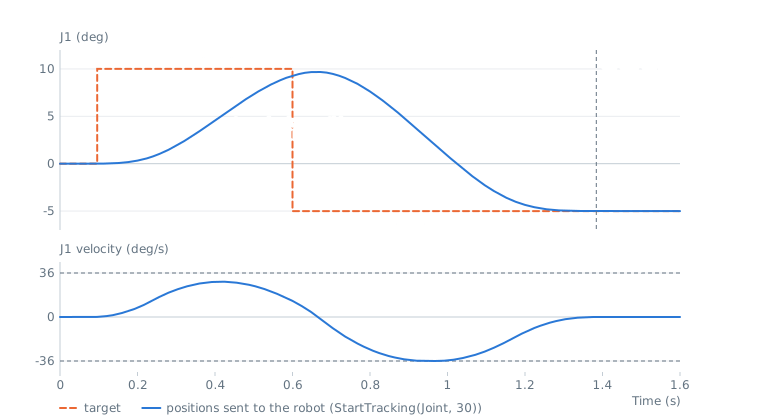
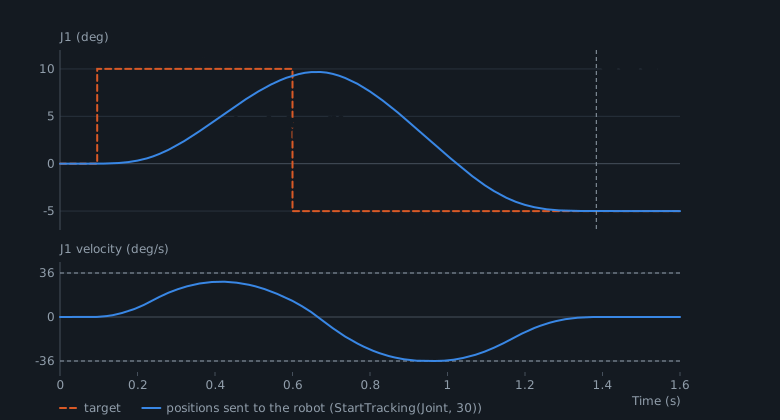
- The limits are
JointLimitsof the client (read from the robot byStartMonitoring()), scaled by the speed and acceleration percentages ofStartTracking(). - The first target is the current position. The robot does not move before the first call to
SetJointTrackingTarget(). - Each axis moves on its own, so the path to the target is not a straight line.
WaitForIdle()returns when the robot is stopped on the target.- The delay between a new target and the start of the motion is about
BufferLeadTimeplus the delay of the robot. ReduceBufferLeadTimein the connection parameters for a faster reaction.
Follow a Cartesian target
Set CartesianLimits before starting a Cartesian tracking. The linear limits are shared between X, Y and Z, and the angular limits between the 3 rotation axes.
var sm = robot.StreamMotion;sm.StartMonitoring();// Cartesian tracking needs Cartesian limitssm.CartesianLimits = new CartesianLimits(250, 1000, 5000, 45, 180, 900);sm.StartTracking(PositionFormat.Cartesian, 50, 50);// For example, a target given by a sensorXYZWPRPosition start = sm.QueueEndCartesianPosition;sm.SetCartesianTrackingTarget(new XYZWPRPosition(start.X + 20, start.Y, start.Z - 10, start.W, start.P, start.R));sm.WaitForIdle(10000);sm.StopTracking();robot.Disconnect();}
Compute each position
With callback streaming, the SetpointRequested event asks your application for the next position at every cycle. Give it with SetJoints() or SetCartesian():
var sm = robot.StreamMotion;sm.StartMonitoring();JointsPosition start = sm.QueueEndJointPosition;// Called on the communication thread, a few cycles before the robot uses the positionsm.SetpointRequested += (sender, e) =>{// e.Time: time of this position since the start, in secondsdouble offset = 5 * (1 - Math.Cos(2 * Math.PI * e.Time / 4)) / 2;e.SetJoints(new JointsPosition(start.Values) { J1 = start.J1 + offset });};sm.StartCallbackStreaming(PositionFormat.Joint);Thread.Sleep(8000);// The robot keeps its last position, or stops smoothly if it was movingsm.StopCallbackStreaming();robot.Disconnect();}
Rules of the callback:
- The event runs on the communication thread, a few cycles before the robot uses the position. It must return quickly, in less than one cycle.
- The first position (
CycleIndex0) must be the current position of the robot, and the next positions must respect the limits of the robot. Use Check on recorded positions to validate your algorithm. - If the handler throws an exception or gives no position, the robot keeps its position, or stops smoothly if it was moving, and
ErrorOccurredis raised. CallHold()to keep the position on purpose. - With Python, the callback works, but its timing depends on the interpreter: prefer target tracking.
Only one source of positions is active at a time: the queue, the target tracking or the callback. Abort(), Finish() and the end of the session stop the target tracking and the callback streaming.
The format given to StartTracking() or StartCallbackStreaming() must be the format of the current session. To use the other format, call Finish() and start in the next session (see one format per session).