Connect to your robot
Configure the connection to an IRC5 or OmniCore controller, choose the Robot Web Services version, and use the synchronous or asynchronous API.
The SDK talks to the robot controller over Robot Web Services (RWS), the HTTP interface that ABB controllers expose on the network. Nothing has to be installed on the robot.
Two classes can open a connection:
AbbController: the main entry point. It holds the connection parameters and gives access to every protocol.RwsClient: a standalone RWS client, when you only need RWS and prefer a smaller object.
What the controller needs
RWS is part of the base RobotWare system. It is always running, there is nothing to enable on the service port of the controller. The conditions below depend on the controller generation and on the Ethernet port your PC is plugged into.
| IRC5 | OmniCore | |
|---|---|---|
| RobotWare | 6.0 or later | 7.0 or later |
| Main computer | DSQC1000 or later | Any OmniCore |
| RobotWare option | None | None on the MGMT port, RobotStudio Connect [3119-1] on WAN |
| Port without any option | Service port, fixed address 192.168.125.1 | MGMT port, fixed address 192.168.125.1 |
| Factory network | WAN port | WAN port, with the option and the firewall rule below |
| Default protocol | HTTP on port 80, Digest authentication | HTTPS on port 443, Basic authentication |
| Sessions | 70 at the same time | 70 at the same time |
An IRC5 with the older DSQC 639 main computer only runs RobotWare 5, which has no RWS. The main computer has to be replaced before RobotWare 6 can be installed.
On OmniCore, RWS answers on the MGMT port only by default. To reach it from the factory network, through the WAN port:
- The system must include the option
RobotStudio Connect [3119-1]. Without it, the firewall rule alone is not enough. - In RobotStudio, open Configuration, Communication, Firewall Manager, edit
RobotWebServicesand enable it on the public network. - Restart the controller.
The LAN ports of an OmniCore belong to the I/O network, which is isolated. RWS does not answer there.
The controller only speaks IPv4. If its host name resolves to an IPv6 address, connect with the IPv4 address.
Quick connection
Pass an IP address and you are connected. The default parameters match an OmniCore controller with its factory user account.
static void Main(){// Connect to an OmniCore controller with the default RWS parametersAbbController robot = new AbbController();robot.Connect("192.168.0.1");// Every RWS service is reachable from robot.RwsConsole.WriteLine(robot.Rws.Controller.GetIdentity().Name);robot.Disconnect();}
Do not know the address yet? Discover the controllers of the network instead of typing one.
Full connection parameters
ConnectionParameters gives access to every option. Use it when the controller is not on its default port, uses HTTPS, or runs RobotWare 6.
using UnderAutomation.ABB;using UnderAutomation.ABB.Rws;public class Connect{static void Main(){ConnectionParameters parameters = new ConnectionParameters("192.168.0.1");// Ping the controller first, so an unreachable robot fails immediatelyparameters.PingBeforeConnect = true;parameters.Rws.Enable = true;parameters.Rws.Username = "Default User";parameters.Rws.Password = "robotics";parameters.Rws.UseHttps = false;parameters.Rws.Port = 0; // 0 means 80 for HTTP and 443 for HTTPSparameters.Rws.Timeout = 10000;parameters.Rws.Version = RwsVersion.OmniCore_V2_0;AbbController robot = new AbbController();robot.Connect(parameters);robot.Disconnect();}}
When PingBeforeConnect is true (default), the SDK sends an ICMP ping before the first HTTP request. An unreachable robot then fails in a few milliseconds instead of waiting for the HTTP timeout. Set it to false when ICMP is blocked on your network.
The default user account of an ABB controller is Default User with the password robotics. Change it if your controller uses a dedicated account. The account must have the User Authorization System (UAS) grants for what you want to do: reading is always allowed, writing needs the matching grant.
IRC5 or OmniCore
One API covers the two generations of controllers. Only the Version property changes.
| Controller | RobotWare | RWS version | RwsVersion value |
|---|---|---|---|
| IRC5 | 6 and earlier | RWS 1.0 | Irc5_V1_0 |
| OmniCore | 7 and later | RWS 2.0 | OmniCore_V2_0 |
static void Main(){// IRC5 controller, RobotWare 6 : RWS 1.0ConnectionParameters irc5 = new ConnectionParameters("192.168.0.1");irc5.Rws.Version = RwsVersion.Irc5_V1_0;// OmniCore controller, RobotWare 7 : RWS 2.0ConnectionParameters omniCore = new ConnectionParameters("192.168.0.2");omniCore.Rws.Version = RwsVersion.OmniCore_V2_0;// UseHttps is independent of the version. Set it to match how this// particular controller is configured on the network, not its generation.omniCore.Rws.UseHttps = true;AbbController robot = new AbbController();robot.Connect(omniCore);// The same code then works on both controllersConsole.WriteLine(robot.Rws.System.GetInfo().Version);}}
OmniCore_V2_0 is the default. If you connect to an IRC5 without setting the version, the first request fails with a 404 status code.
UseHttps is a separate setting from Version. A real IRC5 answers on HTTP and a real OmniCore on HTTPS by default, but a virtual controller can be configured for either one. Set UseHttps to match what the controller answers on. When the controller answers on HTTPS with a self-signed certificate, the SDK accepts it, you do not have to install anything in the certificate store.
The details of both versions are described in IRC5 or OmniCore: which RWS version.
Standalone RWS client
RwsClient connects without AbbController. The services are then directly on the client, client.Controller instead of robot.Rws.Controller.
static void Main(){// RwsClient talks to the controller without going through AbbControllerRwsClient client = new RwsClient();client.Connect("192.168.0.1", "Default User", "robotics", 0, 10000, false, RwsVersion.OmniCore_V2_0);Console.WriteLine(client.Controller.GetIdentity().Name);client.Disconnect();}}
Synchronous and asynchronous
Every service method exists twice: a synchronous version, and an asynchronous one with the same name followed by Async and an optional CancellationToken.
AbbController robot = new AbbController();robot.Connect("192.168.0.1");// Every service method has an asynchronous twin, with a cancellation tokenvar identity = await robot.Rws.Controller.GetIdentityAsync();var tasks = await robot.Rws.Rapid.GetTasksAsync();using (var cts = new CancellationTokenSource(TimeSpan.FromSeconds(5))){var state = await robot.Rws.Panel.GetControllerStateAsync(cts.Token);Console.WriteLine(state);}Console.WriteLine($"{identity.Name} runs {tasks.Length} RAPID tasks");}
The asynchronous methods are not available on .NET Framework 3.5 and 4.0, which have no async / await. Everything else in the SDK works on those versions.
Errors
Every RWS failure is reported as an RwsException. It carries the HTTP status code and, when the controller sends one, the ABB error code and message.
AbbController robot = new AbbController();robot.Connect("192.168.0.1");try{robot.Rws.Panel.SetSpeedRatio(50);}catch (RwsException ex){// StatusCode is the HTTP status returned by the controller// 403 usually means that another client holds the mastershipConsole.WriteLine($"RWS error {ex.StatusCode} : {ex.RwsErrorMessage}");Console.WriteLine($"ABB error code : {ex.RwsErrorCode}");Console.WriteLine($"Raw response : {ex.ResponseBody}");}}}
Common status codes:
| Status | Meaning |
|---|---|
| 400 | The controller refused the value, for example a speed ratio out of range |
| 403 | Another client holds the mastership, or the user account lacks the UAS grant |
| 404 | The resource does not exist on this controller, often a wrong RwsVersion |
| 500 | The controller could not run the operation in its current state |
Disconnect
AbbController robot = new AbbController();robot.Connect("192.168.0.1");// Always disconnect : the controller keeps a limited number of sessions openrobot.Disconnect();Console.WriteLine(robot.Enabled); // False}}
A controller accepts a limited number of simultaneous sessions, around 70 on OmniCore. An application that connects in a loop without disconnecting exhausts them, and every following request answers 503.
Try it in the demo application
Everything on this page can be tried without writing code, in the Connection page of the demo application.
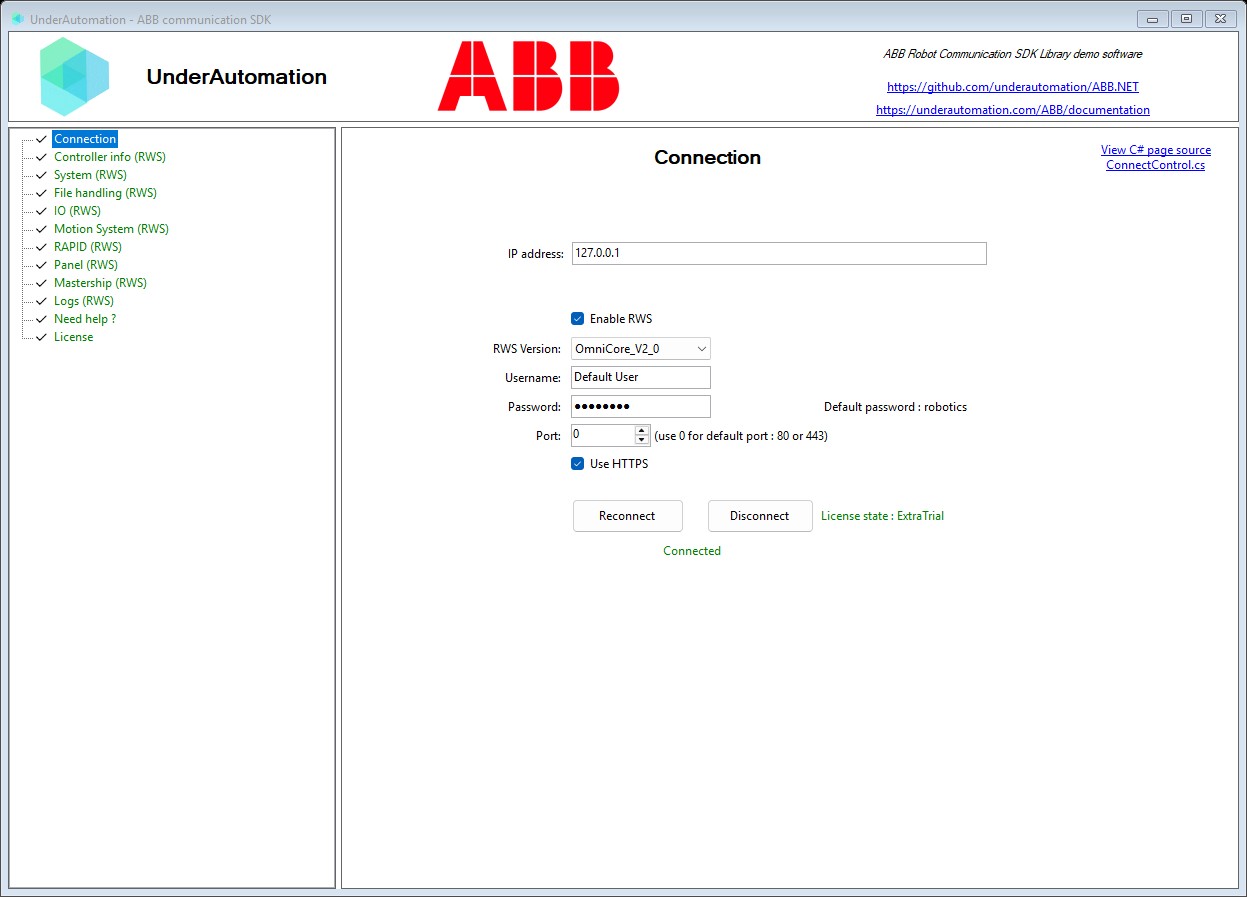
The demo application is open source. The C# source of this page is ConnectControl.cs.
API reference
Connection parameters for an ABB robot controller
| Member | Type | Description |
|---|---|---|
ConnectionParameters() Constructor | Instantiate new connection parameters with default values | |
ConnectionParameters(string) Constructor | Instantiate new connection parameters with a specified address
| |
Address Property | string | Address of the robot controller (IP or host name), default value is 127.0.0.1 |
PingBeforeConnect Property | bool | Send a ping command before initializing any connections |
Rws Property | RwsConnectParameters | RWS2 (Robot Web Services 2) connection parameters |
Equals(object) Method | bool | |
GetHashCode() Method | int | |
ToString() Method | string |
Connection parameters for ABB Robot Web Services (RWS). Supports both RWS v1 and v2.
| Member | Type | Description |
|---|---|---|
RwsConnectParameters() Constructor | ||
Enable Property | bool | Enable or disable the RWS client connection |
DEFAULT_PASSWORD Field | string | Default password for Digest Authentication |
DEFAULT_PORT Field | int | Default RWS port (80 for HTTP, 443 for HTTPS) |
DEFAULT_TIMEOUT Field | int | Default timeout in milliseconds |
DEFAULT_USERNAME Field | string | Default username for Digest Authentication |
Base class for connection parameters. Contains core properties needed for RWS connection.
| Member | Type | Description |
|---|---|---|
RwsConnectParametersBase() Constructor | ||
Password Property | string | Password for Digest Authentication (Default is "robotics") |
Port Property | int | RWS service port (if set to 0, the SDK will use 80 for HTTP, 443 for HTTPS) |
Timeout Property | int | HTTP request timeout in milliseconds (default: 1000ms) |
UseHttps Property | bool | Whether to use HTTPS instead of HTTP (default: false) |
Username Property | string | Username for Digest Authentication (Default is "Default User") |
Version Property | RwsVersion | RWS protocol version to use. If not specified, OmniCore_V2_0 (RWS 2.0) is used. RWS 2.0 is available in RobotWare >= 7, which ships the new OmniCore controller generation. For older RobotWare versions running on IRC5 controllers, use Irc5_V1_0 (RWS 1.0). |
Version of the ABB Robot Web Services (RWS) protocol exposed by the robot controller. The two versions differ in URL shapes, parameter placement and media types, so the client has to know which one it talks to. Pick the value that matches the controller generation.
| Name | Value | Description |
|---|---|---|
Irc5_V1_0 | 10 | RWS 1.0, exposed by IRC5 controllers running RobotWare 6 and earlier. |
OmniCore_V2_0 | 20 | RWS 2.0, exposed by OmniCore controllers running RobotWare 7 and later. This is the default when no version is specified. |
Exception thrown when an RWS API request fails. Compatible with RWS v1 and v2.
| Member | Type | Description |
|---|---|---|
RwsException(string) Constructor | Creates a new RWS exception with a message | |
RwsException(string, Exception) Constructor | Creates a new RWS exception with a message and inner exception | |
RwsException(string, int, string) Constructor | Creates a new RWS exception with a message, status code and response body | |
RwsException(string, string) Constructor | Creates a new RWS exception with a message and the raw response body | |
RwsException(string, RwsException) Constructor | Creates a new RWS exception that explains the failure of another one, keeping its diagnostics | |
ReasonPhrase Property read only | string | HTTP reason phrase returned by the server (e.g. "Forbidden", "Method Not Allowed"), if available |
ResponseBody Property read only | string | Raw response body from the server, if available |
RwsErrorCode Property read only | string | ABB internal error code extracted from the RWS error payload (e.g. "-1073445865"), if present |
RwsErrorMessage Property read only | string | Human readable error text extracted from the RWS error payload, if present |
StatusCode Property read only | int? | HTTP status code returned by the server |