Licensing
One license per brand you connect, the 30 day trial, RegisterLicense, the license states, the maintenance and the source license of UnderAutomation.Robotics.
UnderAutomation.Robotics has no license of its own: it uses the license keys of the Fanuc, Yaskawa, Universal Robots, ABB and Stäubli SDKs. This page explains the trial, the license key of each brand, the license states, the maintenance and the source license.
One license per brand
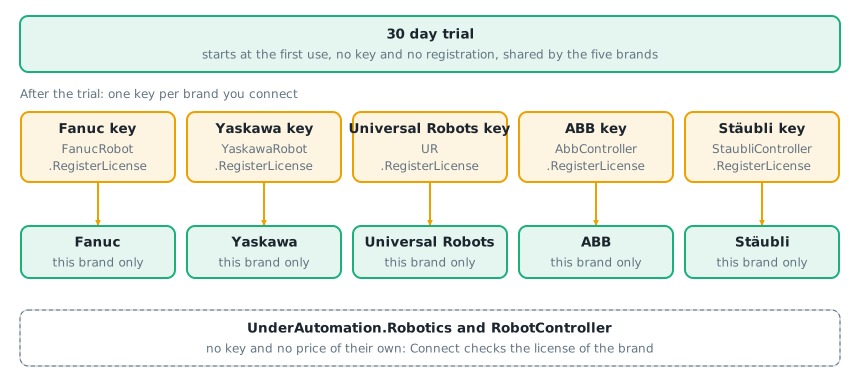
Robotics contains the five brand SDKs, and each brand is licensed separately:
- You buy one license per brand you connect, the license of the brand SDK. There is no license and no price of Robotics.
- The license of a brand unlocks the part of this brand in Robotics, with the same key as in the brand SDK. A customer of a brand SDK keeps the key: see Migrate from a brand SDK.
- A key of one brand does not unlock the other brands.
- The common API (
RobotController) has no key.Connectchecks the license of the brand of the controller. You can use it only in an application that also uses at least one brand, under its license or its trial (article 13.5 of the license agreement).
Trial period
The trial is one period of 30 days that starts at the first use of Robotics, with no registration. The five brands share it, also when you already have the license key of another brand: a brand that you add later only has the days left of this period. Every feature of the brand is available during the trial. Robotics has no trial of its own.
To extend the trial of a brand, or to evaluate a brand after the end of the trial, ask for a trial license key of this brand with the form of the license page, one request for each brand. Register it with RegisterLicense of the brand, like a license key. Its state is ExtraTrial.
The trial is for the evaluation of the library, not for production: see the license agreement.
Register the license key of each brand
Buy the license of a brand (see pricing): you receive a license key and the name of your organization (the licensee). Pass both to the static method RegisterLicense of the brand, once, before the first connection.
static void Main(){// One key per brand, registered once at startup, before the first connectionFanucRobot.RegisterLicense("YourCompanyName", "YOUR_FANUC_LICENSE_KEY");YaskawaRobot.RegisterLicense("YourCompanyName", "YOUR_YASKAWA_LICENSE_KEY");// Each brand has its own license stateConsole.WriteLine($"Fanuc: {FanucRobot.LicenseInfo.State}");Console.WriteLine($"Yaskawa: {YaskawaRobot.LicenseInfo.State}");// Number of trial days left for a brand without a keyint? evaluationDaysLeft = YaskawaRobot.LicenseInfo.EvaluationDaysLeft;// Check the brands of your cell once at startup,// rather than catching the exception on every connectionif (!FanucRobot.LicenseInfo.IsLicensed){// A readable description of the stateConsole.WriteLine(FanucRobot.LicenseInfo);return;}}}
| Brand | Class with RegisterLicense and LicenseInfo | Python import |
|---|---|---|
| Fanuc | UnderAutomation.Fanuc.FanucRobot | from underautomation.fanuc.fanuc_robot import FanucRobot |
| Yaskawa | UnderAutomation.Yaskawa.YaskawaRobot | from underautomation.yaskawa.yaskawa_robot import YaskawaRobot |
| Universal Robots | UnderAutomation.UniversalRobots.UR | from underautomation.universal_robots.ur import UR |
| ABB | UnderAutomation.ABB.AbbController | from underautomation.abb.abb_controller import AbbController |
| Stäubli | UnderAutomation.Staubli.StaubliController | from underautomation.staubli.staubli_controller import StaubliController |
The registration is static: it applies to the whole application, not to one robot. It is the same call as in the brand SDK. You can register a key after the end of the trial.
LicenseInfo.ToString() gives a readable description of the state. It is the message of an InvalidLicenseException.
Add a brand
To connect a new brand, buy the license of this brand SDK on the pricing page, and register its key next to the others. The keys you already have do not change. A license covers one organization at one address, with any number of developers, robots and delivered applications. The users of your application do not need a license.
License states
Each brand has its own LicenseInfo, with one of these states:
LicenseState | Meaning | The brand runs |
|---|---|---|
None | No key is registered and no trial could be started | no |
Trial | The 30 day trial is running | yes |
ExtraTrial | A trial license key is registered | yes |
Expired | The trial is over | no |
Invalid | The licensee and the key do not match | no |
MaintenanceNeeded | The key is valid, but this release is newer than its maintenance | no |
Licensed | The brand is licensed | yes |
IsLicensed is true for Licensed, Trial and ExtraTrial. EvaluationDaysLeft is the number of days left in the trial, also with a trial license key. It is 0 or negative when the trial has expired, and null with a license key.
Without a valid license
Connect checks the license of the brand before it opens the connection: Connect of the brand SDK, and RobotController.Connect for the brand of the controller. The methods of the common API check it again at each call. Without a valid license, they throw the InvalidLicenseException of the brand (UnderAutomation.Fanuc.License.InvalidLicenseException...). The message says why, and the LicenseInfo property of the exception gives the full state.
Test IsLicensed once at startup, as in the code above, rather than catching the exception at each connection.
Maintenance
A license includes a number of maintenance years. MaintenanceExpirationDate is the last date of the releases that the key can use. A release published after this date reports MaintenanceNeeded.
For Robotics, the date that counts is the release date of Robotics. Each release of Robotics is a new release of the five brand SDKs it contains, also when the version of a brand inside is older than the release of Robotics. To use a release of Robotics, the maintenance of each key must cover its release date. The releases you already use keep working: a new key is only needed to use a newer release.
Source license
The Standard and Pro licenses deliver the obfuscated DLL. The source code of Robotics needs a Source license of each of the five brand SDKs, at the same Development Site, or held by a Full Remote organization (a company without a physical development office). A Source license of one brand gives the source code of this brand SDK only, and each brand that you compile from the sources must be covered by a Source license of its brand SDK. The license agreement gives the exact terms, in article 13.8.
The source package gives the build instructions in its README.
What to read next
- Migrate from a brand SDK: move a project from a brand SDK to Robotics, with the same key.
- Pricing: the licenses of the five brand SDKs.
- Trial license key: extend the trial of a brand.
- License agreement: the terms of use of Robotics.