Inputs and outputs
Read the I/O groups of a Yaskawa controller (general, external, specific, network...), test one signal and write the network inputs.
This page shows how to read the inputs and outputs of a Yaskawa Motoman controller with the SDK, and how to write the network inputs from a PC. No job is needed.
Signals, groups and bits
A Yaskawa signal has a number of 5 digits, for example #10013. The first 4 digits are the group, the last digit is the bit in the group (0 to 7). #10013 is the bit 3 of the group 1001, the fourth general output.
The SDK reads and writes whole groups: one byte per group, one bit per signal. IOType and a group number from 1 give the first group:
IOType | Signals | Groups |
|---|---|---|
GeneralInput | #00010 to #05127 | 1 to 512 |
GeneralOutput | #10010 to #15127 | 1 to 512 |
ExternalInput | #20010 to #25127 | 1 to 512 |
NetworkInput | #27010 to #29567 | 1 to 256 |
ExternalOutput | #30010 to #35127 | 1 to 512 |
NetworkOutput | #37010 to #39567 | 1 to 256 |
SpecificInput | #40010 to #41607 | 1 to 160 |
SpecificOutput | #50010 to #53007 | 1 to 300 |
InterfacePanelInput | #60010 to #60647 | 1 to 64 |
AuxiliaryRelay | #70010 to #79997 | 1 to 999 |
RobotControlStatus | #80010 to #81287 | 1 to 128 |
PseudoInput | #82010 to #82207 | 1 to 20 |
The signals that exist depend on the I/O boards and the settings of your controller.
Read I/O
ReadIO(type, group, count) reads count groups from the first group, one byte per group.
var robot = new YaskawaRobot();robot.Connect("192.168.0.1");// 2 groups of general outputs, from group 1: signals #10010 to #10027RobotIOData outputs = robot.HighSpeedEServer.ReadIO(IOType.GeneralOutput, 1, 2);// One byte per group, one bit per signal: bit 0 is #10010, bit 7 is #10017byte group1 = outputs.Value[0];bool out10013 = (group1 & (1 << 3)) != 0;// The same read, with the number of the first group (1001 for #10010)RobotIOData sameOutputs = robot.HighSpeedEServer.ReadIO(1001, 2);// 4 groups of general inputs: #00010 to #00047RobotIOData inputs = robot.HighSpeedEServer.ReadIO(IOType.GeneralInput, 1, 4);robot.Disconnect();}
ReadIO(firstGroup, count) does the same with the number of the first group: 1001 for #10010. In Python 2.2.0, only the form with IOType exists.
Test one signal
IoHelpers.ConvertIOGroupToBitAddress(type, group, bit) gives the number of a signal, to print it as the pendant does. To test a signal, read its group and test its bit.
var robot = new YaskawaRobot();robot.Connect("192.168.0.1");// Signal number of bit 3 of group 1 of the general outputs: 10013uint signal = IoHelpers.ConvertIOGroupToBitAddress(IOType.GeneralOutput, 1, 3);Console.WriteLine($"#{signal:D5}");// Read the group and test the bitbyte value = robot.HighSpeedEServer.ReadIO(IOType.GeneralOutput, 1, 2).Value[0];bool isOn = (value & (1 << 3)) != 0;robot.Disconnect();}
Write the network inputs
A PC can write the network inputs, #27010 to #29567. The jobs and the ladder of the controller read them like other inputs. The other signals are written by the controller itself, and the controller refuses their write.
var robot = new YaskawaRobot();robot.Connect("192.168.0.1");// Network inputs are the signals that a PC can write: #27010 to #27017 for group 1.// One byte per group: here group 1 onlyrobot.HighSpeedEServer.WriteIoNetworkInput(1, new byte[] { 0b0000_0101 });// The same write, with the I/O typerobot.HighSpeedEServer.WriteIO(IOType.NetworkInput, 1, new byte[] { 0b0000_0101 });robot.Disconnect();}
- A write sets the 8 bits of each group. To change one bit, read the group, change the bit, write the group: see Read and write I/O.
Try it in the demo application
Everything on this page can be tried without writing code, in the Inputs / Outputs page of the demo application.
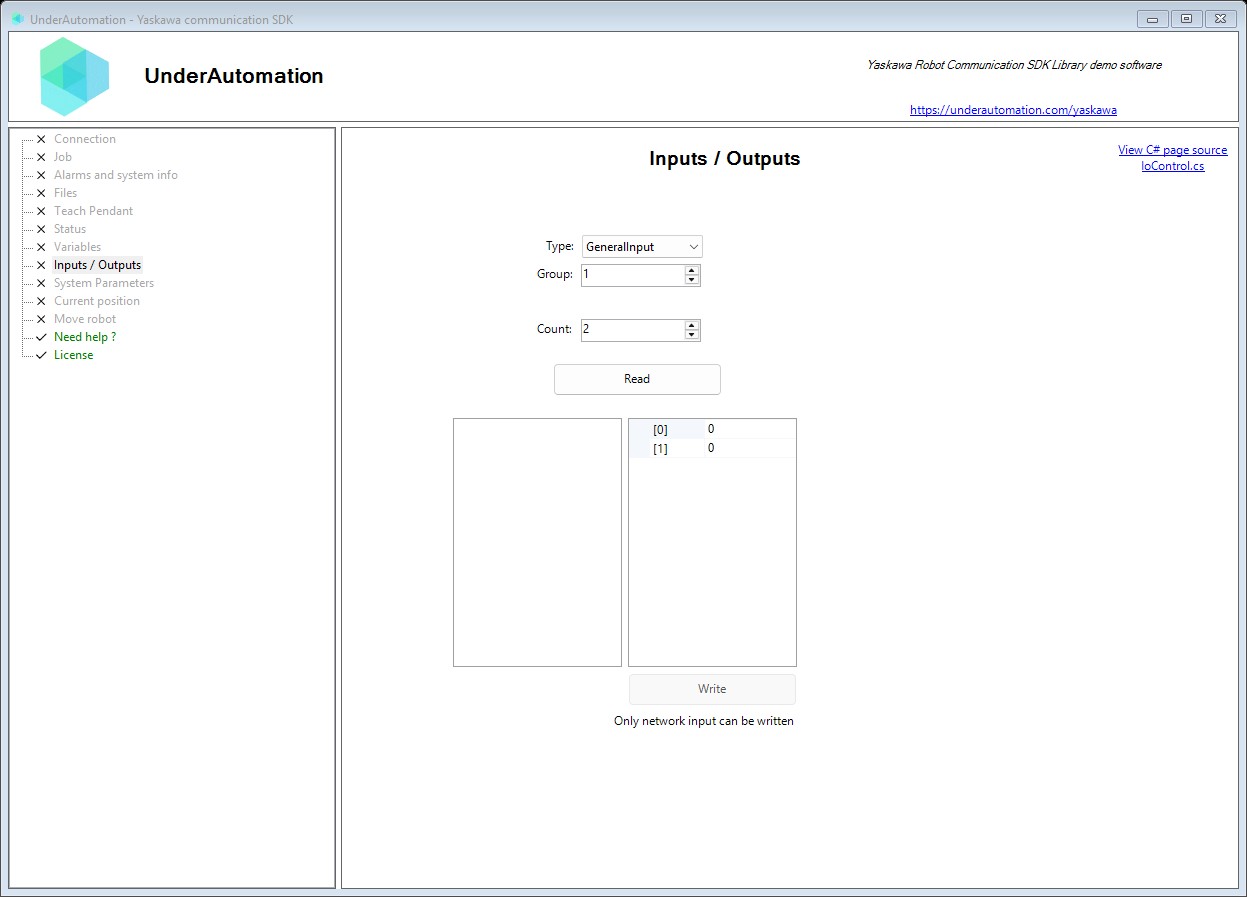
The demo application is open source. The C# source of this page is IoControl.cs.
Reference
Methods of HighSpeedEServerClientBase :// Reads axis configuration information for the default robot control group. Returns axis type names for each of the 8 possible axes.RobotAxisConfigData GetConfigurationInformation();// Reads axis configuration information for a specified control group. Returns axis type names (e.g., "S", "L", "U", "R", "B", "T") for each axis.RobotAxisConfigData GetConfigurationInformation(RobotControlGroup type);// Reads information about the currently selected and executing job (program). Returns job name, current line, step, and speed override percentage.RobotJobData GetExecutingJobInformation();// Reads the position error (difference between commanded and actual position) for the default robot. Values indicate servo tracking error in pulse units.RobotAxisIntData GetPositionError();// Reads the position error for a specified control group. Position error indicates the difference between commanded and actual position.RobotAxisIntData GetPositionError(RobotControlGroup type);// Reads the current robot Cartesian position (TCP position and orientation). Coordinates are returned in millimeters for X, Y, Z and degrees for Rx, Ry, Rz.RobotPositionCartesianData GetRobotCartesianPosition();// Reads the current robot joint position in pulse (encoder) values. Returns raw pulse values for all robot axes.RobotPositionIntData GetRobotJointPosition();// Reads position data for a specified control group. Can read robot, base, or station position data depending on the control group specified.RobotPositionIntData GetRobotPosition(RobotControlGroup type);// Reads the current operational status of the robot controller. Returns information about mode (teach/play), running state, hold status, alarms, and servo power.RobotStatusData GetStatusInformation();// Retrieves system information about the default robot system (R1). Returns software version, robot name, and parameter file information.RobotSystemInformation GetSystemInformation();// Retrieves system information for a specific robot system or control group. Use for multi-robot controllers or to query specific axes groups.RobotSystemInformation GetSystemInformation(RobotSystemTypeData type);// Reads multiple base position variables (BP variables) from the robot controller. Base position variables store the position of the base axes (travel axis) of a robot.RobotBasePositionVariableData ReadBasePosition(int firstIndex, int count);// Reads multiple external axis variables (EX variables) from the robot controller. External axis variables store the position of the station axes (positioner...), in encoder pulses.RobotExternalAxisVariableData ReadExternalPosition(int firstIndex, int count);// Reads multiple I/O bytes from the robot controller starting at a specified index.RobotIOData ReadIO(int firstIndex, int count);// Reads multiple I/O bytes from the robot controller using I/O group addressing. The starting byte index is computed from the I/O type and group number.RobotIOData ReadIO(IOType type, ushort group, int count);// Reads multiple position variables (P variables) from the robot controller. Each variable is a pulse position or a Cartesian position (base, robot, tool or user frame), with its posture, tool number and user frame number.RobotPositionVariableData ReadPositionVariable(int firstIndex, int count);// Writes base position variables (BP variables) to the robot controller.RobotDataHeader WriteBasePosition(int firstIndex, RobotBasePositionData[] data);// Writes external axis variables (EX variables) to the robot controller using generic type. Provided for backward compatibility with existing code.RobotDataHeader WriteExternalPosition(int firstIndex, RobotAxisRawData<int>[] data);// Writes external axis variables (EX variables) to the robot controller.RobotDataHeader WriteExternalPosition(int firstIndex, RobotExternalAxisData[] data);// Writes I/O bytes to the robot controller starting at a specified index.RobotDataHeader WriteIO(int firstIndex, byte[] data);// Writes I/O bytes to the robot controller using I/O group addressing. By default, only Network Input can be written The starting byte index is computed from the I/O type and group number.RobotDataHeader WriteIO(IOType type, ushort group, byte[] data);// Writes network input bytes to the robot controllerRobotDataHeader WriteIoNetworkInput(ushort group, byte[] data);// Writes position variables (P variables) to the robot controller.RobotDataHeader WritePositionVariable(int firstIndex, RobotPositionIntData[] data);
Represents data returned from reading multiple I/O (Input/Output) points from the robot controller. I/O addresses are organized in groups based on their function and accessibility.
| Member | Type | Description |
|---|---|---|
Value Property read only | byte[] | Gets the array of I/O byte values read from the robot controller. Each byte represents 8 consecutive I/O points where each bit corresponds to one I/O state. |
Yaskawa Motoman I/O signal type categories.
| Name | Value | Description |
|---|---|---|
AuxiliaryRelay | 9 | Auxiliary relay signals (#70010–) |
ExternalInput | 2 | External input signals (#20010–) |
ExternalOutput | 4 | External output signals (#30010–) |
GeneralInput | 0 | Robot user input signals (#00010–) |
GeneralOutput | 1 | Robot user output signals (#10010–) |
InterfacePanelInput | 8 | Interface panel input signals (#60010–) |
NetworkInput | 3 | Network input signals (#27010–) |
NetworkOutput | 5 | Network output signals (#37010–) |
PseudoInput | 11 | Pseudo input signals (#82010–) |
RobotControlStatus | 10 | Robot control status signals (#80010–) |
SpecificInput | 6 | Robot system input signals (#40010–) |
SpecificOutput | 7 | Robot system output signals (#50010–) |
Helper methods for handling Yaskawa I/O group conversions and related utilities.
| Member | Type | Description |
|---|---|---|
ConvertIOGroupToBitAddress(IOType, ushort, byte) Method static | uint | Converts an I/O group address (type + group + bit) to a flat Yaskawa 5-digit contact number.
|