Primary Interface: data streaming
Receive the state of a UR cobot at 10 Hz with the Primary Interface: robot mode, joints, tool, I/O, Cartesian position, kinematics and configuration.
- Connect
- Read the data
- State of the connection
- Try it in the demo application
- Packages
- Robot mode
- Joint data
- Tool data
- Masterboard data
- Cartesian information
- Kinematics information
- Configuration data
- Force mode data
- Additional information
- Calibration data
- Safety data
- Tool communication information
- Tool mode
- What to read next
The Primary Interface of a Universal Robots cobot sends the state of the robot 10 times per second: modes, joints, tool, I/O, Cartesian position, kinematics, configuration and messages. This page shows how to connect to it and read its data. The same connection sends URScript: see Send URScript.
Connect
The Primary Interface is enabled by default: Connect("192.168.0.1") opens it. With a ConnectParameters, you can also choose the port:
| Port | Interfaces | Data | URScript |
|---|---|---|---|
| 30001 | PrimaryInterface (default) | All packages | yes |
| 30002 | SecondaryInterface | All packages | yes |
| 30011 | PrimaryInterfaceReadOnly | All packages | no |
| 30012 | SecondaryInterfaceReadOnly | All packages | no |
static void Main(string[] args){var robot = new UR();var parameters = new ConnectParameters("192.168.0.1");// The Primary Interface is enabled by defaultparameters.PrimaryInterface.Enable = true;// Port 30001 (default) accepts URScript. The read only ports do notparameters.PrimaryInterface.Port = Interfaces.PrimaryInterface;robot.Connect(parameters);// The last values received are in the properties of the clientdouble baseSpeed = robot.PrimaryInterface.JointData.Base.ActualSpeed;// Close the Primary Interface onlyrobot.PrimaryInterface.Disconnect();// Close every servicerobot.Disconnect();}}
The same client works without UR:
static void Main(string[] args){// A Primary Interface client, without a UR instancevar client = new PrimaryInterfaceClient();client.Connect("192.168.0.1", Interfaces.PrimaryInterface);double baseSpeed = client.JointData.Base.ActualSpeed;client.Disconnect();}}
The service Primary Client Interface must be enabled on the robot: see Prepare the robot. For the data of the interface, see Remote control via TCP/IP by Universal Robots.
Read the data
Each package of the robot has a property, which holds the last values received, and an event, raised when the package arrives. A property is null until its first package: wait about 100 ms after the connection.
robot.Connect("192.168.0.1");// Last package received, read at any timeJointDataPackageEventArgs joints = robot.PrimaryInterface.JointData;double shoulder = joints.Shoulder.Position; // radCartesianInfoPackageEventArgs tool = robot.PrimaryInterface.CartesianInfo;double x = tool.X; // m// Or an event, raised when a package arrives (10 Hz)robot.PrimaryInterface.JointDataReceived += (sender, e) =>{double wrist3Speed = e.Wrist3.ActualSpeed; // rad/s};robot.PrimaryInterface.RobotModeDataReceived += (sender, e) =>{bool programRunning = e.ProgramRunning;};}}
The sections below list the content of each package.
State of the connection
Connected becomes false when the connection is lost (robot stopped, cable unplugged). No event is raised and there is no automatic reconnection: call Connect again. InternalErrorOccured is raised when the SDK meets an error.
robot.Connect("192.168.0.1");// false after a loss of the connection. There is no automatic reconnectionbool connected = robot.PrimaryInterface.Connected;if (!connected)robot.Connect("192.168.0.1");// Raised when an error happens in the backgroundrobot.PrimaryInterface.InternalErrorOccured += (sender, e) =>{Exception exception = e.Exception;string message = e.Message;StatusCode status = e.Status;};}}
Try it in the demo application
Everything on this page can be tried without writing code, in the Primary Interface (Data streaming and script) page of the demo application.
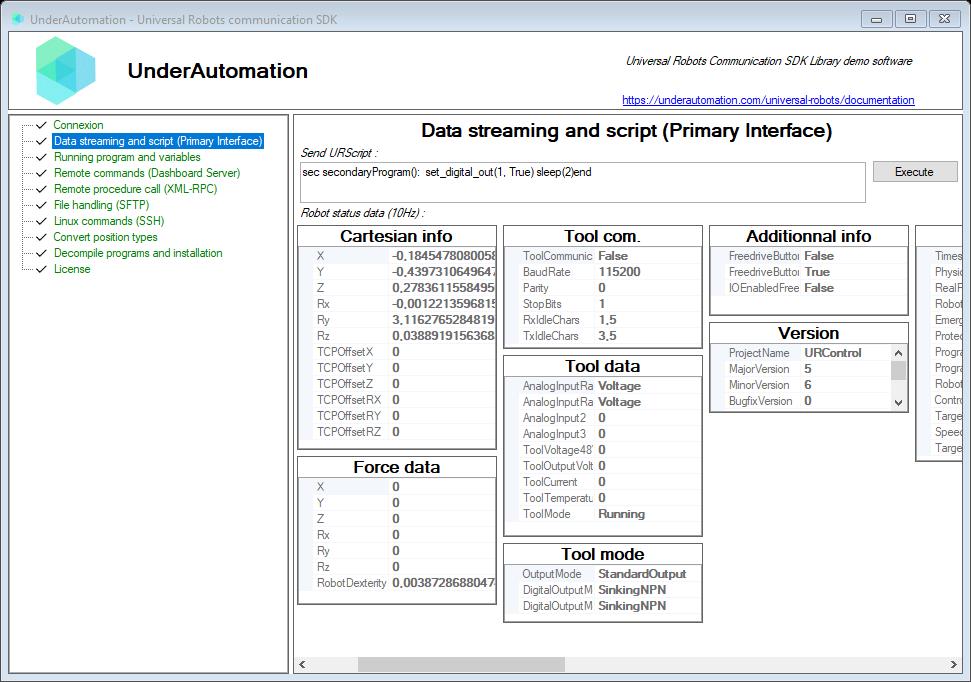
The demo application is open source. The C# source of this page is PrimaryInterfaceControl.cs.
Packages
Robot mode
private UR ur;private void Start() {ur = new UR(); // Create a new UR instanceur.Connect("192.168.0.1"); // Connect to the robot// ...// Direct access to last received packageRobotModeDataPackageEventArgs _value = ur.PrimaryInterface.RobotModeData;// Attach a delegate to the event triggered when new package comesur.PrimaryInterface.RobotModeDataReceived += Ur_RobotModeDataReceived;}private void Ur_RobotModeDataReceived(object sender, RobotModeDataPackageEventArgs e) {// e contains the incoming package}
Information about current robot mode
| Member | Type | Description |
|---|---|---|
RobotModeDataPackageEventArgs() Constructor | ||
ControlMode Property | ControlModes | Current robot control mode |
EmergencyStopped Property | bool | The button Emergency Stop is pressed |
PhysicalRobotConnected Property | bool | Robot is connected to its controller |
ProgramPaused Property | bool | The running program is paused |
ProgramRunning Property | bool | A program is running |
ProtectiveStopped Property | bool | A stop occured due to a fault detection |
RealRobotEnabled Property | bool | Real robot mode active. False if robot is in simulation |
RobotMode Property | RobotModes | Current robot running mode |
RobotPowerOn Property | bool | Robot is powered on and boot is completed. If false, you need to press "ON" button to power it on |
SpeedScaling Property | double | Speed scaling |
TargetSpeedFraction Property | double | Overriden speed ratio between 0 (0%) and 1 (100%) |
TargetSpeedFractionLimit Property | double | Maximum target speed fraction |
Timestamp Property | TimeSpan | Timespan since the robot controller has started |
ToString() Method | string | Returns a string representation of the robot mode data. |
Robot control modes
| Name | Value | Description |
|---|---|---|
Force | 2 | Robot is force controlled. (For example : URScript force_mode() function is called) |
Position | 0 | Robot is position controlled |
Teach | 1 | The robot is hand guided by pushing teached button |
Torque | 3 | Robot is torque controlled |
Robot running modes
| Name | Value | Description |
|---|---|---|
BackDrive | 6 | The robot is hand guided by pushing teached button |
Booting | 2 | The robot controller is booting |
ConfirmSafety | 1 | Robot has stopped due to a Safety Stop |
Disconnected | 0 | Robot is not connected to its controller |
Idle | 5 | Power is on but breaks are not released |
Other | -1 | Robot is in an obsolete CB2 mode |
PowerOff | 3 | The robot is powered off |
PowerOn | 4 | The robot is powered on |
Running | 7 | Robot is in normal mode |
UpdatingFirmware | 8 | Firmware is upgrading |
Joint data
private UR ur;private void Start() {ur = new UR(); // Create a new UR instanceur.Connect("192.168.0.1"); // Connect to the robot// ...// Direct access to last received packageJointDataPackageEventArgs _value = ur.PrimaryInterface.JointData;// Attach a delegate to the event triggered when new package comesur.PrimaryInterface.JointDataReceived += Ur_JointDataReceived;}private void Ur_JointDataReceived(object sender, JointDataPackageEventArgs e) {// e contains the incoming package}
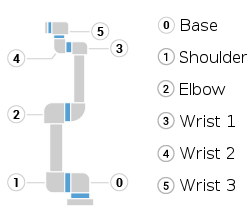
Status of each joints
| Member | Type | Description |
|---|---|---|
JointDataPackageEventArgs() Constructor | ||
Base Property | JointData | Base joint data |
Elbow Property | JointData | Elbow joint data |
Shoulder Property | JointData | Shoulder joint data |
Wrist1 Property | JointData | Wrist1 joint data |
Wrist2 Property | JointData | Wrist2 joint data |
Wrist3 Property | JointData | Wrist3 (Tool) joint data |
ToString() Method | string | Returns a string representation of the joint data for all six joints. |
Joint data
| Member | Type | Description |
|---|---|---|
JointData() Constructor | ||
ActualSpeed Property | double | Joint rotation speed in rad/s |
Current Property | float | Motor current in Amps |
JointMode Property | JointModes | Joint mode |
Position Property | double | Angular joint position in radian |
TargetPosition Property | double | Angular target position in radian |
Temperature Property | float | Joint temperature in °C |
Voltage Property | float | Motor voltage in Volts |
Equals(object) Method | bool | |
GetHashCode() Method | int | |
ToString() Method | string |
Joint modes
| Name | Value | Description |
|---|---|---|
Backdrive | 238 | Joint is in backdrive mode. |
Booting | 247 | Joint is booting. |
Bootloader | 249 | Joint is in bootloader mode. |
Calibration | 250 | Joint is calibrating. |
Fault | 252 | Joint is in a fault state. |
Idle | 255 | Joint is idle. |
MotorInitialisation | 246 | Joint motor is initializing. |
NotResponding | 245 | Joint is not responding. |
PartDCalibration | 237 | Joint is in part D calibration mode. |
PartDCalibrationError | 248 | Joint part D calibration encountered an error. |
PowerOff | 239 | Joint is powered off. |
Running | 253 | Joint is running normally. |
ShuttingDown | 236 | Joint is shutting down. |
Tool data
private UR ur;private void Start() {ur = new UR(); // Create a new UR instanceur.Connect("192.168.0.1"); // Connect to the robot// ...// Direct access to last received packageToolDataPackageEventArgs _value = ur.PrimaryInterface.ToolData;// Attach a delegate to the event triggered when new package comesur.PrimaryInterface.ToolDataReceived += Ur_ToolDataReceived;}private void Ur_ToolDataReceived(object sender, ToolDataPackageEventArgs e) {// e contains the incoming package}
Tool data
| Member | Type | Description |
|---|---|---|
ToolDataPackageEventArgs() Constructor | ||
AnalogInput2 Property | double | Value of Analog input 2 (analog_in[2]) |
AnalogInput3 Property | double | Value of Analog input 3 (analog_in[3]) |
AnalogInputRange2 Property | AnalogRanges | Unit of analog input 2 (analog_in[2]) |
AnalogInputRange3 Property | AnalogRanges | Unit of analog input 3 (analog_in[3]) |
ToolCurrent Property | float | Tool current in Amps |
ToolMode Property | ToolModes | Tool mode |
ToolOutputVoltage Property | sbyte | Tool output voltage |
ToolTemperature Property | float | Tool Temperature in °C |
ToolVoltage48V Property | float | Actual robot voltage power supply |
ToString() Method | string | Returns a string representation of the tool data. |
Analog units of analog inputs and outputs
| Name | Value | Description |
|---|---|---|
Current | 0 | The analog value is in Amps (A) |
Voltage | 1 | The analog value is in Volts (V) |
Tool modes
| Name | Value | Description |
|---|---|---|
Bootloader | 249 | Bootloader |
Idle | 255 | Idle |
Running | 253 | Running |
Masterboard data
private UR ur;private void Start() {ur = new UR(); // Create a new UR instanceur.Connect("192.168.0.1"); // Connect to the robot// ...// Direct access to last received packageMasterboardDataPackageEventArgs _value = ur.PrimaryInterface.MasterboardData;// Attach a delegate to the event triggered when new package comesur.PrimaryInterface.MasterboardDataReceived += Ur_MasterboardDataReceived;}private void Ur_MasterboardDataReceived(object sender, MasterboardDataPackageEventArgs e) {// e contains the incoming package}
Masterboard data
| Member | Type | Description |
|---|---|---|
MasterboardDataPackageEventArgs() Constructor | ||
AnalogInput0 Property | double | Value of analog input 0 (analog_in[0]) |
AnalogInput1 Property | double | Value of analog input 1 (analog_in[1]) |
AnalogInputRange0 Property | AnalogRanges | Unit of analog input 0 (analog_in[0]) |
AnalogInputRange1 Property | AnalogRanges | Unit of analog input 1 (analog_in[1]) |
AnalogOutput0 Property | double | Value of analog output 0 (analog_out[0]) |
AnalogOutput1 Property | double | Value of analog output 1 (analog_out[1]) |
AnalogOutputDomain0 Property | AnalogRanges | Unit of analog output 0 (analog_out[0]) |
AnalogOutputDomain1 Property | AnalogRanges | Unit of analog output 1 (analog_out[1]) |
DigitalInputs Property | MasterboardDigitalIO | Register where each bit is a digital input value |
DigitalOutputs Property | MasterboardDigitalIO | Register where each bit is a digital output value |
Euromap67Installed Property | sbyte | The robot is interfaced to injection molding machines Euromap 67 |
EuromapCurrent Property | float | Euromap current |
EuromapInputBits Property | int | Register where each bit is a digital Euromap input |
EuromapOutputBits Property | int | Register where each bit is a digital Euromap output |
EuromapVoltage Property | float | Euromap voltage |
InReducedMode Property | byte | Robot is in reduced speed mode |
MasterIOCurrent Property | float | Current of all digital and analog inputs and outputs |
MasterboardTemperature Property | float | Temperature of masterboard in °C |
OperationalModeSelectorInput Property | byte | Position of operational mode selector input switch |
RobotCurrent Property | float | Robot current consumption in Amps |
RobotVoltage48V Property | float | Voltage of internal 48V power supply |
Safetymode Property | SafetyStatus | Masterboard safety mode |
ThreePositionEnablingDeviceInput Property | byte | Position of the 3-position enabling device |
ToString() Method | string | Returns a string representation of the masterboard data. |
Represents the state of digital I/O pins on the UR controller masterboard, including standard digital, configurable, and tool digital pins.
| Member | Type | Description |
|---|---|---|
BitArray Property read only | BitArray | Register value seen as a bool array |
Configurable0 Property read only | bool | State of configurable digital I/O pin 0. |
Configurable1 Property read only | bool | State of configurable digital I/O pin 1. |
Configurable2 Property read only | bool | State of configurable digital I/O pin 2. |
Configurable3 Property read only | bool | State of configurable digital I/O pin 3. |
Configurable4 Property read only | bool | State of configurable digital I/O pin 4. |
Configurable5 Property read only | bool | State of configurable digital I/O pin 5. |
Configurable6 Property read only | bool | State of configurable digital I/O pin 6. |
Configurable7 Property read only | bool | State of configurable digital I/O pin 7. |
Digital0 Property read only | bool | State of standard digital I/O pin 0. |
Digital1 Property read only | bool | State of standard digital I/O pin 1. |
Digital2 Property read only | bool | State of standard digital I/O pin 2. |
Digital3 Property read only | bool | State of standard digital I/O pin 3. |
Digital4 Property read only | bool | State of standard digital I/O pin 4. |
Digital5 Property read only | bool | State of standard digital I/O pin 5. |
Digital6 Property read only | bool | State of standard digital I/O pin 6. |
Digital7 Property read only | bool | State of standard digital I/O pin 7. |
ToolDigital0 Property read only | bool | State of tool digital I/O pin 0. |
ToolDigital1 Property read only | bool | State of tool digital I/O pin 1. |
Value Property read only | int | Register value |
Equals(object) Method | bool | |
GetHashCode() Method | int | |
ToString() Method | string |
Safety modes
| Name | Value | Description |
|---|---|---|
AutomaticModeSafeguardStop | 10 | Automatic mode safeguard stop is active. |
Fault | 9 | Safety is in fault mode |
Normal | 1 | Safety is in normal operating conditions |
ProtectiveStop | 3 | Protective safeguard Stop. This safety function is triggeredby an external protective device using safety inputs which will trigger a Cat 2 stop3per IEC 60204-1. |
Recovery | 4 | When a safety limit is violated, the safety system must be restarted. |
Reduced | 2 | Speed is reduced |
RobotEmergencyStop | 7 | (EA + EB + SBUS->Screen) Physical e-stop interface input activated |
SafeguardStop | 5 | (SI0 + SI1 + SBUS) Physical s-stop interface input |
SystemEmergencyStop | 6 | (EA + EB + SBUS->Euromap67) Physical e-stop interface input activated |
SystemThreePositionEnablingStop | 11 | System three-position enabling device stop is active. |
Violation | 8 | Safety is in violation mode (for example, violation of the allowed delay between redundant signals) |
Cartesian information
private UR ur;private void Start() {ur = new UR(); // Create a new UR instanceur.Connect("192.168.0.1"); // Connect to the robot// ...// Direct access to last received packageCartesianInfoPackageEventArgs _value = ur.PrimaryInterface.CartesianInfo;// Attach a delegate to the event triggered when new package comesur.PrimaryInterface.CartesianInfoReceived += Ur_CartesianInfoReceived;}private void Ur_CartesianInfoReceived(object sender, CartesianInfoPackageEventArgs e) {// e contains the incoming package}
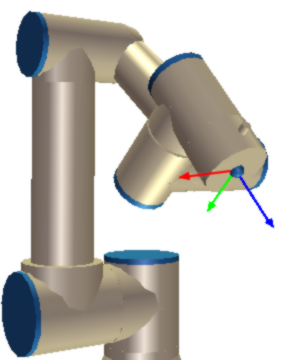
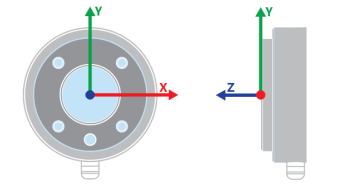
Contains current cartesian position of the robot, including its TCP offset
| Member | Type | Description |
|---|---|---|
CartesianInfoPackageEventArgs() Constructor | ||
Rx Property | double | RX axis coordinate in rad of the TCP in the current frame |
Ry Property | double | RY axis coordinate in rad of the TCP in the current frame |
Rz Property | double | RZ axis coordinate in rad of the TCP in the current frame |
TCPOffsetRX Property | double | RX position of the TCP in the flange frame in rad |
TCPOffsetRY Property | double | RY position of the TCP in the flange frame in rad |
TCPOffsetRZ Property | double | RZ position of the TCP in the flange frame in rad |
TCPOffsetX Property | double | X position of the TCP in the flange frame in meter |
TCPOffsetY Property | double | Y position of the TCP in the flange frame in meter |
TCPOffsetZ Property | double | Z position of the TCP in the flange frame in meter |
X Property | double | X axis coordinate in meter of the TCP in the current frame |
Y Property | double | Y axis coordinate in meter of the TCP in the current frame |
Z Property | double | Z axis coordinate in meter of the TCP in the current frame |
AsPose() Method | Pose | Returns the current cartesian position as a Pose object |
AsTCPOffsetPose() Method | Pose | Returns the TCP offset as a Pose object |
ToString() Method | string | Returns a string representation of the cartesian position data. |
Kinematics information
private UR ur;private void Start() {ur = new UR(); // Create a new UR instanceur.Connect("192.168.0.1"); // Connect to the robot// ...// Direct access to last received packageKinematicsInfoPackageEventArgs _value = ur.PrimaryInterface.KinematicsInfo;// Attach a delegate to the event triggered when new package comesur.PrimaryInterface.KinematicsInfoReceived += Ur_KinematicsInfoReceived;}private void Ur_KinematicsInfoReceived(object sender, KinematicsInfoPackageEventArgs e) {// e contains the incoming package}
Kinematics info
| Member | Type | Description |
|---|---|---|
KinematicsInfoPackageEventArgs() Constructor | ||
A2 Property read only | double | DH parameter a2 (Shoulder.DHa) |
A3 Property read only | double | DH parameter a3 (Elbow.DHa) |
Base Property | JointKinematicsInfo | Base kinematics info |
CalibrationStatus Property | int | Calibration status (0 : OK) |
D1 Property read only | double | DH parameter d1 (Base.DHd) |
D4 Property read only | double | DH parameter d4 (Wrist1.DHd) |
D5 Property read only | double | DH parameter d5 (Wrist2.DHd) |
D6 Property read only | double | DH parameter d6 (Wrist3.DHd) |
Elbow Property | JointKinematicsInfo | Elbow kinematics info |
Shoulder Property | JointKinematicsInfo | Shoulder kinematics info |
Wrist1 Property | JointKinematicsInfo | Wrist1 kinematics info |
Wrist2 Property | JointKinematicsInfo | Wrist2 kinematics info |
Wrist3 Property | JointKinematicsInfo | Wrist3 (Tool) kinematics info |
ToString() Method | string | Returns a string representation of the kinematics info data. |
Joint kinematics info, Denavit–Hartenberg (DH) parameters
| Member | Type | Description |
|---|---|---|
JointKinematicsInfo() Constructor | ||
Checksum Property | int | Joint checksum |
DHa Property | double | DH convention a parameter |
DHd Property | double | DH convention d parameter |
DHtheta Property | double | DH convention theta parameter |
Dhalpha Property | double | DH convention alpha parameter |
Equals(object) Method | bool | |
GetHashCode() Method | int | |
ToString() Method | string |
These are the Denavit-Hartenberg parameters of the robot, with its calibration. See Kinematics and the DH parameters of each model.
Configuration data
private UR ur;private void Start() {ur = new UR(); // Create a new UR instanceur.Connect("192.168.0.1"); // Connect to the robot// ...// Direct access to last received packageConfigurationDataPackageEventArgs _value = ur.PrimaryInterface.ConfigurationData;// Attach a delegate to the event triggered when new package comesur.PrimaryInterface.ConfigurationDataReceived += Ur_ConfigurationDataReceived;}private void Ur_ConfigurationDataReceived(object sender, ConfigurationDataPackageEventArgs e) {// e contains the incoming package}
Joint configuration
| Member | Type | Description |
|---|---|---|
ConfigurationDataPackageEventArgs() Constructor | ||
A2 Property read only | double | DH parameter a2 (Shoulder.DHa) |
A3 Property read only | double | DH parameter a3 (Elbow.DHa) |
AJointDefault Property | double | Default joint acceleration speed in rad/s² |
AToolDefault Property | double | Default TCP acceleration speed in m/s² |
Base Property | JointConfiguration | Base joint configuration |
ControllerBoxType Property | ControllerBoxTypes | Controller box type |
D1 Property read only | double | DH parameter d1 (Base.DHd) |
D4 Property read only | double | DH parameter d4 (Wrist1.DHd) |
D5 Property read only | double | DH parameter d5 (Wrist2.DHd) |
D6 Property read only | double | DH parameter d6 (Wrist3.DHd) |
Elbow Property | JointConfiguration | Elbow joint configuration |
EqRadius Property | double | Equipment radius in meter |
MasterboardVersion Property | int | Masterboard version |
RobotSubType Property | RobotSubTypes | Robot series (e-Series, CB-Series, etc.) |
RobotType Property | RobotModels | Model of the robot (UR3, UR5, UR10, UR16, ...) |
Shoulder Property | JointConfiguration | Shoulder joint configuration |
VJointDefault Property | double | Default joint angular speed in rad/s |
VToolDefault Property | double | Default TCP speed speed in m/s |
Wrist1 Property | JointConfiguration | Wrist1 joint configuration |
Wrist2 Property | JointConfiguration | Wrist2 joint configuration |
Wrist3 Property | JointConfiguration | Wrist3 (Tool) joint configuration |
ToString() Method | string | Returns a string representation of the configuration data. |
Controller box types
| Name | Value | Description |
|---|---|---|
UR10 | 5 | UR10 controller box |
UR16 | 16 | UR16 controller box |
UR20 | 10 | UR20 controller box |
UR3 | 6 | UR3 controller box |
UR30 | 11 | UR30 controller box |
UR5 | 4 | UR5 controller box |
Joint configuration
| Member | Type | Description |
|---|---|---|
JointConfiguration() Constructor | ||
DHa Property | double | a parameter of Denavit–Hartenberg (DH) convention |
DHalpha Property | double | Alpha parameter of Denavit–Hartenberg (DH) convention |
DHd Property | double | d parameter of Denavit–Hartenberg (DH) convention |
DHtheta Property | double | Theta parameter of Denavit–Hartenberg (DH) convention |
JointMaxAcceleration Property | double | Maximum rotation speed in rad/s² |
JointMaxLimit Property | double | Maximum angular position in rad |
JointMaxSpeed Property | double | Maximum rotation speed in rad/s |
JointMinLimit Property | double | Minimum angular position in rad |
Equals(object) Method | bool | |
GetHashCode() Method | int | |
ToString() Method | string |
Robot sub type (e-Serie or CB-Serie)
| Name | Value | Description |
|---|---|---|
CB2Serie | 1 | CB2-series (Firmware 1.x) |
CB3Serie | 2 | CB3-series (Firmware 3.x) |
ESerie | 3 | e-series (Firmware 5.x) |
Model of a UR robot
| Name | Value | Description |
|---|---|---|
UR10 | 2 | UR10 robot model. |
UR16 | 4 | UR16 robot model. |
UR18 | 5 | UR18 robot model. |
UR20 | 7 | UR20 robot model. |
UR3 | 3 | UR3 robot model. |
UR30 | 8 | UR30 robot model. |
UR5 | 1 | UR5 robot model. |
UR8L | 6 | UR8 Long robot model. |
Force mode data
private UR ur;private void Start() {ur = new UR(); // Create a new UR instanceur.Connect("192.168.0.1"); // Connect to the robot// ...// Direct access to last received packageForceModeDataPackageEventArgs _value = ur.PrimaryInterface.ForceModeData;// Attach a delegate to the event triggered when new package comesur.PrimaryInterface.ForceModeDataReceived += Ur_ForceModeDataReceived;}private void Ur_ForceModeDataReceived(object sender, ForceModeDataPackageEventArgs e) {// e contains the incoming package}
Force mode data
| Member | Type | Description |
|---|---|---|
ForceModeDataPackageEventArgs() Constructor | ||
RobotDexterity Property | double | Dexterity of the robot |
Rx Property | double | Rx torque in tool frame in Nm |
Ry Property | double | Ry torque in tool frame in Nm |
Rz Property | double | Rz torque in tool frame in Nm |
X Property | double | X force in tool frame in N |
Y Property | double | Y force in tool frame in N |
Z Property | double | Z force in tool frame in N |
ToString() Method | string | Returns a string representation of the force mode data. |
Additional information
private UR ur;private void Start() {ur = new UR(); // Create a new UR instanceur.Connect("192.168.0.1"); // Connect to the robot// ...// Direct access to last received packageAdditionalInfoPackageEventArgs _value = ur.PrimaryInterface.AdditionalInfo;// Attach a delegate to the event triggered when new package comesur.PrimaryInterface.AdditionalInfoReceived += Ur_AdditionalInfoReceived;}private void Ur_AdditionalInfoReceived(object sender, AdditionalInfoPackageEventArgs e) {// e contains the incoming package}
Additional information
| Member | Type | Description |
|---|---|---|
AdditionalInfoPackageEventArgs() Constructor | ||
FreedriveButtonEnabled Property | bool | The free drive button is enabled |
FreedriveButtonPressed Property | bool | The free drive button is pressed |
IOEnabledFreedrive Property | bool | Free drive is enable via IO |
ToString() Method | string | Returns a string representation of the additional info data. |
Calibration data
private UR ur;private void Start() {ur = new UR(); // Create a new UR instanceur.Connect("192.168.0.1"); // Connect to the robot// ...// Direct access to last received packageCalibrationDataPackageEventArgs _value = ur.PrimaryInterface.CalibrationData;// Attach a delegate to the event triggered when new package comesur.PrimaryInterface.CalibrationDataReceived += Ur_CalibrationDataReceived;}private void Ur_CalibrationDataReceived(object sender, CalibrationDataPackageEventArgs e) {// e contains the incoming package}
Calibration data
| Member | Type | Description |
|---|---|---|
CalibrationDataPackageEventArgs() Constructor | ||
Frx Property | double | Frx calibration data |
Fry Property | double | Fry calibration data |
Frz Property | double | Frz calibration data |
Fx Property | double | Fx calibration data |
Fy Property | double | Fy calibration data |
Fz Property | double | Fz calibration data |
ToString() Method | string | Returns a string representation of the calibration data. |
Safety data
private UR ur;private void Start() {ur = new UR(); // Create a new UR instanceur.Connect("192.168.0.1"); // Connect to the robot// ...// Direct access to last received packageSafetyDataPackageEventArgs _value = ur.PrimaryInterface.SafetyData;// Attach a delegate to the event triggered when new package comesur.PrimaryInterface.SafetyDataReceived += Ur_SafetyDataReceived;}private void Ur_SafetyDataReceived(object sender, SafetyDataPackageEventArgs e) {// e contains the incoming package}
Safety internal data
| Member | Type | Description |
|---|---|---|
SafetyDataPackageEventArgs() Constructor | ||
Data Property | byte[] | Irrelevant (Internal use only) |
ToString() Method | string | Returns a string representation of the safety data. |
Tool communication information
private UR ur;private void Start() {ur = new UR(); // Create a new UR instanceur.Connect("192.168.0.1"); // Connect to the robot// ...// Direct access to last received packageToolCommunicationInfoPackageEventArgs _value = ur.PrimaryInterface.ToolCommunicationInfo;// Attach a delegate to the event triggered when new package comesur.PrimaryInterface.ToolCommunicationInfoReceived += Ur_ToolCommunicationInfoReceived;}private void Ur_ToolCommunicationInfoReceived(object sender, ToolCommunicationInfoPackageEventArgs e) {// e contains the incoming package}
Tool communication info
| Member | Type | Description |
|---|---|---|
ToolCommunicationInfoPackageEventArgs() Constructor | ||
BaudRate Property | int | Baud rate for tool serial communication |
Parity Property | int | Parity |
RxIdleChars Property | float | RX Idle Chars |
StopBits Property | int | Stop bits |
ToolCommunicationIsEnabled Property | bool | Is the tool communication interface enabled |
TxIdleChars Property | float | TX Idle Chars |
ToString() Method | string | Returns a string representation of the tool communication info. |
Tool mode
private UR ur;private void Start() {ur = new UR(); // Create a new UR instanceur.Connect("192.168.0.1"); // Connect to the robot// ...// Direct access to last received packageToolModeInfoPackageEventArgs _value = ur.PrimaryInterface.ToolModeInfo;// Attach a delegate to the event triggered when new package comesur.PrimaryInterface.ToolModeInfoReceived += Ur_ToolModeInfoReceived;}private void Ur_ToolModeInfoReceived(object sender, ToolModeInfoPackageEventArgs e) {// e contains the incoming package}
Tool mode info
| Member | Type | Description |
|---|---|---|
ToolModeInfoPackageEventArgs() Constructor | ||
DigitalOutputMode0 Property | DigitalOutputConfigurations | Digital output 0 configuration |
DigitalOutputMode1 Property | DigitalOutputConfigurations | Digital output 1 configuration |
OutputMode Property | OutputModes | Digital output mode |
ToString() Method | string | Returns a string representation of the tool mode info. |
Digital output configuration (NPN, PNP, Push/Pull)
| Name | Value | Description |
|---|---|---|
PushPull | 3 | Push / Pull |
SinkingNPN | 1 | Sinking (NOPN) |
SourcingPNP | 2 | Sourcing (PNP) |
Digital output modes
| Name | Value | Description |
|---|---|---|
DualPinPower | 1 | Dual Pin Power |
StandardOutput | 0 | Standard output |
What to read next
- Send URScript: run URScript from the PC.
- Read and write variables: the program and installation variables.
- RTDE: the same data, up to 500 Hz.