XML-RPC
Answer the XML-RPC calls of a UR robot program from your application: positions, numbers, text. The SDK is the server.
With XML-RPC, a program that runs on a Universal Robots cobot calls a function of your application and uses its answer: a position computed by a vision system, a number, a text. This page shows how to answer these calls with the SDK. The SDK is the server: it listens on a port of the PC, 50000 by default.
How it works
- The robot program creates a connection to the PC with
rpc_factory. - It calls a function of this connection. The robot waits for the answer.
- The SDK raises
XmlRpcServerRequestwith the name of the function and its arguments. Your code setsAnswer. - The robot assigns the answer to its variable, and the program continues.
URScript of the robot, where 192.168.0.10 is the address of the PC:
rpc := rpc_factory("xmlrpc", "http://192.168.0.10:50000")pose := rpc.get_pose()text := rpc.say_hello("UR5e")total := rpc.sum([1, 3.5, -2])
See XML-RPC communication by Universal Robots. The address of the PC on the network of the robot is also in robot.PrimaryInterface.LocalEndPoint.
Example
The XML-RPC server is disabled by default: set XmlRpc.Enable in ConnectParameters.
static void Main(string[] args){var robot = new UR();var parameters = new ConnectParameters("192.168.0.1");// The XML-RPC server is disabled by defaultparameters.XmlRpc.Enable = true;parameters.XmlRpc.Port = 50000;robot.Connect(parameters);// Raised for each call of the robot programrobot.XmlRpc.XmlRpcServerRequest += OnRequest;// The robot program connects with:// rpc := rpc_factory("xmlrpc", "http://192.168.0.10:50000")// where 192.168.0.10 is the address of this PCstatic void OnRequest(object sender, XmlRpcEventArg request){Console.WriteLine(request.EndPoint.Address + " calls " + request.MethodName);switch (request.MethodName){// URScript: answer := rpc.get_pose()case "get_pose":request.Answer = new Pose(0.4, -0.1, 0.3, 0, 3.14, 0); // m and radbreak;// URScript: answer := rpc.say_hello("UR5e")case "say_hello":request.Answer = "Hello " + request.Arguments[0];break;// URScript: answer := rpc.sum([1, 3.5, -2])case "sum":double[] values = request.Arguments[0];request.Answer = values.Sum();break;// Without an answer, the variable of the robot is not assigneddefault:break;}}}
The same server works without UR:
static void Main(string[] args){// An XML-RPC server, without a UR instancevar server = new XmlRpcServer();server.XmlRpcServerRequest += (sender, request) =>{if (request.MethodName == "get_counter")request.Answer = 42;};server.Start(50000);// ...server.Stop();}}
Allow the port of the server in the firewall of the PC.
Values
Answer and Arguments are XmlRpcValue. In C#, implicit conversions accept and return the native types: request.Answer = 12, = 3.5, = true, = "text", = new Pose(...), = new double[] {...}, and double[] values = request.Arguments[0].
| URScript type | .NET class | Python class |
|---|---|---|
| integer | XmlRpcIntegerValue | XmlRpcIntegerValue(12) |
| float | XmlRpcDoubleValue | XmlRpcDoubleValue(3.5) |
| boolean | XmlRpcBooleanValue | XmlRpcBooleanValue(True) |
| string | XmlRpcStringValue | XmlRpcStringValue("text") |
| pose | XmlRpcPoseValue | XmlRpcPoseValue(Pose(x, y, z, rx, ry, rz)) |
| array | XmlRpcArrayValue | XmlRpcArrayValue |
| struct | XmlRpcStructValue | XmlRpcStructValue |
A value that the SDK cannot read is an XmlRpcUnknownValue: its AdditionalInformation says why.
Without an answer, the function returns nothing to the robot and its variable is not assigned.
Example programs
PolyScope
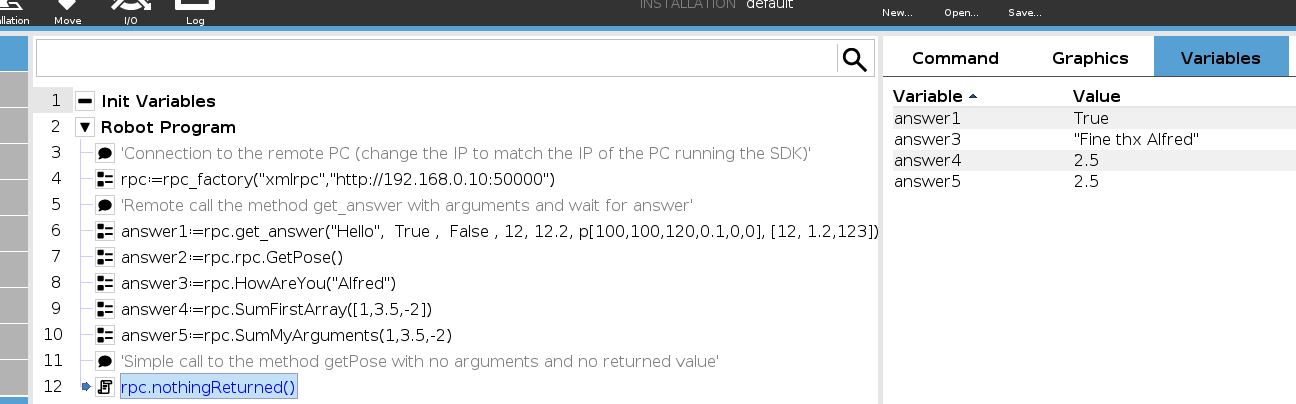
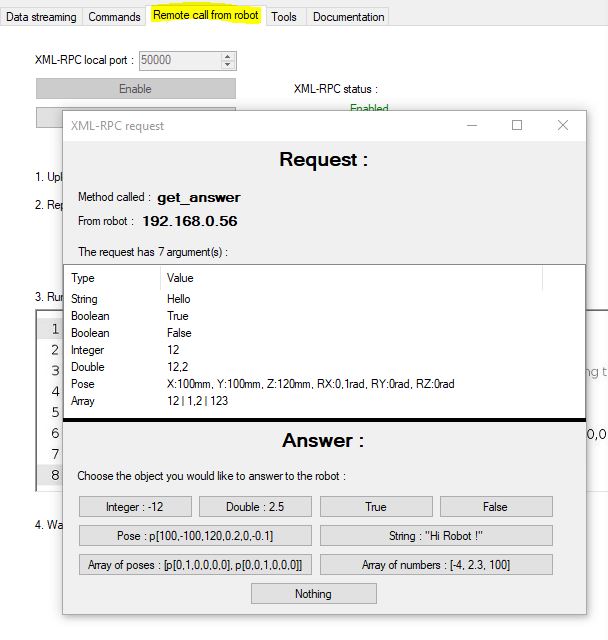
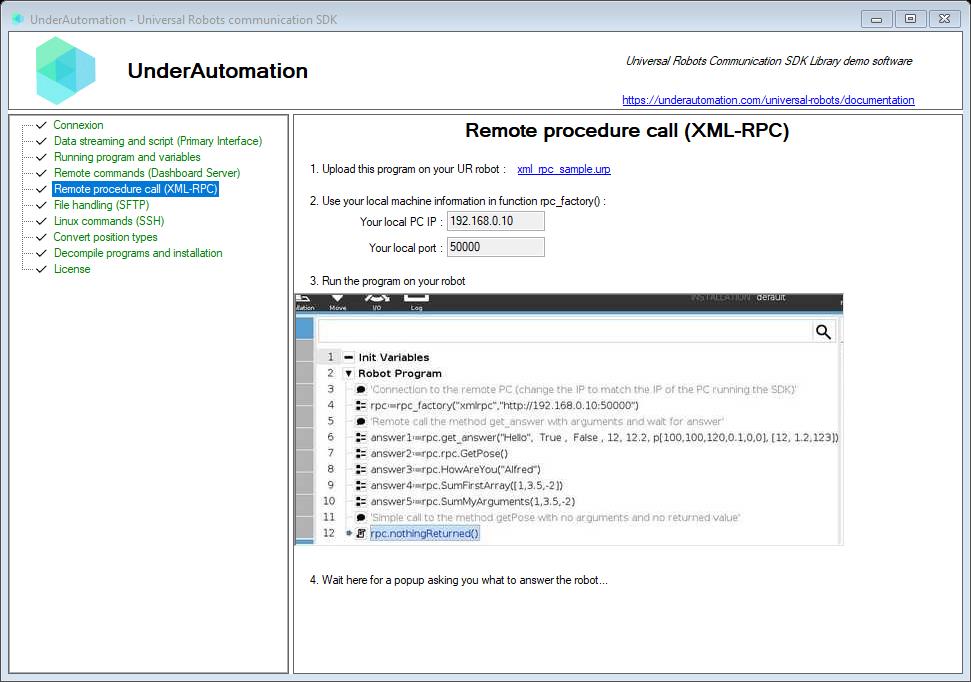
xml_rpc_sample.urp calls several functions. The demo application shows each call and lets you choose the answer.
LabVIEW
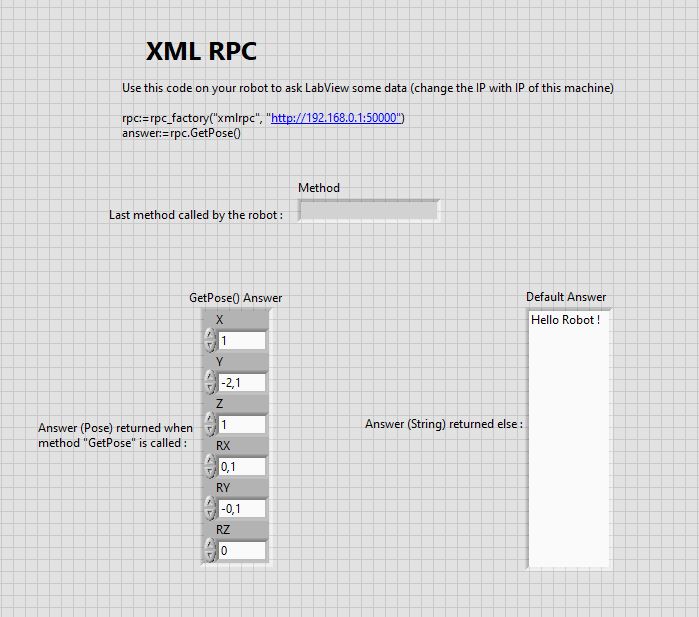
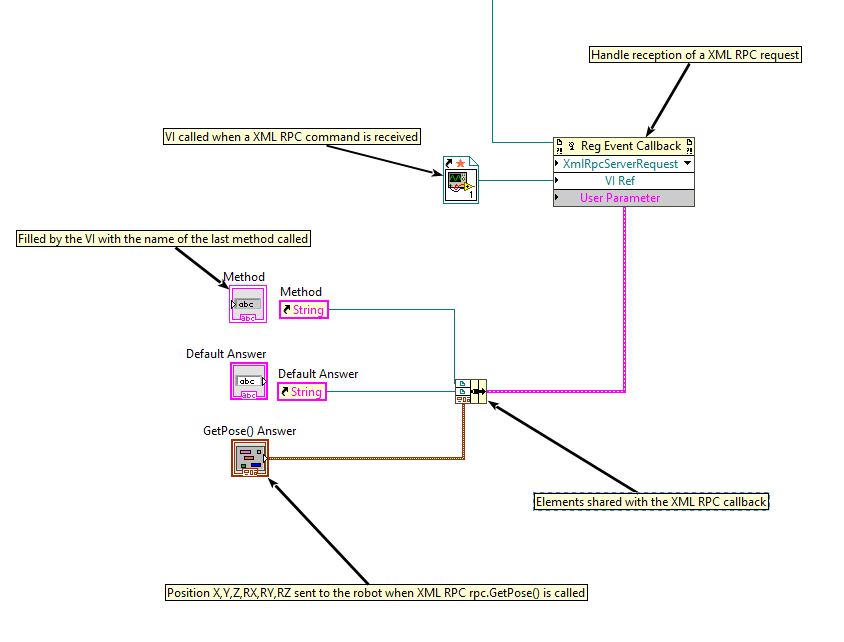
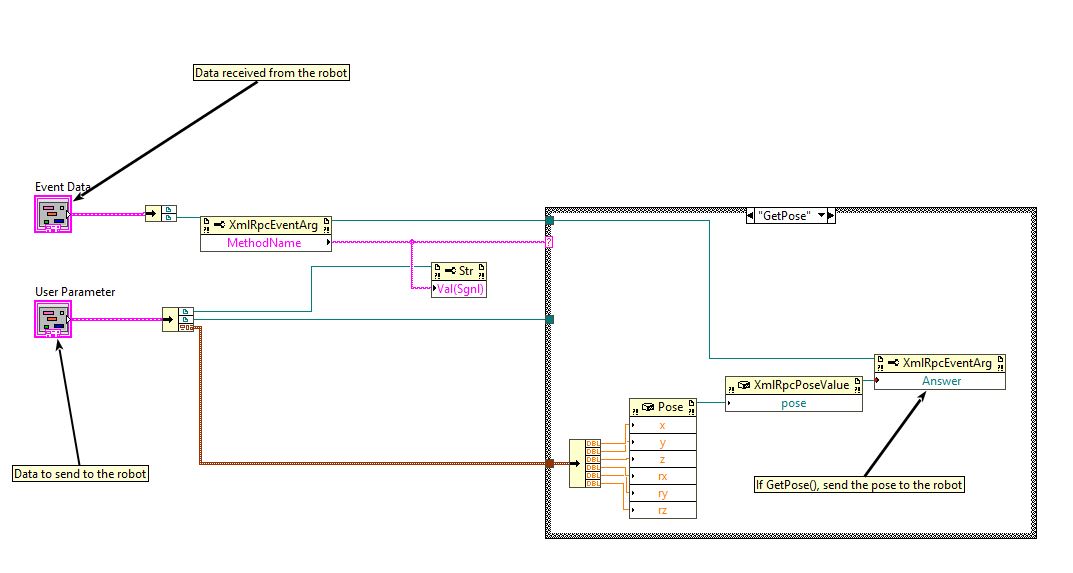
The LabVIEW example answers GetPose() with the position of its front panel, and a text to the other functions:
Try it in the demo application
Everything on this page can be tried without writing code, in the Remote procedure call (XML-RPC) page of the demo application.
The demo application is open source. The C# source of this page is XmlRpcControl.cs.
Reference
Represents a request that has just been received from the robot
| Member | Type | Description |
|---|---|---|
Answer Field | XmlRpcValue | Response to be provided to the robot by the user |
Arguments Field | XmlRpcValue[] | The arguments of the method called |
EndPoint Field | IPEndPoint | IP address of the robot |
MethodName Field | string | The method called by the robot |
XmlRequest Field | XDocument | The XML document received via HTTP |
ToString() Method | string | Returns a string describing the method name and argument count. |
Base class of all elements transmitted by XML-RPC. The Type property indicates the type into which this object can be cast to obtain the value.
| Member | Type | Description |
|---|---|---|
XmlRpcValue() Constructor | ||
Type Property read only | XmlRpcType | Determines the class of this message |
Xml Property read only | XElement | The XML description of the message that has been received from the robot or will be sent to the robot |
ToString() Method | string | Returns the XML string representation of this value. |
implicit operator XmlRpcValue(bool) Operator static | XmlRpcValue | Implicitly converts a bool to an XmlRpcBooleanValue. |
implicit operator XmlRpcValue(bool[]) Operator static | XmlRpcValue | Implicitly converts a bool array to an XmlRpcArrayValue. |
implicit operator XmlRpcValue(double) Operator static | XmlRpcValue | Implicitly converts a double to an XmlRpcDoubleValue. |
implicit operator XmlRpcValue(double[]) Operator static | XmlRpcValue | Implicitly converts a double array to an XmlRpcArrayValue. |
implicit operator XmlRpcValue(int) Operator static | XmlRpcValue | Implicitly converts an int to an XmlRpcIntegerValue. |
implicit operator XmlRpcValue(int[]) Operator static | XmlRpcValue | Implicitly converts an int array to an XmlRpcArrayValue. |
implicit operator XmlRpcValue(string) Operator static | XmlRpcValue | Implicitly converts a string to an XmlRpcStringValue. |
implicit operator XmlRpcValue(string[]) Operator static | XmlRpcValue | Implicitly converts a string array to an XmlRpcArrayValue. |
implicit operator XmlRpcValue(Pose) Operator static | XmlRpcValue | Implicitly converts a Pose to an XmlRpcPoseValue. |
implicit operator XmlRpcValue(Pose[]) Operator static | XmlRpcValue | Implicitly converts a Pose array to an XmlRpcArrayValue. |
implicit operator bool(XmlRpcValue) Operator static | bool | Implicitly converts an XmlRpcValue to a bool. |
implicit operator bool[](XmlRpcValue) Operator static | bool[] | Implicitly converts an XmlRpcValue to a bool array. |
implicit operator double(XmlRpcValue) Operator static | double | Implicitly converts an XmlRpcValue to a double. |
implicit operator double[](XmlRpcValue) Operator static | double[] | Implicitly converts an XmlRpcValue to a double array. |
implicit operator int(XmlRpcValue) Operator static | int | Implicitly converts an XmlRpcValue to an int. |
implicit operator int[](XmlRpcValue) Operator static | int[] | Implicitly converts an XmlRpcValue to an int array. |
implicit operator string(XmlRpcValue) Operator static | string | Implicitly converts an XmlRpcValue to a string. |
implicit operator string[](XmlRpcValue) Operator static | string[] | Implicitly converts an XmlRpcValue to a string array. |
implicit operator Pose(XmlRpcValue) Operator static | Pose | Implicitly converts an XmlRpcValue to a Pose. |
implicit operator Pose[](XmlRpcValue) Operator static | Pose[] | Implicitly converts an XmlRpcValue to a Pose array. |
implicit operator XmlRpcValue(XmlRpcValue[]) Operator static | XmlRpcValue | Implicitly converts an array of XmlRpcValue to an XmlRpcArrayValue. |
What to read next
- Socket communication: exchange your own messages with the robot program.
- Read and write registers: exchange numbers with the robot program, without waiting.