Try the SDK with the demo application
Download the Windows demo application of the Universal Robots SDK and try every interface on your robot or on URSim, without writing code. Its C# sources are on GitHub.
The demo application lets you try the whole Universal Robots SDK on your cobot or on URSim, before you write any code. It is a Windows desktop application that exposes each interface of the SDK with buttons and fields, and shows what the robot answers.
Download
Download UnderAutomation.UniversalRobots.Showcase.Forms.exe
There is no installer. The application is one self contained executable, built with .NET 8 for Windows: it runs on a PC without .NET. Copy it where you want, run it, delete it when you are done.
Windows can block a file downloaded from the internet. Right click the file, open Properties, check Unblock and click OK.
The application runs in the 30 day trial of the SDK. The License page registers a key.
On Linux and macOS, use the console demo: see Try the SDK on Linux and macOS.
What it does
The tree on the left has one page per interface. It works with a real robot and with URSim.
Everything on this page can be tried without writing code, in the Connection page of the demo application.
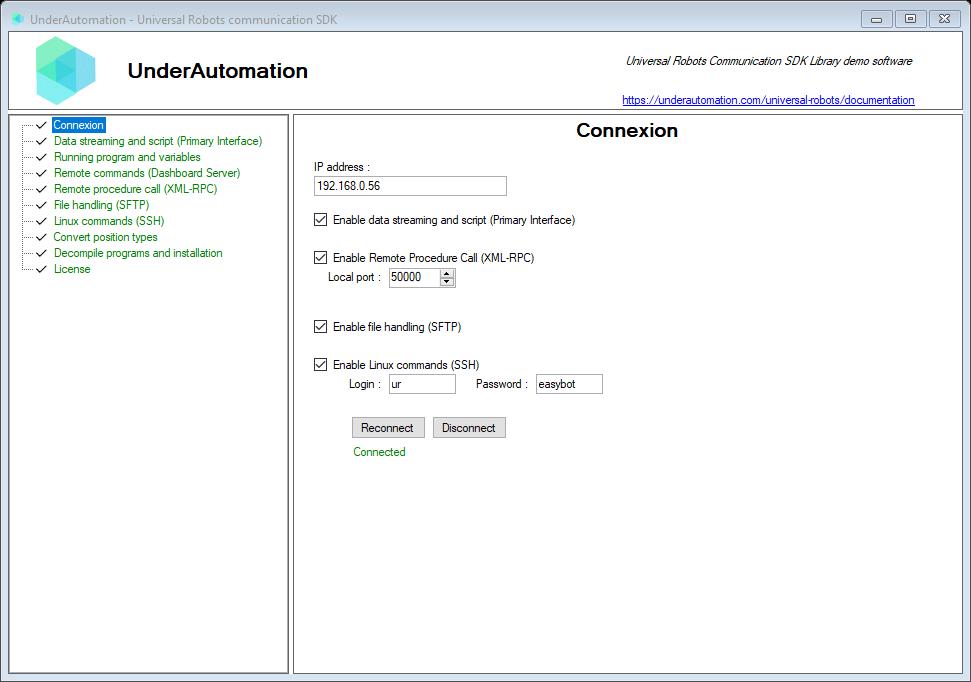
The demo application is open source. The C# source of this page is ConnectControl.cs.
| Page in the application | What you can try | Documentation |
|---|---|---|
| Connection | Address of the robot, choice of the interfaces and of their settings, connect | Connect to the robot |
| Primary Interface (Data streaming and script) | Every package of the robot state, sent at 10 Hz, and URScript to send | Primary Interface |
| Running program and variables | The program and installation variables, updated when they change | Read and write variables |
| Real-time Data Exchange (RTDE) | Choice of the outputs and inputs, values received up to 500 Hz, inputs to write | RTDE |
| Dashboard (Polyscope legacy) | Power, brakes, programs, popups, robot mode and safety status | Dashboard Server |
| REST (PolyscopeX) | Power, brakes and programs on PolyScope X | REST API |
| Interpreter mode | URScript statements sent to a program in interpreter_mode() | Interpreter Mode |
| Remote procedure call (XML-RPC) | The calls of the robot program, and the value to answer | XML-RPC |
| Socket communication | The robots connected to the socket server, their messages, the messages to send | Socket communication |
| File handling (SFTP) | Browse, download, upload, rename and delete the files of the robot | SFTP |
| Linux commands (SSH) | A terminal on the Linux of the controller | SSH |
| Forward & Invert Kinematics | Joint positions to pose and pose to joint positions, for each model | Kinematics |
| Convert position types | Rotation vector to roll, pitch, yaw and back | Convert position types |
| Decompile programs and installation | Open a .urp or .installation file and read its XML | Program and installation files |
| License | Register a license key, read the state of the trial | Licensing |
| Logs | The errors of the SDK and the messages of the robot |
Start with the Connection page. In the tree, the page of an interface is green when this interface is connected, gray when it is not.
The URScript, Interpreter Mode and Dashboard pages can move the robot or start a program. Try them with low speeds, in a cell with its safety functions active.
Read its source
The application is open source: github.com/underautomation/UniversalRobots.NET, folder UnderAutomation.UniversalRobots.Showcase.Forms. A VB.NET version is in the folder UnderAutomation.UniversalRobots.Showcase.Forms.vb.
It is a Windows Forms project for .NET 8. It references the same UnderAutomation.UniversalRobots DLL as your project: there is nothing specific to the demo in the way it calls the SDK. Each page of the application is one C# user control in the Components folder. Copy the calls you need into your code.
What to read next
- Connect to the robot: the settings of the robot and the connection parameters, in code.
- RTDE: exchange data up to 500 Hz.
- Licensing: the 30 day trial and the license key.