Forward and inverse kinematics
Compute the forward and inverse kinematics of UR cobots without a robot: DH parameters of each model, flange pose, up to 8 solutions, singularities.
The namespace UnderAutomation.UniversalRobots.Kinematics computes the forward and inverse kinematics of Universal Robots cobots, without a connection to a robot. This page shows how to get the DH parameters of a robot, compute the position of the flange from the joint positions and back, and detect the singularities.
- Forward kinematics: 6 joint positions give the position and the orientation of the flange.
- Inverse kinematics: a position and an orientation of the flange give up to 8 sets of joint positions.
DH parameters
The Denavit-Hartenberg (DH) parameters describe the geometry of the arm. Each joint has four parameters: θ (rotation around z, the joint variable), d (offset along z), a (length along x) and α (rotation around x). On UR cobots, only a2, a3, d1, d4, d5 and d6 change between the models:
| Joint | a [m] | d [m] | α [rad] | θ [rad] |
|---|---|---|---|---|
| J1 | 0 | d1 | +π/2 | θ1 |
| J2 | a2 | 0 | 0 | θ2 |
| J3 | a3 | 0 | 0 | θ3 |
| J4 | 0 | d4 | +π/2 | θ4 |
| J5 | 0 | d5 | −π/2 | θ5 |
| J6 | 0 | d6 | 0 | θ6 |
See the DH parameters of each model by Universal Robots.
Nominal or custom parameters
GetDhParametersFromModel returns the nominal parameters of a model (UR3 to UR30, CB-Series and e-Series). CustomUrDhParameters takes your own values.
static void Main(string[] args){// Nominal DH parameters of a modelIUrDhParameters ur5e = KinematicsUtils.GetDhParametersFromModel(RobotModelsExtended.UR5e);// Or your own values, in metersIUrDhParameters custom = new CustomUrDhParameters(a2: -0.425,a3: -0.3922,d1: 0.1625,d4: 0.1333,d5: 0.0997,d6: 0.0996);}}
Parameters of a connected robot
The Primary Interface sends the DH parameters of the robot, with its calibration, in KinematicsInfo and ConfigurationData. Both implement IUrDhParameters.
static void Main(string[] args){var robot = new UR();// The Primary Interface is enabled by defaultrobot.Connect("192.168.0.1");// Wait for the first packages (10 Hz)Thread.Sleep(500);// DH parameters of this robot, with its calibrationIUrDhParameters dh = robot.PrimaryInterface.KinematicsInfo;// Current joint positions, in radiansJointDataPackageEventArgs j = robot.PrimaryInterface.JointData;double[] joints ={j.Base.Position, j.Shoulder.Position, j.Elbow.Position,j.Wrist1.Position, j.Wrist2.Position, j.Wrist3.Position};// Current position of the tool center pointPose pose = robot.PrimaryInterface.CartesianInfo.AsPose();}}
Denavit–Hartenberg (DH) parameters for Universal Robots with only the relevant parameters
| Member | Type | Description |
|---|---|---|
A2 Property read only | double | DH parameter a2 (Shoulder) |
A3 Property read only | double | DH parameter a3 (Elbow) |
D1 Property read only | double | DH parameter d1 (Base) |
D4 Property read only | double | DH parameter d4 (Wrist1) |
D5 Property read only | double | DH parameter d5 (Wrist2) |
D6 Property read only | double | DH parameter d6 (Wrist3/Tool) |
Forward kinematics
ForwardKinematics takes 6 joint positions in radians. ToolTransform is the 4x4 transform of the flange in the base frame: Pose.From4x4MatrixToRotationVector converts it to a pose in meters and radians. Add the TCP offset of your tool to get the position of the tool center point.
static void Main(string[] args){IUrDhParameters dh = KinematicsUtils.GetDhParametersFromModel(RobotModelsExtended.UR5e);// Joint positions in radians: base, shoulder, elbow, wrist 1, wrist 2, wrist 3double[] joints = { 0, -1.57, 1.57, -1.57, -1.57, 0 };KinematicsResult result = KinematicsUtils.ForwardKinematics(joints, dh);// 4x4 transform of the flange, as a pose: X, Y, Z in m, rotation vector in radPose flange = Pose.From4x4MatrixToRotationVector(result.ToolTransform);// Transform of each joint, alone and composed with the previous onesTransformationSet local = result.IndividualLocalTransforms;TransformationSet global = result.CumulativeGlobalTransforms;}}
IndividualLocalTransforms gives the transform of each joint alone, and CumulativeGlobalTransforms the transform of each joint composed with the previous ones.
Result of a forward kinematics calculation
| Member | Type | Description |
|---|---|---|
KinematicsResult() Constructor | ||
CumulativeGlobalTransforms Property | TransformationSet | Cumulative global transformation matrices of each joint |
IndividualLocalTransforms Property | TransformationSet | Individual local transformation matrices of each joint |
ToolTransform Property | double[,] | 4x4 transformation matrix of the tool |
Equals(object) Method | bool | |
GetHashCode() Method | int | |
ToString() Method | string |
Set of transformation matrices for each joint
| Member | Type | Description |
|---|---|---|
TransformationSet() Constructor | ||
Base Property | double[,] | 4x4 transformation matrix of the base joint 1 |
Elbow Property | double[,] | 4x4 transformation matrix of the elbow joint 3 |
Shoulder Property | double[,] | 4x4 transformation matrix of the shoulder joint 2 |
Wrist1 Property | double[,] | 4x4 transformation matrix of the wrist1 joint 4 |
Wrist2 Property | double[,] | 4x4 transformation matrix of the wrist2 joint 5 |
Wrist3 Property | double[,] | 4x4 transformation matrix of the wrist3 (Tool) joint 6 |
Equals(object) Method | bool | |
GetHashCode() Method | int | |
ToString() Method | string |
Inverse kinematics
InverseKinematics takes the 4x4 transform of the flange and returns up to 8 solutions, of 6 joint positions each. GetNearestSolution picks the solution nearest to a reference, usually the current joint positions. The solutions close to a singularity are included.
static void Main(string[] args){IUrDhParameters dh = KinematicsUtils.GetDhParametersFromModel(RobotModelsExtended.UR5e);// Target of the flange: X, Y, Z in m, rotation vector in radvar target = new Pose(0.4, -0.1, 0.3, 0, 3.14, 0);// Up to 8 solutions, 6 joint positions in radians eachdouble[][] solutions = KinematicsUtils.InverseKinematics(target.FromRotationVectorTo4x4Matrix(), dh);// The solution nearest to the current joint positionsdouble[] current = { 0, -1.57, 1.57, -1.57, -1.57, 0 };double[] nearest = KinematicsUtils.GetNearestSolution(solutions, current);}}
Singularities
Near a singularity, the robot loses a degree of freedom: a small move of the tool needs a large move of a joint, and the inverse kinematics has no unique answer. GetSingularity returns the singularities near a set of joint positions: Wrist, Elbow, Shoulder, or None.
static void Main(string[] args){IUrDhParameters dh = KinematicsUtils.GetDhParametersFromModel(RobotModelsExtended.UR5e);// Joint positions in radiansdouble q2 = -1.57; // shoulderdouble q3 = 0.0; // elbowdouble q4 = -1.57; // wrist 1double q5 = 1.57; // wrist 2// The 4 joint positions are given in the order q2, q3, q4, q5SingularityType singularity = KinematicsUtils.GetSingularity(q2, q3, q4, q5, dh);// Flags: Wrist, Elbow, Shoulder, or Noneif (singularity != SingularityType.None)Console.WriteLine("Close to a singularity: " + singularity);}}
Types of singularities
| Name | Value | Description |
|---|---|---|
Elbow | 2 | Elbow singularity |
None | 0 | No singularity |
Shoulder | 4 | Shoulder singularity |
Wrist | 1 | Wrist singularity |
Try it in the demo application
Everything on this page can be tried without writing code, in the Forward & Invert Kinematics page of the demo application.
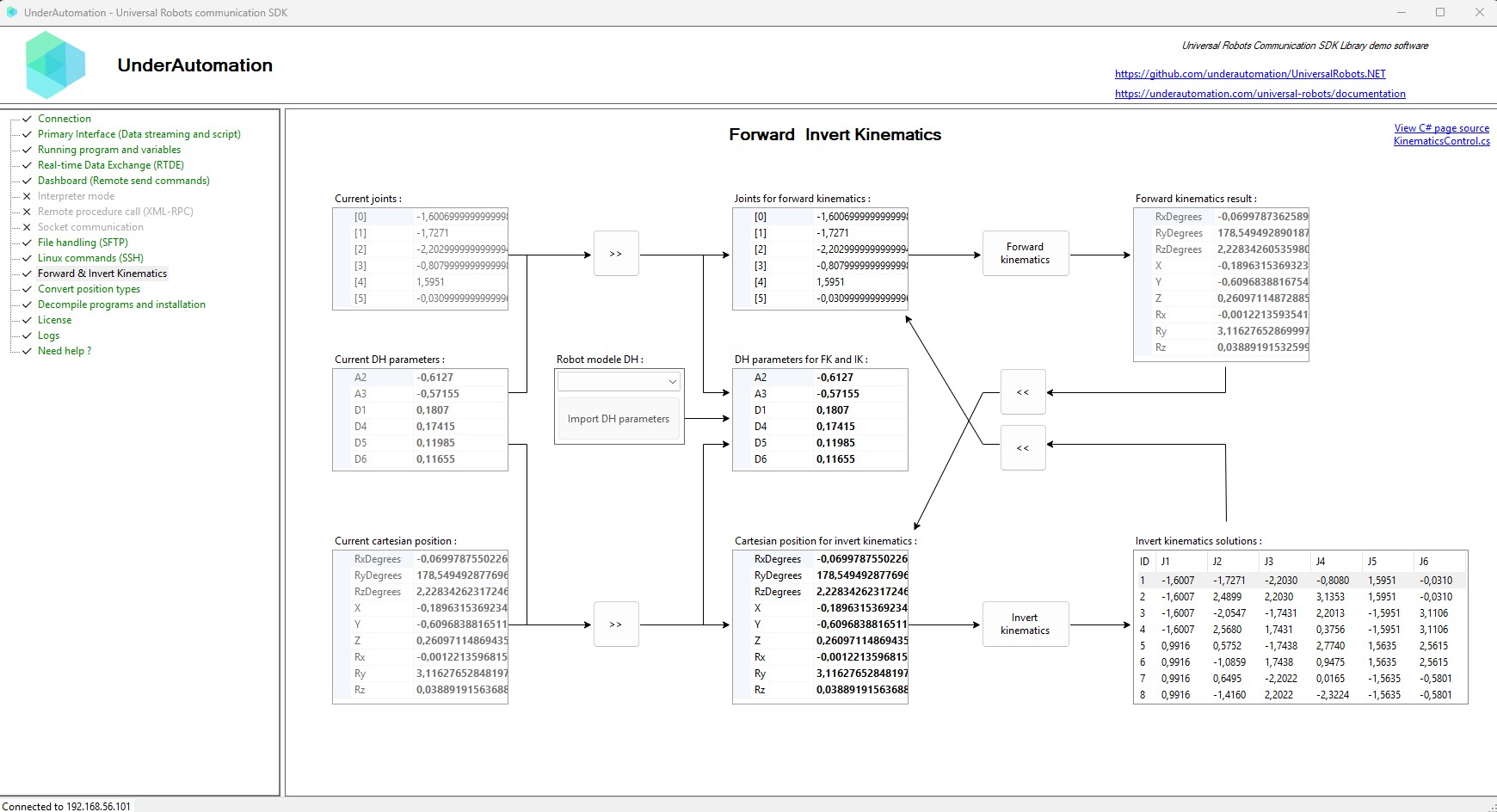
The demo application is open source. The C# source of this page is KinematicsControl.cs.
Reference
========================================================================================================= Implementation notes : --------------------------------------------------------------------------------------------------------- This class implements forward and inverse kinematics for a 6-DOF serial cobot using the analytical method described in Chen et al., IEEE ICASI 2017 ("A general analytical algorithm for collaborative robot (cobot) with 6 DOF"). The DH convention and the closed-form inverse steps follow the paper's derivations. References (equation numbers below refer to the paper): - DH homogeneous transform (Eq. (1.1)). - Forward kinematics chain product T_0^6 = Π_i T_{i-1}^i (Eq. (1.2)). - Inverse kinematics main steps: q1 from Eq. (1.12) ; q5 from Eq. (1.15) ; q6 from Eq. (1.17) ; q234 from Eq. (1.20) ; q2 from Eq. (1.25) ; q3 and q4 from Eq. (1.27). Singularity check equation used (paper text): det(J) ∝ s3 * s5 * a2 * a3 * (c2*a2 + c23*a3 + s234*d5) Paper: Chen, S., Luo, M., Abdelaziz, O., Jiang, G. "A General Analytical Algorithm for Collaborative Robot (cobot) with 6 DOF", IEEE ICASI 2017. =========================================================================================================
| Member | Type | Description |
|---|---|---|
DHTransform(double, double, double, double) Method static | double[,] | Computes the 4x4 Denavit-Hartenberg homogeneous transformation matrix for one joint.
|
ForwardKinematics(double[], IUrDhParameters) Method static | KinematicsResult | Forward kinematics : compute tool transform and intermediate transforms from joint angles (radians) and DH parameters.
|
GetDhParametersFromModel(RobotModelsExtended) Method static | IUrDhParameters | Returns the factory Denavit-Hartenberg parameters for a given UR robot model.
|
GetNearestSolution(double[][], double[]) Method static | double[] | Pick the solution nearest to a reference joint vector (L1 distance). Null if invalid inputs.
|
GetSingularity(double, double, double, double, IUrDhParameters) Method static | SingularityType | Detects singularities using Jacobian determinant factors: sin(q5)≈0 (wrist), sin(q3)≈0 (elbow), and c2·a2 + c23·a3 + s234·d5 ≈ 0 (shoulder).
|
HomogeneousMultiply(double[,], double[,]) Method static | double[,] | Multiplies two 4x4 homogeneous transformation matrices, optimized for DH transforms.
|
InverseKinematics(double[,], IUrDhParameters) Method static | double[][] | Analytical inverse kinematics Returns a list of candidate joint vectors; filters out singularities.
|
Implementation
The solver is analytical (closed form), with the standard DH convention and the sequence of Chen et al., IEEE ICASI 2017. The forward kinematics is the product of the 6 homogeneous transforms of the joints. The inverse kinematics solves q1, then q5, q6, the sum q2 + q3 + q4, then q2, and q3 and q4 last. The singularities are detected from the factors of the determinant of the Jacobian: sin(q5) for the wrist, sin(q3) for the elbow, and a2·cos(q2) + a3·cos(q2 + q3) + d5·sin(q2 + q3 + q4) for the shoulder.
Reference: Chen et al., IEEE ICASI 2017, IEEE Xplore.