REST API (PolyScope X)
Control a UR cobot with PolyScope X over HTTP: power, brakes, load, play and stop programs, read the program state. Replaces the Dashboard Server.
The REST API of PolyScope X controls a Universal Robots cobot over HTTP: power, brakes, load and play programs, read the state of the robot, show popups, list, upload and download the program files. This page shows how to use it with the SDK. It replaces the Dashboard Server, which PolyScope X does not have.
For CB-Series and e-Series robots with PolyScope 5, use the Dashboard Server.
Prerequisites
- The robot runs PolyScope X, or URSim PolyScope X: see Develop without a robot.
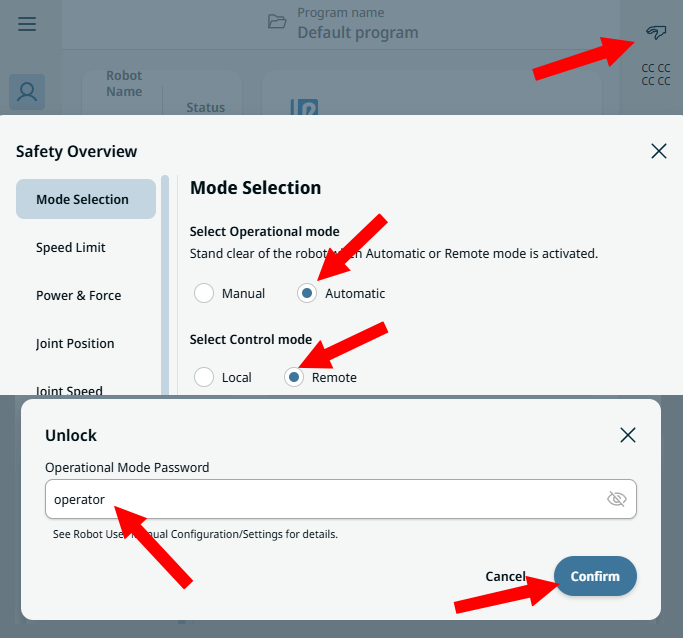
- The robot is in remote control. Switch it with the icon at the top right of PolyScope X. The default password is
operator.
Example
The REST API is disabled by default: set Rest.Enable in ConnectParameters.
static void Main(string[] args){var robot = new UR();var parameters = new ConnectParameters("192.168.0.1");// The REST API is disabled by defaultparameters.Rest.Enable = true;// The Dashboard Server does not exist on PolyScope Xparameters.Dashboard.Enable = false;robot.Connect(parameters);robot.Rest.PowerOn();robot.Rest.BrakeRelease();robot.Rest.LoadProgram("my_program");robot.Rest.Play();// Playing, Paused, Stopped or Unknownvar state = robot.Rest.GetProgramState();Console.WriteLine(state.Value.State);robot.Disconnect();}
The same client works without UR:
static void Main(string[] args){// A REST client, without a UR instancevar client = new RestClient();// Address of the robot. Optional: port, API version, timeoutclient.Enable("192.168.0.1");client.PowerOn();client.LoadProgram("my_program");client.Play();client.Disable();}}
Connection parameters
| Property | Default | Role |
|---|---|---|
Enable | false | Enable the REST client |
Port | 80 | HTTP port of the robot |
Version | Latest | Version of the API (V1, Latest) |
TimeoutMs | 5000 | Timeout of a request, in ms |
{var robot = new UR();var parameters = new ConnectParameters("192.168.0.1");parameters.Rest.Enable = true;parameters.Rest.Port = 80; // HTTP port, 80 by defaultparameters.Rest.Version = RestApiVersion.V1; // Latest by defaultparameters.Rest.TimeoutMs = 10000; // 5000 ms by defaultrobot.Connect(parameters);// The client is readyif (robot.Rest.Initialized)Console.WriteLine(robot.Rest.IP + ":" + robot.Rest.Port);}}
Commands
State of the robot
PowerOn, BrakeRelease, PowerOff, UnlockProtectiveStop and RestartSafety change the state of the robot. ChangeRobotState does the same with a RobotStateAction.
var robot = new UR();robot.Connect(new ConnectParameters("192.168.0.1") { Rest = { Enable = true } });// Power on, then release the brakesrobot.Rest.PowerOn();robot.Rest.BrakeRelease();// After a protective stop or a safety faultrobot.Rest.UnlockProtectiveStop();robot.Rest.RestartSafety();robot.Rest.PowerOff();// The same actions, with one generic methodrobot.Rest.ChangeRobotState(RobotStateAction.POWER_ON);robot.Rest.ChangeRobotState(RobotStateAction.BRAKE_RELEASE);}}
Programs
LoadProgram loads a program by its name, with or without the .urp extension. Play, Pause, Resume and Stop control it, and GetProgramState returns its state: Playing, Paused, Stopped or Unknown. ChangeProgramState does the same with a ProgramStateAction.
var robot = new UR();robot.Connect(new ConnectParameters("192.168.0.1") { Rest = { Enable = true } });// The name of the program, with or without .urprobot.Rest.LoadProgram("my_program");// Name of the loaded programRestApiResponse<string> loaded = robot.Rest.GetLoadedProgram();robot.Rest.Play();robot.Rest.Pause();robot.Rest.Resume();robot.Rest.Stop();// The same actions, with one generic methodrobot.Rest.ChangeProgramState(ProgramStateAction.play);RestApiResponse<ProgramStateResponse> response = robot.Rest.GetProgramState();if (response.Succeed){RestProgramState state = response.Value.State; // Playing, Paused, Stopped, Unknown}}}
Information on the robot
Read the robot mode, the safety mode, the operational mode, the remote control state, the version of PolyScope X and the version of the robot API. A robot mode or a safety mode that the SDK does not know gives Unknown. For an operational mode that the SDK does not know, Succeed is false.
param.Rest.Enable = true;robot.Connect(param);// Unknown if the robot answers a mode that the SDK does not knowRestApiResponse<RobotModes> robotMode = robot.Rest.GetRobotMode();RestApiResponse<SafetyModes> safetyMode = robot.Rest.GetSafetyMode();RestApiResponse<OperationalModes> operationalMode = robot.Rest.GetOperationalMode();RestApiResponse<bool> remote = robot.Rest.IsInRemoteControl();RestApiResponse<PolyscopeVersion> polyscope = robot.Rest.GetPolyscopeVersion();RestApiResponse<Version> api = robot.Rest.GetRobotApiVersion();Console.WriteLine($"Robot mode: {robotMode.Value}, safety mode: {safetyMode.Value}");Console.WriteLine($"Operational mode: {operationalMode.Value}, remote control: {remote.Value}");Console.WriteLine($"PolyScope X {polyscope.Value?.Description}, robot API {api.Value}");robot.Disconnect();}
Safety modes of a UR robot.
| Name | Value | Description |
|---|---|---|
AutomaticModeSafeguardStop | 12 | Safeguard stop in automatic mode. |
Fault | 9 | Safety fault. |
ImmiEmergencyStop | 15 | Emergency stop from the IMMI interface. |
ImmiSafeguardStop | 16 | Safeguard stop from the IMMI interface. |
Normal | 1 | Normal operation. |
ProfisafeAutomaticModeSafeguardStop | 18 | PROFIsafe safeguard stop in automatic mode. |
ProfisafeEmergencyStop | 20 | PROFIsafe emergency stop. |
ProfisafeSafeguardStop | 19 | PROFIsafe safeguard stop. |
ProfisafeWaitingForParameters | 17 | PROFIsafe is waiting for its parameters. |
ProtectiveStop | 3 | Protective stop. |
Recovery | 4 | Recovery mode after a safety limit violation. |
Reduced | 2 | Reduced mode: speed and force limits are lower. |
RobotEmergencyStop | 7 | Robot emergency stop. |
SafeguardStop | 5 | Safeguard stop. |
SafetyApiSafeguardStop | 22 | Safeguard stop requested through the safety API. |
SystemEmergencyStop | 6 | System emergency stop. |
SystemThreePositionEnablingStop | 13 | System three-position enabling device stop. |
TpThreePositionEnablingStop | 14 | Teach pendant three-position enabling device stop. |
UndefinedSafetyMode | 11 | Undefined safety mode. |
Unknown | -128 | The safety mode is not known. Returned for a value this SDK does not recognize. |
ValidateJointId | 10 | The safety system validates the joint identification. |
Violation | 8 | Safety violation. |
Popups
ShowPopup shows a popup with an empty title, ShowPopupWithTitle with a title. ClosePopup closes the popup, CloseSafetyPopup closes a safety popup.
param.Rest.Enable = true;robot.Connect(param);// Popup with an empty titlerobot.Rest.ShowPopup("Load the parts");// Popup with a titlerobot.Rest.ShowPopupWithTitle("Cell 3", "Load the parts");robot.Rest.ClosePopup();robot.Rest.CloseSafetyPopup();robot.Disconnect();}
Program files
List the programs
GetPrograms returns a RestProgramInfo for each program of the robot: name, description, state, and the dates of creation, last modification and last save, in milliseconds since 1970-01-01 UTC.
Description of a program stored on a PolyScope X robot, returned by GetPrograms.
| Member | Type | Description |
|---|---|---|
RestProgramInfo() Constructor | ||
CreatedDate Property | long | Creation date, in milliseconds since 1970-01-01 UTC. 0 if the robot gives none. |
Description Property | string | Description of the program. Empty if the robot gives none. |
LastModifiedDate Property | long | Date of the last modification, in milliseconds since 1970-01-01 UTC. 0 if the robot gives none. |
LastSavedDate Property | long | Date of the last save, in milliseconds since 1970-01-01 UTC. 0 if the robot gives none. |
Name Property | string | Name of the program. |
ProgramState Property | string | State of the program as text. Empty if the robot gives none. |
Equals(object) Method | bool | |
GetHashCode() Method | int | |
ToString() Method | string |
Upload and download
UploadProgramFileandUploadProgramContentadd a new program. The robot refuses a program that already exists.UpdateProgramFileandUpdateProgramContentreplace an existing program.DownloadProgramreturns the text of a program,DownloadProgramToFilewrites it to a file of your computer. An existing file is replaced.
param.Rest.Enable = true;robot.Connect(param);// List the programs of the robotRestApiResponse<RestProgramInfo[]> programs = robot.Rest.GetPrograms();foreach (RestProgramInfo program in programs.Value){// Dates are in milliseconds since 1970-01-01 UTCvar modified = DateTimeOffset.FromUnixTimeMilliseconds(program.LastModifiedDate);Console.WriteLine($"{program.Name}, modified on {modified:yyyy-MM-dd}");}// Add a new program. The robot refuses a program that already exists.RestApiResponse<string> uploaded = robot.Rest.UploadProgramFile(@"C:\programs\pick_and_place.urpx");Console.WriteLine($"Name on the robot: {uploaded.Value}");// Replace an existing programrobot.Rest.UpdateProgramFile(@"C:\programs\pick_and_place.urpx");// Same from a text contentstring content = File.ReadAllText(@"C:\programs\pick_and_place.urpx");robot.Rest.UpdateProgramContent("pick_and_place.urpx", content);// Read a program as text, or save it in a fileRestApiResponse<string> downloaded = robot.Rest.DownloadProgram("pick_and_place");robot.Rest.DownloadProgramToFile("pick_and_place", @"C:\backup\pick_and_place.urpx");robot.Disconnect();}
Responses and errors
Every method returns a RestApiResponse. GetProgramState returns a RestApiResponse<ProgramStateResponse>, with the state in Value.
| Property | Role |
|---|---|
Succeed | true when the robot answered HTTP 2xx |
StatusCode | HTTP status of the answer |
Message | Message of success, or description of the error |
RawResponse | Body of the answer, in JSON |
Value | Typed value (RestApiResponse<T> only) |
The errors of the SDK, a timeout for example, raise InternalErrorOccured.
var robot = new UR();robot.Connect(new ConnectParameters("192.168.0.1") { Rest = { Enable = true } });RestApiResponse response = robot.Rest.PowerOn();if (!response.Succeed){// HTTP status, message and body of the answer of the robotConsole.WriteLine(response.StatusCode);Console.WriteLine(response.Message);Console.WriteLine(response.RawResponse);}// Errors of the SDK, for example a timeoutrobot.Rest.InternalErrorOccured += (sender, e) =>{Console.WriteLine(e.Message);Console.WriteLine(e.Exception);};}}
From the Dashboard Server to the REST API
An application that supports both PolyScope 5 and PolyScope X enables the client of the robot:
{var robot = new UR();// PolyScope 5 and CB-Series: Dashboard Serverrobot.Connect(new ConnectParameters("192.168.0.1") { Dashboard = { Enable = true } });robot.Dashboard.PowerOn();robot.Dashboard.LoadProgram("/programs/my_program.urp");robot.Dashboard.Play();// PolyScope X: REST APIrobot.Connect(new ConnectParameters("192.168.0.1") { Rest = { Enable = true } });robot.Rest.PowerOn();robot.Rest.LoadProgram("my_program");robot.Rest.Play();}}
- The REST API uses HTTP (port 80), the Dashboard Server TCP (port 29999).
LoadProgramtakes the name of the program, without its folder.ReleaseBrakeof the Dashboard Server isBrakeReleasein the REST API.
The interface IRobotDashboard hides these differences: one code for PolyScope 5 and PolyScope X. See the section "Same code for PolyScope and PolyScope X" of the Dashboard Server page.
Try it in the demo application
Everything on this page can be tried without writing code, in the REST (PolyscopeX) page of the demo application.
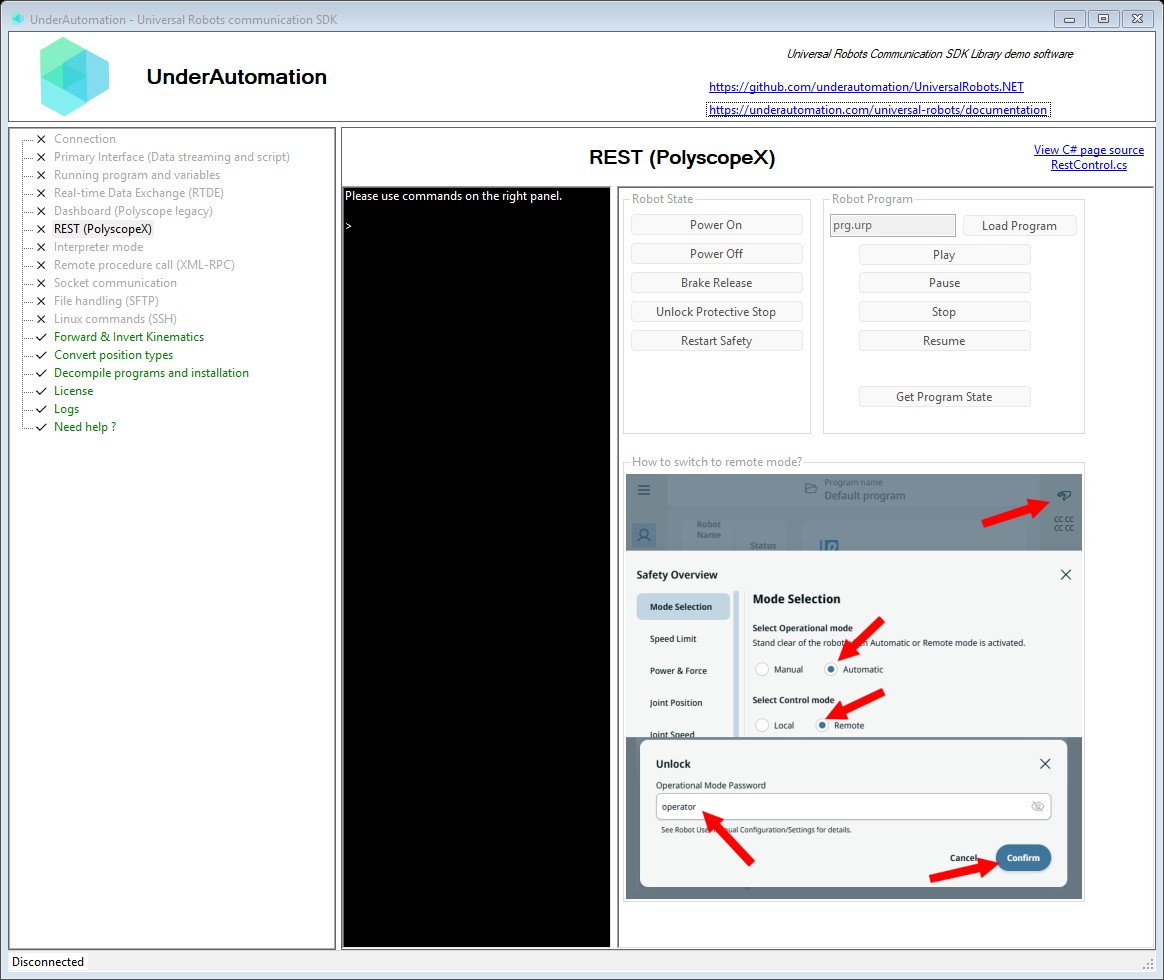
The demo application is open source. The C# source of this page is RestControl.cs.
Reference
Base implementation of the REST API client for PolyscopeX robots
| Member | Type | Description |
|---|---|---|
RestClientBase() Constructor | ||
IP Property read only | string | IP address of the robot |
Initialized Property read only | bool | Indicates whether the REST client has been initialized |
Port Property read only | int | HTTP port for REST API |
TimeoutMs Property read only | int | Request timeout in milliseconds |
Version Property read only | RestApiVersion | REST API version being used |
BrakeRelease() Method | RestApiResponse | Release the robot brakes. |
ChangeProgramState(ProgramStateAction) Method | RestApiResponse | Change the program state.
|
ChangeRobotState(RobotStateAction) Method | RestApiResponse | Change the robot's operational state.
|
ClosePopup() Method | RestApiResponse | Close the popup of the screen of the robot. |
CloseSafetyPopup() Method | RestApiResponse | Close a safety popup of the screen of the robot. |
Disable() Method | void | Disable the REST client |
DownloadProgram(string) Method | RestApiResponse<string> | Download a program from the robot.
|
DownloadProgramToFile(string, string) Method | RestApiResponse | Download a program from the robot and save it in a file of this computer.
|
EnableInternal(string, int, RestApiVersion, int) Method | void | Enable the REST client |
GetLoadedProgram() Method | RestApiResponse<string> | Get the name of the loaded program. |
GetOperationalMode() Method | RestApiResponse<OperationalModes> | Get the operational mode of the robot. |
GetPolyscopeVersion() Method | RestApiResponse<PolyscopeVersion> | Get the version of PolyScope X. |
GetProgramState() Method | RestApiResponse<ProgramStateResponse> | Get the current program state. |
GetPrograms() Method | RestApiResponse<RestProgramInfo[]> | List the programs stored on the robot. |
GetRobotApiVersion() Method | RestApiResponse<Version> | Get the version of the robot API of the robot. |
GetRobotMode() Method | RestApiResponse<RobotModes> | Get the mode of the robot. |
GetSafetyMode() Method | RestApiResponse<SafetyModes> | Get the safety mode of the robot. |
IsInRemoteControl() Method | RestApiResponse<bool> | Indicate whether the robot is in remote control. |
LoadProgram(string) Method | RestApiResponse | Load a program by name.
|
Pause() Method | RestApiResponse | Pause the running program. |
Play() Method | RestApiResponse | Start playing the loaded program. |
PowerOff() Method | RestApiResponse | Power off the robot. |
PowerOn() Method | RestApiResponse | Power on the robot. |
RestartSafety() Method | RestApiResponse | Restart the safety system. |
Resume() Method | RestApiResponse | Resume a paused program. |
ShowPopup(string) Method | RestApiResponse | Show a popup on the screen of the robot, with an empty title.
|
ShowPopupWithTitle(string, string) Method | RestApiResponse | Show a popup on the screen of the robot.
|
Stop() Method | RestApiResponse | Stop the running program. |
UnlockProtectiveStop() Method | RestApiResponse | Unlock the robot from protective stop state. |
UpdateProgramContent(string, string) Method | RestApiResponse<string> | Replace a program of the robot from its text content.
|
UpdateProgramFile(string) Method | RestApiResponse<string> | Replace a program of the robot with a program file.
|
UploadProgramContent(string, string) Method | RestApiResponse<string> | Upload a new program to the robot from its text content. The robot refuses a program that already exists: use UpdateProgramContent(string%String) to replace it.
|
UploadProgramFile(string) Method | RestApiResponse<string> | Upload a new program file to the robot. The robot refuses a program that already exists: use UpdateProgramFile(string) to replace it.
|
Response from a REST API call
| Member | Type | Description |
|---|---|---|
RestApiResponse() Constructor | ||
Message Property | string | Response message or error description |
RawResponse Property | string | Raw JSON response body |
StatusCode Property | HttpStatusCode | HTTP status code returned by the API |
Succeed Property | bool | Indicates whether the API call succeeded (HTTP 200) |
Equals(object) Method | bool | |
GetHashCode() Method | int | |
ToString() Method | string |
Actions available for changing the robot's operational state via REST API
| Name | Value | Description |
|---|---|---|
BRAKE_RELEASE | 4 | Releases the robot brakes |
POWER_OFF | 2 | Powers off the robot |
POWER_ON | 3 | Powers on the robot |
RESTART_SAFETY | 1 | Restarts the safety system |
UNLOCK_PROTECTIVE_STOP | 0 | Unlocks the robot from a protective stop state |
Actions available for changing the program state via REST API
| Name | Value | Description |
|---|---|---|
pause | 1 | Pause the running program |
play | 0 | Start or resume playing the program |
resume | 3 | Resume a paused program |
stop | 2 | Stop the running program |
Program state values returned by the REST API
| Name | Value | Description |
|---|---|---|
Paused | 3 | Program is paused |
Playing | 2 | Program is playing |
Stopped | 1 | Program is stopped |
Unknown | 0 | Unknown state |
What to read next
- Run a program: the steps from power on to the end of the program.
- RTDE: the data of the robot, also on PolyScope X.