REST API (PolyScope X)
Control a UR cobot with PolyScope X over HTTP: power, brakes, load, play and stop programs, read the program state. Replaces the Dashboard Server.
The REST API of PolyScope X controls a Universal Robots cobot over HTTP: power, brakes, load and play programs, read the state of the program. This page shows how to use it with the SDK. It replaces the Dashboard Server, which PolyScope X does not have.
For CB-Series and e-Series robots with PolyScope 5, use the Dashboard Server.
Prerequisites
- The robot runs PolyScope X, or URSim PolyScope X: see Develop without a robot.
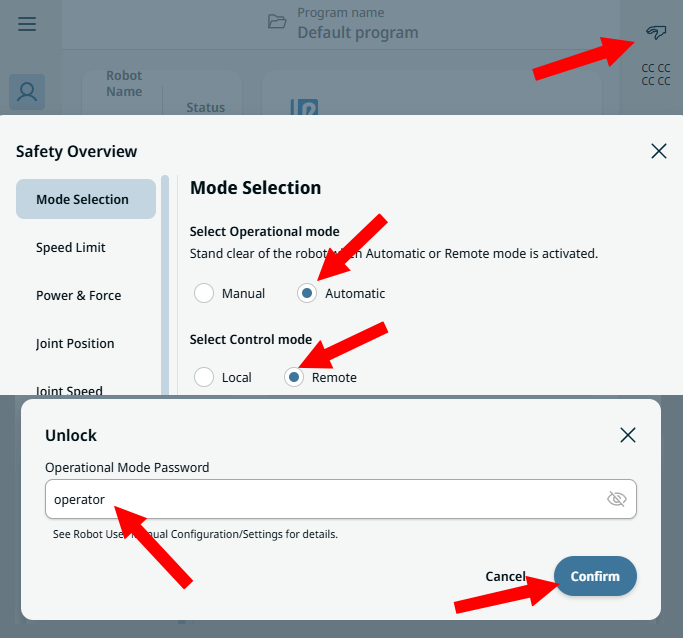
- The robot is in remote control. Switch it with the icon at the top right of PolyScope X. The default password is
operator.
Example
The REST API is disabled by default: set Rest.Enable in ConnectParameters.
static void Main(string[] args){var robot = new UR();var parameters = new ConnectParameters("192.168.0.1");// The REST API is disabled by defaultparameters.Rest.Enable = true;// The Dashboard Server does not exist on PolyScope Xparameters.Dashboard.Enable = false;robot.Connect(parameters);robot.Rest.PowerOn();robot.Rest.BrakeRelease();robot.Rest.LoadProgram("my_program");robot.Rest.Play();// Playing, Paused, Stopped or Unknownvar state = robot.Rest.GetProgramState();Console.WriteLine(state.Value.State);robot.Disconnect();}
The same client works without UR:
static void Main(string[] args){// A REST client, without a UR instancevar client = new RestClient();// Address of the robot. Optional: port, API version, timeoutclient.Enable("192.168.0.1");client.PowerOn();client.LoadProgram("my_program");client.Play();client.Disable();}}
Connection parameters
| Property | Default | Role |
|---|---|---|
Enable | false | Enable the REST client |
Port | 80 | HTTP port of the robot |
Version | Latest | Version of the API (V1, Latest) |
TimeoutMs | 5000 | Timeout of a request, in ms |
{var robot = new UR();var parameters = new ConnectParameters("192.168.0.1");parameters.Rest.Enable = true;parameters.Rest.Port = 80; // HTTP port, 80 by defaultparameters.Rest.Version = RestApiVersion.V1; // Latest by defaultparameters.Rest.TimeoutMs = 10000; // 5000 ms by defaultrobot.Connect(parameters);// The client is readyif (robot.Rest.Initialized)Console.WriteLine(robot.Rest.IP + ":" + robot.Rest.Port);}}
Commands
State of the robot
PowerOn, BrakeRelease, PowerOff, UnlockProtectiveStop and RestartSafety change the state of the robot. ChangeRobotState does the same with a RobotStateAction.
var robot = new UR();robot.Connect(new ConnectParameters("192.168.0.1") { Rest = { Enable = true } });// Power on, then release the brakesrobot.Rest.PowerOn();robot.Rest.BrakeRelease();// After a protective stop or a safety faultrobot.Rest.UnlockProtectiveStop();robot.Rest.RestartSafety();robot.Rest.PowerOff();// The same actions, with one generic methodrobot.Rest.ChangeRobotState(RobotStateAction.POWER_ON);robot.Rest.ChangeRobotState(RobotStateAction.BRAKE_RELEASE);}}
Programs
LoadProgram loads a program by its name, with or without the .urp extension. Play, Pause, Resume and Stop control it, and GetProgramState returns its state: Playing, Paused, Stopped or Unknown. ChangeProgramState does the same with a ProgramStateAction.
var robot = new UR();robot.Connect(new ConnectParameters("192.168.0.1") { Rest = { Enable = true } });// The name of the program, with or without .urprobot.Rest.LoadProgram("my_program");robot.Rest.Play();robot.Rest.Pause();robot.Rest.Resume();robot.Rest.Stop();// The same actions, with one generic methodrobot.Rest.ChangeProgramState(ProgramStateAction.play);RestApiResponse<ProgramStateResponse> response = robot.Rest.GetProgramState();if (response.Succeed){RestProgramState state = response.Value.State; // Playing, Paused, Stopped, Unknown}}}
Responses and errors
Every method returns a RestApiResponse. GetProgramState returns a RestApiResponse<ProgramStateResponse>, with the state in Value.
| Property | Role |
|---|---|
Succeed | true when the robot answered HTTP 200 |
StatusCode | HTTP status of the answer |
Message | Message of success, or description of the error |
RawResponse | Body of the answer, in JSON |
Value | Typed value (RestApiResponse<T> only) |
The errors of the SDK, a timeout for example, raise InternalErrorOccured.
var robot = new UR();robot.Connect(new ConnectParameters("192.168.0.1") { Rest = { Enable = true } });RestApiResponse response = robot.Rest.PowerOn();if (!response.Succeed){// HTTP status, message and body of the answer of the robotConsole.WriteLine(response.StatusCode);Console.WriteLine(response.Message);Console.WriteLine(response.RawResponse);}// Errors of the SDK, for example a timeoutrobot.Rest.InternalErrorOccured += (sender, e) =>{Console.WriteLine(e.Message);Console.WriteLine(e.Exception);};}}
From the Dashboard Server to the REST API
An application that supports both PolyScope 5 and PolyScope X enables the client of the robot:
{var robot = new UR();// PolyScope 5 and CB-Series: Dashboard Serverrobot.Connect(new ConnectParameters("192.168.0.1") { Dashboard = { Enable = true } });robot.Dashboard.PowerOn();robot.Dashboard.LoadProgram("/programs/my_program.urp");robot.Dashboard.Play();// PolyScope X: REST APIrobot.Connect(new ConnectParameters("192.168.0.1") { Rest = { Enable = true } });robot.Rest.PowerOn();robot.Rest.LoadProgram("my_program");robot.Rest.Play();}}
- The REST API uses HTTP (port 80), the Dashboard Server TCP (port 29999).
LoadProgramtakes the name of the program, without its folder.ReleaseBrakeof the Dashboard Server isBrakeReleasein the REST API.
Try it in the demo application
Everything on this page can be tried without writing code, in the REST (PolyscopeX) page of the demo application.
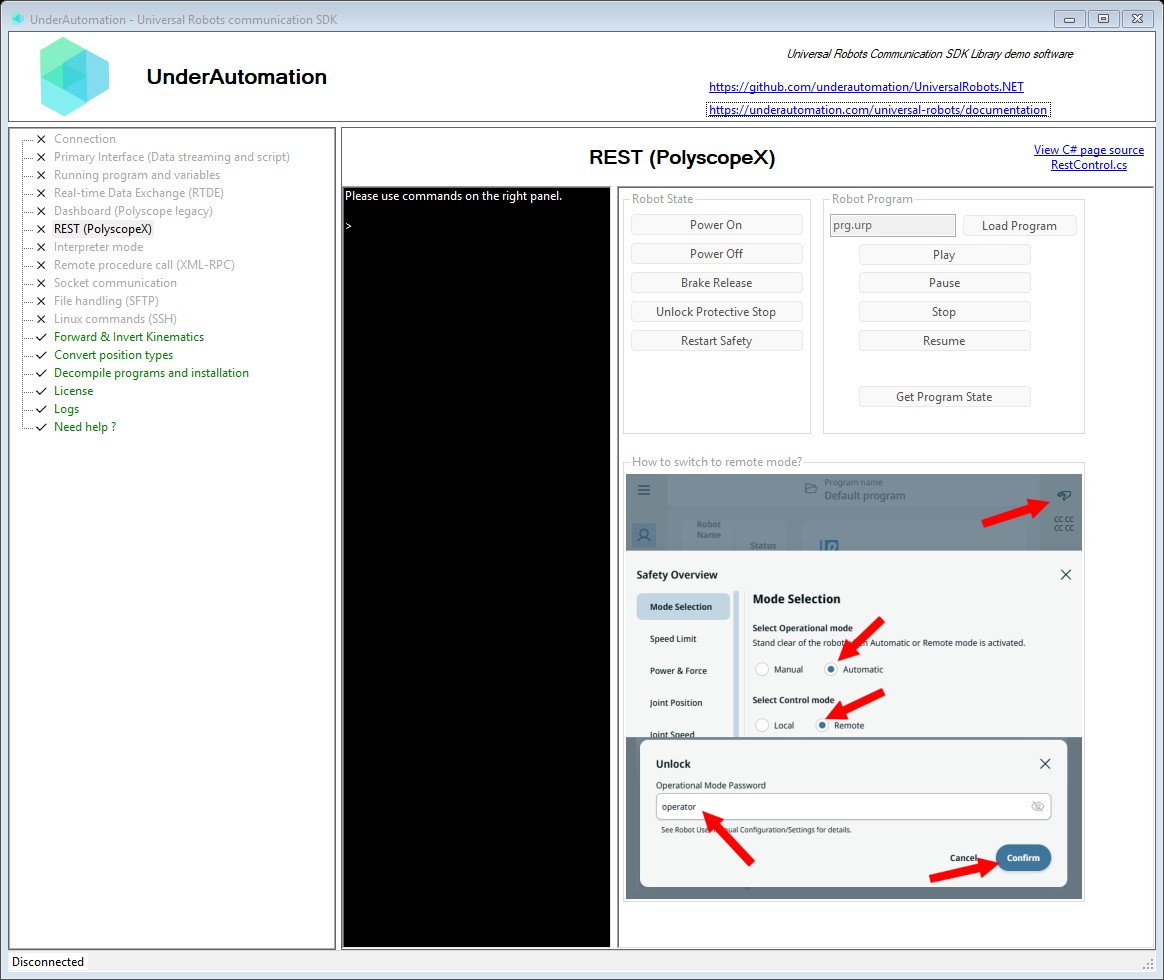
The demo application is open source. The C# source of this page is RestControl.cs.
Reference
Base implementation of the REST API client for PolyscopeX robots
| Member | Type | Description |
|---|---|---|
RestClientBase() Constructor | ||
IP Property read only | string | IP address of the robot |
Initialized Property read only | bool | Indicates whether the REST client has been initialized |
Port Property read only | int | HTTP port for REST API |
TimeoutMs Property read only | int | Request timeout in milliseconds |
Version Property read only | RestApiVersion | REST API version being used |
BrakeRelease() Method | RestApiResponse | Release the robot brakes. |
ChangeProgramState(ProgramStateAction) Method | RestApiResponse | Change the program state. PUT /program/v1/state
|
ChangeRobotState(RobotStateAction) Method | RestApiResponse | Change the robot's operational state. PUT /robotstate/v1/state
|
Disable() Method | void | Disable the REST client |
EnableInternal(string, int, RestApiVersion, int) Method | void | Enable the REST client |
GetProgramState() Method | RestApiResponse<ProgramStateResponse> | Get the current program state. GET /program/v1/state |
LoadProgram(string) Method | RestApiResponse | Load a program by name. PUT /program/v1/load
|
Pause() Method | RestApiResponse | Pause the running program. |
Play() Method | RestApiResponse | Start playing the loaded program. |
PowerOff() Method | RestApiResponse | Power off the robot. |
PowerOn() Method | RestApiResponse | Power on the robot. |
RestartSafety() Method | RestApiResponse | Restart the safety system. |
Resume() Method | RestApiResponse | Resume a paused program. |
Stop() Method | RestApiResponse | Stop the running program. |
UnlockProtectiveStop() Method | RestApiResponse | Unlock the robot from protective stop state. |
Response from a REST API call
| Member | Type | Description |
|---|---|---|
RestApiResponse() Constructor | ||
Message Property | string | Response message or error description |
RawResponse Property | string | Raw JSON response body |
StatusCode Property | HttpStatusCode | HTTP status code returned by the API |
Succeed Property | bool | Indicates whether the API call succeeded (HTTP 200) |
Equals(object) Method | bool | |
GetHashCode() Method | int | |
ToString() Method | string |
Actions available for changing the robot's operational state via REST API
| Name | Value | Description |
|---|---|---|
BRAKE_RELEASE | 4 | Releases the robot brakes |
POWER_OFF | 2 | Powers off the robot |
POWER_ON | 3 | Powers on the robot |
RESTART_SAFETY | 1 | Restarts the safety system |
UNLOCK_PROTECTIVE_STOP | 0 | Unlocks the robot from a protective stop state |
Actions available for changing the program state via REST API
| Name | Value | Description |
|---|---|---|
pause | 1 | Pause the running program |
play | 0 | Start or resume playing the program |
resume | 3 | Resume a paused program |
stop | 2 | Stop the running program |
Program state values returned by the REST API
| Name | Value | Description |
|---|---|---|
Paused | 3 | Program is paused |
Playing | 2 | Program is playing |
Stopped | 1 | Program is stopped |
Unknown | 0 | Unknown state |
What to read next
- Run a program: the steps from power on to the end of the program.
- RTDE: the data of the robot, also on PolyScope X.