Send URScript
Send URScript to a UR cobot with the Primary Interface: a line, a program or a secondary program, and their effect on the running program.
The Primary Interface of a Universal Robots cobot runs URScript sent by your application: a line, a program, or a secondary program that runs next to the main program. This page shows the three forms and their effect on the program that runs on the robot.
Prerequisites
- The Primary Interface is connected on port 30001 or 30002 (the default). The read only ports do not accept URScript.
- On e-Series and PolyScope X, the robot is in remote control: see Remote control.
- To move, the robot is powered on and its brakes are released.
Example
Script.Send sends the text to the robot:
robot.Connect("192.168.0.1");// One line: the running program stops and the line runsrobot.PrimaryInterface.Script.Send("movej([-1.5, -1.5, -2, -0.5, 1.8, 0], a=1.4, v=1.05)");// A program, defined with def ... endrobot.PrimaryInterface.Script.Send("def myProgram():\n" +" movej([0.94, -1.31, 2.21, -2.65, -1.08, 4.81], a=1.4, v=1.05)\n" +" movej([0.94, -1.01, 2.25, -2.99, -1.08, 4.81], a=1.4, v=1.05)\n" +"end\n");// A secondary program, with sec ... end: it runs next to the main// program without stopping it, but cannot move the robotrobot.PrimaryInterface.Script.Send("sec mySecondaryProgram():\n" +" set_standard_digital_out(1, True)\n" +"end\n");}}
The three forms
| Form | Example | Effect on the program that runs on the robot |
|---|---|---|
| One line | set_standard_digital_out(1, True) | The program stops, the line runs |
| A program | def myProgram(): ... end | The program stops, the new program runs |
| A secondary program | sec mySecondaryProgram(): ... end | The program continues. The secondary program runs next to it |
A secondary program cannot move the robot, cannot wait, and cannot write global variables. It suits the I/O and the registers. See Secondary program by Universal Robots.
The robot does not answer: Send returns when the text is sent. To know if a program runs, read RobotModeData.ProgramRunning, and listen to RuntimeExceptionMessageReceived for its errors. See Monitor the state of the robot.
The functions of URScript are in the Script Manual of your PolyScope version, in the download center of Universal Robots.
Other ways to run URScript
- Interpreter Mode: statements sent to a running program, which continues after them.
- SFTP and Dashboard Server: send a
.urpprogram, load it and play it. - Move the robot from a PC: which way to choose for a move.
Try it in the demo application
Everything on this page can be tried without writing code, in the Primary Interface (Data streaming and script) page of the demo application.
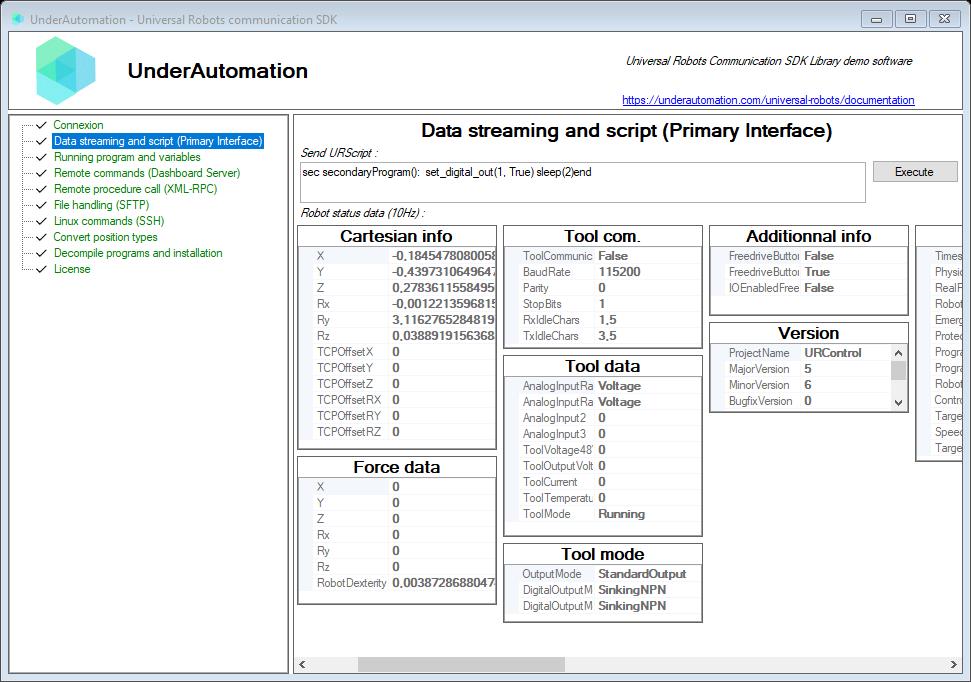
The demo application is open source. The C# source of this page is PrimaryInterfaceControl.cs.