Dashboard Server: remote commands
Power, brakes, programs, popups, robot mode and safety status of a UR cobot with the Dashboard Server of PolyScope 5. All the commands of the SDK.
- Prerequisites
- Example
- Responses
- Power and brakes
- GetRobotMode
- PowerOn
- PowerOff
- ReleaseBrake
- UnlockProtectiveStop
- Shutdown
- Programs
- LoadProgram
- GetLoadedProgram
- Play
- Stop
- Pause
- IsProgramRunning
- GetProgramState
- IsProgramSaved
- Teach pendant
- ShowPopup
- ClosePopup
- AddToLog
- Robot information
- GetPolyscopeVersion
- GetSerialNumber
- GetRobotModel
- LoadInstallation
- Operational mode
- GetOperationalMode
- SetOperationalMode
- ClearOperationalMode
- IsInRemoteControl
- Safety
- GetSafetyStatus
- CloseSafetyPopup
- RestartSafety
- Variables and other commands
- GetVariable
- SendCustomDashboardCommand
- Try it in the demo application
- What to read next
The Dashboard Server of a Universal Robots cobot accepts remote commands on TCP port 29999: power on and off, release the brakes, load and play programs, show popups, read the robot mode and the safety status. This page lists the commands of the SDK for CB-Series and e-Series robots with PolyScope.
PolyScope X has no Dashboard Server: use the REST API.
Prerequisites
- The service
Dashboard Serveris enabled on the robot: see Prepare the robot. - On e-Series, the commands that change the state of the robot (power, brakes, load, play) need the remote control: see Remote control. The commands that read a value work in local control.
Example
The Dashboard Server is enabled by default: Connect("192.168.0.1") opens it.
static void Main(string[] args){var robot = new UR();var parameters = new ConnectParameters("192.168.0.1");// The Dashboard Server is enabled by defaultparameters.Dashboard.Enable = true;robot.Connect(parameters);// Every command returns a CommandResponsevar powerOn = robot.Dashboard.PowerOn();if (!powerOn.Succeed) Console.WriteLine(powerOn.Message);robot.Dashboard.ReleaseBrake();robot.Dashboard.LoadProgram("pick_and_place.urp");robot.Dashboard.Play();// Commands that read a value return a CommandResponse<T>var running = robot.Dashboard.IsProgramRunning();Console.WriteLine($"Running: {running.Value}");// Close the Dashboard Server onlyrobot.Dashboard.Disable();}}
The same client works without UR:
static void Main(string[] args){// A Dashboard Server client, without a UR instancevar client = new DashboardClient();// Address of the robot. Optional: port, receive and send timeoutsclient.Enable("192.168.0.1");client.PowerOn();client.ReleaseBrake();client.Play();client.Disable();}}
Responses
Every command returns a CommandResponse: Succeed says if the robot accepted the command, Message gives its answer. The commands that read a value return a CommandResponse<T>, with the value in Value.
Generic answer returned by a command
| Member | Type | Description |
|---|---|---|
CommandResponse() Constructor | ||
Message Field | string | A message that described the error or the action done |
Succeed Field | bool | The command as succeeded |
Equals(object) Method | bool | Determines whether the specified object is equal to this response. |
GetHashCode() Method | int | Returns a hash code for this response. |
ToString() Method | string | A human readable answer |
Power and brakes
GetRobotMode
Get the current robot mode.
// Returns the current robot state. (From FW 1.6)public CommandResponse<RobotModes> GetRobotMode()
private UR ur;private void Start() {ur = new UR(); // Create a new UR instanceur.Connect("192.168.0.1"); // Connect to the robot// ...// Call the commandvar response = ur.Dashboard.GetRobotMode();if(response.Succeed) Console.WriteLine("Succeed");else Console.WriteLine("Command failed");Console.WriteLine(response.Message);// Get returned valueRobotModes robotMode = response.Value;}
Robot running modes
| Name | Value | Description |
|---|---|---|
BackDrive | 6 | The robot is hand guided by pushing teached button |
Booting | 2 | The robot controller is booting |
ConfirmSafety | 1 | Robot has stopped due to a Safety Stop |
Disconnected | 0 | Robot is not connected to its controller |
Idle | 5 | Power is on but breaks are not released |
Other | -1 | Robot is in an obsolete CB2 mode |
PowerOff | 3 | The robot is powered off |
PowerOn | 4 | The robot is powered on |
Running | 7 | Robot is in normal mode |
UpdatingFirmware | 8 | Firmware is upgrading |
PowerOn
Power on the robot.
// Powers on the robot arm. (From FW 3.0)public CommandResponse PowerOn()
private UR ur;private void Start() {ur = new UR(); // Create a new UR instanceur.Connect("192.168.0.1"); // Connect to the robot// ...// Call the commandvar response = ur.Dashboard.PowerOn();if(response.Succeed) Console.WriteLine("Succeed");else Console.WriteLine("Command failed");Console.WriteLine(response.Message);}
PowerOff
Power off the robot.
// Powers off the robot arm. (From FW 3.0)public CommandResponse PowerOff()
private UR ur;private void Start() {ur = new UR(); // Create a new UR instanceur.Connect("192.168.0.1"); // Connect to the robot// ...// Call the commandvar response = ur.Dashboard.PowerOff();if(response.Succeed) Console.WriteLine("Succeed");else Console.WriteLine("Command failed");Console.WriteLine(response.Message);}
ReleaseBrake
Release the brakes after powering on.
// Releases the brakes. (From FW 3.0)public CommandResponse ReleaseBrake()
private UR ur;private void Start() {ur = new UR(); // Create a new UR instanceur.Connect("192.168.0.1"); // Connect to the robot// ...// Call the commandvar response = ur.Dashboard.ReleaseBrake();if(response.Succeed) Console.WriteLine("Succeed");else Console.WriteLine("Command failed");Console.WriteLine(response.Message);}
UnlockProtectiveStop
Unlock the robot from protective stop state.
// Closes the current popup and unlocks protective stop. (From FW 3.1)public CommandResponse UnlockProtectiveStop()
private UR ur;private void Start() {ur = new UR(); // Create a new UR instanceur.Connect("192.168.0.1"); // Connect to the robot// ...// Call the commandvar response = ur.Dashboard.UnlockProtectiveStop();if(response.Succeed) Console.WriteLine("Succeed");else Console.WriteLine("Command failed");Console.WriteLine(response.Message);}
Shutdown
Completely shut down the robot.
// Shuts down and turns off robot and controller. Closes the connection. (From FW 1.4)public CommandResponse Shutdown()
private UR ur;private void Start() {ur = new UR(); // Create a new UR instanceur.Connect("192.168.0.1"); // Connect to the robot// ...// Call the commandvar response = ur.Dashboard.Shutdown();if(response.Succeed) Console.WriteLine("Succeed");else Console.WriteLine("Command failed");Console.WriteLine(response.Message);}
Programs
LoadProgram
Load a program from the robot's file system.
// Start loading the specified program. (From FW 1.4)Returns when both program and associated installation has loaded (or failed).The load command fails if the associated installation requires confirmation of safety.The return value in this case will be 'Error while loading program'.public CommandResponse LoadProgram(string programName)
private UR ur;private void Start() {ur = new UR(); // Create a new UR instanceur.Connect("192.168.0.1"); // Connect to the robot// ...// Call the commandvar response = ur.Dashboard.LoadProgram("prg1.urp");if(response.Succeed) Console.WriteLine("Succeed");else Console.WriteLine("Command failed");Console.WriteLine(response.Message);}
GetLoadedProgram
Get the name of the currently loaded program.
// Returns the path of the loaded program. If not program is loaded, Value member is null. (From FW 1.6)public CommandResponse<string> GetLoadedProgram()
private UR ur;private void Start() {ur = new UR(); // Create a new UR instanceur.Connect("192.168.0.1"); // Connect to the robot// ...// Call the commandvar response = ur.Dashboard.GetLoadedProgram();if(response.Succeed) Console.WriteLine("Succeed");else Console.WriteLine("Command failed");Console.WriteLine(response.Message);// Get returned valuestring loadedProgram = response.Value;}
Play
Start executing the loaded program.
// Starts program, if any program is loaded and robot is ready. (From FW 1.4)Returns failure if the program fails to start.public CommandResponse Play()
private UR ur;private void Start() {ur = new UR(); // Create a new UR instanceur.Connect("192.168.0.1"); // Connect to the robot// ...// Call the commandvar response = ur.Dashboard.Play();if(response.Succeed) Console.WriteLine("Succeed");else Console.WriteLine("Command failed");Console.WriteLine(response.Message);}
Stop
Stop program execution.
// Stops running program. (From FW 1.4)Returns failure if the program fails to stoppublic CommandResponse Stop()
private UR ur;private void Start() {ur = new UR(); // Create a new UR instanceur.Connect("192.168.0.1"); // Connect to the robot// ...// Call the commandvar response = ur.Dashboard.Stop();if(response.Succeed) Console.WriteLine("Succeed");else Console.WriteLine("Command failed");Console.WriteLine(response.Message);}
Pause
Pause the running program.
// Pauses the running program . (From FW 1.4)Returns failure if the program fails to pausepublic CommandResponse Pause()
private UR ur;private void Start() {ur = new UR(); // Create a new UR instanceur.Connect("192.168.0.1"); // Connect to the robot// ...// Call the commandvar response = ur.Dashboard.Pause();if(response.Succeed) Console.WriteLine("Succeed");else Console.WriteLine("Command failed");Console.WriteLine(response.Message);}
IsProgramRunning
Check if a program is currently running.
// Returns a True value is a program is running. (From FW 1.6)public CommandResponse<bool> IsProgramRunning()
private UR ur;private void Start() {ur = new UR(); // Create a new UR instanceur.Connect("192.168.0.1"); // Connect to the robot// ...// Call the commandvar response = ur.Dashboard.IsProgramRunning();if(response.Succeed) Console.WriteLine("Succeed");else Console.WriteLine("Command failed");Console.WriteLine(response.Message);// Get returned valuebool isProgramRunning = response.Value;}
GetProgramState
Get the current program state.
// Returns the state of the active program and path to loaded program file, or STOPPED if no program is loadedpublic CommandResponse<ProgramState> GetProgramState()
private UR ur;private void Start() {ur = new UR(); // Create a new UR instanceur.Connect("192.168.0.1"); // Connect to the robot// ...// Call the commandvar response = ur.Dashboard.GetProgramState();if(response.Succeed) Console.WriteLine("Succeed");else Console.WriteLine("Command failed");Console.WriteLine(response.Message);// Get returned valueProgramState state = response.Value;}
Describes a program state (its running state and its name)
| Member | Type | Description |
|---|---|---|
ProgramState() Constructor | ||
Name Field | string | Name of the loaded program |
State Field | ProgramStates | Running state of the loaded program |
Equals(object) Method | bool | Determines whether the specified object is equal to this program state. |
GetHashCode() Method | int | Returns a hash code for this program state. |
ToString() Method | string |
IsProgramSaved
Check if the current program has unsaved changes.
// Returns the save state of the active program and path to loaded program file. (From FW 1.8.11997)public CommandResponse<ProgramSaveState> IsProgramSaved()
private UR ur;private void Start() {ur = new UR(); // Create a new UR instanceur.Connect("192.168.0.1"); // Connect to the robot// ...// Call the commandvar response = ur.Dashboard.IsProgramSaved();if(response.Succeed) Console.WriteLine("Succeed");else Console.WriteLine("Command failed");Console.WriteLine(response.Message);// Get returned valueProgramSaveState state = response.Value;}
Represents the save state of the currently loaded program on the Universal Robots controller.
| Member | Type | Description |
|---|---|---|
ProgramSaveState() Constructor | ||
IsSaved Field | bool | Is the program saved |
Name Field | string | Name of the loaded program |
Equals(object) Method | bool | Determines whether the specified object is equal to this program save state. |
GetHashCode() Method | int | Returns a hash code for this program save state. |
ToString() Method | string |
Teach pendant
ShowPopup
Display a popup message on the teach pendant.
// Shows a popup on Polyscope with the specified message. The popup-text will be translated to the selected language, if the text exists in the language file. (From FW 1.6)public CommandResponse ShowPopup(string message)
private UR ur;private void Start() {ur = new UR(); // Create a new UR instanceur.Connect("192.168.0.1"); // Connect to the robot// ...// Call the commandvar response = ur.Dashboard.ShowPopup("This is a popup message !");if(response.Succeed) Console.WriteLine("Succeed");else Console.WriteLine("Command failed");Console.WriteLine(response.Message);}
ClosePopup
Close any open popup message.
// Closes the popup (From FW 1.6)public CommandResponse ClosePopup()
private UR ur;private void Start() {ur = new UR(); // Create a new UR instanceur.Connect("192.168.0.1"); // Connect to the robot// ...// Call the commandvar response = ur.Dashboard.ClosePopup();if(response.Succeed) Console.WriteLine("Succeed");else Console.WriteLine("Command failed");Console.WriteLine(response.Message);}
AddToLog
Add a message to the robot's log.
// Adds log-message to the Log history. (From FW 1.8.11657)public CommandResponse AddToLog(string message)
private UR ur;private void Start() {ur = new UR(); // Create a new UR instanceur.Connect("192.168.0.1"); // Connect to the robot// ...// Call the commandvar response = ur.Dashboard.AddToLog("This is a log message !");if(response.Succeed) Console.WriteLine("Succeed");else Console.WriteLine("Command failed");Console.WriteLine(response.Message);}
Robot information
GetPolyscopeVersion
Get the Polyscope software version.
// Returns the version of the Polyscope software (From FW 1.8.14035)public CommandResponse<PolyscopeVersion> GetPolyscopeVersion()
private UR ur;private void Start() {ur = new UR(); // Create a new UR instanceur.Connect("192.168.0.1"); // Connect to the robot// ...// Call the commandvar response = ur.Dashboard.GetPolyscopeVersion();if(response.Succeed) Console.WriteLine("Succeed");else Console.WriteLine("Command failed");Console.WriteLine(response.Message);}
GetSerialNumber
Get the robot's serial number.
// Returns serial number of the robot (FW 3.12 and from FW 5.6)public CommandResponse GetSerialNumber()
private UR ur;private void Start() {ur = new UR(); // Create a new UR instanceur.Connect("192.168.0.1"); // Connect to the robot// ...// Call the commandvar response = ur.Dashboard.GetSerialNumber();if(response.Succeed) Console.WriteLine("Succeed");else Console.WriteLine("Command failed");Console.WriteLine(response.Message);}
GetRobotModel
Get the robot model (UR3, UR5, UR10, etc.).
// Returns the robot model (UR3, UR5, UR10, UR16, ...). (FW 3.12 and from FW 5.6)public CommandResponse<RobotModels> GetRobotModel()
private UR ur;private void Start() {ur = new UR(); // Create a new UR instanceur.Connect("192.168.0.1"); // Connect to the robot// ...// Call the commandvar response = ur.Dashboard.GetRobotModel();if(response.Succeed) Console.WriteLine("Succeed");else Console.WriteLine("Command failed");Console.WriteLine(response.Message);// Get returned valueRobotModels model = response.Value;}
Model of a UR robot
| Name | Value | Description |
|---|---|---|
UR10 | 2 | UR10 robot model. |
UR16 | 4 | UR16 robot model. |
UR18 | 5 | UR18 robot model. |
UR20 | 7 | UR20 robot model. |
UR3 | 3 | UR3 robot model. |
UR30 | 8 | UR30 robot model. |
UR5 | 1 | UR5 robot model. |
UR8L | 6 | UR8 Long robot model. |
LoadInstallation
Load an installation file.
// Loads the specified installation file (From FW 3.2.18654)public CommandResponse LoadInstallation(string installation)
private UR ur;private void Start() {ur = new UR(); // Create a new UR instanceur.Connect("192.168.0.1"); // Connect to the robot// ...// Call the commandvar response = ur.Dashboard.LoadInstallation("default.installation");if(response.Succeed) Console.WriteLine("Succeed");else Console.WriteLine("Command failed");Console.WriteLine(response.Message);}
Operational mode
GetOperationalMode
Get the current operational mode.
// Returns the operational mode. (From FW 5.6)public CommandResponse<OperationalModes> GetOperationalMode()
private UR ur;private void Start() {ur = new UR(); // Create a new UR instanceur.Connect("192.168.0.1"); // Connect to the robot// ...// Call the commandvar response = ur.Dashboard.GetOperationalMode();if(response.Succeed) Console.WriteLine("Succeed");else Console.WriteLine("Command failed");Console.WriteLine(response.Message);// Get returned valueOperationalModes mode = response.Value;}
Enumerates all robot operational modes
| Name | Value | Description |
|---|---|---|
Automatic | 1 | Loading and editing programs and installations is not allowed, only playing programs |
Manual | 0 | Loading and editing programs is allowed |
None | 2 | The password has not been set. |
SetOperationalMode
Set the operational mode.
// Controls the operational mode. See User manual for details. If this function is called the operational mode cannot be changed from PolyScope, and the user password is disabled. OperationalModes.None is not a valid operational mode. (From FW 5.0.0)public CommandResponse SetOperationalMode(OperationalModes mode)
private UR ur;private void Start() {ur = new UR(); // Create a new UR instanceur.Connect("192.168.0.1"); // Connect to the robot// ...// Call the commandvar response = ur.Dashboard.SetOperationalMode(OperationalModes.Manual);if(response.Succeed) Console.WriteLine("Succeed");else Console.WriteLine("Command failed");Console.WriteLine(response.Message);}
ClearOperationalMode
Clear the current operational mode.
// The operational mode can again be changed from PolyScope, and the user password is enabled. (From FW 5.0.0)public CommandResponse ClearOperationalMode()
private UR ur;private void Start() {ur = new UR(); // Create a new UR instanceur.Connect("192.168.0.1"); // Connect to the robot// ...// Call the commandvar response = ur.Dashboard.ClearOperationalMode();if(response.Succeed) Console.WriteLine("Succeed");else Console.WriteLine("Command failed");Console.WriteLine(response.Message);}
IsInRemoteControl
Check if the robot is in remote control mode.
// Returns the remote control status of the robot. If the robot Is In remote control it returns False And If remote control Is disabled Or robot Is in local control it returns false. (From FW 5.6)public CommandResponse<bool> IsInRemoteControl()
private UR ur;private void Start() {ur = new UR(); // Create a new UR instanceur.Connect("192.168.0.1"); // Connect to the robot// ...// Call the commandvar response = ur.Dashboard.IsInRemoteControl();if(response.Succeed) Console.WriteLine("Succeed");else Console.WriteLine("Command failed");Console.WriteLine(response.Message);// Get returned valuebool isRemoteControl = response.Value;}
Safety
GetSafetyStatus
Get the current safety status.
// Returns the current safety status. (From FW 3.11 to 3.12 and from FW 5.5)public CommandResponse<SafetyStatus> GetSafetyStatus()
private UR ur;private void Start() {ur = new UR(); // Create a new UR instanceur.Connect("192.168.0.1"); // Connect to the robot// ...// Call the commandvar response = ur.Dashboard.GetSafetyStatus();if(response.Succeed) Console.WriteLine("Succeed");else Console.WriteLine("Command failed");Console.WriteLine(response.Message);// Get returned valueSafetyStatus status = response.Value;}
Safety modes
| Name | Value | Description |
|---|---|---|
AutomaticModeSafeguardStop | 10 | Automatic mode safeguard stop is active. |
Fault | 9 | Safety is in fault mode |
Normal | 1 | Safety is in normal operating conditions |
ProtectiveStop | 3 | Protective safeguard Stop. This safety function is triggeredby an external protective device using safety inputs which will trigger a Cat 2 stop3per IEC 60204-1. |
Recovery | 4 | When a safety limit is violated, the safety system must be restarted. |
Reduced | 2 | Speed is reduced |
RobotEmergencyStop | 7 | (EA + EB + SBUS->Screen) Physical e-stop interface input activated |
SafeguardStop | 5 | (SI0 + SI1 + SBUS) Physical s-stop interface input |
SystemEmergencyStop | 6 | (EA + EB + SBUS->Euromap67) Physical e-stop interface input activated |
SystemThreePositionEnablingStop | 11 | System three-position enabling device stop is active. |
Violation | 8 | Safety is in violation mode (for example, violation of the allowed delay between redundant signals) |
CloseSafetyPopup
Close any safety-related popup.
// Closes a safety popup. (From FW 3.1)public CommandResponse CloseSafetyPopup()
private UR ur;private void Start() {ur = new UR(); // Create a new UR instanceur.Connect("192.168.0.1"); // Connect to the robot// ...// Call the commandvar response = ur.Dashboard.CloseSafetyPopup();if(response.Succeed) Console.WriteLine("Succeed");else Console.WriteLine("Command failed");Console.WriteLine(response.Message);}
RestartSafety
Restart the safety system after a safety fault.
// Restarts the safety. Used when robot gets a safety fault or violation to restart the safety. After safety has been rebooted the robot will be in Power Off. (From FW 3.7 to 3.12.0 and from 5.1.0)public CommandResponse RestartSafety()
private UR ur;private void Start() {ur = new UR(); // Create a new UR instanceur.Connect("192.168.0.1"); // Connect to the robot// ...// Call the commandvar response = ur.Dashboard.RestartSafety();if(response.Succeed) Console.WriteLine("Succeed");else Console.WriteLine("Command failed");Console.WriteLine(response.Message);}
Variables and other commands
GetVariable
Read a global variable of the running program. See Read and write variables.
// Get variable value and estimate its typepublic CommandResponse<GlobalVariable> GetVariable(string name)
private UR ur;private void Start() {ur = new UR(); // Create a new UR instanceur.Connect("192.168.0.1"); // Connect to the robot// ...// Call the commandvar response = ur.Dashboard.GetVariable("myVar");if(response.Succeed) Console.WriteLine("Succeed");else Console.WriteLine("Command failed");Console.WriteLine(response.Message);// Get returned valueGlobalVariable variable = response.Value;}
SendCustomDashboardCommand
Send a command of the Dashboard Server that has no method in the SDK. The answer of the robot is in Message.
// Send a custom command to the Dashboard Server portpublic CommandResponse SendCustomDashboardCommand(string command)
private UR ur;private void Start() {ur = new UR(); // Create a new UR instanceur.Connect("192.168.0.1"); // Connect to the robot// ...// Call the commandvar response = ur.Dashboard.SendCustomDashboardCommand("robotmode");if(response.Succeed) Console.WriteLine("Succeed");else Console.WriteLine("Command failed");Console.WriteLine(response.Message);}
Try it in the demo application
Everything on this page can be tried without writing code, in the Dashboard (Polyscope legacy) page of the demo application.
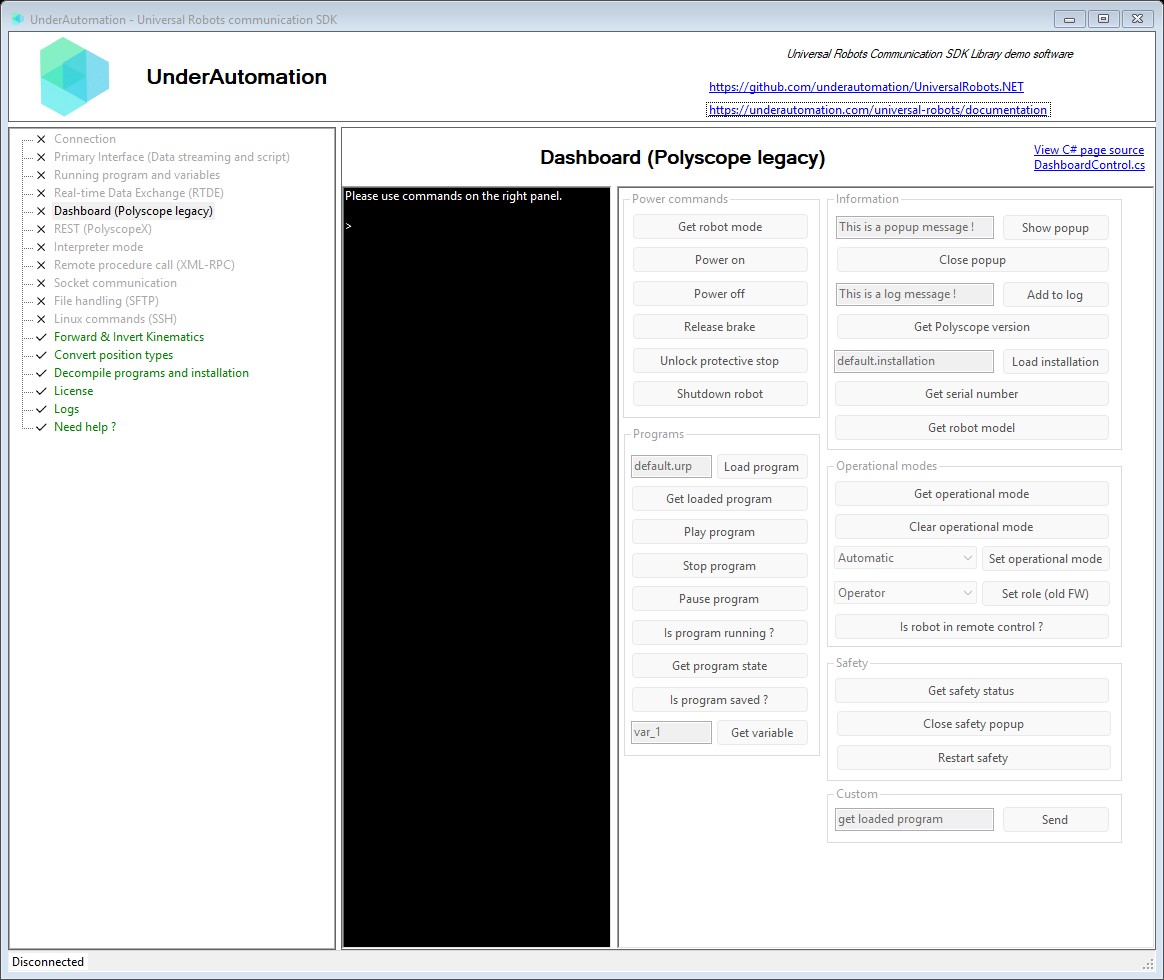
The demo application is open source. The C# source of this page is DashboardControl.cs.
What to read next
- Run a program: a complete program, from power on to the end of the program.
- Read and reset alarms: protective stops and safety faults.
- Dashboard Server by Universal Robots: the list of the commands of the robot.