Telnet overview
Telnet KCL (Keyboard Command Line) sends commands to a Fanuc robot: run programs, reset alarms, read and write variables, control I/O ports.
Telnet KCL is a text-based protocol that lets you send commands to a Fanuc robot controller. It requires no paid option and is available on all controllers and ROBOGUIDE.
Key features
- Program control: Run, pause, hold, continue, abort programs
- Variable access: Read and write system variables
- I/O control: Set output ports, simulate and unsimulate inputs
- Alarm management: Reset alarms and errors
- Debugging: Add breakpoints, step through code line by line
- Custom commands: Send any raw KCL command
Prerequisites
Telnet must be enabled on your robot controller. See Enable Telnet on your robot for setup instructions.
Quick example
using UnderAutomation.Fanuc;using UnderAutomation.Fanuc.Telnet;public class Telnet{static void Main(){// Create a new Fanuc robot instanceFanucRobot robot = new FanucRobot();// Set connection parametersConnectionParameters parameters = new ConnectionParameters("192.168.0.1");parameters.Telnet.Enable = true;parameters.Telnet.TelnetKclPassword = "TELNET_PASS";// Connect to the robotrobot.Connect(parameters);// Reset alarmsrobot.Telnet.Reset();// Run a programrobot.Telnet.Run("MyProgram");robot.Telnet.Pause("MyProgram");robot.Telnet.Hold("MyProgram");robot.Telnet.Continue("MyProgram");robot.Telnet.Abort("MyProgram", force: true);// Set a variablerobot.Telnet.SetVariable("$RMT_MASTER", 1);// Set an output port (example: DOUT port 2 = 0)robot.Telnet.SetPort(KCLPorts.DOUT, 2, 0);// Simulate an input port (example: DIN port 3 = 1)robot.Telnet.Simulate(KCLPorts.DIN, 3, 1);robot.Telnet.Unsimulate(KCLPorts.DIN, 3);}}
Connection
static void Main(){// Via FanucRobotvar robot = new FanucRobot();var parameters = new ConnectionParameters("192.168.0.1");parameters.Telnet.Enable = true;parameters.Telnet.TelnetKclPassword = "your_password";robot.Connect(parameters);// Or standalonevar telnet = new TelnetClient();telnet.Connect("192.168.0.1", "your_password");}}
For ROBOGUIDE, pass the workcell folder path instead of an IP address. The SDK reads services.txt to find the correct Telnet port.
Events
The Telnet client raises events for real-time monitoring:
MessageReceived: Fired when a message is received from the controllerRawDataReceived: Raw byte data from the TCP socketErrorOccured: Connection or communication errorsCommandSent/CommandReceived: Track sent and received KCL commandsTpCoordinatesReceived: Teach pendant coordinate system changes
Check if Telnet is available
Via FTP, you can check if Telnet is available on the controller:
parameters.Ftp.FtpPassword = "";robot.Connect(parameters);Features features = robot.Ftp.GetSummaryDiagnostic().Features;bool isTelnetAvailable = features.HasTelnet;}}
Limitations
- Text-based protocol: Slower than binary protocols like SNPX for bulk data operations
- Sequential commands: Commands are sent one at a time over a single TCP connection
- No bulk register read: Variable reading is done by name, not by index. Use SNPX, FTP or CGTP for reading registers in bulk
Try it in the demo application
Everything on this page can be tried without writing code, in the Telnet page of the demo application.
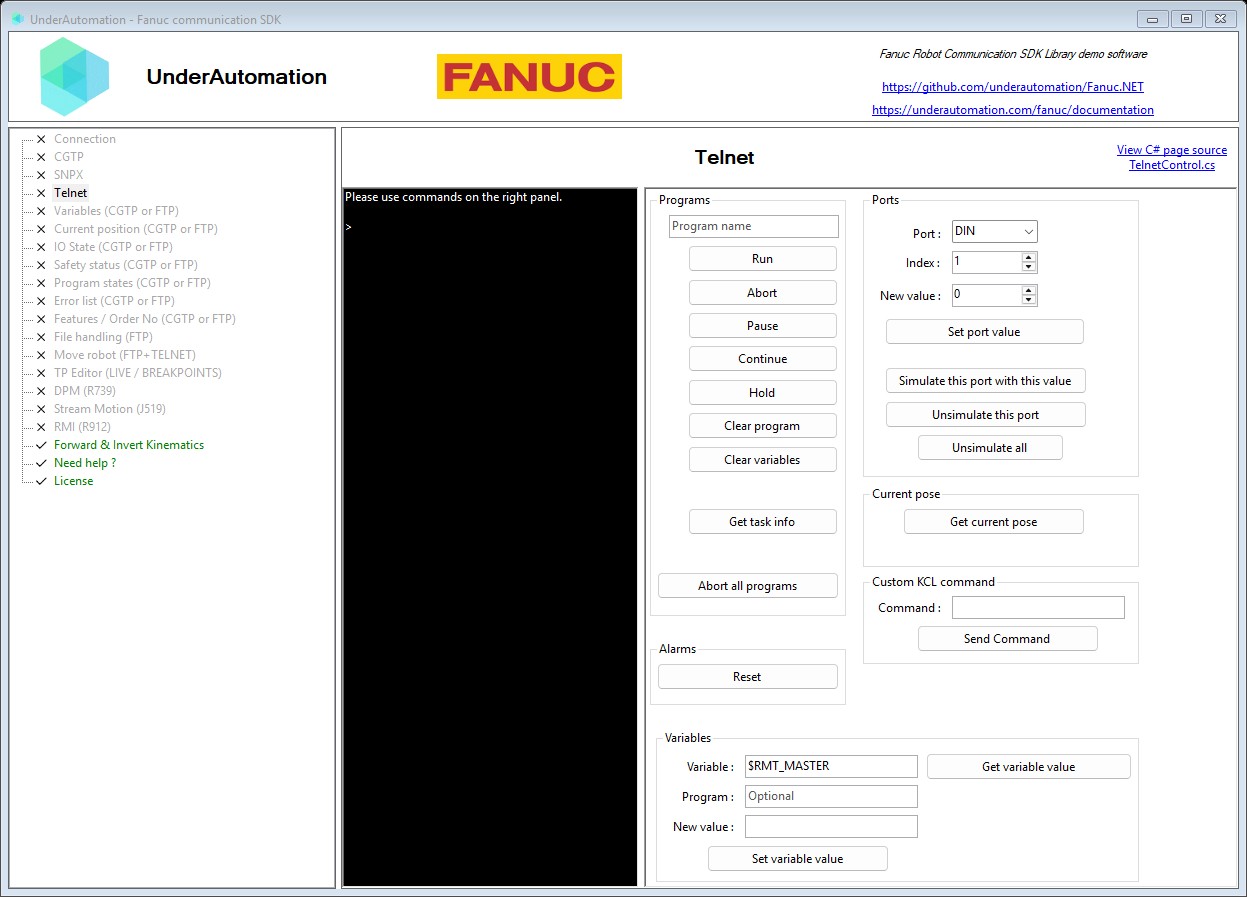
The demo application is open source. The C# source of this page is TelnetControl.cs.
Next steps
- Program control : Run, pause, abort programs
- Variables & I/O : Read/write variables and control ports
- Debugging & breakpoints : Step-by-step debugging
API reference
Standalone Telnet KCL client for direct use without FanucRobot. Telnet KCL is a legacy protocol: it is not secured (password and commands are sent in clear text), and its behavior changes with the firmware version and on ROBOGUIDE. The same KCL commands are available on the web server of the controller with Cgtp.CgtpClient.Kcl (firmware V8.30 and later): prefer it for new developments.
| Member | Type | Description |
|---|---|---|
TelnetClient() Constructor | Create a new instance of a robot communication | |
Connect(string, string) Method | void | Connect to a robot
|
Base class for Telnet KCL client. Telnet KCL is a legacy protocol: it is not secured (password and commands are sent in clear text), and its behavior changes with the firmware version and on ROBOGUIDE. The same KCL commands are available on the web server of the controller with robot.Cgtp.Kcl (firmware V8.30 and later): prefer it for new developments.
| Member | Type | Description |
|---|---|---|
TelnetClientBase() Constructor | ||
Connected Property read only | bool | Is Telnet client connected |
IP Property read only | string | Connect robot IP address or host name |
Language Property | Languages | Controller language (default is English) |
TpCoordinates Property read only | TpCoordinates | Gets the current Teach Pendant coordinate system. |
CommandReceived Event | EventHandler<KclCommandReceived> | Occurs when a KCL command is received. |
CommandSent Event | EventHandler<CommandSentEventArgs> | Occurs when a command is sent. |
ErrorOccured Event | EventHandler<KclClientErrorEventArgs> | Occurs when an error occurs in the KCL client. |
MessageReceived Event | EventHandler<MessageReceivedEventArgs> | Occurs when a message is received. |
RawDataReceived Event | EventHandler<RawDataReceivedEventArgs> | Occurs when raw data is received. |
StringDataReceived Event | EventHandler<RawDataReceivedEventArgs> | Occurs when data is received and its content can successfully be parsed as a string message. |
TpCoordinatesReceived Event | EventHandler<TpCoordinatesReceivedEventArgs> | Occurs when TP coordinates are received. |
Disconnect() Method | void | Disconnect Telnet client from robot |
PollAndGetUpdatedConnectedState() Method | bool | Checks the actual connection status via an active socket polling |
SendKclUnsafe<T>(string) Method | <T> | Sends a KCL command in Unsafe mode. When used through the CGTP KCL client, success or failure cannot be determined from the result. |
SendKcl<T>(string) Method | <T> | Sends a KCL command and returns the parsed result. |