TP editor with breakpoints
Prototype your own TP Editor with syntax highlighting and breakpoint debugging using Telnet and FTP features.
This article shows how to set breakpoints in TP and Karel programs of a Fanuc controller from a PC, and how to build a small TP editor with breakpoints, using the Telnet and FTP features of the Fanuc SDK.
Fanuc controllers support breakpoints, but the TP editor of ROBOGUIDE and the teach pendant do not show them. With breakpoints, a program stops at a given line, without flags or other synchronization in the program.
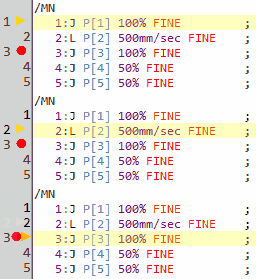
Breakpoints
What a breakpoint does
A breakpoint pauses a program at a given line, so that you can look at the state of the robot and of the variables. A program can have several breakpoints, in TP and in Karel programs.
Add and remove breakpoints
Telnet KCL manages the breakpoints:
FanucRobot.Telnet.AddBreakpoint: adds a breakpoint at a line.FanucRobot.Telnet.GetBreakpoints: lists the breakpoints of a program.FanucRobot.Telnet.RemoveAllBreakpoints: removes all the breakpoints of a program.
The controller removes the breakpoints of a task when the task is aborted.
Example
using UnderAutomation.Fanuc;using UnderAutomation.Fanuc.Telnet;public class TpEditorWithBreakpoints{static void Main(){// Create a new Fanuc robot instanceFanucRobot robot = new FanucRobot();// Set connection parametersConnectionParameters parameters = new ConnectionParameters("192.168.0.1");parameters.Telnet.Enable = true;parameters.Telnet.TelnetKclPassword = "TELNET_PASS";// Connect to the robotrobot.Connect(parameters);// Add a breakpoint at line 10 of TP or Karel program MyProgramrobot.Telnet.AddBreakpoint("MyProgram", 10);// List all breakpoints of TP program MyProgramBreakpointsResult result = robot.Telnet.GetBreakpoints("MyProgram");foreach (Breakpoint breakpoint in result.Breakpoints){Console.WriteLine($"Breakpoint at line {breakpoint.Line}");}// Remove all breakpoints of TP program MyProgramrobot.Telnet.RemoveAllBreakpoints("MyProgram");}}
A TP editor with breakpoints
Components
The demo application has a TP editor with breakpoints, written with Windows Forms:
- a
TreeViewthat lists the*.lsfiles of the controller; - a
RichTextBoxwith the syntax highlighting of TP code; - a margin that sets the breakpoints, shows the line being executed, and numbers the lines from the
/MNsection; - buttons to save and run the program.
SDK features used
It uses the FTP features of the SDK to:
- list the files;
- read the
*.lsfiles; - upload the modified programs;
- monitor the tasks in the background: task names, call stacks and current line.
And the Telnet features to start and stop the program, and to run it line by line.
Source and video
The source is the C# class TPEditorControl of the demo application.
Limits of the demo
- Karel programs are not edited.
- The call stack is simplified: the demo assumes that the task and the program are the same.
Reference
Result containing the breakpoints of a task.
| Member | Type | Description |
|---|---|---|
BreakpointsResult() Constructor | ||
Breakpoints Property read only | Breakpoint[] | Gets the breakpoints set on the task. |
EndReceive() Method | void | Indicates that responses have been completed and received |
FromResult(string) Method | bool | During implementation, return true if it is assumed that the frame has finished being received. |
ShouldCompleteOnEmptyAnswer() Method | bool | Controls whether the result should be finalized when an empty answer is received (i.e. a frame consisting only of VT100 escape sequences and whitespace). Override and return false until meaningful data has been accumulated, to prevent premature finalization caused by intermediate display-update frames. Default is true (backward compatible: finalize immediately on empty answer). |
Represents a breakpoint set on a task line.
| Member | Type | Description |
|---|---|---|
Breakpoint() Constructor | ||
Line Property read only | int | Gets the line number where the breakpoint is set. |
Equals(object) Method | bool | |
GetHashCode() Method | int | |
ToString() Method | string |
Result of adding a breakpoint.
| Member | Type | Description |
|---|---|---|
AddBreakpointResult() Constructor | ||
FromResult(string) Method | bool | During implementation, return true if it is assumed that the frame has finished being received. |