Trajectories from points
Create trajectories from your own positions, sampled or timed, check them against the limits of the robot, and slow them down if needed.
When your application computes the positions itself, create a Trajectory from them. The SDK never changes your positions silently: it gives you the tools to check them against the limits of the robot, and to slow them down if needed.
One position per cycle
If you have one position per communication cycle of the robot, create the trajectory from these samples. With Stream Motion, they are sent exactly as they are, one per cycle.
static void Main(){// One position every 8 ms (communication cycle of the robot), computed by your applicationdouble cycle = 0.008;var samples = new List<JointValues>();for (int i = 0; i <= 500; i++){double s = (1 - Math.Cos(Math.PI * i / 500)) / 2; // smooth from 0 to 1 in 4 ssamples.Add(new JointValues(20 * s, 0, 0, 0, -90, 0));}// These positions are sent without any change, one per cycleTrajectory trajectory = Trajectory.FromJointSamples(samples.ToArray(), cycle);// FANUC Cartesian positions work the same way: W, P, R are sent without any changeTrajectory cartesian = FanucMotion.FromCartesianSamples(new[]{new XYZWPRPosition(500, 0, 300, 180, 0, 0),new XYZWPRPosition(500, 0, 300, 180, 0, 0)}, cycle);}}
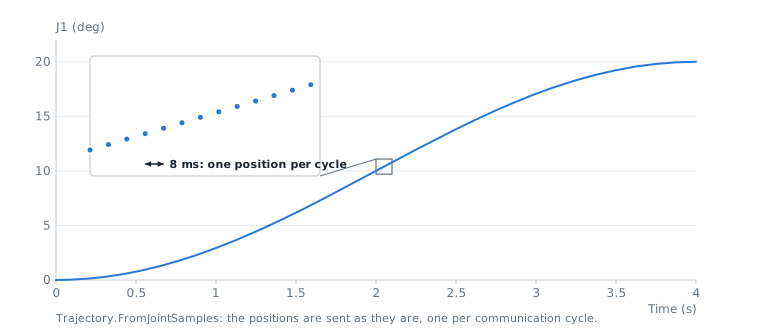
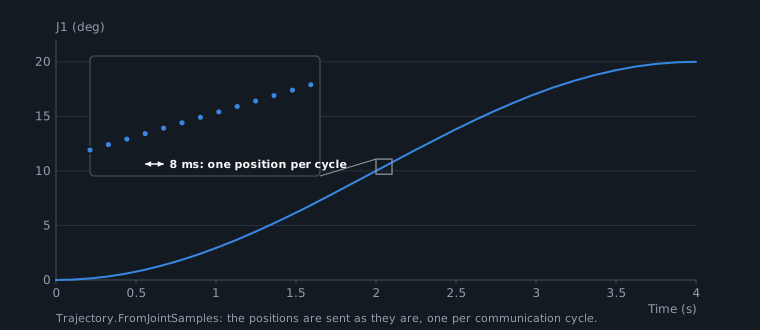
The period must be the communication cycle of the robot, given by StreamMotion.CycleTime (for example 0.008 or 0.002 s).
Positions at given times
If you have a few positions with their time, the SDK joins them with a smooth curve (cubic spline). The trajectory passes through each position at its time, and the robot is at rest at the first and the last position.
static void Main(){// A few positions with their time: the trajectory passes through each one at this timevar points = new[]{new JointValues(0, 0, 0, 0, -90, 0),new JointValues(10, 5, 0, 0, -90, 0),new JointValues(20, 0, 5, 0, -80, 0),new JointValues(25, -5, 5, 0, -80, 10)};var times = new[] { 0.0, 1.0, 2.5, 4.0 };Trajectory trajectory = Trajectory.FromTimedJoints(points, times);// Same with Cartesian positions: the orientation is interpolated with quaternionsvar poses = new[]{new XYZWPRPosition(500, 0, 300, 170, 0, 0),new XYZWPRPosition(520, 20, 300, -175, 5, 10),new XYZWPRPosition(540, 0, 310, -170, 0, 20)};Trajectory cartesian = Trajectory.FromTimedCartesian(poses.Select(FanucMotion.ToCartesianPose).ToArray(), new[] { 0.0, 1.5, 3.0 });}}
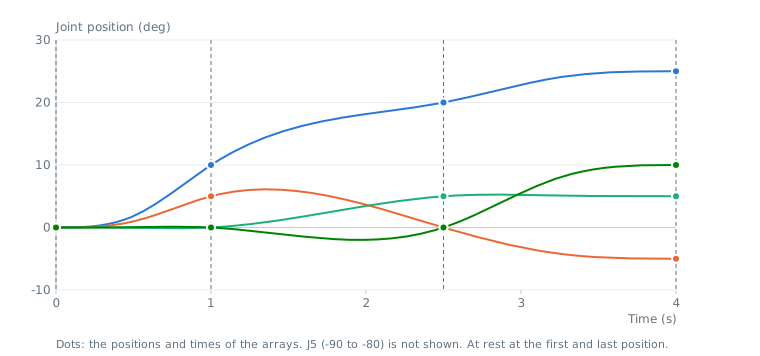
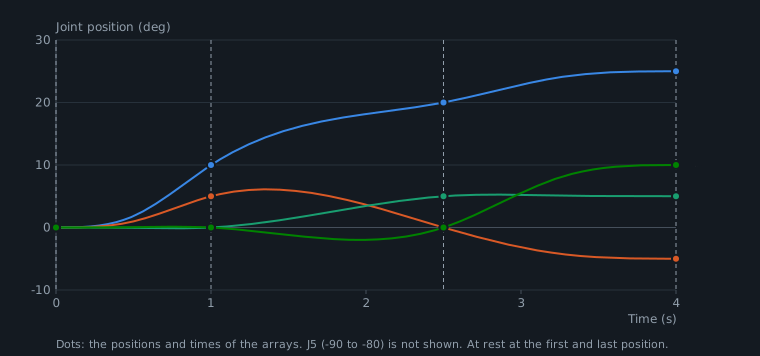
- The times are in seconds and must increase. The trajectory starts at the first time.
- For Cartesian positions, the orientation is interpolated with quaternions: there is no singularity, and the W, P, R angles of the trajectory stay continuous.
- The times are kept as they are. If they are too short for the robot,
Check()tells it andRetime()gives a slower version.
Check a trajectory
Check() computes the velocity, acceleration and jerk of each axis as the robot does: positions sampled at the communication cycle, and differences between consecutive positions. It returns the maximum values and the list of violations.
new double[] { 1125, 1125, 1687, 2530, 1265, 2530 });var cartesianLimits = new CartesianLimits(500, 2000, 10000, 90, 360, 1800);Trajectory trajectory = Trajectory.FromTimedJoints(new[] { new JointValues(0, 0, 0, 0, -90, 0), new JointValues(90, 0, 0, 0, -90, 0) },new[] { 0.0, 0.5 });// Velocity, acceleration and jerk computed as the robot does, at its communication cycle.// singlePrecision: true with protocol version 1, where positions are sent in single precision.TrajectoryReport report = trajectory.Check(jointLimits, 0.008, true);if (!report.IsValid){TrajectoryViolation first = report.Violations[0];Console.WriteLine($"J{first.Axis} {first.Type} {first.Value:0.0} > {first.Limit:0.0} at {first.Time:0.000} s");// Same path, played slower so that the limits are respectedtrajectory = trajectory.Retime(jointLimits, 0.008, true);}// Cartesian trajectories: linear and angular limitsvar points = new[] { new XYZWPRPosition(500, 0, 300, 180, 0, 0), new XYZWPRPosition(600, 0, 300, 180, 0, 0) };CartesianTrajectoryReport cartesianReport = Trajectory.FromTimedCartesian(points.Select(FanucMotion.ToCartesianPose).ToArray(), new[] { 0.0, 1.0 }).CheckCartesian(cartesianLimits, 0.008);}}
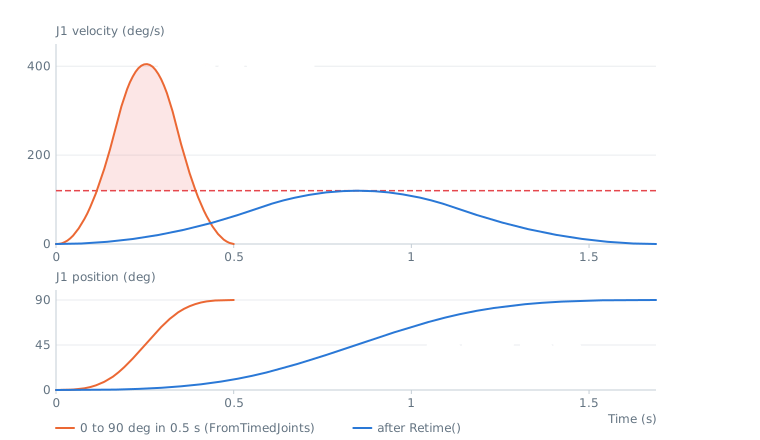
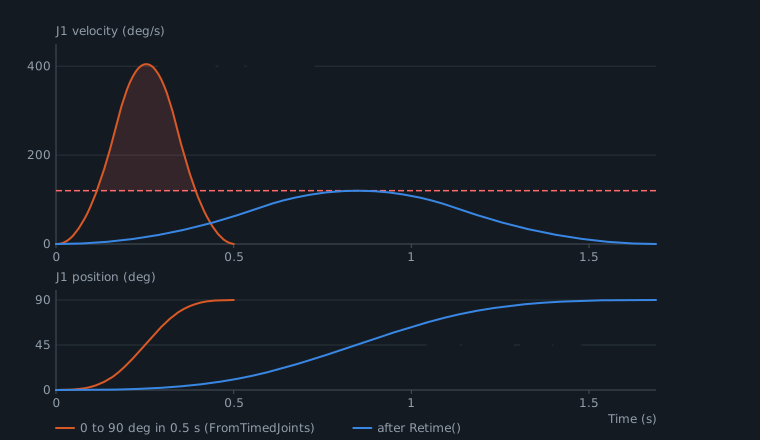
singlePrecision: set it to true for protocol version 1, where positions are sent in single precision. The rounding adds a small noise to the jerk.CheckCartesian()checks the linear and angular limits of a Cartesian trajectory. The joint limits of a Cartesian trajectory cannot be checked: the robot checks them after its own conversion to joint positions.Retime()andRetimeCartesian()return the same path played slower, so that the limits are respected. The positions do not change, only the time. They fail when the trajectory does not start at rest. For protocol version 1, set thesinglePrecisionparameter ofRetime()to true, as forCheck(): the rounding can add a few percent to the jerk.
Trajectories created by the motion planner already respect the limits given to the planner.
Compute your own profile
DoubleSProfile is the jerk limited profile used by the planner. Use it to move one value, for example a position along your own path, from one position to another with velocity, acceleration and jerk limits.
static void Main(){// Jerk limited profile (7 phases) from 0 to 100 mm, from rest to restvar profile = new DoubleSProfile(0, 100, 0, 0, 200, 1000, 10000);Console.WriteLine($"Duration: {profile.Duration:0.000} s, peak velocity: {profile.PeakVelocity:0.0}");double position = profile.GetPosition(0.25);double velocity = profile.GetVelocity(0.25);double acceleration = profile.GetAcceleration(0.25);// Same profile, played in 2 secondsDoubleSProfile slower = profile.StretchTo(2.0);}}
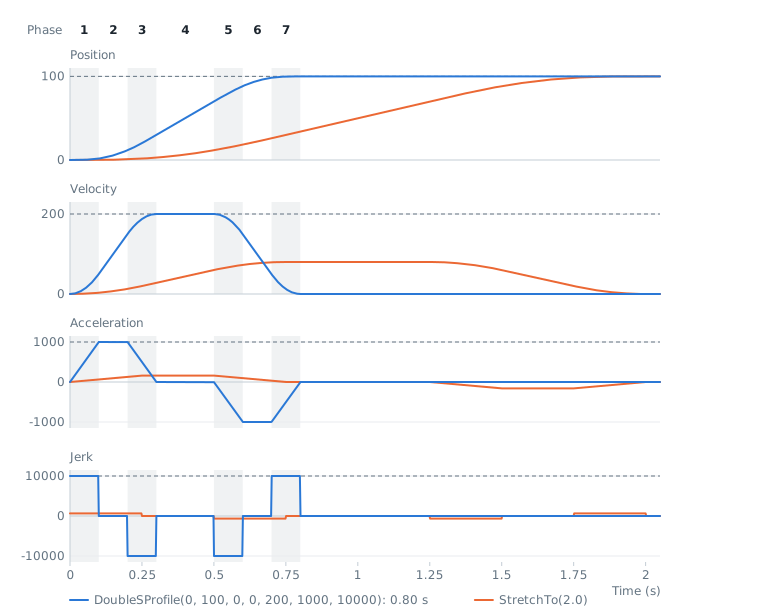
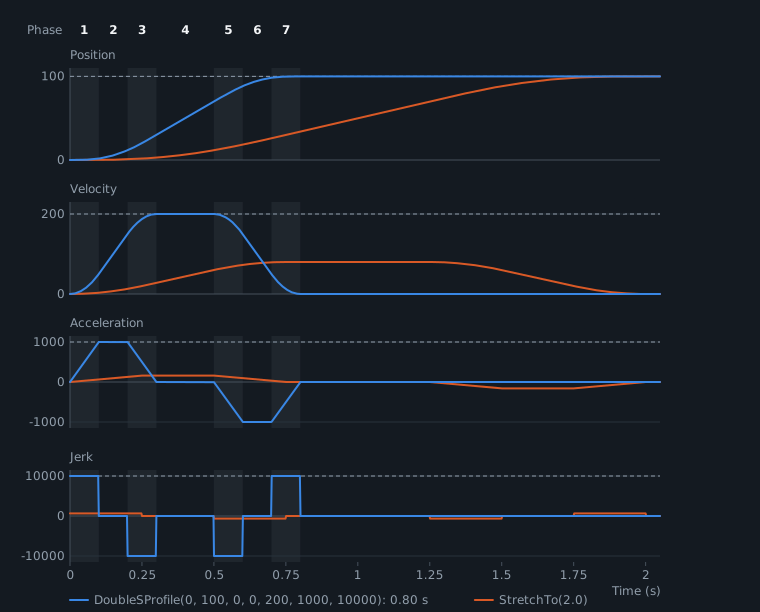
The start and end velocities can be different from 0. StretchTo() gives the same profile in a longer time.
API reference
Result of the check of a joint trajectory against velocity, acceleration and jerk limits
| Member | Type | Description |
|---|---|---|
CycleTime Property read only | double | Period used for the check, in seconds |
IsValid Property read only | bool | True when no limit is exceeded |
MaxAcceleration Property read only | double[] | Highest acceleration of each axis (9 values) |
MaxJerk Property read only | double[] | Highest jerk of each axis (9 values) |
MaxVelocity Property read only | double[] | Highest velocity of each axis (9 values) |
SampleCount Property read only | int | Number of samples checked |
ViolationCount Property read only | int | Total number of values that exceed a limit |
Violations Property read only | TrajectoryViolation[] | First violations (at most 100) |
ToString() Method | string |
One-dimensional motion profile with bounded velocity, acceleration and jerk (7 phases, "double S" profile). The acceleration is zero at the start and at the end. Start and end velocities can be different from zero.
| Member | Type | Description |
|---|---|---|
DoubleSProfile(double, double, double, double, double, double, double) Constructor | Computes the fastest profile from a start position to an end position with the given limits
| |
AccelerationTime Property read only | double | Duration of the acceleration phase in seconds |
ConstantVelocityTime Property read only | double | Duration of the constant velocity phase in seconds |
DecelerationTime Property read only | double | Duration of the deceleration phase in seconds |
Duration Property read only | double | Duration of the profile in seconds |
EndPosition Property read only | double | End position |
EndVelocity Property read only | double | Velocity at the end |
MaxAcceleration Property read only | double | Acceleration limit used to compute the profile |
MaxJerk Property read only | double | Jerk limit used to compute the profile |
MaxVelocity Property read only | double | Velocity limit used to compute the profile |
PeakVelocity Property read only | double | Highest velocity reached (absolute value) |
StartPosition Property read only | double | Start position |
StartVelocity Property read only | double | Velocity at the start |
GetAcceleration(double) Method | double | Acceleration at the given time (limited to [0, Duration])
|
GetJerk(double) Method | double | Jerk at the given time (limited to [0, Duration])
|
GetPosition(double) Method | double | Position at the given time (limited to [0, Duration])
|
GetVelocity(double) Method | double | Velocity at the given time (limited to [0, Duration])
|
StretchTo(double) Method | DoubleSProfile | Returns the same motion slowed down to last the given duration. The velocity is divided by k, the acceleration by k² and the jerk by k³, where k is the ratio of the durations, so the limits are still respected. Only for profiles that start and end at rest.
|
ToString() Method | string |