Motion planner overview
Create smooth robot trajectories offline, with velocity, acceleration and jerk limits, using FANUC motion instructions (J, L, C, FINE, CNT, CR).
The Motion module creates smooth robot trajectories that respect velocity, acceleration and jerk limits. It works offline, without robot connection, and its trajectories can be sent with Stream Motion, used in a simulation, or checked before use.
Motions are described as in a TP program: joint (J), linear (L) and circular (C) motions, with a speed and a FINE, CNT or CR termination. The module also creates splines through points, geometric shapes, and trajectories from your own positions.
The planner is in the UnderAutomation.Robotics.Motion namespace. This namespace is the same in all UnderAutomation robot SDKs, so the same code can plan trajectories for other robot brands. The FanucMotion class of UnderAutomation.Fanuc.Motion converts FANUC positions, FINE, CNT and CR terminations and I/O to the types of the planner.
Quick start
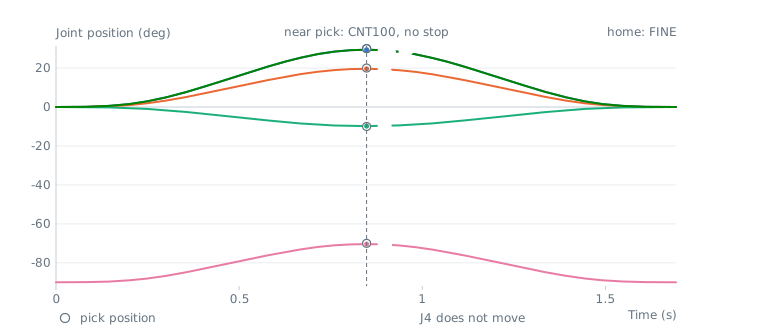
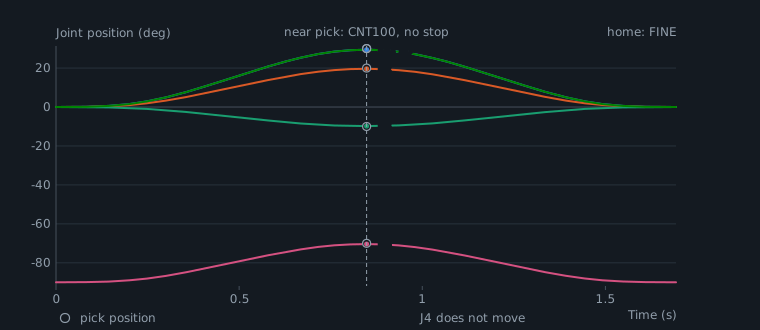
new double[] { 1125, 1125, 1687, 2530, 1265, 2530 });var cartesianLimits = new CartesianLimits(500, 2000, 10000, 90, 360, 1800);var planner = new MotionPlanner(jointLimits, cartesianLimits);// Joint motions, as J instructions of a TP programvar home = new JointValues(0, 0, 0, 0, -90, 0);var pick = new JointValues(30, 20, -10, 0, -70, 30);Trajectory trajectory = planner.CreateJointPath(home).MoveJoint(pick, 50, FanucMotion.Cnt(100)) // 50% speed, CNT100.MoveJoint(home, 50, FanucMotion.Fine()).Build();Console.WriteLine($"Duration: {trajectory.Duration:0.000} s");// Position at any time, or one position per communication cycleJointValues middle = trajectory.GetJoints(trajectory.Duration / 2);JointValues[] samples = trajectory.SampleJoints(0.008);// FANUC joint position, when neededJointsPosition fanucMiddle = FanucMotion.ToJointsPosition(middle);// Velocity, acceleration and jerk of each axis, computed as the robot doesTrajectoryReport report = trajectory.Check(jointLimits, 0.008, false);Console.WriteLine(report.IsValid);}}
Try it in the demo application
The demo application (Windows) has a Stream Motion page with two buttons that build trajectories with the motion planner and send them to the robot with Stream Motion.
- Joint demo uses a
JointPathBuilder: J1 moves to +amplitude, then to -amplitude with aCnttermination between the two moves, then back to the start withFine. - Cartesian demo uses a
CartesianPathBuilder: a horizontal circle of the given radius, starting and ending at the current position.
Change the amplitude, the radius or the speed and send the demo again: the duration of the resulting trajectory is shown in the log, and the joint and Cartesian positions update in real time while the robot moves.
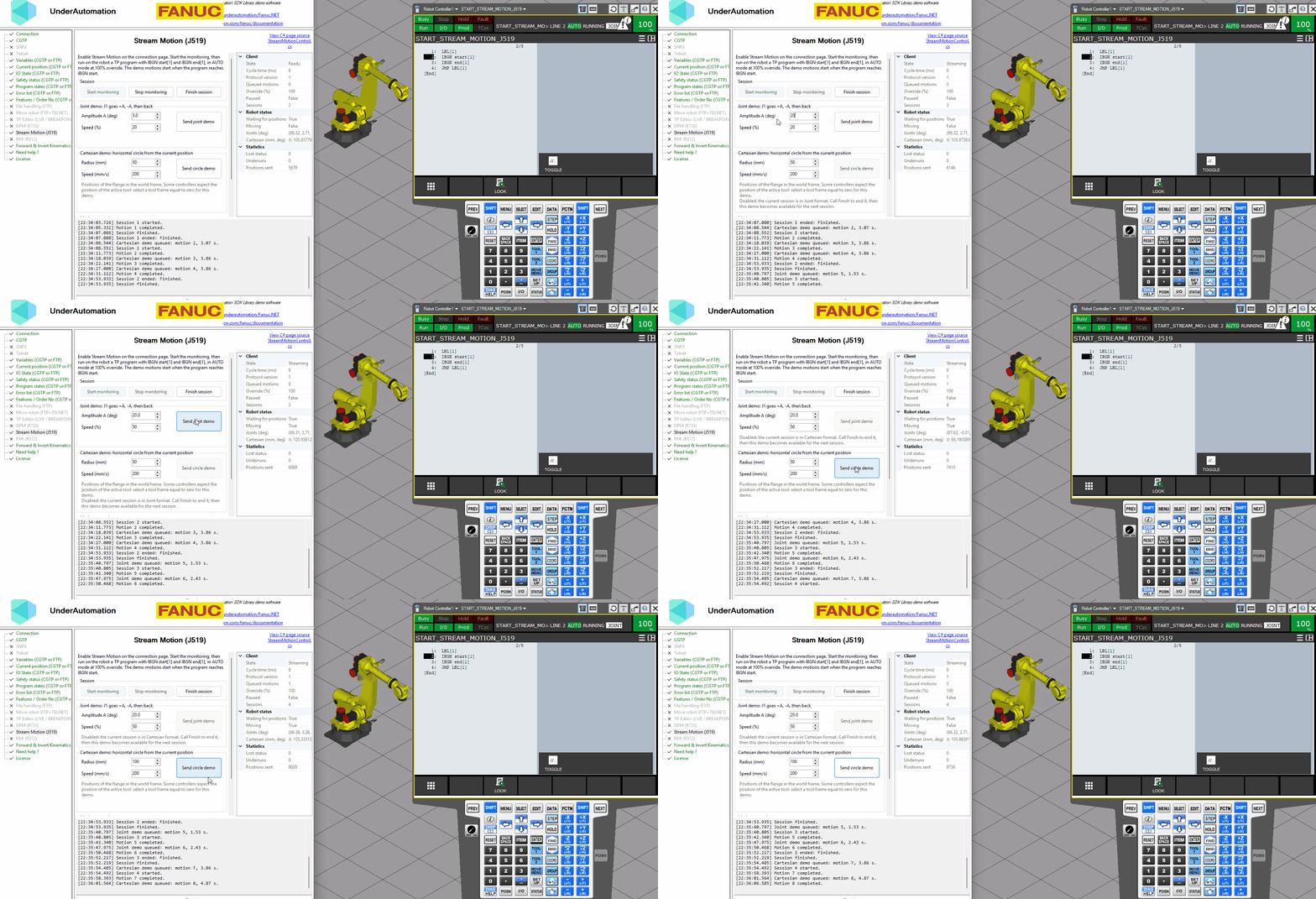
The C# source of this page is in the StreamMotionControl.cs file of the Fanuc.NET repository.
Main concepts
| Class | Role |
|---|---|
JointLimits | Velocity, acceleration and jerk of each axis (9 axes). Read them from the robot with StreamMotion.ReadLimits() |
CartesianLimits | Linear and angular velocity, acceleration and jerk, for Cartesian motions. You choose them |
MotionPlanner | Creates joint and Cartesian paths with the limits, and optional tool and user frames |
JointPathBuilder, CartesianPathBuilder | Chain motions, waits and I/O, then Build() the trajectory |
Trajectory | Result: position at any time, samples at a fixed period, I/O events, limit checks |
JointValues, CartesianPose | Joint and Cartesian positions of the planner. A CartesianPose has X, Y, Z, an Orientation and optional external axes |
FanucMotion | Conversions with JointsPosition and XYZWPRPosition, FINE, CNT and CR terminations, I/O signals, FANUC positions of a trajectory |
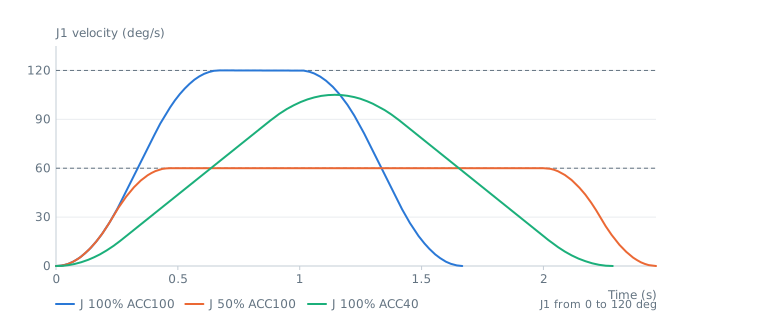
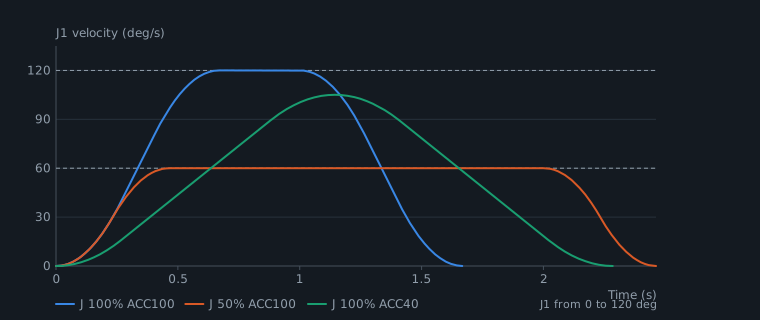
All motions use jerk limited profiles: the acceleration changes progressively, which gives smooth motions and avoids the jerk alarms of the robot. 100% speed means the velocity limits, and the acceleration percentage (ACC) scales the acceleration and the jerk.
What do you want to do?
| Need | Page |
|---|---|
| Move to positions with J, L, C motions, FINE, CNT, CR | Joint & Cartesian motions |
| Pass through a list of points, draw a circle, a rectangle or a helix | Splines & shapes |
| Use positions computed by your application, check or slow down a trajectory | Trajectories from points |
| Convert orientations and positions between frames | Frames & orientations |
Units and conventions
- Joint positions in degrees (mm for linear axes), Cartesian positions in mm, angles in degrees.
- Velocities per second, accelerations per second squared, jerks per second cubed.
- The W, P, R angles of FANUC use the fixed XYZ convention:
CartesianPose.FromEuler(x, y, z, w, p, r, EulerConvention.FixedXYZ)gives the same pose asFanucMotion.ToCartesianPose(new XYZWPRPosition(x, y, z, w, p, r)). FanucMotion.SampleCartesian()gives FANUC positions whose W, P, R angles stay continuous: an angle can go beyond 180 degrees instead of jumping to -180.
API reference
Creates trajectories from joint motions, linear and circular motions, splines and shapes, with velocity, acceleration and jerk limits.
| Member | Type | Description |
|---|---|---|
MotionPlanner(JointLimits, CartesianLimits) Constructor | Creates a planner
| |
CartesianLimits Property | CartesianLimits | Limits for Cartesian motions |
JointLimits Property | JointLimits | Limits for joint motions. 100% speed uses the velocity limits of this object. The limits of axes 7 to 9 are also used for the external axes of Cartesian motions. |
ToolFrame Property | CartesianPose | Tool frame, relative to the flange. When it is set, the targets of Cartesian motions are poses of this tool, and the trajectory gives the flange poses. Null when the targets are flange poses. |
UserFrame Property | CartesianPose | User frame, relative to the world frame. When it is set, the targets of Cartesian motions are expressed in this frame, and the trajectory gives poses in the world frame. Null when the targets are in the world frame. |
CreateCartesianPath(CartesianPose) Method | CartesianPathBuilder | Starts a Cartesian path
|
CreateJointPath(JointValues) Method | JointPathBuilder | Starts a joint path
|
Velocity, acceleration and jerk limits of the 9 axes of a robot. Units are degrees (mm for linear axes) per second, per second squared and per second cubed. A limit of 0 means that the axis is not present or not limited.
| Member | Type | Description |
|---|---|---|
JointLimits() Constructor | Creates limits with all values set to 0 | |
JointLimits(double[], double[], double[]) Constructor | Creates limits from arrays of values. Arrays can contain less than 9 values, missing values are set to 0.
| |
Acceleration Property read only | double[] | Acceleration limit of each axis (9 values) |
Jerk Property read only | double[] | Jerk limit of each axis (9 values) |
Velocity Property read only | double[] | Velocity limit of each axis (9 values) |
AxisCount Field | int | Number of axes handled by this class |
Equals(object) Method | bool | |
GetHashCode() Method | int | |
Scale(double, double, double) Method | JointLimits | Returns a copy of these limits where each value is multiplied by the given factors
|
ToString() Method | string |
Cartesian velocity, acceleration and jerk limits, for the position (mm) and for the orientation (degrees)
| Member | Type | Description |
|---|---|---|
CartesianLimits() Constructor | Creates limits with all values set to 0 | |
CartesianLimits(double, double, double, double, double, double) Constructor | Creates limits with the given values
| |
AngularAcceleration Property | double | Angular acceleration limit in deg/s² |
AngularJerk Property | double | Angular jerk limit in deg/s³ |
AngularVelocity Property | double | Angular velocity limit in deg/s |
LinearAcceleration Property | double | Linear acceleration limit in mm/s² |
LinearJerk Property | double | Linear jerk limit in mm/s³ |
LinearVelocity Property | double | Linear velocity limit in mm/s |
Equals(object) Method | bool | |
GetHashCode() Method | int | |
ToString() Method | string |
Conversions between the FANUC types (positions, FINE/CNT/CR terminations, I/O types) and the types of the motion planner of namespace UnderAutomation.Robotics.Motion.
| Member | Type | Description |
|---|---|---|
WprConvention Property static read only | EulerConvention | Convention of the W, P, R angles of FANUC positions: rotation W around the fixed X axis, then P around the fixed Y axis, then R around the fixed Z axis |
Cnt(int) Method static | Termination | CNT termination: the next motion starts during the deceleration of this one
|
Cr(double) Method static | Termination | CR termination (corner region): the corner is replaced by a smooth curve at constant speed. Only between Cartesian motions.
|
Fine() Method static | Termination | FINE termination: the robot stops at the target position |
FromCartesianSamples(XYZWPRPosition[], double) Method static | Trajectory | Creates a Cartesian trajectory from FANUC positions taken at a fixed period. The W, P, R angles are kept without any change, and the extended axes are used when the positions are ExtendedCartesianPosition.
|
SampleCartesian(Trajectory, double) Method static | ExtendedCartesianPosition[] | Samples a Cartesian trajectory at a fixed period and returns FANUC positions. The W, P, R angles stay continuous from one position to the next.
|
Signal(IOType, int) Method static | DigitalSignal | Returns the digital signal of an I/O, to write it during a trajectory (for example DO[5])
|
ToCartesianPose(XYZWPRPosition) Method static | CartesianPose | Converts a FANUC position to a pose. The extended axes E1, E2 and E3 are copied when the position is an ExtendedCartesianPosition.
|
ToExtendedCartesianPosition(CartesianPose, XYZWPRPosition) Method static | ExtendedCartesianPosition | Converts a pose to a FANUC position with extended axes (0 when the pose has no external axes).
|
ToJointValues(JointsPosition) Method static | JointValues | Converts a FANUC joint position (J1 to J9) to joint values
|
ToJointsPosition(JointValues) Method static | JointsPosition | Converts joint values to a FANUC joint position. Missing axes are 0.
|