Motion system, position & kinematics
Read the robot position as a robtarget or a jointtarget, jog the robot, compute forward and inverse kinematics, and manage mechanical units and calibration.
robot.Rws.MotionSystem covers everything about how the robot stands and how it moves: the mechanical units of the system and their axes, where the tool currently is, jogging, the kinematics calculations, the collision supervision and the calibration.
This is the service that moves a real robot. Reading is always safe. Writing needs the mastership of the Motion domain, and most of the time also a controller in manual mode with the motors on, which is read and changed through the control panel.
Geometry types
The positions of the SDK are built from a few small classes of the UnderAutomation.ABB.Common namespace. They are the same types everywhere, so a position read here can be written into a RAPID variable without conversion.
| Type | Holds |
|---|---|
Position | X, Y, Z |
Quaternion | Q1 to Q4, an orientation as a unit quaternion |
Pose | a Position plus an Orientation |
RobotConfiguration | Quarter1, Quarter4, Quarter6 and QuarterX, which say in which turn the axes sit |
RobotJoints | Axis1 to Axis6, the six axes of the arm |
ExternalJoints | AxisA to AxisF, the six external axes |
RobTarget | a Pose plus a Configuration and the ExternalAxes |
JointTarget | RobotAxes plus ExternalAxes |
A pose alone does not say how the robot reaches it. The same point in space is usually reachable in several ways, and RobotConfiguration is what tells them apart.
An external axis the system does not use is reported with a large value instead of a real one. Compare it with the constant ExternalJoints.NotInUse rather than with zero.
Units are not the same everywhere, and this is the convention of the controller, not a choice of the SDK:
| Where | Units |
|---|---|
| Positions, axis poses and base frames | millimetres, and degrees for the joints |
| The four kinematics calculations | metres and radians |
A point in space, expressed in the coordinate system of whoever produced it. Most readings of the controller express a position in millimetres, while the kinematics calculations work in metres. The method that returns or takes a position says which one it uses.
| Member | Type | Description |
|---|---|---|
Position() Constructor | Initializes a new position at the origin | |
Position(double, double, double) Constructor | Initializes a new position
| |
X Property | double | Coordinate along the X axis |
Y Property | double | Coordinate along the Y axis |
Z Property | double | Coordinate along the Z axis |
ToString() Method | string | Returns a string representation of this position |
An orientation in space, expressed as a unit quaternion. The controller rejects a quaternion that is not normalized, so keep Q1² + Q2² + Q3² + Q4² equal to 1.
| Member | Type | Description |
|---|---|---|
Quaternion() Constructor | Initializes a new quaternion with no rotation at all (1, 0, 0, 0) | |
Quaternion(double, double, double, double) Constructor | Initializes a new quaternion
| |
Q1 Property | double | Real component of the quaternion |
Q2 Property | double | First imaginary component of the quaternion |
Q3 Property | double | Second imaginary component of the quaternion |
Q4 Property | double | Third imaginary component of the quaternion |
ToString() Method | string | Returns a string representation of this orientation |
A position and the orientation the robot holds there: a Position extended with a Quaternion.
| Member | Type | Description |
|---|---|---|
Pose() Constructor | Initializes a new pose at the origin, with no rotation | |
Pose(double, double, double, double, double, double, double) Constructor | Initializes a new pose
| |
Pose(double, double, double, Quaternion) Constructor | Initializes a new pose
| |
Orientation Property | Quaternion | Orientation held at this position. Never null: a pose built without one carries the identity rotation. |
ToString() Method | string | Returns a string representation of this pose |
The axis configuration the robot uses to reach a pose. Several joint combinations reach the same tool position and orientation. The configuration names the one to use, as the quarter revolution each of the deciding axes sits in.
| Member | Type | Description |
|---|---|---|
RobotConfiguration() Constructor | Initializes a new configuration with every quarter revolution set to zero | |
RobotConfiguration(int, int, int, int) Constructor | Initializes a new configuration
| |
Quarter1 Property | int | Quarter revolution axis 1 sits in |
Quarter4 Property | int | Quarter revolution axis 4 sits in |
Quarter6 Property | int | Quarter revolution axis 6 sits in |
QuarterX Property | int | Index of the arm configuration, which tells the remaining joint combinations apart |
ToString() Method | string | Returns a string representation of this configuration |
The six joint values of a robot arm. Readings of the controller express them in degrees, while the kinematics calculations work in radians. The method that returns or takes them says which one it uses.
| Member | Type | Description |
|---|---|---|
RobotJoints() Constructor | Initializes the six axes to zero | |
RobotJoints(double, double, double, double, double, double) Constructor | Initializes the six axes
| |
Axis1 Property | double | Value of axis 1 |
Axis2 Property | double | Value of axis 2 |
Axis3 Property | double | Value of axis 3 |
Axis4 Property | double | Value of axis 4 |
Axis5 Property | double | Value of axis 5 |
Axis6 Property | double | Value of axis 6 |
ToString() Method | string | Returns a string representation of these joint values |
The six external axis values that travel with a robot position. An axis the robot system does not define comes back as 9E9, which is how the controller says "not in use" rather than an actual position.
| Member | Type | Description |
|---|---|---|
ExternalJoints() Constructor | Initializes the six external axes to zero | |
ExternalJoints(double, double, double, double, double, double) Constructor | Initializes the six external axes
| |
AxisA Property | double | Value of external axis A |
AxisB Property | double | Value of external axis B |
AxisC Property | double | Value of external axis C |
AxisD Property | double | Value of external axis D |
AxisE Property | double | Value of external axis E |
AxisF Property | double | Value of external axis F |
NotInUse Field | double | Value the controller reports for an external axis that is not in use |
ToString() Method | string | Returns a string representation of these external axis values |
A complete robot target: a Pose extended with the axis configuration used to reach it and the external axis values that travel with it.
| Member | Type | Description |
|---|---|---|
RobTarget() Constructor | Initializes a new target at the origin, with no rotation | |
RobTarget(double, double, double, Quaternion, RobotConfiguration, ExternalJoints) Constructor | Initializes a new target
| |
Configuration Property | RobotConfiguration | Axis configuration used to reach the pose. Never null. |
ExternalAxes Property | ExternalJoints | Values of the six external axes, null when the reading does not report them |
ToString() Method | string | Returns a string representation of this target |
A robot position expressed joint by joint: the six axes of the arm and the six external axes.
| Member | Type | Description |
|---|---|---|
JointTarget() Constructor | Initializes a new joint target with every axis at zero | |
JointTarget(RobotJoints, ExternalJoints) Constructor | Initializes a new joint target
| |
ExternalAxes Property | ExternalJoints | Values of the six external axes. Never null. |
RobotAxes Property | RobotJoints | Values of the six axes of the robot arm. Never null. |
ToString() Method | string | Returns a string representation of this joint target |
Mechanical units
A mechanical unit is anything the controller drives: the robot arm itself, a track, a positioner. GetMechanicalUnits lists them, GetMechanicalUnit describes one of them, and SetMechanicalUnit changes its properties.
AbbController robot = new AbbController();robot.Connect("192.168.0.1");// Every mechanical unit of the system, with its activation stateforeach (MechanicalUnitItem unit in robot.Rws.MotionSystem.GetMechanicalUnits()){Console.WriteLine($"{unit.Name} : {unit.Mode}, drive module {unit.DriveModule}");}// Everything the controller knows about one unitMechanicalUnitInfo info = robot.Rws.MotionSystem.GetMechanicalUnit("ROB_1");Console.WriteLine($"{info.Type}, task {info.TaskName}, status {info.Status}");Console.WriteLine($"tool {info.ToolName}, work object {info.WorkObjectName}, payload {info.PayloadName}");Console.WriteLine($"{info.Axes} axes, jog mode {info.JogMode}, frame {info.CoordinateSystem}");// Axis by axis. Axes are numbered from 1.int axisCount = robot.Rws.MotionSystem.GetAxisCount("ROB_1");for (int axis = 1; axis <= axisCount; axis++){AxisInfo axisInfo = robot.Rws.MotionSystem.GetAxis("ROB_1", axis);Pose axisPose = robot.Rws.MotionSystem.GetAxisPose("ROB_1", axis);Console.WriteLine($"axis {axisInfo.Number} : {axisInfo.Status}, at {axisPose}");}// Where the base of the unit stands, in millimetresBaseFrame baseFrame = robot.Rws.MotionSystem.GetBaseFrame("ROB_1");Console.WriteLine($"base frame {baseFrame}, type {baseFrame.Type}");// Changing a property of a unit needs the mastership of the motion domain.// Give only the properties you want to change, leave the others null.robot.Rws.Mastership.Request(MastershipDomain.Motion);try{robot.Rws.MotionSystem.SetMechanicalUnit("ROB_1",tool: "tGripper",jogMode: JogMode.Cartesian,coordinateSystem: CoordinateSystem.Base);}finally{robot.Rws.Mastership.Release();}// The controller answers success even when it could not apply one of the properties.// Read the unit back to see what it really did.Console.WriteLine(robot.Rws.MotionSystem.GetMechanicalUnit("ROB_1").ToolName);// Declaring where a base or an axis sits changes the calibration of the cell.// The user account needs the matching UAS grant.
MechanicalUnitInfo.Status says whether the unit can move at all:
MechanicalUnitStatus | Meaning |
|---|---|
Synchronized | Calibrated and synchronized, the unit can be moved |
NotCommutated | One or several motors have not been commutated |
NotCalibrated | The unit has never been calibrated |
NotAbsoluteSynchronized, NotRelativeSynchronized | The measurement of one or several axes is not synchronized |
Locked, LockedShow | The unit is locked and refuses to move |
Initiated, Undefined, Unknown | The unit is starting up, or the controller does not report its state |
SetMechanicalUnit needs the mastership of the Motion domain. Give only the properties you want to change and leave the others null. The controller answers with a success status even when it could not apply one of them, so read the unit back to see what it really did.
SetBaseFrame and SetAxisPose declare where a unit or an axis sits in the cell. They do not move anything, they change the calibration of the cell, and the user account needs the matching UAS grant. The controller takes the request and applies the frame afterwards, so a success means the request was accepted, not that the new frame is already in use.
// Gets the state of one axis of a mechanical unit (synchronous)AxisInfo GetAxis(string mechanicalUnit, int axis);// Gets how many axes a mechanical unit has (synchronous)int GetAxisCount(string mechanicalUnit);// Gets where one axis of a mechanical unit sits (synchronous) The position is expressed in millimetres.Pose GetAxisPose(string mechanicalUnit, int axis);// Gets where the base of a mechanical unit sits (synchronous) The position is expressed in millimetres.BaseFrame GetBaseFrame(string mechanicalUnit);// Gets everything the controller knows about one mechanical unit (synchronous)MechanicalUnitInfo GetMechanicalUnit(string mechanicalUnit);// Lists the mechanical units of the motion system (synchronous)MechanicalUnitItem[] GetMechanicalUnits();// Declares where one axis of a mechanical unit sits (synchronous) The position is expressed in millimetres.void SetAxisPose(string mechanicalUnit, int axis, Pose pose);// Declares where the base of a mechanical unit sits (synchronous) The position is expressed in millimetres.void SetBaseFrame(string mechanicalUnit, Pose baseFrame);// Changes one or several properties of a mechanical unit (synchronous) Every argument but the unit name is optional; leave the ones you do not want to touch null. At least one of them has to be given.void SetMechanicalUnit(string mechanicalUnit, string tool = null, string workObject = null, string payload = null, string totalPayload = null, MechanicalUnitMode? mode = null, JogMode? jogMode = null, CoordinateSystem? coordinateSystem = null);// Places a mechanical unit at the given joint values without moving it there (synchronous) Only a virtual controller accepts this: it teleports the simulated robot, which a real one cannot do.void SetMechanicalUnitPosition(string mechanicalUnit, JointTarget position);
Every method also exists in an asynchronous version, with the same name followed by Async and an optional CancellationToken.
One mechanical unit of the motion system, as listed by MotionSystemService.GetMechanicalUnits(). Only the few properties the list carries are filled in. Read the unit itself with MotionSystemService.GetMechanicalUnit() to get a MechanicalUnitInfo.
| Member | Type | Description |
|---|---|---|
MechanicalUnitItem() Constructor | Initializes a new instance of the MechanicalUnitItem class | |
ActivationAllowed Property | bool? | Whether the unit can be activated, null when the controller did not report it |
DriveModule Property | int? | Number of the drive module the unit is connected to, null when the controller did not report it |
Mode Property | MechanicalUnitMode | Whether the unit is activated |
Name Property | string | Name of the mechanical unit, for example "ROB_1" |
ToString() Method | string | Returns a string representation of this mechanical unit |
Everything the controller knows about one mechanical unit. Returned by MotionSystemService.GetMechanicalUnit().
| Member | Type | Description |
|---|---|---|
MechanicalUnitInfo() Constructor | Initializes a new instance of the MechanicalUnitInfo class | |
Axes Property | int? | Number of axes of the unit, null when the controller did not report it |
CoordinateSystem Property | CoordinateSystem | Reference frame the cartesian positions of the unit are expressed in |
HasIntegratedUnit Property | string | Name of the mechanical unit integrated into this one. A unit that integrates no other one is reported with a placeholder name rather than an empty value. |
IsIntegratedUnit Property | string | Name of the mechanical unit this one is integrated into. A unit that is integrated into no other one is reported with a placeholder name rather than an empty value. |
JogMode Property | JogMode | How the jogging commands sent to the unit are interpreted |
Mode Property | MechanicalUnitMode | Whether the unit is activated |
Name Property | string | Name of the mechanical unit, for example "ROB_1" |
PayloadName Property | string | Name of the active payload |
Status Property | MechanicalUnitStatus | Calibration and synchronization state of the unit |
TaskName Property | string | Name of the RAPID task that drives the unit |
ToolName Property | string | Name of the active tool |
TotalAxes Property | int? | Number of axes of the unit and of the units integrated with it, null when the controller did not report it |
TotalPayloadName Property | string | Name of the active total payload, which is the payload plus the load of the tool |
Type Property | MechanicalUnitType | Kind of mechanical unit |
WorkObjectName Property | string | Name of the active work object |
ToString() Method | string | Returns a string representation of this mechanical unit |
Whether a mechanical unit is activated and can be moved
| Name | Value | Description |
|---|---|---|
Activated | 1 | The mechanical unit is activated and takes part in the motion |
Deactivated | 2 | The mechanical unit is deactivated and stays where it is |
Unknown | 0 | The controller reported a mode this library does not know |
Kind of mechanical unit the controller drives
| Name | Value | Description |
|---|---|---|
None | 1 | No mechanical unit |
Robot | 3 | A robot arm without a tool center point, which can only be moved axis by axis |
Single | 4 | A single external axis, such as a track or a positioner |
TcpRobot | 2 | A robot arm holding a tool center point, which can be moved in cartesian coordinates |
Undefined | 5 | The controller knows the unit but does not report what it is |
Unknown | 0 | The controller reported a type this library does not know |
Calibration and synchronization state of a mechanical unit or of one of its axes
| Name | Value | Description |
|---|---|---|
Initiated | 1 | The unit is starting up |
Locked | 7 | The unit is locked and refuses to move |
LockedShow | 8 | The unit is locked, and the controller shows it as such |
NotAbsoluteSynchronized | 4 | One or several absolute measurement axes are not synchronized |
NotCalibrated | 3 | The unit has never been calibrated |
NotCommutated | 2 | One or several motors have not been commutated |
NotRelativeSynchronized | 5 | One or several relative measurement axes are not synchronized |
Synchronized | 6 | The unit is calibrated and synchronized, and can be moved |
Undefined | 9 | The controller knows the unit but does not report its state |
Unknown | 0 | The controller reported a state this library does not know |
State of one axis of a mechanical unit. Returned by MotionSystemService.GetAxis().
| Member | Type | Description |
|---|---|---|
AxisInfo() Constructor | Initializes a new instance of the AxisInfo class | |
LogicalAxis Property | int? | Logical joint number of the axis, null when the controller did not report it |
Number Property | int | Number of the axis inside its mechanical unit, starting at 1 |
Status Property | MechanicalUnitStatus | Calibration and synchronization state of the axis |
ToString() Method | string | Returns a string representation of this axis |
Where the base of a mechanical unit sits, and what kind of base it is: a Pose extended with the type of the frame. Returned by MotionSystemService.GetBaseFrame(). The position is expressed in millimetres.
| Member | Type | Description |
|---|---|---|
BaseFrame() Constructor | Initializes a new base frame at the origin, with no rotation | |
Type Property | string | Kind of base frame the controller reports, for example "IRBRobot" |
ToString() Method | string | Returns a string representation of this base frame |
Reference frame a cartesian position is expressed in
| Name | Value | Description |
|---|---|---|
Base | 2 | The base frame of the mechanical unit |
Tool | 3 | The frame of the active tool |
Unknown | 0 | The controller reported a frame this library does not know |
WorkObject | 4 | The frame of the active work object |
World | 1 | The world frame, shared by every mechanical unit of the system |
How the jogging commands sent to a mechanical unit are interpreted
| Name | Value | Description |
|---|---|---|
Align | 4 | The tool is aligned with the closest axis of the active coordinate system |
AxisGroup1 | 1 | Each command moves one axis of the first axis group |
AxisGroup2 | 2 | Each command moves one axis of the second axis group |
Cartesian | 3 | The tool is moved along the axes of the active coordinate system |
ConfigurationJog | 6 | The robot changes axis configuration without moving the tool center point |
GoToPosition | 5 | The robot moves to a given position |
Unknown | 0 | The controller reported a mode this library does not know |
Read the robot position
Four readings answer the same question in four ways. All of them are read only and need no mastership.
| Method | Returns |
|---|---|
GetRobTarget(unit) | RobTarget, the Cartesian position with the axis configuration and the external axes |
GetCartesianPosition(unit) | RobTarget without the external axes, ExternalAxes is then null |
GetJointTarget(unit) | JointTarget, the joint values |
GetPhysicalJoints(unit) | RobotJoints, the raw values of the measurement system of the unit |
AbbController robot = new AbbController();robot.Connect("192.168.0.1");// Where the tool is, in millimetres, with the axis configuration and the external axesRobTarget target = robot.Rws.MotionSystem.GetRobTarget("ROB_1");Console.WriteLine($"X={target.X} Y={target.Y} Z={target.Z}");Console.WriteLine($"orientation {target.Orientation}");Console.WriteLine($"configuration {target.Configuration}");Console.WriteLine($"external axes {target.ExternalAxes}");// The same reading in another frame, with a given tool and work objectRobTarget inWorld = robot.Rws.MotionSystem.GetRobTarget("ROB_1", CoordinateSystem.World,tool: "tGripper", workObject: "wobj0");Console.WriteLine(inWorld);// The joint values, robot axes in degreesJointTarget joints = robot.Rws.MotionSystem.GetJointTarget("ROB_1");Console.WriteLine($"axis 1 = {joints.RobotAxes.Axis1} deg");Console.WriteLine($"axis 2 = {joints.RobotAxes.Axis2} deg");// An external axis the system does not define comes back as ExternalJoints.NotInUseif (joints.ExternalAxes.AxisA != ExternalJoints.NotInUse){Console.WriteLine($"external axis A = {joints.ExternalAxes.AxisA}");}// alwaysRead asks the controller to measure again instead of answering with the value it holdsJointTarget measured = robot.Rws.MotionSystem.GetJointTarget("ROB_1", alwaysRead: true);Console.WriteLine(measured);// Cartesian position without the external axes. ExternalAxes is null here.RobTarget cartesian = robot.Rws.MotionSystem.GetCartesianPosition("ROB_1");Console.WriteLine(cartesian);// The raw values of the measurement system of the unitRobotJoints physical = robot.Rws.MotionSystem.GetPhysicalJoints("ROB_1");Console.WriteLine(physical);// The same two positions seen from a RAPID task instead of a mechanical unitRobTarget taskTarget = robot.Rws.Rapid.GetRobTarget("T_ROB1");JointTarget taskJoints = robot.Rws.Rapid.GetJointTarget("T_ROB1");// Which external joints of the task carry a real valueRapidExternalJointStates states = robot.Rws.Rapid.GetExternalJointStates("T_ROB1");Console.WriteLine($"external joint 1 : {states.Joint1}");// The units the task can moveforeach (RapidMechanicalUnitItem unit in robot.Rws.Rapid.GetMechanicalUnits("T_ROB1")){Console.WriteLine($"{unit.Name} : {unit.Type}, {unit.Mode}");}robot.Disconnect();}
GetRobTarget takes a CoordinateSystem, a tool and a work object. Without them it answers in the base frame of the unit, with the tool and the work object currently active on it. Passing a tool that does not exist is refused by the controller.
GetJointTarget has an alwaysRead parameter. By default the controller answers with the value it already holds. With alwaysRead: true it measures the position again, which costs more and is what you want when the robot has just moved.
// Gets where the tool of a mechanical unit currently is, without the external axes (synchronous) The position is expressed in millimetres.RobTarget GetCartesianPosition(string mechanicalUnit, CoordinateSystem coordinateSystem = CoordinateSystem.Base, string tool = null, string workObject = null, bool logErrors = false);// Gets the joint values a mechanical unit currently stands at (synchronous) The robot axes are expressed in degrees.JointTarget GetJointTarget(string mechanicalUnit, bool alwaysRead = false);// Gets the physical joint values of a mechanical unit, as its measurement system reads them (synchronous)RobotJoints GetPhysicalJoints(string mechanicalUnit);// Gets where the tool of a mechanical unit currently is (synchronous) The position is expressed in millimetres.RobTarget GetRobTarget(string mechanicalUnit, CoordinateSystem coordinateSystem = CoordinateSystem.Base, string tool = null, string workObject = null);
Every method also exists in an asynchronous version, with the same name followed by Async and an optional CancellationToken.
Position of a RAPID task
The same two positions can also be read from a RAPID task instead of a mechanical unit. Those methods are on robot.Rws.Rapid, and the last block of the snippet above shows them.
| Method | Returns |
|---|---|
robot.Rws.Rapid.GetRobTarget(task) | RobTarget of the robot of that task |
robot.Rws.Rapid.GetJointTarget(task) | JointTarget of the robot of that task |
robot.Rws.Rapid.GetExternalJointStates(task) | What each external joint of the task is doing |
robot.Rws.Rapid.GetMechanicalUnits(task) | The units the positions of the task are expressed in |
Which one to use:
- Read from the motion system when you work with a mechanical unit by name, when you need another coordinate system, another tool or another work object, or when you want the raw measurement.
- Read from the RAPID task when your code already works with tasks, or when you want the position exactly as the running program sees it.
GetExternalJointStates is what says how to read the external axis values of the task: a joint can be linear, rotating, inactive, or active without a position. A RobTarget read from a task reports an inactive external axis with the same large value as ExternalJoints.NotInUse.
// Gets what each of the six external joints of a task is doing (synchronous) This is what says how to read the corresponding value of GetJointTarget(System.String): a joint reported as not active carries no meaningful position.RapidExternalJointStates GetExternalJointStates(string task);// Gets the joint values of the robot of a task (synchronous)JointTarget GetJointTarget(string task);// Gets the mechanical units the positions of a task are expressed in (synchronous)RapidMechanicalUnitItem[] GetMechanicalUnits(string task);// Gets where the tool of a task currently stands, as a position and an orientation (synchronous)RobTarget GetRobTarget(string task, string tool = null, string workObject = null);
Every method also exists in an asynchronous version, with the same name followed by Async and an optional CancellationToken.
What each of the six external joints of a task is doing, which says how to read the corresponding value of an external axis. Returned by RapidService.GetExternalJointStates(). A joint reported as NotActive carries no meaningful position.
| Member | Type | Description |
|---|---|---|
RapidExternalJointStates() Constructor | Initializes a new instance of the RapidExternalJointStates class | |
Joint1 Property | RapidJointState | State of the first external joint |
Joint2 Property | RapidJointState | State of the second external joint |
Joint3 Property | RapidJointState | State of the third external joint |
Joint4 Property | RapidJointState | State of the fourth external joint |
Joint5 Property | RapidJointState | State of the fifth external joint |
Joint6 Property | RapidJointState | State of the sixth external joint |
ToString() Method | string | Returns a string representation of these joint states |
What an external joint of a task is doing
| Name | Value | Description |
|---|---|---|
Linear | 1 | The joint moves along a line |
NoPosition | 4 | The joint is active but has no position |
NotActive | 3 | The joint is not active |
Rotating | 2 | The joint turns |
Unknown | 0 | The controller reported a state this library does not know |
A mechanical unit the positions of a task are expressed in. Returned by RapidService.GetMechanicalUnits(). This is the view the RAPID task has of the unit; MotionSystemService.GetMechanicalUnits() answers with everything the motion system knows about the same units.
| Member | Type | Description |
|---|---|---|
RapidMechanicalUnitItem() Constructor | Initializes a new instance of the RapidMechanicalUnitItem class | |
Mode Property | MechanicalUnitMode | Whether the unit is activated |
Name Property | string | Name of the unit, for example "ROB_1" |
Type Property | MechanicalUnitType | Kind of unit |
ToString() Method | string | Returns a string representation of this unit |
Move to a target
SetPositionTarget sends the robot to a Cartesian target. It really moves the arm. The preconditions are the same as for jogging: the controller in manual mode, the motors on, this client as the local client of the controller, and the mastership of the Motion domain.
SetMechanicalUnitPosition does not move anything. It places the unit at the given joint values. Only a virtual controller accepts it, a real one refuses the call.
AbbController robot = new AbbController();robot.Connect("192.168.0.1");// SetPositionTarget really moves the robot to a cartesian target.// Same preconditions as jogging: manual mode, motors on, local client, motion mastership.RobTarget target = robot.Rws.MotionSystem.GetRobTarget("ROB_1");target.Z += 10; // 10 mm uprobot.Rws.Mastership.Request(MastershipDomain.Motion);try{robot.Rws.MotionSystem.SetPositionTarget(target);}finally{robot.Rws.Mastership.Release();}// SetMechanicalUnitPosition does not move anything: it places the unit at the given joint// values. Only a virtual controller accepts it, a real one refuses the call.JointTarget joints = new JointTarget(new RobotJoints(0, 0, 0, 0, 30, 0), new ExternalJoints());robot.Rws.Mastership.Request(MastershipDomain.Motion);try{robot.Rws.MotionSystem.SetMechanicalUnitPosition("ROB_1", joints);}finally{robot.Rws.Mastership.Release();}robot.Disconnect();}
// Places a mechanical unit at the given joint values without moving it there (synchronous) Only a virtual controller accepts this: it teleports the simulated robot, which a real one cannot do.void SetMechanicalUnitPosition(string mechanicalUnit, JointTarget position);// Sends the robot to a cartesian target (synchronous) The position is expressed in millimetres, in the coordinate system currently active for the mechanical unit selected for jogging.void SetPositionTarget(RobTarget target);
Every method also exists in an asynchronous version, with the same name followed by Async and an optional CancellationToken.
Jog the robot
Jogging moves the robot step by step, the way the operator does from the FlexPendant. Four conditions have to be met, and none of them can be arranged by a request:
- The controller is in manual mode. In automatic mode the request is refused with the HTTP status code 403.
- The motors are on.
- This client is the local client of the controller.
- This connection holds the mastership of the
Motiondomain.
AbbController robot = new AbbController();robot.Connect("192.168.0.1");// Check the preconditions before asking the robot to moveOperationMode mode = robot.Rws.Panel.GetOperationMode();ControllerState state = robot.Rws.Panel.GetControllerState();if (mode == OperationMode.Automatic || state != ControllerState.MotorsOn){Console.WriteLine("Jogging is refused in this state");return;}robot.Rws.Mastership.Request(MastershipDomain.Motion);try{// Which unit the jogging commands apply torobot.Rws.MotionSystem.SetJoggingMechanicalUnit("ROB_1");// How the six values are read depends on the jog mode of that unitrobot.Rws.MotionSystem.SetMechanicalUnit("ROB_1", jogMode: JogMode.AxisGroup1);// The change count of the last reading. The controller refuses a command// built on a state that has moved on since.MotionSystemInfo info = robot.Rws.MotionSystem.GetInfo();// One small step on axis 1, nothing on the other fiveRobotJoints step = new RobotJoints(100, 0, 0, 0, 0, 0);robot.Rws.MotionSystem.Jog(step, info.ChangeCount.Value, JogIncrementMode.Small);}finally{robot.Rws.Mastership.Release();}// With JogIncrementMode.None the robot moves for as long as the command is repeated,// so the loop itself is what stops the motion.MotionSystemInfo current = robot.Rws.MotionSystem.GetInfo();RobotJoints speed = new RobotJoints(50, 0, 0, 0, 0, 0);for (int i = 0; i < 20; i++){robot.Rws.MotionSystem.Jog(speed, current.ChangeCount.Value, JogIncrementMode.None);System.Threading.Thread.Sleep(100);}// Some jogging requests are accepted by the controller and still not honoured.// The error state says what went wrong.MotionSystemErrorState error = robot.Rws.MotionSystem.GetErrorState();Console.WriteLine($"{error.State}, {error.Count} error(s)");robot.Disconnect();}
SetJoggingMechanicalUnit chooses which unit the following jogging commands apply to. Jog then sends six values. How they are read depends on the jog mode of that unit, which SetMechanicalUnit sets:
JogMode | The six values are |
|---|---|
AxisGroup1, AxisGroup2 | One value per axis of the group |
Cartesian | A motion of the tool along the axes of the active coordinate system |
Align | An alignment of the tool with the closest axis of the active coordinate system |
GoToPosition | A position to move to |
ConfigurationJog | A change of axis configuration that does not move the tool center point |
Jog also takes the change count of the last reading of the motion system. The controller refuses a command built on a state that has moved on since, so read GetInfo().ChangeCount before jogging.
JogIncrementMode | Effect |
|---|---|
None | The robot moves for as long as the command is repeated. The loop is what stops the motion. |
User | One step of the size configured in the system parameters |
Small, Medium, Large | One step of the corresponding size |
A jogging request can be accepted by the controller and still not honoured. GetErrorState then says why, see the last section of this page.
// Moves the mechanical unit currently selected for jogging (synchronous) The unit is the one SetJoggingMechanicalUnit(System.String) chose, and how the six values are interpreted depends on its jog mode: axis by axis, along the axes of a coordinate system, and so on.void Jog(RobotJoints axes, int changeCount, JogIncrementMode incrementMode = JogIncrementMode.None);// Chooses which mechanical unit the jogging commands apply to (synchronous)void SetJoggingMechanicalUnit(string mechanicalUnit);
Every method also exists in an asynchronous version, with the same name followed by Async and an optional CancellationToken.
Size of the step a jogging command moves the robot by
| Name | Value | Description |
|---|---|---|
Large | 4 | One large step |
Medium | 3 | One medium step |
None | 0 | The robot moves for as long as the command is repeated, with no fixed step |
Small | 2 | One small step |
User | 1 | One step of the size configured in the system parameters |
Kinematics
The controller can compute where the tool would be for a set of joint values, and which joint values put the tool at a given pose. Nothing moves, and no mastership is needed.
These four calculations work in metres and radians, unlike every other reading of the service. The values are passed and returned in the same classes, only the unit changes.
AbbController robot = new AbbController();robot.Connect("192.168.0.1");// These four calculations work in metres and radians, not in millimetres and degrees.// Tool relative to the mounting flange. Here the flange itself, with no rotation.Pose toolFrame = new Pose(0, 0, 0, new Quaternion(1, 0, 0, 0));// Forward kinematics: where the tool would be for these joint valuesJointTarget joints = new JointTarget(new RobotJoints(0, 0, 0, 0, 0.5, 0), new ExternalJoints());RobTarget pose = robot.Rws.MotionSystem.GetPoseFromJoints("ROB_1", toolFrame, joints);Console.WriteLine($"tool at {pose.X} {pose.Y} {pose.Z} metres, configuration {pose.Configuration}");// Inverse kinematics: which joint values put the tool at that pose.// previousJoints decides between the solutions the pose admits.JointTarget solution = robot.Rws.MotionSystem.GetJointsFromPose("ROB_1", pose, new ExternalJoints(),toolFrame, joints, pose.Configuration);Console.WriteLine($"axis 5 = {solution.RobotAxes.Axis5} rad");// The controller has a second calculation for the same question. It does not always// pick the same solution.JointTarget other = robot.Rws.MotionSystem.GetJointsFromCartesian("ROB_1", pose, new ExternalJoints(),toolFrame, joints, pose.Configuration);Console.WriteLine(other);// Every way of reaching the pose. A six axis robot usually has eight.JointSolution[] solutions = robot.Rws.MotionSystem.GetAllJointSolutions("ROB_1", pose, new ExternalJoints(),toolFrame, pose.Configuration);foreach (JointSolution s in solutions){Console.WriteLine($"{s.Configuration} : {s.RobotAxes}");}// Set robotHoldsWorkObject to true when the tool is fixed in the cell and the robot// carries the work object. Set logErrors to true to have the controller write an
| Method | Answers |
|---|---|
GetPoseFromJoints | Forward kinematics: the pose for these joint values |
GetJointsFromPose | Inverse kinematics: the joint values for this pose |
GetJointsFromCartesian | The same question, through a second calculation of the controller |
GetAllJointSolutions | Every joint combination that reaches the pose, one per axis configuration |
GetJointsFromPose and GetJointsFromCartesian take the same arguments and do not always return the same solution. Both are exposed because a controller can accept one and refuse the other. Compare the pose they reach rather than the joint values themselves.
previousJoints is what decides between the solutions a pose admits. Pass the joint values the robot is currently in, so the answer is the closest one.
Set robotHoldsWorkObject to true when the tool is fixed in the cell and the robot carries the work object. Set logErrors to true to have the controller write an event log message when the calculation fails.
A pose that cannot be reached is refused by the controller and reported as an RwsException.
// Asks the controller for every joint combination that puts the tool at the given pose (synchronous) A six axis robot usually reaches the same pose in eight different ways, each one in a different axis configuration.JointSolution[] GetAllJointSolutions(string mechanicalUnit, Pose pose, ExternalJoints externalAxes, Pose toolFrame, RobotConfiguration configuration, bool robotHoldsWorkObject = false);// Asks the controller which joint values put the tool at the given pose, staying close to the joint values the robot is already in (synchronous)JointTarget GetJointsFromCartesian(string mechanicalUnit, Pose pose, ExternalJoints externalAxes, Pose toolFrame, JointTarget previousJoints, RobotConfiguration configuration, bool robotHoldsWorkObject = false, bool logErrors = false);// Asks the controller which joint values put the tool at the given pose (synchronous)JointTarget GetJointsFromPose(string mechanicalUnit, Pose pose, ExternalJoints externalAxes, Pose toolFrame, JointTarget previousJoints, RobotConfiguration configuration, bool robotHoldsWorkObject = false, bool logErrors = false);// Asks the controller where the tool would be if the robot stood at the given joint values, without moving it there (synchronous)RobTarget GetPoseFromJoints(string mechanicalUnit, Pose toolFrame, JointTarget joints, bool robotHoldsWorkObject = false, bool logErrors = false);
Every method also exists in an asynchronous version, with the same name followed by Async and an optional CancellationToken.
One of the joint combinations that reach a given pose: a JointTarget extended with the axis configuration it corresponds to. Returned by MotionSystemService.GetAllJointSolutions(). The joint values are expressed in radians.
| Member | Type | Description |
|---|---|---|
JointSolution() Constructor | Initializes a new solution with every axis at zero | |
Configuration Property | RobotConfiguration | Axis configuration this solution corresponds to. Never null. |
ToString() Method | string | Returns a string representation of this solution |
Collision supervision
The controller watches the torque of the axes and stops the robot when it meets an unexpected resistance. There is one setting for jogging and one for a programmed path, per mechanical unit.
AbbController robot = new AbbController();robot.Connect("192.168.0.1");// Collision detection while the unit is joggedMotionSupervision jogging = robot.Rws.MotionSystem.GetMotionSupervision("ROB_1");Console.WriteLine($"jogging supervision {jogging.Enabled}, sensitivity {jogging.Level} %");// Collision detection while the unit follows a programmed pathPathSupervision path = robot.Rws.MotionSystem.GetPathSupervision("ROB_1");Console.WriteLine($"path supervision {path.Enabled}, sensitivity {path.Level} %");// Writing these four values needs the mastership of the motion domain.// The lower the percentage, the sooner the controller reports a collision.robot.Rws.Mastership.Request(MastershipDomain.Motion);try{robot.Rws.MotionSystem.SetMotionSupervisionMode("ROB_1", true);robot.Rws.MotionSystem.SetMotionSupervisionLevel("ROB_1", 80);robot.Rws.MotionSystem.SetPathSupervisionMode("ROB_1", true);robot.Rws.MotionSystem.SetPathSupervisionLevel("ROB_1", 80);}finally{robot.Rws.Mastership.Release();}// Collision prediction stops the robot before it hits something the controller// knows about. It is a separate setting, and it needs no mastership.bool predicting = robot.Rws.MotionSystem.GetCollisionPredictionMode();if (!predicting){// Refused when the collision detection option is not installed.// The error message then names the missing option.robot.Rws.MotionSystem.SetCollisionPredictionMode(true);}robot.Disconnect();}
| Setting | Applies while |
|---|---|
MotionSupervision | The unit is jogged |
PathSupervision | The unit follows a programmed path |
The level is a percentage. The lower the value, the sooner the controller reports a collision. The four write methods need the mastership of the Motion domain.
Collision prediction is a different feature: it stops the robot before it hits something the controller already knows about, where the supervision only reacts once the arm meets a resistance. GetCollisionPredictionMode and SetCollisionPredictionMode need no mastership.
All of this belongs to the Collision Detection option. On a controller built without it, switching the feature on is refused with the HTTP status code 403 and the SDK reports an error naming the missing option. Writing back the value the controller already holds is accepted.
SetNonMotionExecutionMode is nearby but different: it runs the RAPID program while skipping every motion instruction, which is how a program is tested without the robot leaving its position. It belongs to the editing domain, not to the motion one, so take every domain before calling it.
// Tells whether the controller predicts collisions before they happen (synchronous) Collision prediction stops the robot before it hits something it knows about, where the motion supervision only reacts once the arm meets an unexpected resistance.bool GetCollisionPredictionMode();// Gets the collision detection settings that apply while a mechanical unit is jogged (synchronous)MotionSupervision GetMotionSupervision(string mechanicalUnit);// Tells whether the controller runs RAPID programs without moving the robot (synchronous) In that mode the program executes normally but every motion instruction is skipped, which is how a program is tested without the robot leaving its position.bool GetNonMotionExecutionMode();// Gets the collision detection settings that apply while a mechanical unit follows a programmed path (synchronous)PathSupervision GetPathSupervision(string mechanicalUnit);// Switches collision prediction on or off (synchronous)void SetCollisionPredictionMode(bool enabled);// Sets how sensitive the jogging collision detection of a mechanical unit is (synchronous)void SetMotionSupervisionLevel(string mechanicalUnit, int sensitivity);// Switches the jogging collision detection of a mechanical unit on or off (synchronous)void SetMotionSupervisionMode(string mechanicalUnit, bool enabled);// Chooses whether the controller runs RAPID programs without moving the robot (synchronous)void SetNonMotionExecutionMode(bool enabled);// Sets how sensitive the path collision detection of a mechanical unit is (synchronous)void SetPathSupervisionLevel(string mechanicalUnit, int level);// Switches the path collision detection of a mechanical unit on or off (synchronous)void SetPathSupervisionMode(string mechanicalUnit, bool enabled);
Every method also exists in an asynchronous version, with the same name followed by Async and an optional CancellationToken.
Collision detection settings of one mechanical unit while it is jogged. Returned by MotionSystemService.GetMotionSupervision().
| Member | Type | Description |
|---|---|---|
MotionSupervision() Constructor | Initializes a new instance of the MotionSupervision class | |
Enabled Property | bool? | Whether the supervision is switched on, null when the controller did not report it |
Level Property | int? | Sensitivity of the supervision, as a percentage: the lower the value, the sooner a collision is reported. Null when the controller did not report it. |
ToString() Method | string | Returns a string representation of these settings |
Collision detection settings of one mechanical unit while it follows a programmed path. Returned by MotionSystemService.GetPathSupervision().
| Member | Type | Description |
|---|---|---|
PathSupervision() Constructor | Initializes a new instance of the PathSupervision class | |
Enabled Property | bool? | Whether the supervision is switched on, null when the controller did not report it |
Level Property | int? | Sensitivity of the supervision, as a percentage: the lower the value, the sooner a collision is reported. Null when the controller did not report it. |
ToString() Method | string | Returns a string representation of these settings |
Lead through
Lead through releases the arm so an operator can push it around by hand. The motors have to be on and the robot has to support the feature. This is one of the two writes of the service that need no mastership.
AbbController robot = new AbbController();robot.Connect("192.168.0.1");// Is the arm free to be pushed by hand right nowLeadThroughStatus status = robot.Rws.MotionSystem.GetLeadThrough("ROB_1");Console.WriteLine(status);// Switching it on releases the arm: the motors have to be on, and the robot// has to support lead through. This call needs no mastership.robot.Rws.MotionSystem.SetLeadThrough("ROB_1", true);// Switching it off makes the arm hold its position againrobot.Rws.MotionSystem.SetLeadThrough("ROB_1", false);robot.Disconnect();}
GetLeadThrough returns Active when the arm gives way when pushed, and Inactive when it holds its position.
// Tells whether an operator can push the arm of a mechanical unit around by hand (synchronous)LeadThroughStatus GetLeadThrough(string mechanicalUnit);// Lets an operator push the arm of a mechanical unit around by hand, or stops letting them (synchronous)void SetLeadThrough(string mechanicalUnit, bool active);
Every method also exists in an asynchronous version, with the same name followed by Async and an optional CancellationToken.
Whether an operator can push the robot arm around by hand
| Name | Value | Description |
|---|---|---|
Active | 1 | The arm gives way when pushed |
Inactive | 2 | The arm holds its position |
Unknown | 0 | The controller reported a state this library does not know |
Calibration
The calibration says where each axis really is. Reading it is safe and tells you why a unit reports something else than Synchronized.
AbbController robot = new AbbController();robot.Connect("192.168.0.1");// How each joint of the unit was calibratedCalibrationInfo calibration = robot.Rws.MotionSystem.GetCalibrationInfo("ROB_1");Console.WriteLine($"method {calibration.CalibrationMethodUsed}, {calibration.ExistingJointCount} joint(s)");// The controller always answers with more joint slots than the unit has.// The extra ones carry no name and are marked as not existing.foreach (CalibrationJointInfo joint in calibration.Joints){if (!joint.Exists) continue;Console.WriteLine($"{joint.JointName} : factory {joint.FactoryCalibrationMethod}, now {joint.CurrentCalibrationMethod}");}// The name each joint carries, and the name of its calibration dataforeach (MotorCalibrationName name in robot.Rws.MotionSystem.GetMotorCalibrationNames("ROB_1")){Console.WriteLine($"joint {name.Number} : {name.JointName}, data {name.CalibrationName}");}// The calibration is stored twice: in the controller cabinet and in the robot itself.// The two copies are meant to agree.SmbData smb = robot.Rws.MotionSystem.GetSmbData("ROB_1");Console.WriteLine($"cabinet calibration {smb.CabinetCalibrationStatus}");Console.WriteLine($"robot calibration {smb.RobotCalibrationStatus}");if (smb.CabinetCalibrationStatus == SmbDataStatus.ValidNotEqual){Console.WriteLine("the two copies do not hold the same data");}robot.Disconnect();}
GetCalibrationInfo always answers with a fixed number of joint slots, larger than the number of joints the unit really has. The extra ones carry no name and have Exists set to false. ExistingJointCount counts the real ones.
The calibration data is stored twice, once in the controller cabinet and once in the robot itself. GetSmbData returns both copies with a status per block of data. ValidNotEqual means the two copies are present but do not agree.
The write operations replace the calibration of an axis. RWS offers no way to put the previous one back, so a wrong calibration leaves the robot moving to the wrong place until somebody recalibrates it from the FlexPendant. They need the mastership of the Motion domain, and the measurement board operations also need the controller in manual mode with this client as its local client.
AbbController robot = new AbbController();robot.Connect("192.168.0.1");// These four operations replace the calibration of an axis. RWS has no way to// put the previous one back, so read the state first and be sure of the position// the axis is standing in.MechanicalUnitInfo unit = robot.Rws.MotionSystem.GetMechanicalUnit("ROB_1");if (unit.Status != MechanicalUnitStatus.Synchronized){Console.WriteLine($"ROB_1 is {unit.Status}");}robot.Rws.Mastership.Request(MastershipDomain.Motion);try{// Teaches the controller how the rotor of the motor is oriented.// Needed once after a motor has been replaced.robot.Rws.MotionSystem.Commutate("ROB_1", 1);// Move the axis to its synchronization mark first: the controller stores// the position the axis is in right now.robot.Rws.MotionSystem.SynchronizeAxisRevolutionCounter("ROB_1", 1);robot.Rws.MotionSystem.UpdateRevolutionCounter("ROB_1", 1);// Takes the current position of the axis as its new calibration positionrobot.Rws.MotionSystem.FineCalibrate("ROB_1", 1);}finally{robot.Rws.Mastership.Release();}// Copy one of the two calibration data stores over the other. The overwritten// one is gone, so read both first and keep the good one.robot.Rws.MotionSystem.SetSmbData("ROB_1", SmbDataTransfer.RobotToController);// Erase one of them. The controller cannot recover it.robot.Rws.MotionSystem.ClearSmbData("ROB_1", SmbDataMemory.Controller);robot.Disconnect();}
| Method | Effect |
|---|---|
Commutate | Teaches the controller how the rotor of the motor is oriented. Needed once after a motor has been replaced. |
SynchronizeAxisRevolutionCounter | Tells the controller the axis stands at its synchronization mark |
UpdateRevolutionCounter | Updates the revolution counter of the axis |
FineCalibrate | Takes the current position of the axis as its new calibration position |
SetSmbData | Copies one of the two data stores over the other |
ClearSmbData | Erases one of the two data stores |
For the three operations that store a position, move the axis to its synchronization mark first. The controller stores the position the axis is in at the moment of the call.
Methods of MotionSystemService :// Erases one of the two serial measurement board data stores (synchronous)void ClearSmbData(string mechanicalUnit, SmbDataMemory memory);// Commutates the motor of one axis, which teaches the controller how the rotor of that motor is oriented (synchronous) Needed once after a motor has been replaced, before the axis can be calibrated.void Commutate(string mechanicalUnit, int axis);// Fine calibrates one axis of a mechanical unit (synchronous)void FineCalibrate(string mechanicalUnit, int axis);// Gets how each joint of a mechanical unit was calibrated (synchronous)CalibrationInfo GetCalibrationInfo(string mechanicalUnit);// Gets the name each joint of a mechanical unit carries, and the name of its calibration data (synchronous)MotorCalibrationName[] GetMotorCalibrationNames(string mechanicalUnit);// Gets the serial measurement board data of a mechanical unit, as held by the controller cabinet and by the robot itself (synchronous) The two copies are meant to agree. When they do not, one of them is written over the other with Data.SmbDataTransfer).SmbData GetSmbData(string mechanicalUnit);// Copies one of the two serial measurement board data stores over the other (synchronous)void SetSmbData(string mechanicalUnit, SmbDataTransfer direction);// Synchronizes the revolution counter of one axis, telling the controller that the axis stands at its synchronization mark (synchronous)void SynchronizeAxisRevolutionCounter(string mechanicalUnit, int axis);// Updates the revolution counter of one axis of a mechanical unit (synchronous)void UpdateRevolutionCounter(string mechanicalUnit, int axis);
Every method also exists in an asynchronous version, with the same name followed by Async and an optional CancellationToken.
How a mechanical unit was calibrated, joint by joint. Returned by MotionSystemService.GetCalibrationInfo().
| Member | Type | Description |
|---|---|---|
CalibrationInfo() Constructor | Initializes a new instance of the CalibrationInfo class | |
ActiveJointCount Property | int? | Number of joints of the unit that are in use, null when the controller did not report it |
CalibrationMethodUsed Property | string | Name of the calibration method the unit was last calibrated with, for example "AxisCalibration" |
CalibrationWindowType Property | int? | Kind of calibration window the controller offers for this unit, null when the controller did not report it |
ExistingJointCount Property read only | int | Number of joints that exist on the unit, counted from Joints |
JointCount Property | int? | Number of entries in Joints, which is fixed and larger than ActiveJointCount. Null when the controller did not report it. |
Joints Property | CalibrationJointInfo[] | One entry per joint slot of the unit, the unused ones marked as such. Never null. |
ToString() Method | string | Returns a string representation of this calibration |
How one joint of a mechanical unit was calibrated. Held by CalibrationInfo.
| Member | Type | Description |
|---|---|---|
CalibrationJointInfo() Constructor | Initializes a new instance of the CalibrationJointInfo class | |
CurrentCalibrationMethod Property | string | Method the joint is currently calibrated with |
Exists Property | bool | Whether the joint exists on this mechanical unit. The controller always answers with a fixed number of entries and marks the unused ones, which carry no name at all. |
FactoryCalibrationMethod Property | string | Method the joint was calibrated with in the factory |
JointName Property | string | Name of the joint, for example "rob1_1", empty for an entry that does not exist |
ToString() Method | string | Returns a string representation of this joint |
Names one joint of a mechanical unit carries: the joint itself and the calibration data attached to it. Returned by MotionSystemService.GetMotorCalibrationNames().
| Member | Type | Description |
|---|---|---|
MotorCalibrationName() Constructor | Initializes a new instance of the MotorCalibrationName class | |
CalibrationName Property | string | Name of the calibration data of the joint, usually the same as JointName |
JointName Property | string | Name of the joint, for example "rob1_1" |
Number Property | int | Number of the joint inside its mechanical unit, starting at 1 |
ToString() Method | string | Returns a string representation of these names |
Serial measurement board data of one mechanical unit, held twice: once in the controller cabinet and once in the memory of the robot itself. Returned by MotionSystemService.GetSmbData(). Comparing the cabinet properties with the robot ones tells whether the two copies still agree, which is what MotionSystemService.SetSmbData() repairs by copying one over the other.
| Member | Type | Description |
|---|---|---|
SmbData() Constructor | Initializes a new instance of the SmbData class | |
CabinetAbsoluteAccuracyStatus Property | SmbDataStatus | State of the absolute accuracy data stored in the cabinet |
CabinetAxisCalibrationStatus Property | SmbDataStatus | State of the axis calibration data stored in the cabinet |
CabinetCalibrationStatus Property | SmbDataStatus | State of the calibration data stored in the cabinet |
CabinetSerialNumberHighPart Property | string | High part of the serial number stored in the cabinet |
CabinetSerialNumberLowPart Property | string | Low part of the serial number stored in the cabinet |
CabinetSerialNumberValid Property | bool? | Whether the serial number stored in the cabinet is usable, null when the controller did not report it |
CabinetServiceInformationStatus Property | SmbDataStatus | State of the service information data stored in the cabinet |
DriveModule Property | int? | Number of the drive module the data belongs to, null when the controller did not report it |
MeasurementBoard Property | int? | Number of the measurement board the data belongs to, null when the controller did not report it |
MeasurementLink Property | int? | Number of the measurement link the data belongs to, null when the controller did not report it |
RobotAbsoluteAccuracyStatus Property | SmbDataStatus | State of the absolute accuracy data stored in the robot |
RobotAxisCalibrationStatus Property | SmbDataStatus | State of the axis calibration data stored in the robot |
RobotCalibrationStatus Property | SmbDataStatus | State of the calibration data stored in the robot |
RobotSerialNumberHighPart Property | string | High part of the serial number stored in the robot |
RobotSerialNumberLowPart Property | string | Low part of the serial number stored in the robot |
RobotSerialNumberValid Property | bool? | Whether the serial number stored in the robot is usable, null when the controller did not report it |
RobotServiceInformationStatus Property | SmbDataStatus | State of the service information data stored in the robot |
ToString() Method | string | Returns a string representation of this data |
State of one block of serial measurement board data, on the controller side or on the robot side
| Name | Value | Description |
|---|---|---|
NotUsed | 4 | The robot system does not use this block of data |
NotValid | 3 | The data is missing or unusable |
Unknown | 0 | The controller reported a state this library does not know |
Valid | 1 | The data is present and the two copies agree |
ValidNotEqual | 2 | The data is present on both sides, but the two copies differ |
Which of the two copies of the serial measurement board data overwrites the other
| Name | Value | Description |
|---|---|---|
ControllerToRobot | 1 | The copy held by the controller cabinet is written into the robot |
RobotToController | 0 | The copy held by the robot is written into the controller cabinet |
Which of the two copies of the serial measurement board data is erased
| Name | Value | Description |
|---|---|---|
Controller | 1 | The copy held by the controller cabinet |
Robot | 0 | The copy held by the robot itself |
State of the motion system
GetInfo gives the overview: which unit the jogging commands apply to, whether absolute accuracy is on, and the change count.
AbbController robot = new AbbController();robot.Connect("192.168.0.1");// Overview of the motion system: which unit the jogging commands apply to,// and the counter the controller increments on every changeMotionSystemInfo info = robot.Rws.MotionSystem.GetInfo();Console.WriteLine($"jogging applies to {info.MechanicalUnitName}");Console.WriteLine($"change count {info.ChangeCount}, absolute accuracy {info.AbsoluteAccuracyActive}");// Ask whether anything moved since that reading, instead of reading everything againif (info.ChangeCount.HasValue && robot.Rws.MotionSystem.HasChanged(info.ChangeCount.Value)){Console.WriteLine("the motion system changed");}// The last error the motion system ran into. Most of them come from a jogging// request the controller accepted and could not honour.MotionSystemErrorState error = robot.Rws.MotionSystem.GetErrorState();if (error.State != MotionErrorState.Ok){Console.WriteLine($"{error.State} ({error.RawState}), {error.Count} error(s)");}// Run the RAPID program without moving the robot. The instructions execute,// the motion ones are skipped.bool skipped = robot.Rws.MotionSystem.GetNonMotionExecutionMode();robot.Rws.Mastership.Request();try{robot.Rws.MotionSystem.SetNonMotionExecutionMode(true);}finally{robot.Rws.Mastership.Release();}robot.Disconnect();}
The change count is a counter the controller increments on every change of the motion system. Reading it once and asking HasChanged afterwards is cheaper than fetching the whole state again to find out that nothing moved. Only pass a count a previous reading gave: the controller does not track how two counts relate, so a count it never reported comes back as changed.
GetErrorState returns the last error the motion system ran into and how many it has counted. Most of them come from a jogging request the controller accepted and could not honour, and they stay reported until a new one replaces them.
MotionErrorState | Meaning |
|---|---|
Ok | No error |
MechanicalUnitNotActive | A mechanical unit was jogged whose activation failed |
UncalibratedJogMotionType | An uncalibrated robot was jogged in a mode that needs its calibration |
UnnormalizedQuaternion | A tool, a load or a work object carries an orientation that is not normalized |
ErroneousToolMass | A load definition carries a negative mass |
RobotHoldMismatch | The tool and the work object disagree on which one the robot holds |
WorkObjectMechanicalUnitNotFound | A unit used in coordinated jogging was not found |
InvalidJogMotionType | The requested jogging mode is not valid |
Unknown | The controller reported an error the library does not know, RawState then holds it |
// Gets the last error the motion system ran into, and how many errors it has counted (synchronous) Most of these errors are raised by a jogging request the controller could not honour, and stay reported until a new one replaces them.MotionSystemErrorState GetErrorState();// Gets an overview of the motion system: the mechanical unit jogging applies to, the change counter and the payload and accuracy settings (synchronous)MotionSystemInfo GetInfo();// Tells whether the motion system changed since it reported the given change count (synchronous) Reading MotionSystemInfo.ChangeCount once and asking this afterwards is cheaper than fetching the whole state again to find out that nothing moved.bool HasChanged(int changeCount);
Every method also exists in an asynchronous version, with the same name followed by Async and an optional CancellationToken.
Overview of the motion system of the controller. Returned by MotionSystemService.GetInfo().
| Member | Type | Description |
|---|---|---|
MotionSystemInfo() Constructor | Initializes a new instance of the MotionSystemInfo class | |
AbsoluteAccuracyActive Property | bool? | Whether absolute accuracy is switched on, null when the controller did not report it |
ChangeCount Property | int? | Counter the controller increments on every change of the motion system. Pass it to MotionSystemService.HasChanged() to find out whether anything moved since a previous reading, without fetching the whole state again. |
MechanicalUnitName Property | string | Name of the mechanical unit the jogging commands currently apply to |
ModalPayloadMode Property | bool? | Whether the payload of the robot is set by the running program rather than by the mechanical unit, null when the controller did not report it |
PollRate Property | int? | Rate at which the controller refreshes the motion system state, null when it did not report it |
ToString() Method | string | Returns a string representation of this motion system |
Error state of the motion system, and how many errors it has counted. Returned by MotionSystemService.GetErrorState().
| Member | Type | Description |
|---|---|---|
MotionSystemErrorState() Constructor | Initializes a new instance of the MotionSystemErrorState class | |
Count Property | int? | Number of errors counted since the controller started, incremented on every new error, null when the controller did not report it |
RawState Property | string | Error state exactly as the controller reported it, useful when State is Unknown |
State Property | MotionErrorState | Last error the motion system ran into |
ToString() Method | string | Returns a string representation of this error state |
Last error the motion system ran into, most of them raised by a jogging request it could not honour
| Name | Value | Description |
|---|---|---|
ErroneousToolMass | 5 | A load definition carries a negative mass |
InvalidJogMotionType | 8 | The requested jogging mode is not valid |
MechanicalUnitNotActive | 2 | A mechanical unit was jogged whose activation failed |
Ok | 1 | No error |
RobotHoldMismatch | 6 | The tool and the work object disagree on which one the robot holds |
UncalibratedJogMotionType | 3 | An uncalibrated robot was jogged in a mode that needs its calibration |
Unknown | 0 | The controller reported an error this library does not know |
UnnormalizedQuaternion | 4 | A quaternion that is not normalized reached the jogging task, from a tool, a load or a work object |
WorkObjectMechanicalUnitNotFound | 7 | A mechanical unit used in coordinated jogging was not found |
Try it in the demo application
Everything on this page can be tried without writing code, in the Motion System (RWS) page of the demo application.
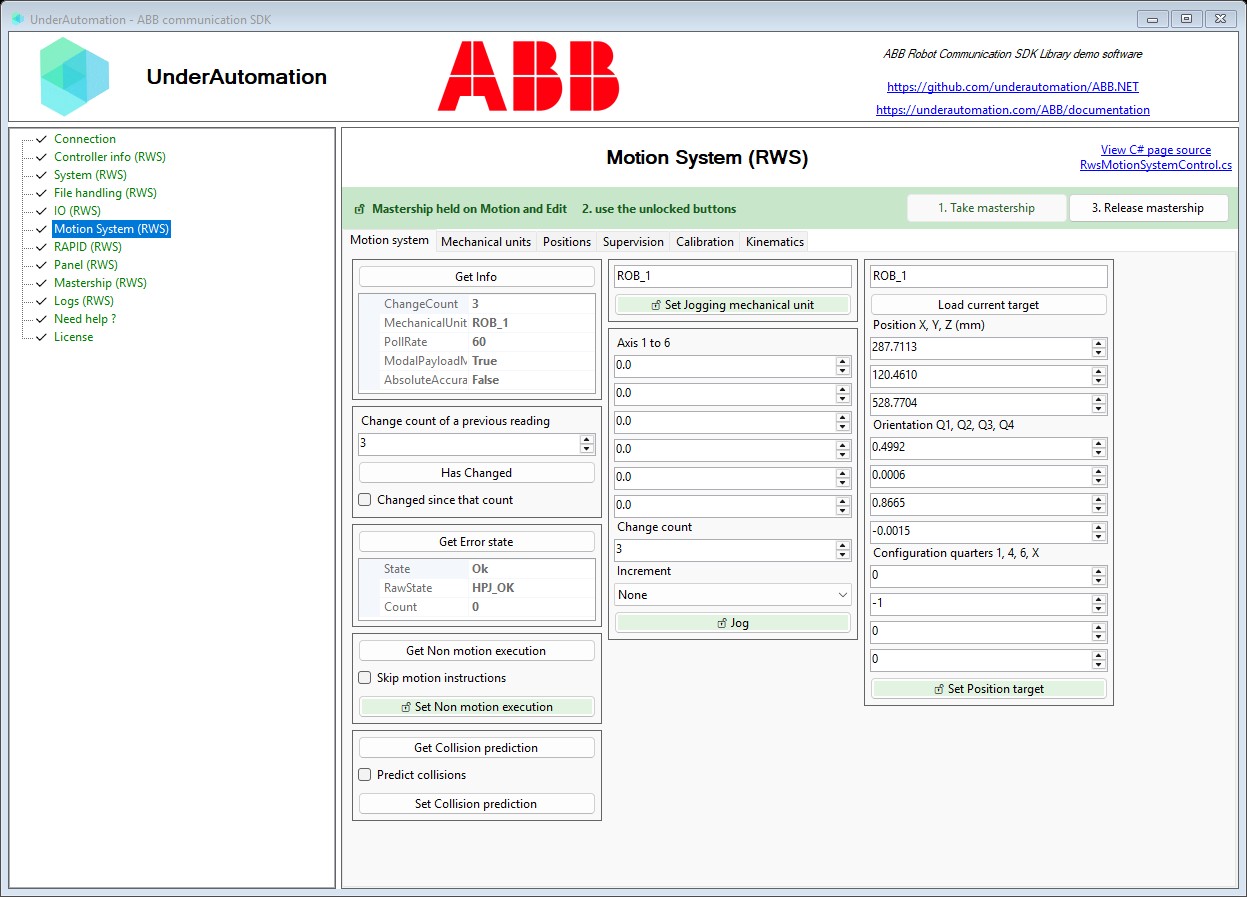
The demo application is open source. The C# source of this page is RwsMotionSystemControl.cs.