Controller: identity, clock & backup
Read controller identity and options, set the clock, the time zone and the network configuration, restart the controller, create and restore backups, read the safety state.
robot.Rws.Controller gives access to the controller itself, not to the robot program: identity, clock, network, installed options and systems, restart, backups, safety controller and virtual time. Most of these calls work on an IRC5 and on an OmniCore without changing anything in your code.
Some resources only exist on a real controller. When you call them on a RobotStudio virtual controller, the SDK throws an RwsException saying that the resource is not implemented, instead of a raw 404.
Identity and information
GetInfo returns a summary of the controller: system time, name, type and level. GetIdentity returns the same name plus the controller id and the MAC address of the main network interface.
AbbController robot = new AbbController();robot.Connect("192.168.0.1");// Overview of the controller: system time, name, type and levelControllerInfo info = robot.Rws.Controller.GetInfo();Console.WriteLine($"{info.Name} ({info.Type}), level {info.Level}");Console.WriteLine($"Controller time (UTC) : {info.SystemTime}");// Identity of the controller, with its id and its MAC addressControllerIdentity identity = robot.Rws.Controller.GetIdentity();Console.WriteLine($"Id : {identity.Id}");Console.WriteLine($"MAC address : {identity.MacAddress}");// Type tells a real controller from a RobotStudio virtual controllerbool isVirtual = identity.Type == ControllerType.VirtualController;Console.WriteLine($"Virtual controller : {isVirtual}");// Rename the controller. Only a real controller accepts it.robot.Rws.Controller.SetIdentity("CELL_01");robot.Disconnect();}
Type tells a real controller from a virtual one, which is useful before calling a method that needs real hardware.
ControllerType | Meaning |
|---|---|
RealController | A physical IRC5 or OmniCore cabinet |
VirtualController | A controller running in RobotStudio, see Test with a RobotStudio virtual controller |
Unknown | The controller reported a value the SDK does not know |
SetIdentity renames the controller. It works only on a real controller. The id argument is accepted by RWS 1.0 only, an OmniCore may ignore or refuse it.
GetEnvironmentVariable reads a controller environment variable such as $TEMP or $HOME, with or without the leading dollar sign. It gives the real path behind these names, which is handy before writing a file with the file system service.
// Gets the value of a controller environment variable (synchronous)string GetEnvironmentVariable(string name);// Gets the identity of the controller: name, id, type, MAC address and level (synchronous)ControllerIdentity GetIdentity();// Gets an overview of the controller resources (synchronous) Contains the current system time, the controller identity and the list of available sub resources.ControllerInfo GetInfo();// Sets the identity of the controller (synchronous) Available only on a real controller.void SetIdentity(string name, string id = null);
Every method also exists in an asynchronous version, with the same name followed by Async and an optional CancellationToken.
Overview of the controller resources. Returned by ControllerService.GetInfo().
| Member | Type | Description |
|---|---|---|
ControllerInfo() Constructor | Initializes a new instance of the ControllerInfo class | |
Level Property | ControllerLevel | Indicates whether the controller runs at system level or in bootserver mode |
Name Property | string | Name of the controller |
Resources Property | string[] | Names of the sub resources exposed by the controller ("clock", "identity", "network", ...) |
SystemTime Property | DateTime? | Current system time of the controller (UTC), if available |
Type Property | ControllerType | Indicates whether the controller is a real or a virtual controller |
ToString() Method | string | Returns a string representation of this controller information |
Identity of the robot controller. Returned by ControllerService.GetIdentity().
| Member | Type | Description |
|---|---|---|
ControllerIdentity() Constructor | Initializes a new instance of the ControllerIdentity class | |
Id Property | string | Controller id, available only for a real controller |
Level Property | ControllerLevel | Indicates whether the controller runs at system level or in bootserver mode |
MacAddress Property | string | MAC address of the controller, available only for a real controller |
Name Property | string | Name of the controller |
Type Property | ControllerType | Indicates whether the controller is a real or a virtual controller |
ToString() Method | string | Returns a string representation of this controller identity |
Type of the robot controller (real or virtual)
| Name | Value | Description |
|---|---|---|
RealController | 1 | Physical robot controller (RC) |
Unknown | 0 | The controller type could not be determined |
VirtualController | 2 | Virtual controller (VC), for example running in RobotStudio |
Level the controller is currently running at
| Name | Value | Description |
|---|---|---|
BootLevel | 2 | The controller runs the boot application (bootserver mode) |
SystemLevel | 1 | A system is loaded and running (system level) |
Unknown | 0 | The controller level could not be determined |
Date, time and time server
The controller clock is always UTC. GetClock returns a UTC DateTime, and SetClock expects one. The time zone is read and written apart, with the name used by the tz database, for example Europe/Stockholm.
AbbController robot = new AbbController();robot.Connect("192.168.0.1");// The controller clock is always UTCDateTime clock = robot.Rws.Controller.GetClock();Console.WriteLine($"Controller time (UTC) : {clock}");// Set the clock from the PC timerobot.Rws.Controller.SetClock(DateTime.UtcNow);// Time zone, named as in the tz databaseConsole.WriteLine($"Time zone : {robot.Rws.Controller.GetTimeZone()}");robot.Rws.Controller.SetTimeZone("Europe/Stockholm");// Time server the controller synchronizes its clock withrobot.Rws.Controller.SetTimeServer("132.163.4.101");TimeServerInfo timeServer = robot.Rws.Controller.GetTimeServer();// null when no time server is configuredif (timeServer != null){Console.WriteLine($"{timeServer.Address} answers {timeServer.Time}");}robot.Disconnect();}
Instead of setting the clock from your application, you can give the controller a time server with SetTimeServer. GetTimeServer returns null when no time server is configured. Passing an IP address to GetTimeServer queries one specific server, this needs a connection opened as RWS 2.0. On an RWS 1.0 connection the SDK throws instead of quietly returning the default server.
The clock, the time zone and the time server are not settable on a virtual controller.
Methods of ControllerService :// Gets the current system time of the controller (synchronous) The time returned by the controller is always UTC.DateTime GetClock();// Gets the time server used by the controller to synchronize its clock (synchronous) Available only on a real controller.TimeServerInfo GetTimeServer(string serverIp = null);// Gets the time zone used by the controller (synchronous)string GetTimeZone();// Sets the system time of the controller (synchronous) The controller clock is always UTC, pass a UTC date and time. Instead of setting the time explicitly, a time server can be configured with SetTimeServer(System.String).void SetClock(DateTime dateTime);// Sets the time server used by the controller to synchronize its clock (synchronous) Available only on a real controller.void SetTimeServer(string timeServer);// Sets the time zone used by the controller (synchronous) Available only on a real controller.void SetTimeZone(string timeZone);
Every method also exists in an asynchronous version, with the same name followed by Async and an optional CancellationToken.
Time server used by the controller to synchronize its clock. Returned by ControllerService.GetTimeServer().
| Member | Type | Description |
|---|---|---|
TimeServerInfo() Constructor | Initializes a new instance of the TimeServerInfo class | |
Address Property | string | Address of the time server |
Time Property | DateTime? | Time reported by the time server (UTC), if available. Only available when connected with version 2. |
ToString() Method | string | Returns a string representation of this time server |
Network
GetNetworkInterfaces lists the IP configuration of every network interface of the controller.
AbbController robot = new AbbController();robot.Connect("192.168.0.1");// IP configuration of every network interface of the controllerNetworkInterfaceItem[] interfaces = robot.Rws.Controller.GetNetworkInterfaces();foreach (NetworkInterfaceItem item in interfaces){Console.WriteLine($"{item.Port} {item.LogicalName} : {item.Address} / {item.Mask}");Console.WriteLine($" gateway {item.Gateway}, DHCP {item.DhcpEnabled}");}// Fixed address on the LAN adapterrobot.Rws.Controller.SetNetworkConfiguration(NetworkConfigurationMethod.FixIp,"192.168.0.10","255.255.255.0","192.168.0.254");// Or let a DHCP server give the addressrobot.Rws.Controller.SetNetworkConfiguration(NetworkConfigurationMethod.Dhcp);// The new configuration is used after the next restartrobot.Rws.Controller.Restart(ControllerRestartMode.Restart);robot.Disconnect();}
SetNetworkConfiguration changes the address of the LAN adapter. This call can cut you off from the robot. The controller keeps its current address until the next restart, then answers on the new one. If you set a wrong address or a wrong mask, the only way back is the FlexPendant. The connected user needs the UAS grant to write the controller properties.
NetworkConfigurationMethod | Meaning |
|---|---|
FixIp | Fixed address. address and mask are required, gateway is optional. |
Dhcp | The address is given by a DHCP server |
NoIp | The interface gets no address |
Both methods are refused by a virtual controller.
Methods of ControllerService :// Gets the IP configuration of all network interfaces of the controller (synchronous) Not applicable to a virtual controller.NetworkInterfaceItem[] GetNetworkInterfaces();// Sets the IP configuration of the LAN adapter of the controller (synchronous) The controller must be restarted for the change to take effect. Requires the UAS grant UAS_CONTROLLER_PROPERTIES_WRITE. Not supported by a virtual controller.void SetNetworkConfiguration(NetworkConfigurationMethod method, string address = null, string mask = null, string gateway = null);
Every method also exists in an asynchronous version, with the same name followed by Async and an optional CancellationToken.
Network interface of the robot controller. Returned by ControllerService.GetNetworkInterfaces().
| Member | Type | Description |
|---|---|---|
NetworkInterfaceItem() Constructor | Initializes a new instance of the NetworkInterfaceItem class | |
Address Property | string | IP address of the interface |
DhcpEnabled Property | bool? | DHCP status of the interface, if reported by the controller |
Gateway Property | string | Default gateway of the interface, if applicable |
LogicalName Property | string | Logical name of the interface, for example "WAN", "LAN1" or "SERVICE" |
Mask Property | string | Subnet mask of the interface |
Network Property | string | Network the interface belongs to ("Public", "Private", "Ability", "Drive"). Only available when connected with version 2. |
Port Property | string | Physical port of the interface, for example "X6" or "X23" |
PrimaryDns Property | string | Primary DNS server of the interface. Only available when connected with version 2. |
SecondaryDns Property | string | Secondary DNS server of the interface. Only available when connected with version 2. |
ToString() Method | string | Returns a string representation of this network interface |
IP configuration method of a controller LAN adapter
| Name | Value | Description |
|---|---|---|
Dhcp | 1 | IP address obtained from a DHCP server |
FixIp | 0 | Fixed IP address, the address, mask and gateway have to be provided |
NoIp | 2 | No IP address configured on the adapter |
Options and installed systems
HasOption returns true or false instead of throwing when the option is missing. The option name is case sensitive, SAFEMOVEPRO and not SafeMovePro.
AbbController robot = new AbbController();robot.Connect("192.168.0.1");// Is an option installed? The name is case sensitive.bool hasSafeMove = robot.Rws.Controller.HasOption("SAFEMOVEPRO");Console.WriteLine($"SafeMove Pro : {hasSafeMove}");// Systems installed on the controllerstring[] systems = robot.Rws.Controller.GetInstalledSystems();Console.WriteLine($"Installed systems : {string.Join(", ", systems)}");// Value of a controller environment variablestring temp = robot.Rws.Controller.GetEnvironmentVariable("$TEMP");Console.WriteLine($"$TEMP is {temp}");// Would this RobotWare version run on this hardware?bool compatible = robot.Rws.Controller.IsRobotWareVersionCompatible("6.03.0101");Console.WriteLine($"Compatible : {compatible}");robot.Disconnect();}
GetInstalledSystems returns the names of the systems installed on the controller, and IsRobotWareVersionCompatible says whether a given RobotWare version would run on this hardware. Both need a real controller.
SetLanguage changes the language the controller writes its messages in, with a code such as en, de or sv. The language must be installed, otherwise the controller answers 400. The same setting is also reachable from the control panel service.
The RobotWare version and the full list of installed options and products are read from the system service.
Methods of ControllerService :// Gets the names of the systems installed on the controller (synchronous)string[] GetInstalledSystems();// Verifies whether an option is present on the controller (synchronous) The option name is case sensitive, for example "SAFEMOVEPRO".bool HasOption(string option);// Checks whether a RobotWare version is compatible with the controller hardware (synchronous) Supported only on a real controller.bool IsRobotWareVersionCompatible(string robotWareVersion);// Sets the language of the controller (synchronous)void SetLanguage(string language);
Every method also exists in an asynchronous version, with the same name followed by Async and an optional CancellationToken.
Restart
Restart stops the robot. A running RAPID program is interrupted, the motors go off and the controller reboots. Depending on the mode, the RAPID programs or the system settings can also be lost. Do not call it on a production cell without knowing what the mode does.
AbbController robot = new AbbController();robot.Connect("192.168.0.1");// Warm restart of the controllerrobot.Rws.Controller.Restart(ControllerRestartMode.Restart);// The controller closes the connection while it rebootsrobot.Disconnect();// Try to reconnect until the controller answers againwhile (true){try{robot.Connect("192.168.0.1");break;}catch (Exception){Thread.Sleep(5000);}}Console.WriteLine(robot.Rws.Panel.GetControllerState());robot.Disconnect();}
ControllerRestartMode | What the controller does |
|---|---|
Restart | Warm restart. The system and the RAPID programs are kept. |
Shutdown | The controller stops and stays off. Someone has to power it on again. |
IStart | The system restarts with its default settings |
PStart | The system restarts and the RAPID programs are removed |
BStart | The system restarts from the state stored at the last shutdown |
XStart | The controller restarts to the boot application, where another system can be selected |
The request returns as soon as the controller accepts it. The connection is then lost, and every following request fails until the controller is up again. Call Disconnect, wait, and connect again.
On an OmniCore, the restart needs the mastership on all domains. The SDK takes it for you, this is what the useImplicitMastership argument does. Set it to false when you already hold the mastership. An IRC5 needs no mastership here and ignores the argument.
The control panel service also has a Restart method, with the same modes.
// Restarts or shuts down the controller (synchronous)void Restart(ControllerRestartMode mode, bool useImplicitMastership = true);
Every method also exists in an asynchronous version, with the same name followed by Async and an optional CancellationToken.
Restart mode of the robot controller
| Name | Value | Description |
|---|---|---|
BStart | 5 | The controller will be restarted. The last automatically saved system state will be loaded. Should be used to recover from a system crash. |
IStart | 3 | The controller will be restarted. The current system parameter settings and RAPID programs will be discarded, and the original system installation settings will be used. |
PStart | 4 | The controller will be restarted. The current RAPID programs and data will be discarded, but not the system parameter settings. |
Restart | 0 | The controller will be restarted. The state is saved and any changed system parameter settings will be activated after the restart. |
Shutdown | 1 | The main computer will be shut down. Should be used if the controller UPS is broken. |
XStart | 2 | The controller will be restarted and the Boot Application will be started. The current system is saved and deactivated (the controller is non-functional, for advanced maintenance only). |
Backup and restore
A backup is a folder written by the controller on its own file system. Creating one is asynchronous: CreateBackup returns as soon as the controller accepts the request, and you follow the progress with GetBackupState.
AbbController robot = new AbbController();robot.Connect("192.168.0.1");// The controller creates the backup in the background, this call returns immediatelyrobot.Rws.Controller.CreateBackup("$temp/mybackup");// Poll the state until the controller is doneBackupState state = robot.Rws.Controller.GetBackupState();while (state == BackupState.BackupInProgress){Thread.Sleep(1000);state = robot.Rws.Controller.GetBackupState();}if (state != BackupState.BackupReady){Console.WriteLine($"The backup failed : {state}");return;}// What the backup containsBackupSystemInfo backup = robot.Rws.Controller.GetBackupInfo("$temp/mybackup");Console.WriteLine($"{backup.SystemName}, RobotWare {backup.RobotWareVersion}");Console.WriteLine($"{backup.OptionCount} option(s) : {string.Join(", ", backup.Options)}");robot.Disconnect();}
The destination path must be on the controller file system. Environment variables are allowed, $temp/mybackup or ~temp/mybackup both work. The folder must not exist yet, and it cannot be created under $HOME. Creating a backup can stop the RAPID execution, so do not do it in the middle of a production cycle. The connected user needs the backup grant.
BackupState | Meaning |
|---|---|
BackupInProgress | The controller is writing the backup |
BackupReady | The last backup finished correctly |
ErrorDuringBackup | The last backup failed |
None, InitState, Invalid, Unknown | No usable backup state is reported |
GetBackupInfo reads the content of a backup folder without restoring it: system name, RobotWare version and the options the backed up system was built with.
To copy the backup on your PC, download the files with the file system service. A complete example is given in Backup & restore a controller.
Restore
RestoreBackup replaces the current system and restarts the controller. The RAPID programs, the configuration and, when asked, the safety settings of the running system are overwritten. Check the backup first with CheckRestore, which reports the mismatches without touching anything.
AbbController robot = new AbbController();robot.Connect("192.168.0.1");// Check the backup before restoring itCheckRestoreResult check = robot.Rws.Controller.CheckRestore("$temp/mybackup");if (!check.IsAccepted){Console.WriteLine($"The backup cannot be restored : {check.Status} {check.Path}");return;}// The controller restarts as soon as the restore is acceptedrobot.Rws.Controller.RestoreBackup("$temp/mybackup");// A backup taken on another controller has a different system id.// Ignore the mismatch to restore it anyway, and keep the backup folder.robot.Rws.Controller.RestoreBackup("$temp/mybackup",BackupRestoreIgnore.SystemId,false);// Restore only the RAPID modules, not the configurationrobot.Rws.Controller.RestoreBackup("$temp/mybackup",BackupRestoreIgnore.All,true,true,true,BackupRestoreInclude.Modules);robot.Disconnect();}
CheckRestoreStatus | Meaning |
|---|---|
Accepted | The backup can be restored as it is |
RestoreMismatchSystemId | The backup comes from another controller |
RestoreMismatchTemplateId | The backup was made from another system template |
DirectoryNotComplete | The backup folder misses files, Path names one of them |
ConfigurationDataIncorrect | A configuration file of the backup cannot be read |
BackupRestoreIgnore says which mismatches are accepted anyway: None, SystemId, TemplateId or All. BackupRestoreInclude limits what is restored: All, Cfg for the configuration only, or Modules for the RAPID modules only.
includeControllerSettings is used by RobotWare 6. RobotWare 7 does not restore the controller settings and ignores the flag.
GetBackupResources returns the names of the backup sub resources the controller exposes. It is mainly useful to know what this particular controller supports.
// Checks a backup for mismatches and other problems before restoring it (synchronous)CheckRestoreResult CheckRestore(string backupPath, BackupRestoreIgnore ignore = BackupRestoreIgnore.None, bool includeControllerSettings = true, bool includeSafetySettings = true, BackupRestoreInclude include = BackupRestoreInclude.All);// Creates a backup of the current system on the controller file system (synchronous) The backup is created asynchronously by the controller: this method returns as soon as the request is accepted. Poll ControllerService.GetBackupState to know when the backup is finished. Requires the UAS grant UAS_BACKUP. Creating a backup may affect RAPID execution and can cause system stops.void CreateBackup(string backupPath, bool archive = false);// Gets information about a backup stored on the controller file system (synchronous)BackupSystemInfo GetBackupInfo(string backupPath);// Gets the names of the backup sub resources exposed by the controller (synchronous)string[] GetBackupResources();// Gets the state of the backup operation of the controller (synchronous) Used to follow a backup started with String%2cSystem.Boolean).BackupState GetBackupState();// Restores a backup stored on the controller file system (synchronous) When the backup can be restored, the controller restarts. Requires the UAS grant to restore a backup. Use Data.BackupRestoreInclude) first to detect mismatches.void RestoreBackup(string backupPath, BackupRestoreIgnore ignore = BackupRestoreIgnore.None, bool deleteDirectory = true, bool includeControllerSettings = true, bool includeSafetySettings = true, BackupRestoreInclude include = BackupRestoreInclude.All);
Every method also exists in an asynchronous version, with the same name followed by Async and an optional CancellationToken.
Information about a backup stored on the controller file system. Returned by ControllerService.GetBackupInfo(backupPath).
| Member | Type | Description |
|---|---|---|
BackupSystemInfo() Constructor | Initializes a new instance of the BackupSystemInfo class | |
OptionCount Property read only | int | Number of options installed on the backed up system |
Options Property | string[] | Options installed on the backed up system |
RobotControlVersion Property | string | RobotControl version of the backed up system. Only available when connected with version 2. |
RobotOsVersion Property | string | RobotOS version of the backed up system. Only available when connected with version 2. |
RobotWareVersion Property | string | RobotWare version of the backed up system. Only available when connected with version 1. |
SystemName Property | string | Name of the backed up system |
ToString() Method | string | Returns a string representation of this backup information |
State of the backup operation of the controller
| Name | Value | Description |
|---|---|---|
BackupInProgress | 3 | A backup operation is running |
BackupReady | 4 | The backup operation finished successfully |
ErrorDuringBackup | 5 | The backup operation failed |
InitState | 2 | A backup operation has been initialized |
Invalid | 6 | The backup state is invalid |
None | 1 | No backup operation |
Unknown | 0 | The backup state could not be determined |
Result of a backup restore check. Returned by ControllerService.CheckRestore(...).
| Member | Type | Description |
|---|---|---|
CheckRestoreResult() Constructor | Initializes a new instance of the CheckRestoreResult class | |
IsAccepted Property read only | bool | Indicates whether the backup can be restored |
Path Property | string | File missing or corrupted in the backup, if reported by the controller |
Status Property | CheckRestoreStatus | Status of the check |
ToString() Method | string | Returns a string representation of this check result |
Result status of a backup restore check
| Name | Value | Description |
|---|---|---|
Accepted | 1 | The backup is accepted and can be restored |
ConfigurationDataIncorrect | 5 | Error in the configuration data of the backup |
DirectoryNotComplete | 4 | The backup directory is not complete |
RestoreMismatchSystemId | 2 | The backup was not created from the current system, there might be differences in active options and selected languages |
RestoreMismatchTemplateId | 3 | The current system and the backed up system may be generated from different key ids, possibly with different robot types |
Unknown | 0 | The status could not be determined |
Mismatches between a backup and the current system that are ignored when restoring
| Name | Value | Description |
|---|---|---|
All | 1 | All mismatches are ignored |
None | 0 | No mismatch is ignored |
SystemId | 2 | A mismatch between the system id of the backup and the system id of the current system is ignored |
TemplateId | 3 | A mismatch between the template id of the backup and the template id of the current system is ignored |
Content included when restoring a backup
| Name | Value | Description |
|---|---|---|
All | 0 | Restore configuration files and RAPID modules |
Cfg | 1 | Restore configuration files only |
Modules | 2 | Restore RAPID modules only |
Safety
These methods talk to the safety controller. They need the Safety Module option (SafeMove) on the controller and the safety grants on the user account. Without them the controller answers 403, and the SDK throws an RwsException that says which of the two is probably missing.
AbbController robot = new AbbController();robot.Connect("192.168.0.1");// Current safety mode of the controllerSafetyModeStatus mode = robot.Rws.Controller.GetSafetyMode();Console.WriteLine($"Safety mode : {mode.Mode}, user data {mode.UserData}");// Versions and checksum of the loaded safety configurationSafetyConfiguration configuration = robot.Rws.Controller.GetSafetyConfiguration();Console.WriteLine($"{configuration.Name} created on {configuration.CreationDate} by {configuration.CreatedBy}");Console.WriteLine($"Checksum : {configuration.Checksum}");// What the safety controller reports about the last violationSafetyViolationInfo violation = robot.Rws.Controller.GetSafetyViolationInfo();Console.WriteLine($"{violation.ViolationNumber} violation(s), type {violation.ViolationType}");// Cyclic brake check of the drive number 1CyclicBrakeCheckStatus brakeCheck = robot.Rws.Controller.GetCyclicBrakeCheckStatus(1);Console.WriteLine($"Brake check : {brakeCheck.Status}, last result {brakeCheck.LastBrakeCheckStatus}");robot.Disconnect();}
GetSafetyMode returns the current mode and the user data that goes with it. SetSafetyMode accepts Active, Commissioning and Service. The other values, ModeError and Unknown, are reported by the controller and cannot be requested. The controller must be in manual mode.
Loading a safety configuration is a two step operation. GetSafetyLoadOperationStatus says whether the controller accepts it right now, then LoadSafetyConfiguration reads a file that already exists on the controller file system.
AbbController robot = new AbbController();robot.Connect("192.168.0.1");// A safety configuration can only be loaded in some controller statesSafetyLoadOperationStatus status = robot.Rws.Controller.GetSafetyLoadOperationStatus();if (status == SafetyLoadOperationStatus.Ok){// The file is already on the controller file systemrobot.Rws.Controller.LoadSafetyConfiguration("$home/safety.xml");}else{Console.WriteLine($"A safety configuration cannot be loaded now : {status}");}// The controller must be in manual mode to change the safety moderobot.Rws.Controller.SetSafetyMode(SafetyMode.Commissioning);// Removes the validation information of the current safety configurationrobot.Rws.Controller.InvalidateSafetyConfiguration();robot.Disconnect();}
SafetyLoadOperationStatus | Why loading is refused |
|---|---|
Ok | A configuration can be loaded |
OptionNotPresent | The safety option is not installed |
NotInManualMode | The controller is not in manual mode |
NotInMotorsOff | The motors are on |
CurrentConfigurationLocked | The configuration in use is locked |
UserGrantMissing | The connected user has no safety grant |
InvalidateSafetyConfiguration removes the validation information of the configuration file. After that the safety configuration has to be validated again before the robot can run.
GetCyclicBrakeCheckStatus takes the drive number of a mechanical unit and returns when the next brake check is due and how the last one ended. GetSafetyViolationInfo gives the details of the last violation seen by the safety controller.
// Gets the cyclic brake check status of a mechanical unit (synchronous)CyclicBrakeCheckStatus GetCyclicBrakeCheckStatus(int driveNumber);// Gets the safety supervision configuration of the controller (synchronous)SafetyConfiguration GetSafetyConfiguration();// Checks whether a new safety configuration is allowed to be loaded (synchronous) The user must have the safety services privileges.SafetyLoadOperationStatus GetSafetyLoadOperationStatus();// Gets the safety mode of the controller (synchronous)SafetyModeStatus GetSafetyMode();// Gets the names of the safety sub resources exposed by the controller (synchronous)string[] GetSafetyResources();// Gets the safety violation details reported by the safety controller (synchronous) The user must have the safety services privileges.SafetyViolationInfo GetSafetyViolationInfo();// Removes the validation information from the safety configuration file (synchronous) Requires the UAS grant UAS_SAFETY_SERVICES.void InvalidateSafetyConfiguration();// Loads a safety configuration file into the controller (synchronous) The configuration file must already exist on the controller file system. Use ControllerService.GetSafetyLoadOperationStatus to check whether loading is currently allowed.void LoadSafetyConfiguration(string filePath);// Sets the safety mode of the controller (synchronous) The controller must be in manual mode.void SetSafetyMode(SafetyMode mode);
Every method also exists in an asynchronous version, with the same name followed by Async and an optional CancellationToken.
Safety mode status of the controller. Returned by ControllerService.GetSafetyMode().
| Member | Type | Description |
|---|---|---|
SafetyModeStatus() Constructor | Initializes a new instance of the SafetyModeStatus class | |
Mode Property | SafetyMode | Current safety mode |
UserData Property | int? | User data associated with the safety mode, if reported by the controller |
ToString() Method | string | Returns a string representation of this safety mode status |
Safety mode of the safety controller
| Name | Value | Description |
|---|---|---|
Active | 1 | The safety configuration is active and supervised |
Commissioning | 2 | Commissioning mode, used while configuring the safety controller |
ModeError | 4 | The safety controller reports a mode error |
Service | 3 | Service mode |
Unknown | 0 | The safety mode could not be determined |
Safety supervision configuration of the controller. Returned by ControllerService.GetSafetyConfiguration().
| Member | Type | Description |
|---|---|---|
SafetyConfiguration() Constructor | Initializes a new instance of the SafetyConfiguration class | |
Checksum Property | string | Checksum of the configuration, as base64 encoded data |
ConfigurationStatus Property | string | Status of the configuration, for example "SCORCH_CONFIG_LOADED". Only available when connected with version 2. |
CreatedBy Property | string | Author of the configuration |
CreationDate Property | DateTime? | Creation date of the configuration, if available |
FileMajorVersion Property | int? | Configuration file major version |
FileMinorVersion Property | int? | Configuration file minor version |
FileRevision Property | int? | Configuration file revision |
Name Property | string | Name of the configuration |
SoftwareMajorVersion Property | int? | Safety software major version |
SoftwareMinorVersion Property | int? | Safety software minor version |
SoftwareRevision Property | int? | Safety software revision |
ToString() Method | string | Returns a string representation of this safety configuration |
Indicates whether a new safety configuration is allowed to be loaded
| Name | Value | Description |
|---|---|---|
CurrentConfigurationLocked | 5 | The current safety configuration is locked (SCORCH_ERR_CURRENT_CONFIG_LOCKED) |
NotInManualMode | 3 | The controller is not in manual mode (SCORCH_ERR_NOT_IN_MANUAL_MODE) |
NotInMotorsOff | 4 | The motors are not switched off (SCORCH_ERR_NOT_IN_MOTORS_OFF) |
Ok | 1 | Loading a new safety configuration is allowed |
OptionNotPresent | 2 | The safety option is not present on the controller (SCORCH_ERR_OPTION_NOT_PRESENT) |
Unknown | 0 | The status could not be determined |
UserGrantMissing | 6 | The user does not have the required grant (SCORCH_ERR_USER_GRANT_IS_MISSING) |
Safety violation details reported by the safety controller. Returned by ControllerService.GetSafetyViolationInfo().
| Member | Type | Description |
|---|---|---|
SafetyViolationInfo() Constructor | Initializes a new instance of the SafetyViolationInfo class | |
AxisRangeActiveStatus Property | int? | Axis range supervision active status |
AxisRangeViolationStatus Property | int? | Axis range violation status |
DriveModuleIndex Property | int? | Index of the drive module involved in the violation |
LastViolationInstanceId Property | int? | Instance id of the last violation |
ToolId Property | int? | Id of the tool involved in the violation |
ToolPositionActiveStatus Property | int? | Tool position supervision active status |
ToolPositionViolationStatus Property | int? | Tool position violation status |
ToolSpeedActiveStatus Property | int? | Tool speed supervision active status |
ToolSpeedViolationStatus Property | int? | Tool speed violation status |
Unsynchronized Property | int? | Indicates whether the robot is unsynchronized |
UpperArmViolationStatus Property | int? | Upper arm violation status |
ViolatingSsv Property | int? | Violating safety supervision value |
ViolationNumber Property | int? | Number of violations |
ViolationType Property | SafetyViolationType | Type of the current violation |
ToString() Method | string | Returns a string representation of this safety violation information |
Type of safety violation reported by the safety controller
| Name | Value | Description |
|---|---|---|
EmergencyStop | 12 | Emergency stop triggered (empstop) |
Invalid | 14 | The safety controller reports an invalid violation |
None | 1 | No violation |
OperationalSafetyRange | 7 | Operational Safety Range (osr) |
Other | 13 | Internal error (other) |
ReducedAxisSpeed | 10 | Reduced Axis Speed in manual mode (red_axis_speed) |
ReducedToolSpeed | 9 | Reduced Tool Speed in manual mode (red_tool_speed) |
SafeAxisRange | 3 | Safe Axis Range (sar) |
SafeAxisSpeed | 5 | Safe Axis Speed (sas) |
SafeStandstill | 8 | Safe Standstill (sst) |
SafeToolSpeed | 4 | Safe Tool Speed (sts) |
SafeToolZone | 2 | Safe Tool Zone (stz) |
ToolOrientationMonitoring | 6 | Tool Orientation Monitoring (tom) |
Unknown | 0 | The violation type could not be determined |
UnsynchronizedSpeedLimit | 11 | Reduced Axis Speed due to unsynchronized robot (unsync_speed_lim) |
Cyclic brake check status of a mechanical unit. Returned by ControllerService.GetCyclicBrakeCheckStatus(driveNumber).
| Member | Type | Description |
|---|---|---|
CyclicBrakeCheckStatus() Constructor | Initializes a new instance of the CyclicBrakeCheckStatus class | |
DriveNumber Property | int | Drive number of the mechanical unit this status belongs to |
LastBrakeCheckStatus Property | CyclicBrakeCheckTestStatus | Result of the last brake check |
NextBrakeCheckTime Property | long? | Remaining time before the next brake check is required, if reported by the controller |
Status Property | CyclicBrakeCheckState | Current cyclic brake check state |
ToString() Method | string | Returns a string representation of this cyclic brake check status |
Cyclic brake check state of a mechanical unit
| Name | Value | Description |
|---|---|---|
Ok | 1 | No brake check is needed (CBC_STATUS_OK) |
PreWarning | 2 | A brake check will soon be required (CBC_STATUS_PREWARNING) |
Required | 3 | A brake check is required (CBC_STATUS_REQUIRE_CBC) |
Unknown | 0 | The state could not be determined |
Result of the last cyclic brake check test
| Name | Value | Description |
|---|---|---|
Error | 3 | The last brake check failed (CBC_TEST_ERROR) |
Ok | 1 | The last brake check succeeded (CBC_TEST_OK) |
Undefined | 4 | No brake check has been performed yet (CBC_TEST_UNDEFINED) |
Unknown | 0 | The test status could not be determined |
Warning | 2 | The last brake check ended with a warning (CBC_TEST_WARNING) |
Virtual time
A RobotStudio virtual controller does not run in real time. It runs a simulation clock, the virtual time, that you can slow down, speed up or advance step by step. These methods make sense only on a virtual controller, a real one has no such clock.
AbbController robot = new AbbController();robot.Connect("127.0.0.1");// Milliseconds elapsed since the virtual controller startedlong virtualTime = robot.Rws.Controller.GetVirtualTime();Console.WriteLine($"Virtual time : {virtualTime} ms");// 100 is about real time, -1 runs the simulation as fast as possiblerobot.Rws.Controller.SetVirtualTimeSpeed(100);Console.WriteLine($"Speed : {robot.Rws.Controller.GetVirtualTimeSpeed()} %");// Duration of one step, 10 ms minimumrobot.Rws.Controller.SetVirtualTimeSlice(50);Console.WriteLine($"Time slice : {robot.Rws.Controller.GetVirtualTimeSlice()} ms");// Run the virtual time one step at a timerobot.Rws.Controller.SetVirtualTimeState(VirtualTimeState.RunSlice);robot.Rws.Controller.RunVirtualTime();VirtualTimeState state = robot.Rws.Controller.GetVirtualTimeState();Console.WriteLine($"State : {state}");// Let the simulation run freely againrobot.Rws.Controller.SetVirtualTimeState(VirtualTimeState.FreeRun);robot.Disconnect();}
GetVirtualTime returns the milliseconds elapsed since the virtual controller started. GetVirtualTimeSpeed and SetVirtualTimeSpeed work in percent of the real time: 100 is about real time, -1 runs the simulation as fast as the PC can. The time slice is the duration of one step, 10 ms minimum.
VirtualTimeState | Meaning |
|---|---|
Stop | The virtual time does not advance |
FreeRun | The virtual time runs continuously |
RunSlice | Each call to RunVirtualTime advances the clock by one time slice |
NextEvent | Each call to RunVirtualTime advances the clock to the next controller event |
Unknown | The controller reported a value the SDK does not know |
Unknown is only returned by GetVirtualTimeState, it cannot be set. RunVirtualTime executes the virtual time according to the current state, so it is used with RunSlice and NextEvent.
Running a simulation faster than real time makes tests shorter, but the robot then reacts faster than your application. Read Test with a RobotStudio virtual controller before using it in automated tests.
Methods of ControllerService :// Gets the current value of the virtual time, in milliseconds (synchronous) The virtual time is zeroed when the virtual controller starts. Supported only on a virtual controller.long GetVirtualTime();// Gets the names of the virtual time sub resources exposed by the controller (synchronous) Supported only on a virtual controller.string[] GetVirtualTimeResources();// Gets the time slice of the virtual controller, in milliseconds (synchronous) Supported only on a virtual controller.int GetVirtualTimeSlice();// Gets the speed of the virtual time, in percent relative to real time (synchronous) -1 means full speed. Supported only on a virtual controller.int GetVirtualTimeSpeed();// Gets the state of the virtual time server (synchronous) Supported only on a virtual controller.VirtualTimeState GetVirtualTimeState();// Executes the virtual time according to the current state of the virtual time server (synchronous) Supported only on a virtual controller.void RunVirtualTime();// Sets the time slice of the virtual controller, in milliseconds (synchronous) The minimum value is 10 ms, lower values are replaced by the controller with the default value of 10 ms. Supported only on a virtual controller.void SetVirtualTimeSlice(int milliseconds);// Sets the speed of the virtual time, in percent relative to real time (synchronous) 100 makes the virtual time run approximately at real time speed, -1 runs it as fast as possible. Supported only on a virtual controller.void SetVirtualTimeSpeed(int speed);// Sets the state of the virtual time server (synchronous) Supported only on a virtual controller.void SetVirtualTimeState(VirtualTimeState state);
Every method also exists in an asynchronous version, with the same name followed by Async and an optional CancellationToken.
State of the virtual time server of a virtual controller
| Name | Value | Description |
|---|---|---|
FreeRun | 2 | Virtual time runs freely (VTFREERUN) |
NextEvent | 4 | Virtual time runs until the next event (VTNEXTEVENT) |
RunSlice | 3 | Virtual time runs one time slice at a time (VTRUNSLICE) |
Stop | 1 | Virtual time is stopped (VTSTOP) |
Unknown | 0 | The state could not be determined |
Try it in the demo application
Everything on this page can be tried without writing code, in the Controller info (RWS) page of the demo application.
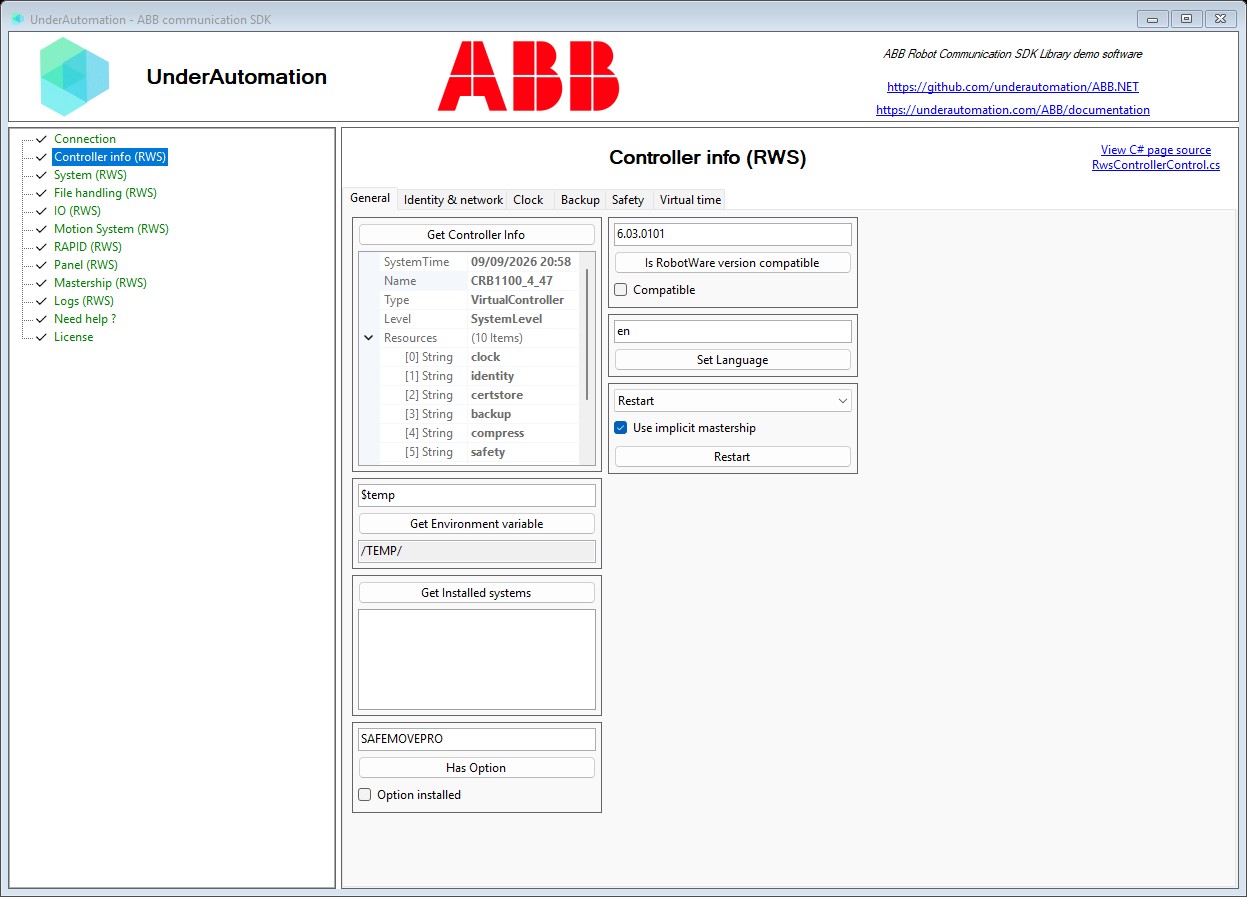
The demo application is open source. The C# source of this page is RwsControllerControl.cs.